When a battery-powered G4 lasts only a few weeks, changing brands immediately can hide whether the issue is the cells, the battery estimate, or the doorbell workload. I use one short fixed-load comparison before buying another set.
For two complete battery sets, I keep the same detection zones, sensitivity, recording duration, approach settings, chime distance, and weather window. At installation and then every 24 hours I record:
cell chemistry and rated capacity;
battery percentage shown in Aqara Home;
motion events, doorbell presses, live-view minutes, and saved clips;
ambient temperature and any weak-signal or offline events.
I do not mix old and new cells or different chemistries in the same set. If one set loses reported percentage quickly but continues running, the gauge may be misleading. If both percentage and runtime drop with a high event count or weak connection, I would reduce one workload variable and repeat before blaming battery capacity alone.
That makes the comparison about energy use per day, not just the number printed on the battery.
Absolutely. You really can’t rely on the specs advertised by manufacturers. They’re often just marketing figures. It’s always best to check third-party reviews before buying. Plenty of independent testers benchmark cells across various loads to measure actual capacity and real-world discharge curves, though you should still cross-reference a few sources to be sure.
You should also avoid standard NiMH rechargeables here, as their nominal 1.2 V isn’t sufficient. Make sure each cell reliably delivers 1.5 V.
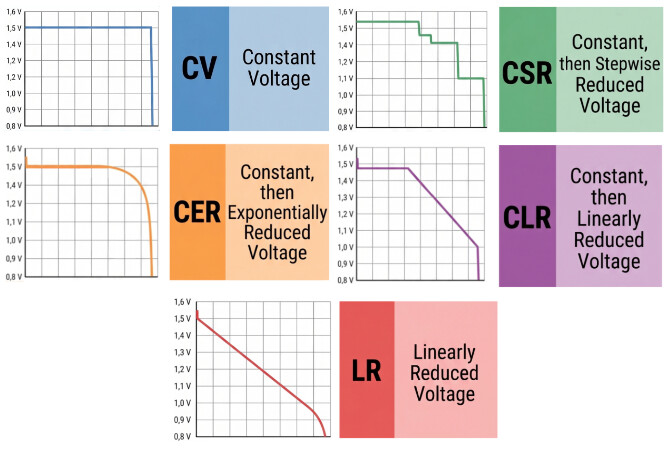
Keep in mind that with regulated 1.5 V Li-ion rechargeables, the battery indicator might not read accurately. Because their internal buck converters hold the output flat at 1.5 V until they are depleted, the voltage drops off a cliff rather than following the gradual discharge curve of alkaline batteries, which devices use to estimate capacity. However, some newer 1.5 V Li-ion models intentionally simulate a voltage drop near the end of the discharge cycle so the low-battery warning still triggers. Look for that specific feature in the product specs before you buy.
One important caveat regarding your test setup: recording the daily battery percentage reported by the app will not yield reliable data with 1.5 V Li-ion rechargeables. If the cells do not simulate a voltage drop, the app will simply stay pegged at 100% until they abruptly shut down. Even if they feature a simulated step-down, the actual reading will depend entirely on which discharge curve profile the battery follows (see image).
You will also typically find these abbreviations in the battery’s specifications.
By the way, another small detail worth keeping in mind: rechargeable batteries with a built-in USB port are convenient, but they usually offer less capacity than models without one. The charging port and its extra circuitry take up physical space inside the casing, leaving less room for the actual battery cell.
Good point about regulated 1.5 V Li-ion cells. I should treat the app percentage as a chemistry-dependent indicator rather than a capacity measurement, and compare runtime, event load, low-battery warning behavior, and shutdown time separately. For flat-output cells, the daily percentage trend may add no useful evidence at all.