Hi everyone
I have created automation with my fp2 presence sensor but there is strange behavior about light That turn off when should be on according automation
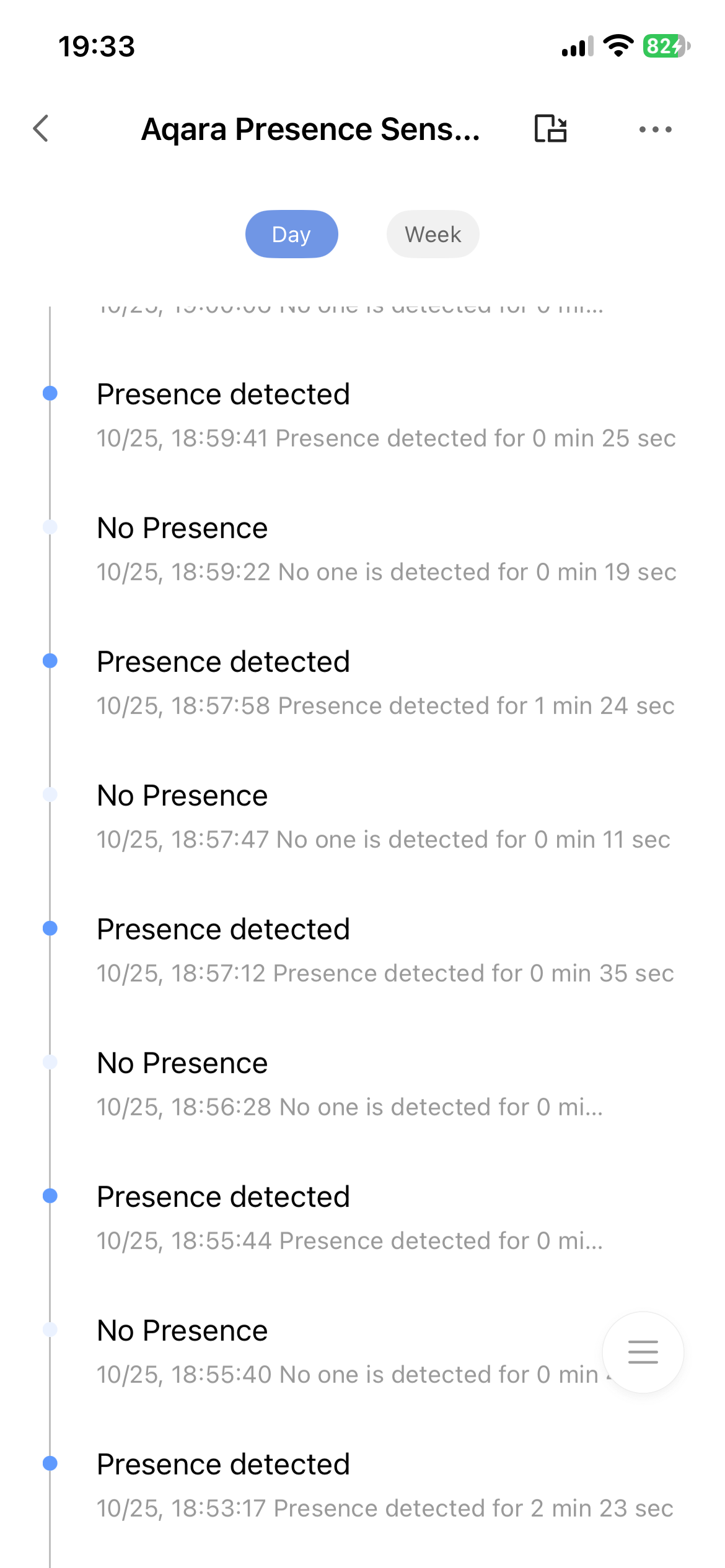
I’ve noticed in log continuous presence/no presence state
Is the sensor broken?
9 Likes
Hi there, it looks like you’re experiencing a support-related issue. We’ve automatically created a support ticket for you and will reach out via the forum email within the next two business days.
If other members have any suggestions or insights on this topic, feel free to share!
5 Likes
Is there anything in the space that could trigger presence? Fan, washer/dryer, mirror?
Also, do you see anything on the room map?
4 Likes
I bet there is a ceiling fan or some other thing spinning or causing a flickering of some sort
2 Likes
If you have AI Person Detection enabled, then it may sometimes think you’re interference.
Even without this feature enabled, the FP2 may think there’s no presence if you’re sitting down or laying on a couch (or near the edge of the room).
Replace “No Presence” with “No presence exceeding a set time” in your automation. Set the time to 30s or 1min. This will make your light automation less prone to false negatives.
3 Likes
No AI person detection enabled.
The state presence/ not presence happens continuously and within a few seconds so it makes it impossible for me to define a rule for automation.
I need create the automation in homekit due to non-aqara light ( but fully HomeKit)
Delayed action is already present in automation flow.
Shuold be a setting in aqara device to define status after xx seconds but there’s not
3 Likes
Could you describe your setup? Where is this sensor placed? Any devices or other moving objects nearby? I’d the FP2 on the latest firmware? How is it configured?
4 Likes
As @markus said show as screens with the settings as even if you have is automated on HomeKit you need to adjust the settings of detection for that specific zone on Aqara since HomeKit doesn’t allow those kind of settings.also see if the angle of it is the one as I have mine mounted into an small kitchen and I had to move it to another place as I got multiple ghosts and si ve i move it also angle it down since is an small space.
3 Likes
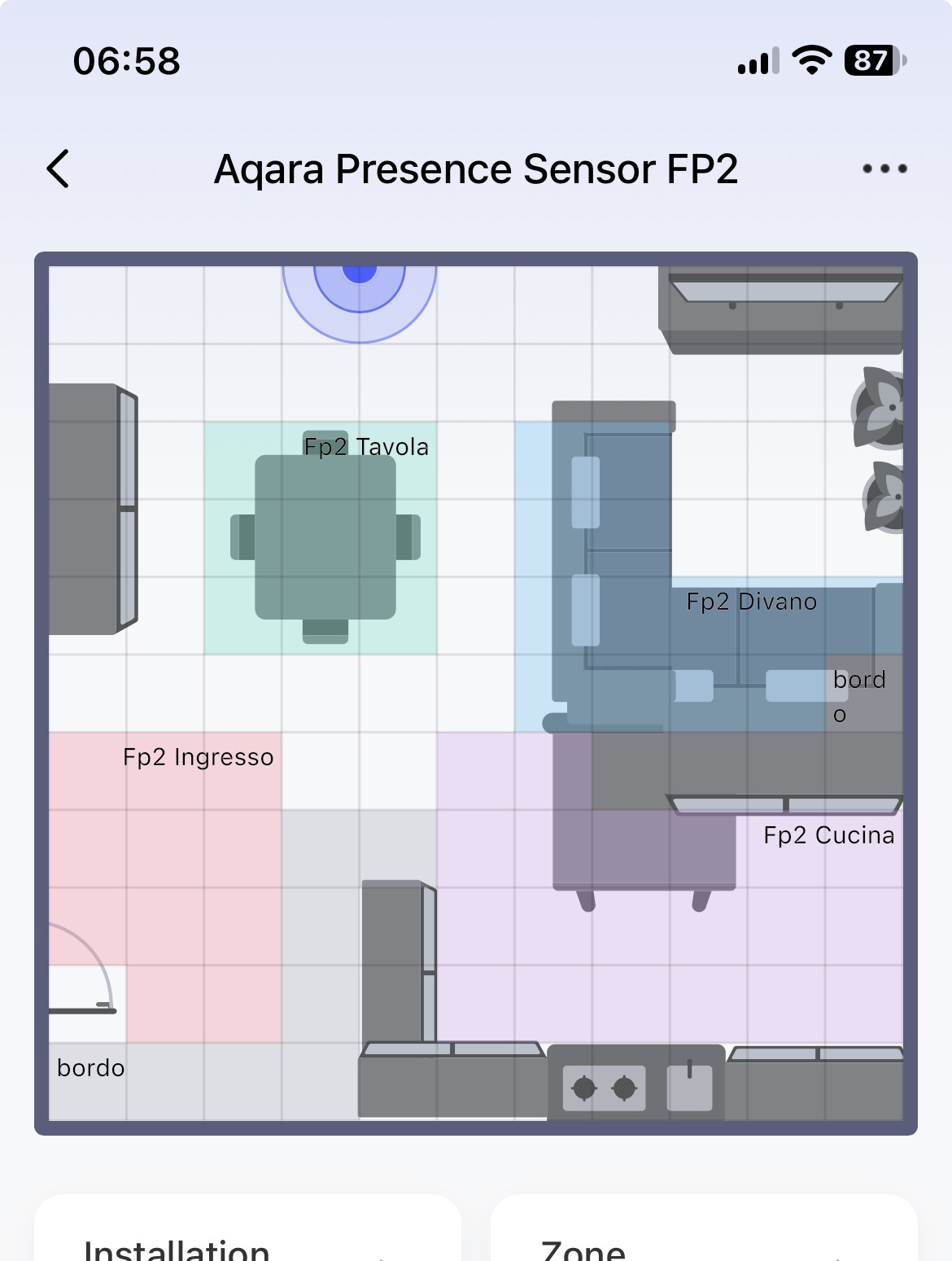
This is the map
Issues in the kitchen zone (pink) around 5~7 m from sensor
but logs reports strange behavior in every zone.
3 Likes
Sensor is installed in the front part of my book shelf , ~1.70 m from floor
No moving object, latest firmware
Installation mode: Multi zone
Sensitivity : medium
Trigger distance: near (1m)

3 Likes
Thanks for the additional information. Have you watched the room map while the presence sensor shows the changes in presence/absence? I have not seen a change in presence that disagrees with what I see on the room map.
Perhaps it’s a strange radiation from the meteorite. 
4 Likes
No pets, no robot cleaner no one.
Only me and my presence/no presence😂
4 Likes
Have you watched the room map during these periods? And do ghosts appear during these periods? It looks like you might have a slight upward angle on your sensor. Have you tried aiming the sensor a bit lower? Also, the sensor is fixed securely and the bookshelf doesn’t vibrate or move, right?
4 Likes
Sensor aim a bit lower and book shelf is steady
3 Likes
Have you watched the room map while those erroneous ghosts appear?
3 Likes
No gost.
Map is not real time, there’s a lag between position and real state of the sensor
Presence is displayed fractions of seconds before icon reach relative zone.
I think this is normal
1 Like
Right, I’m not worried about the slight lag. Just trying to understand if the presence/absence seen on the room map agrees with the logs. If you are seeing nothing on the map while the log is showing changes, then that makes no sense and I would assume then that the sensor is bad.
3 Likes
Try to unplug you FP2 let it for an min and plug it back sometimes this helps with such issues.also how did you set you detections?
3 Likes

Did you try selecting on the detection direction set the other option?that left to right not sure if works well on your zone.
2 Likes