I am about to switch to the 400 from the 410 mostly due to the repeater chime disconnecting and based on where the doorbell is located, I do not need the horizontal view and the vertical is more important. However, I saw a Reddit post today that showed a night view from the 400 and it was so dark you could barely see anything. I do not have that issue with the 410. Is that normal for the 400 or is that a one off issue that person is having? Thank you,
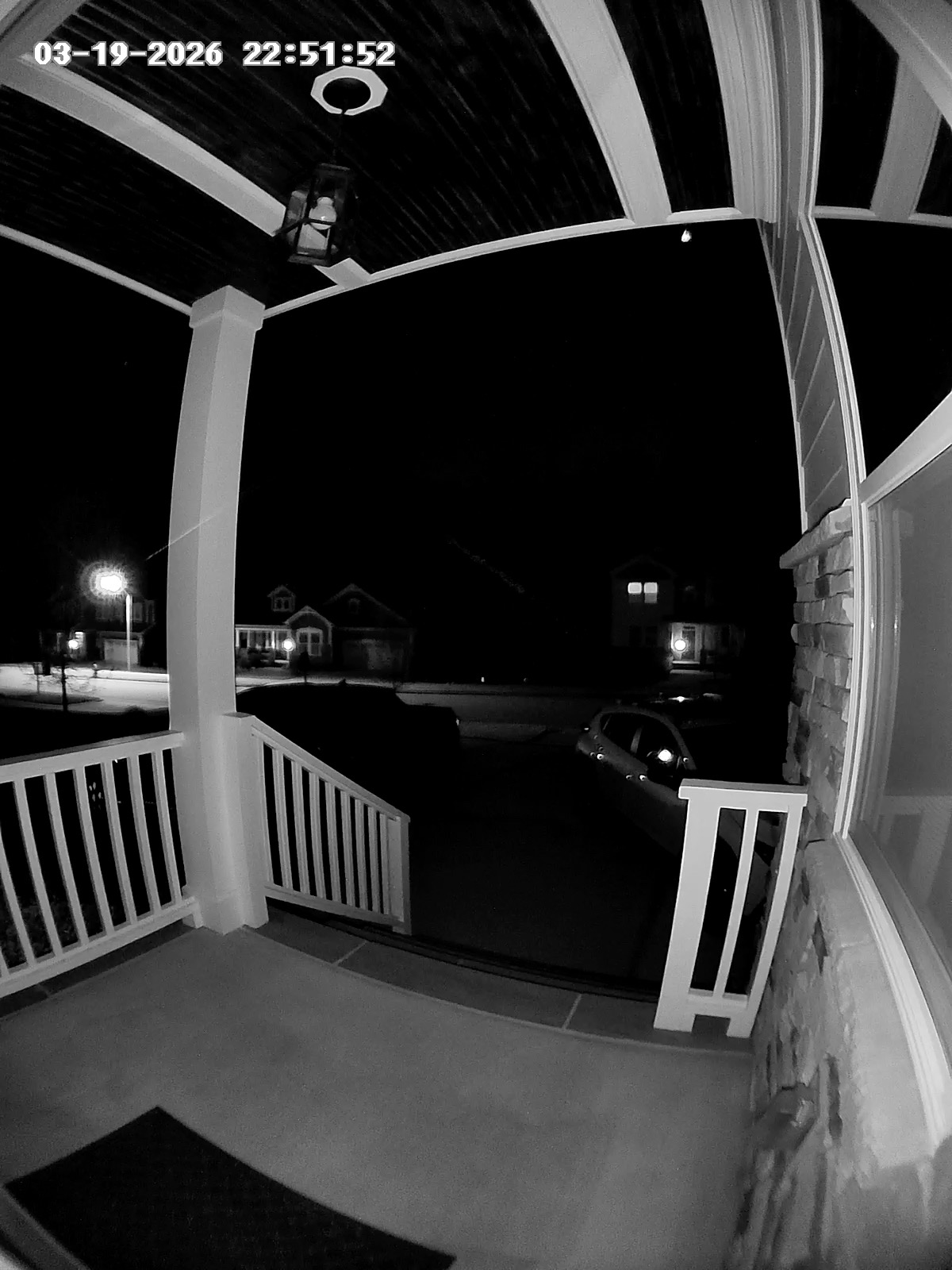
The IR lights for night view illuminate decently about 10’ or so in front of the camera, and things past that will be quite dark with the default settings. You can disable the “Auto-Adjust” and set a brightness for both day and night modes. I currently have the night mode set to about 85% to brighten our driveway up a bit farther out.
The problem with that is if someone then stands in front of the camera they’re overblown and difficult to make out. It does seem to still auto adjust when using overrides, but just not enough. If I reach my hand out close to the camera (so that a larger part of the image is overblown) it will dim down enough to where my face is no longer a white blob. So it seems like some tweaks to the exposure/auto-brightness calculation could make it a lot better!
Here’s the G400 with Auto Adjust on:
Here’s 100% brightness:
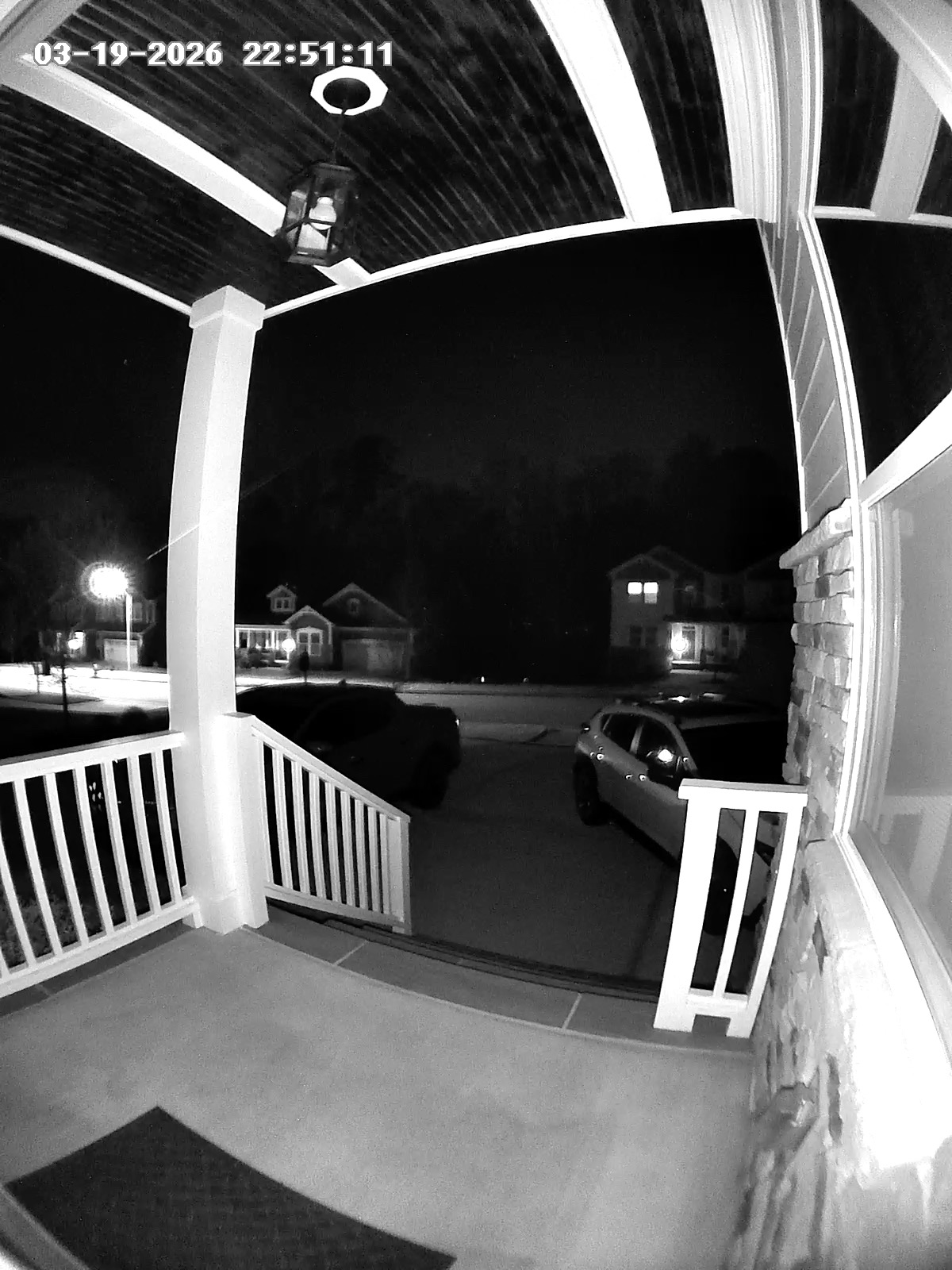
In our case, the 85-100% brightness setting makes it possible to see someone between our two cars which is very useful.
Face detection was better on the old g4 having being kept local to the device and no need then for home guardian. Yesterday the doorbell had lots of activity and the g400 only identified 1 known face in the library of faces. That 1 person passed the g400 approx 6 times and was found just that once. With such poor face integration automations set via face identification do not work. Further more in order for face identification to work the g400 needs to allow all motion detection which is a terrible idea as then the cloud recording timeline gets filled up with sudden movements from bushes or small debris blowing with the wind across the driveway and that’s with motion detection set to the bare minimum sensitivity aswell as fewer tiles to monitor of the feed. I literally only need person detection for the cloud video timeline and face detection for the same and for automation to work.
Aside from the above moaning, it seems a great device otherwise but I’m surprised this far on and the g4 can do a better job at face detection than this g400.
It looks like I’ve solved the connection instability issue. I switched my Cudy POE switch from Default mode to Extend mode; the speed dropped to 10 Mbps, but the stability is much better. Apparently, the G400 has issues over long distances, since mine is located 60 meters from the router.
Great find! I was going to ask about cable length. Ethernet cable attenuation is legit. I’m not sure why Aqara would be more sensitive to it than ReoLink, other than it needing better connection. This was the case with G5 Pro also. The loss may be worse on older cables too.
I agree with you. If the detections can be done on the device, then there should be no need for a cloud sub. I see this popping up as a common complaint. Hopefully Aqara will address it.
The cable is in perfect condition—it’s two years old and protected by a sleeve. The Reolink has been working without any outages; apparently, the G400 has issues over long distances. But it’s a shame—I’m buying a POE doorbell precisely because of the longer range. There’s no point in dealing with Wi-Fi 60 meters from the house; that’s what POE is for. However, there’s a limitation: you must have a switch capable of “Extend” mode. All devices are limited to just 10 Mbps—luckily, 10 Mbps is sufficient for Full HD from the G400. But Aqara should address this limitation; I don’t think it can be fixed with a software update. Many people who want to use POE over long distances will face this problem.
Nice write up. I’ve had mixed thoughts about my G400 due to a couple of problems.
(1) I can’t get the software to update. The Aqara iOS app says it has an available update, but it fails every time I try. I’ve tried restarted the device and doing a factory reset, but the problem persists.
(2) The doorbell uses the existing electrical wires that go to the physical doorbell chimes in my house. Unfortunately, the power going through the wires to doorbell also causes a buzzing in my doorbell chime, despite the doorbell not activating the chime. I did not have this problem with my Google Nest doorbell that was also wired. Maybe, I need to find a way to fully discount the doorbell chime while still sending power to the doorbell, but I’m not an electrician and don’t know how to do this.
The issue you are describing with the chime buzzing is caused by a underpowered transformer. I’ve seen it a bunch of times. It’s the reason I mentioned it in the video.
What you do depends on your full set up. Is this your only doorbell? If so, you can bypass the chime altogether. If not, your other option is to upgrade your transformer. It’s a relatively simple task to swap the existing one for one that’s got more power.
I don’t have much help on that one. Maybe Aqara support can help.