Hello everyone,
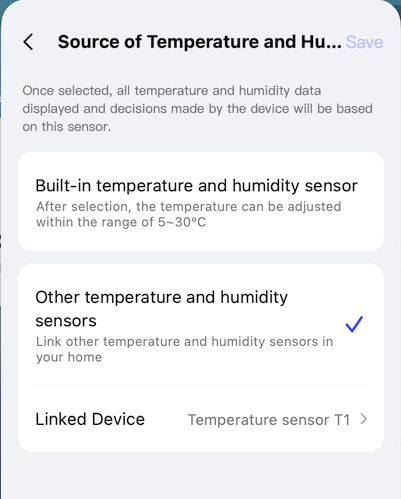
I am experiencing an issue with my Aqara setup regarding how the W600 Radiator Thermostat handles external temperature sensors (Aqara T1). I wanted to share my configuration, firmware/hardware details, and the specific behavior I am observing to see if anyone has a solution or if this is a known limitation of the PID control loop.
 Hardware & Firmware Details
- Primary Hub: Aqara Hub M3 — Firmware
v4.5.80_0007 (Zigbee controller)
- Radiator Thermostat: Aqara W600 — Firmware
v0.0.0_2848 (migrated from Thread to Zigbee for better ecosystem integration)
- External Temperature Sensor: Aqara T1 — Firmware
v0.0.0_0029 (placed under my workspace desk at an ergonomic height of ~70–80 cm to measure actual room temperature)
 Current Room Conditions
- Target Temperature (Set point): 20.0°C
- External T1 Sensor (under desk): 23.5°C – 23.6°C
- W600 Built-in Sensor (near the radiator pipe): 19.5°C (with temperature compensation set to 0°C)
 The Problem / Case Description
Despite having the external T1 sensor configured, the W600 radiator thermostat continues to trigger and open the valve based on its local built-in sensor, effectively ignoring the external T1 reading.
Observed Sequence:
- The Conflict: Even though the external T1 sensor clearly reports 23.5°C (well above the 20.0°C target), the W600 reads its internal sensor at 19.5°C.
- PID Controller Behavior: Because the PID algorithm perceives the local temperature ($19.5^\circ\text{C}$) to be below the target ($20.0^\circ\text{C}$), it calculates a heating demand and opens the valve, resulting in unnecessary heating.
- Window Detection / Transient States: After airing out the room (window opened for 30 minutes, causing the local sensor to drop sharply), closing the window triggered a state update where the thermostat prioritized local readings over the remote Zigbee binding.
- Manual Trigger Limitations: Pressing the physical pairing/status button on the T1 sensor successfully sends a button event to the hub, but it does not force an immediate transmission of a temperature packet unless the strict reporting threshold ($\pm 0.1–0.2^\circ\text{C}$) is crossed or the keep-alive timer triggers.
 Questions for the Community
- External Sensor Binding Enforcement: On firmware
0.0.0_2848, is there a specific configuration step in the Aqara Home app to strictly force the W600 to use the external T1 sensor as the sole primary input for its PID loop, completely overriding the internal sensor’s heating logic?
- Reporting Intervals: How frequently does the Aqara T1 (firmware
0.0.0_0029) push temperature updates to the Hub M3 (4.5.80_0007) under normal conditions, and can this interval be adjusted to make the W600 react faster to remote temperature changes?
Any insights, workarounds, or troubleshooting tips would be greatly appreciated!
4 Likes
Hi there, it looks like you’re experiencing a support-related issue. We’ve automatically created a support ticket for you and will reach out via the forum email within the next two business days.
If other members have any suggestions or insights on this topic, feel free to share!
1 Like
Hello, welcome to the forum. Once an hour, or when the temperature changes by 0.5°C.
3 Likes
Could you capture a short timeline around closing the window: the T1 temperature and its last update time, the W600 local temperature, the valve state, and whether Aqara Home still shows T1 as the selected external sensor? That would help separate a binding reset from a stale remote reading. The 23.5°C versus 19.5°C difference by itself does not establish which input the controller actually used.
Hello again,
I have cross-referenced the precise event logs from Aqara Home across the W600 Thermostat, T1 Temperature Sensor, and Door/Window Sensor, which clearly demonstrate the priority issue.
Sequence of Events from Logs:
-
Room Temperature (T1 Sensor under desk):
16:11 to 17:10: Stable at 23.6°C (well above the 20.0°C setpoint).
-
Door/Window Sensor:
16:00: Window Opened.
17:07: Window Closed.
-
W600 Thermostat Activity:
17:12: Right after the window was closed (17:07), the W600 triggered Turn on heating at a 20°C setpoint, despite the external T1 sensor reporting 23.6°C just 2 minutes prior (17:10).
17:12 – 17:26: The rapid setpoint changes in the logs (toggling between 19°C and 20°C) were my manual attempts to force the valve to close, as it kept actively heating.
Confirmed Setting: The W600 configuration in the Aqara Home app was explicitly set to use the external T1 sensor as its temperature source during this entire window.
Conclusion
This confirms that upon window closure, the W600 PID controller / firmware falls back to its internal temperature reading (which had dropped due to cold draft exposure near the radiator) and completely disregards the active, up-to-date Zigbee binding from the external T1 sensor (23.6°C).
It appears there is an unhandled logic race condition during the exit from Open Window Detection where local sensor fallback overrides remote sensor binding.
I exported 24 Oct 2026, 15:00–18:00 (GMT+02) from local Aqara Home on macOS (parsed with Cursor). Hub: Aqara M3; same room: W600 radiator, T1 temp/humidity, T1 window sensor.
Timeline (window close ~17:07)
| Time |
Window |
T1 °C |
W600 °C |
| 15:00 |
Closed (since 14:00) |
— |
— |
| 16:00:34 |
Open |
— |
— |
| 17:06:24 |
Open |
23.61 |
— |
| 17:06:27 |
Open |
23.61 |
23.61 |
| 17:07:09 |
Closed |
23.61* |
23.61* |
| 17:10:20 / 23 |
Closed |
23.59 |
23.59 |
| 17:14:23 |
Closed |
23.59 |
19.50† |
*No new sample exactly at 17:07:09; last T1 @ 17:06:24, last W600 @ 17:06:27.
†W600-only blip; T1 still 23.59 — not at close time.
No local history for valve / heating (4.21.85, 1.49.85, 1.21.85) that day. No logged TemperatureSource at 17:07. Around close, W600 tracked T1 (not a sustained 19.5 °C input).
| timestamp |
device_id |
device_name |
metric |
value |
unit |
source |
note |
| 2026-10-24 15:00:00 |
WINDOW_SENSOR |
Door/window T1 |
window_state |
Closed |
|
inferred |
No transition in 15:00-16:00:34 interval |
| 2026-10-24 15:16:35 |
T1_HT |
Temp/humidity T1 |
humidity |
56.07 |
% |
local_chart |
resource_id=0.2.85 |
| 2026-10-24 15:16:35 |
T1_HT |
Temp/humidity T1 |
temperature |
23.37 |
C |
local_chart |
resource_id=0.1.85 |
| 2026-10-24 15:16:35 |
T1_HT |
Temp/humidity T1 |
temperature |
23.37 |
C |
local_journal |
journal_event |
| 2026-10-24 15:16:36 |
W600 |
Radiator W600 |
temperature |
23.37 |
C |
local_chart |
resource_id=0.1.85 |
| 2026-10-24 15:43:55 |
W600 |
Radiator W600 |
temperature |
23.37 |
C |
local_chart |
resource_id=0.1.85 |
| 2026-10-24 15:59:22 |
W600 |
Radiator W600 |
temperature |
23.37 |
C |
local_chart |
resource_id=0.1.85 |
| 2026-10-24 16:00:34 |
WINDOW_SENSOR |
Door/window T1 |
window_state |
Open |
|
local_activity |
magnet_status |
| 2026-10-24 16:11:30 |
T1_HT |
Temp/humidity T1 |
humidity |
53.90 |
% |
local_chart |
resource_id=0.2.85 |
| 2026-10-24 16:11:30 |
T1_HT |
Temp/humidity T1 |
temperature |
23.62 |
C |
local_chart |
resource_id=0.1.85 |
| 2026-10-24 16:11:30 |
T1_HT |
Temp/humidity T1 |
temperature |
23.62 |
C |
local_journal |
journal_event |
| 2026-10-24 16:11:35 |
W600 |
Radiator W600 |
temperature |
23.62 |
C |
local_chart |
resource_id=0.1.85 |
| 2026-10-24 16:18:19 |
W600 |
Radiator W600 |
temperature |
23.62 |
C |
local_chart |
resource_id=0.1.85 |
| 2026-10-24 16:24:09 |
T1_HT |
Temp/humidity T1 |
humidity |
51.45 |
% |
local_chart |
resource_id=0.2.85 |
| 2026-10-24 16:33:35 |
W600 |
Radiator W600 |
contact_misc |
0 |
|
local_chart |
resource_id=8.0.2045 |
| 2026-10-24 16:33:35 |
T1_HT |
Temp/humidity T1 |
contact_misc |
0 |
|
local_chart |
resource_id=8.0.2045 |
| 2026-10-24 16:34:01 |
W600 |
Radiator W600 |
contact_misc |
1 |
|
local_chart |
resource_id=8.0.2045 |
| 2026-10-24 16:34:01 |
T1_HT |
Temp/humidity T1 |
contact_misc |
1 |
|
local_chart |
resource_id=8.0.2045 |
| 2026-10-24 16:44:44 |
W600 |
Radiator W600 |
contact_misc |
0 |
|
local_chart |
resource_id=8.0.2045 |
| 2026-10-24 16:44:44 |
T1_HT |
Temp/humidity T1 |
contact_misc |
0 |
|
local_chart |
resource_id=8.0.2045 |
| 2026-10-24 16:45:44 |
W600 |
Radiator W600 |
contact_misc |
1 |
|
local_chart |
resource_id=8.0.2045 |
| 2026-10-24 16:45:44 |
T1_HT |
Temp/humidity T1 |
contact_misc |
1 |
|
local_chart |
resource_id=8.0.2045 |
| 2026-10-24 17:06:24 |
T1_HT |
Temp/humidity T1 |
humidity |
48.96 |
% |
local_chart |
resource_id=0.2.85 |
| 2026-10-24 17:06:24 |
T1_HT |
Temp/humidity T1 |
temperature |
23.61 |
C |
local_chart |
resource_id=0.1.85 |
| 2026-10-24 17:06:24 |
T1_HT |
Temp/humidity T1 |
temperature |
23.61 |
C |
local_journal |
journal_event |
| 2026-10-24 17:06:27 |
W600 |
Radiator W600 |
temperature |
23.61 |
C |
local_chart |
resource_id=0.1.85 |
| 2026-10-24 17:07:09 |
WINDOW_SENSOR |
Door/window T1 |
window_state |
Closed |
|
local_activity |
magnet_status |
| 2026-10-24 17:10:17 |
T1_HT |
Temp/humidity T1 |
humidity |
58.57 |
% |
local_chart |
resource_id=0.2.85 |
| 2026-10-24 17:10:20 |
T1_HT |
Temp/humidity T1 |
humidity |
58.57 |
% |
local_chart |
resource_id=0.2.85 |
| 2026-10-24 17:10:20 |
T1_HT |
Temp/humidity T1 |
temperature |
23.59 |
C |
local_chart |
resource_id=0.1.85 |
| 2026-10-24 17:10:20 |
T1_HT |
Temp/humidity T1 |
temperature |
23.59 |
C |
local_journal |
journal_event |
| 2026-10-24 17:10:23 |
W600 |
Radiator W600 |
temperature |
23.59 |
C |
local_chart |
resource_id=0.1.85 |
| 2026-10-24 17:10:28 |
T1_HT |
Temp/humidity T1 |
humidity |
67.19 |
% |
local_chart |
resource_id=0.2.85 |
| 2026-10-24 17:10:39 |
T1_HT |
Temp/humidity T1 |
humidity |
56.54 |
% |
local_chart |
resource_id=0.2.85 |
| 2026-10-24 17:14:23 |
W600 |
Radiator W600 |
temperature |
19.50 |
C |
local_chart |
resource_id=0.1.85 |
| 2026-10-24 17:14:28 |
W600 |
Radiator W600 |
temperature |
19.50 |
C |
local_chart |
resource_id=0.1.85 |
| 2026-10-24 17:14:59 |
W600 |
Radiator W600 |
temperature |
23.59 |
C |
local_chart |
resource_id=0.1.85 |
| 2026-10-24 17:17:52 |
W600 |
Radiator W600 |
temperature |
20.00 |
C |
local_chart |
resource_id=0.1.85 |
| 2026-10-24 17:23:31 |
W600 |
Radiator W600 |
temperature |
23.59 |
C |
local_chart |
resource_id=0.1.85 |
2 Likes
The exported timeline is useful: it shows W600 matching T1 at 17:10, then a brief W600-only 19.5°C reading at 17:14. With no valve/heating history or TemperatureSource event, I would keep internal-sensor fallback as a hypothesis rather than a confirmed cause. On the next occurrence, could you capture the heating/valve indicator and selected source alongside the readings before changing the setpoint? That would make the control decision easier for Aqara to trace.
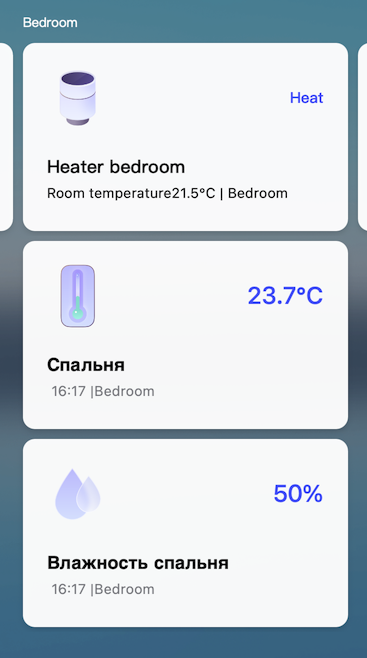
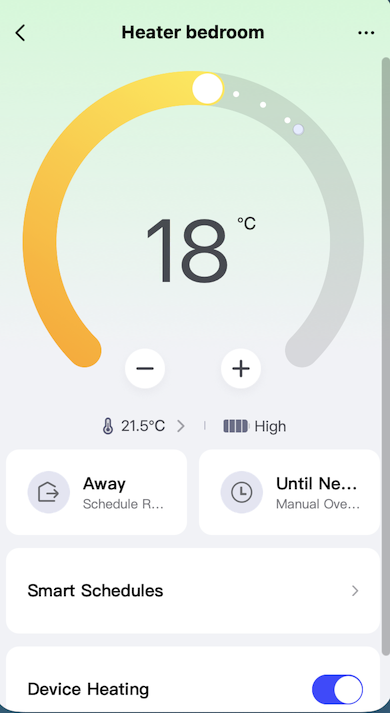
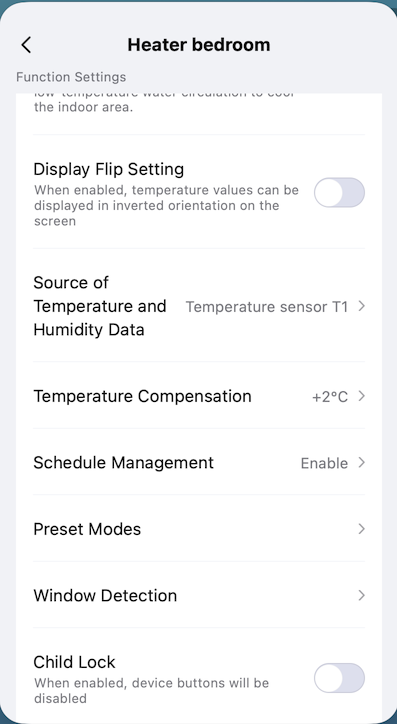
Today the issue happened again. Even though the W600 thermostat is configured to use the external T1 sensor, it is actually showing and using the temperature from its own built-in sensor.
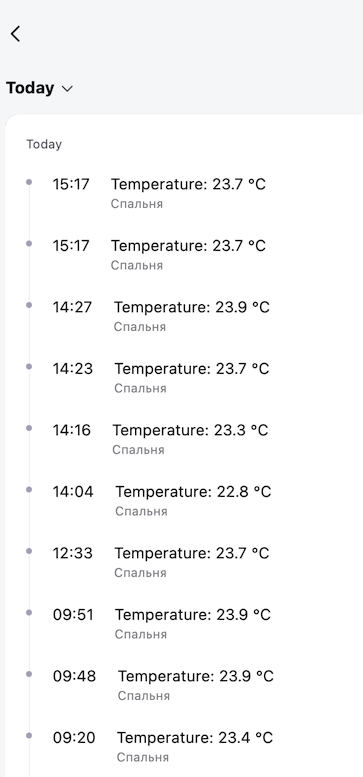
Here is a screenshot showing that the external T1 sensor is correctly selected in the settings, but the temperature on the main screen reflects the internal reading.
On the first screenshot, you can see that the temperatures of the sensor and the thermostat are different. The second one shows the temperature log of the external sensor, followed by the thermostatic head settings.
The screenshots make the display mismatch clearer: T1 remains selected while the W600 screen shows its local reading. I would still separate that from whether the valve is actually using the local reading for control. If it happens again, could you capture the setpoint and valve/heating state alongside both temperature readings and their timestamps before changing the setpoint? That should help distinguish a display issue from a control-source fallback.