1.1.0.1
Thanks for your input on this issue. This might help to isolate the behavior. Maybe @Blaze has an idea on that?
Actually I think it is a combination of the Aqara issues and Eero and Apples Home’s network conflicting. I have disabled Eero and for 24 hours no issues.
I use UniFi, not Eero, but why would WiFi be related? 24 hours might also be too short to tell.
Possibly. I think it has to do with competing thread networks. I also disabled WPA3. I will update this post in a few days
Why would disabling WPA3 affect your Thread devices which do not use WiFi?
As for interference: I’ve vacated the 2.4 GHz WiFi from channel 11 (so it’s only using 1 and 6) so that Thread (on channel 20) and Zigbee (on channel 25) have a free spectrum.
I am not sure, but devices that became unavailable periodically are not rock solid. I will try to turn on WPA3 again after a few days to see if it has any effect. I suspect it was the competing thread networks
Toggling WPA3 on/off does not affect the radio spectrum.
An update from Aqara support:
We have currently identified the root cause of the problem. We will add a relevant offline detection mechanism in the future firmware updates for the FP300 to ensure that once the device goes offline, it cannot come back online.
I read this as: “there is a bug that prevents the device from reconnecting after a connection loss and this will be fixed”
Update: support installed a test build of firmware version 1.1.0.8 which includes the potential fix on my FP300s a couple of days ago and they’ve been rock solid since. I need to monitor a little longer, but I’m hopeful.
1 Like
So 1.1.0.8 looks like a solid improvement but not a full solution. After a almost a week of uptime, I got the first device “offline” notification. Unlike before, the sensor successfully reconnected to the network without a manual power cycle, but it took almost an hour (54 minutes) to do so. All other devices on the network remained online during that time.
Did support send you the latest firmware or is there a way to obtain it independently? I have a similar issue and just reached out to support.
FWIW, I am not using multi-admin, I only have my FP300s setup in Home Assistant.
They installed it remotely and you have to grant support access through the app.
Not related to FP300, but i found out altely that my Aqara Temperature & humidity sensors T1 are going offline after a power cut, where the coordinator is offline for more than 10-20 minutes. I have to go on each sensor and press the phisical button to get them back online. This is getting frustrating , as we have numerous power cuts due to heavy snow or other issues.
There’s a new phenomenon with 1.1.0.8 - invalid temperature readings:
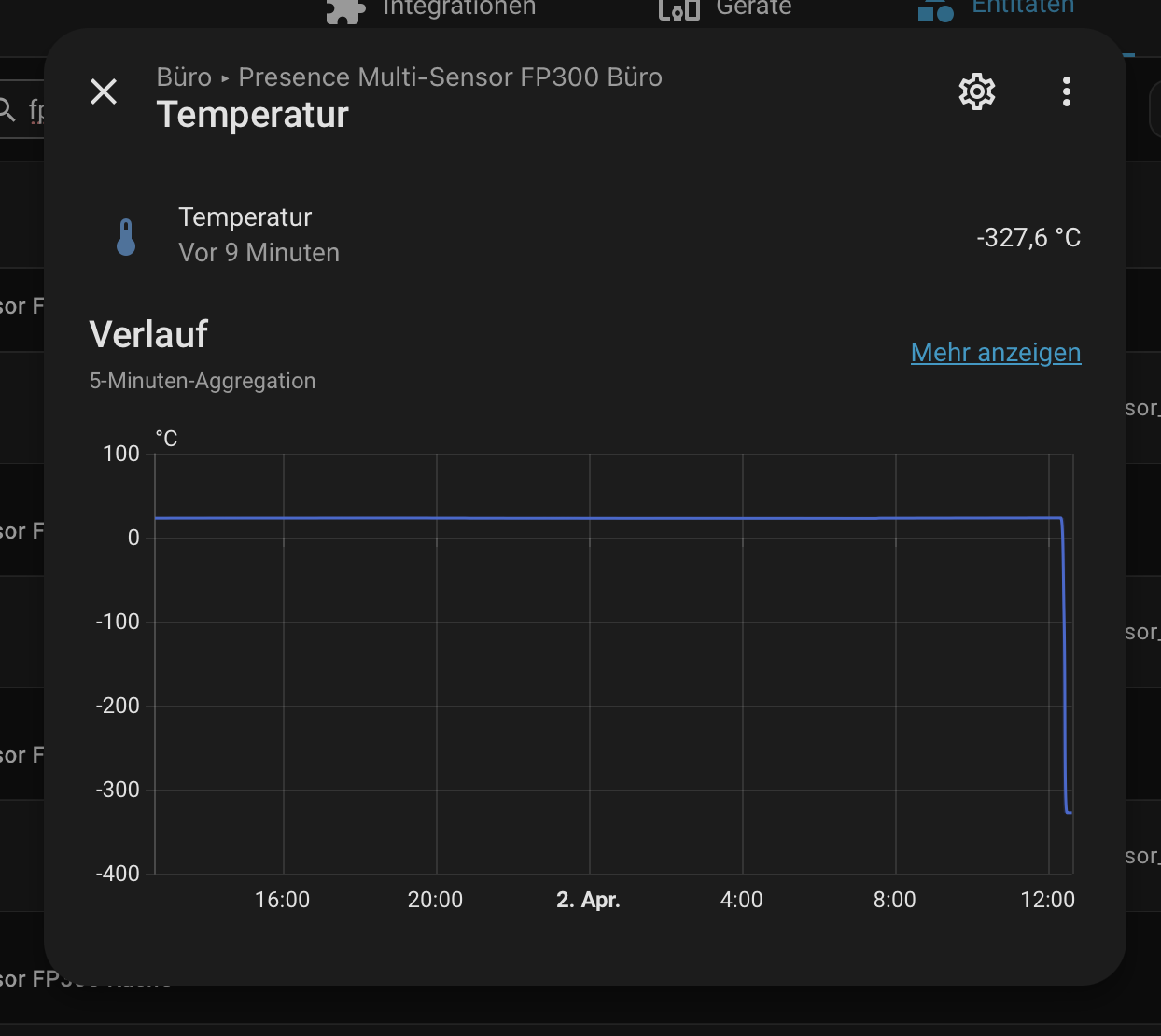
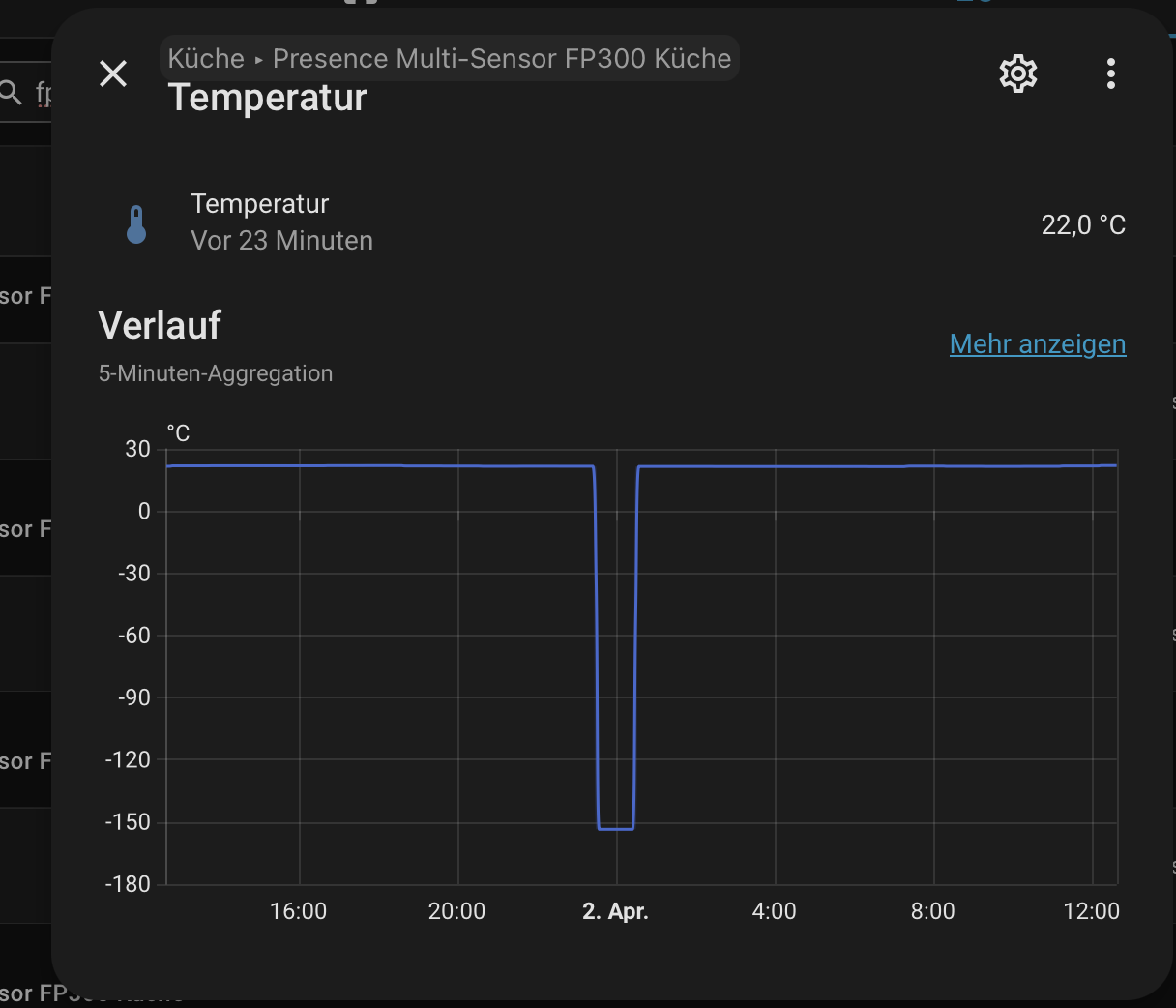
This kinda makes it hard to use them for controlling heating…
To make T1 work, you need to wait about 1 hour, or change its temperature by 0.5°C or humidity by 10%. Data transfer is limited in time to save battery power. To prevent this from happening, you need to power the gateway from the mini USB and reconnect the sensor to the gateway at a time when there is no industrial voltage (sensor T1<->gateway), mode without a repeater.
Hello everyone,
I’m experiencing the same issue. My two FP300 units go offline at regular intervals. So far, the only fix has been to remove the battery and insert it again.
I’m using an Apple HomePod mini and Home Assistant as Thread border routers. All my other Thread devices—including an Aqara H2 EU light switch—are working without any problems.
I contacted support again to ask if there are any updates. They mentioned that a new beta version is expected next week, and it won’t be version 1.1.0.8. I hope this will bring a positive improvement for all of us.
3 Likes
Thanks for that info - maybe the Matter protocol has some connection issues with third party Matter routers
1 Like
@DEChrisE you mean an issue with the implementation of the Matter protocol in the FP300 firmware? If so, yes that could well be.
I’m also waiting for firmware 1.1.2.0 which is supposed to be tested next week.
1 Like