FP400 “Abnormal Installation Mode" and Downgrade


”error persists across Zigbee and Thread"

Hi everyone,

I’m experiencing a persistent issue with my Aqara FP400 and would like to know if anyone has encountered the same problem.

The FP400 is physically installed in the same position and has never been moved. It is mounted in the corner of a shelf, at approximately 1.5–1.8 meters height , with the Aqara logo facing downward.

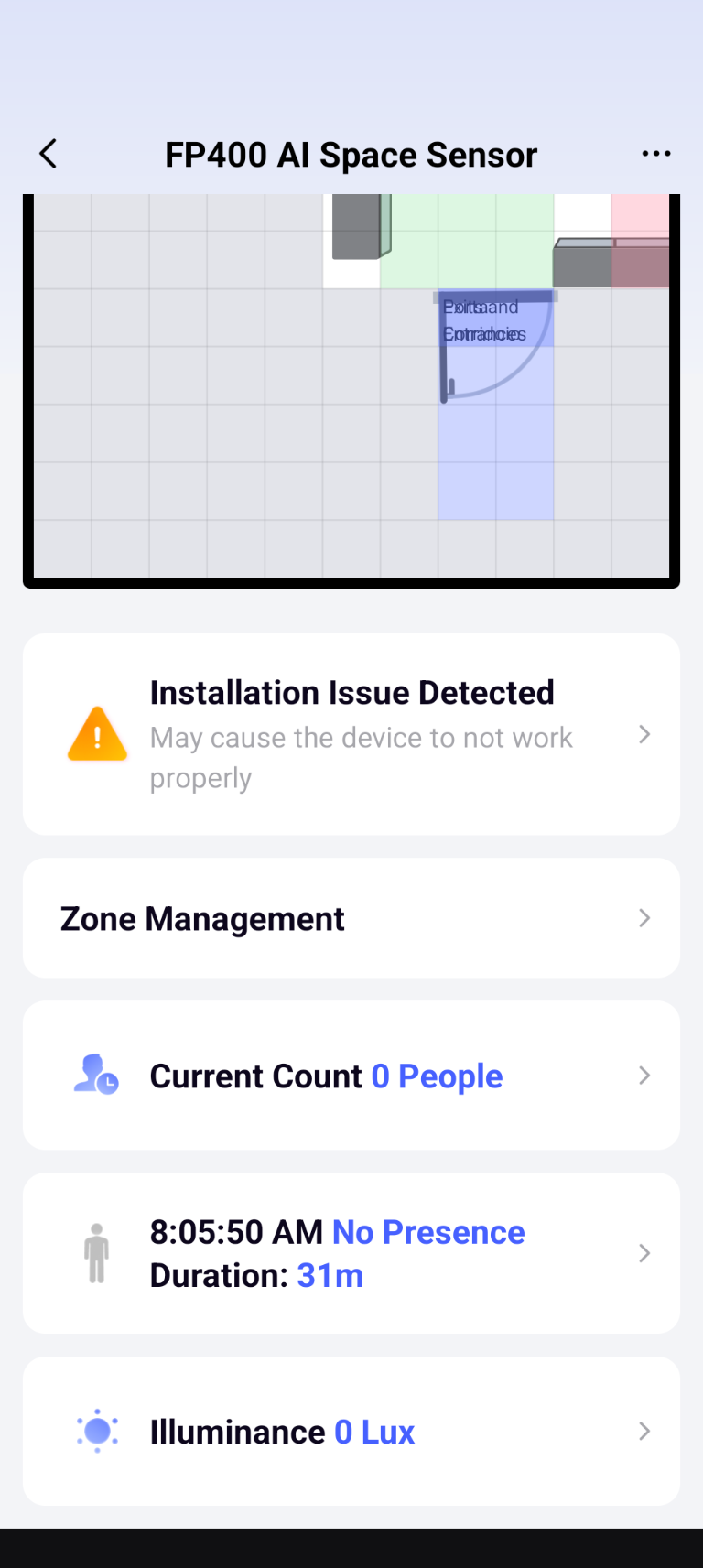
However, Aqara Home keeps showing this warning:

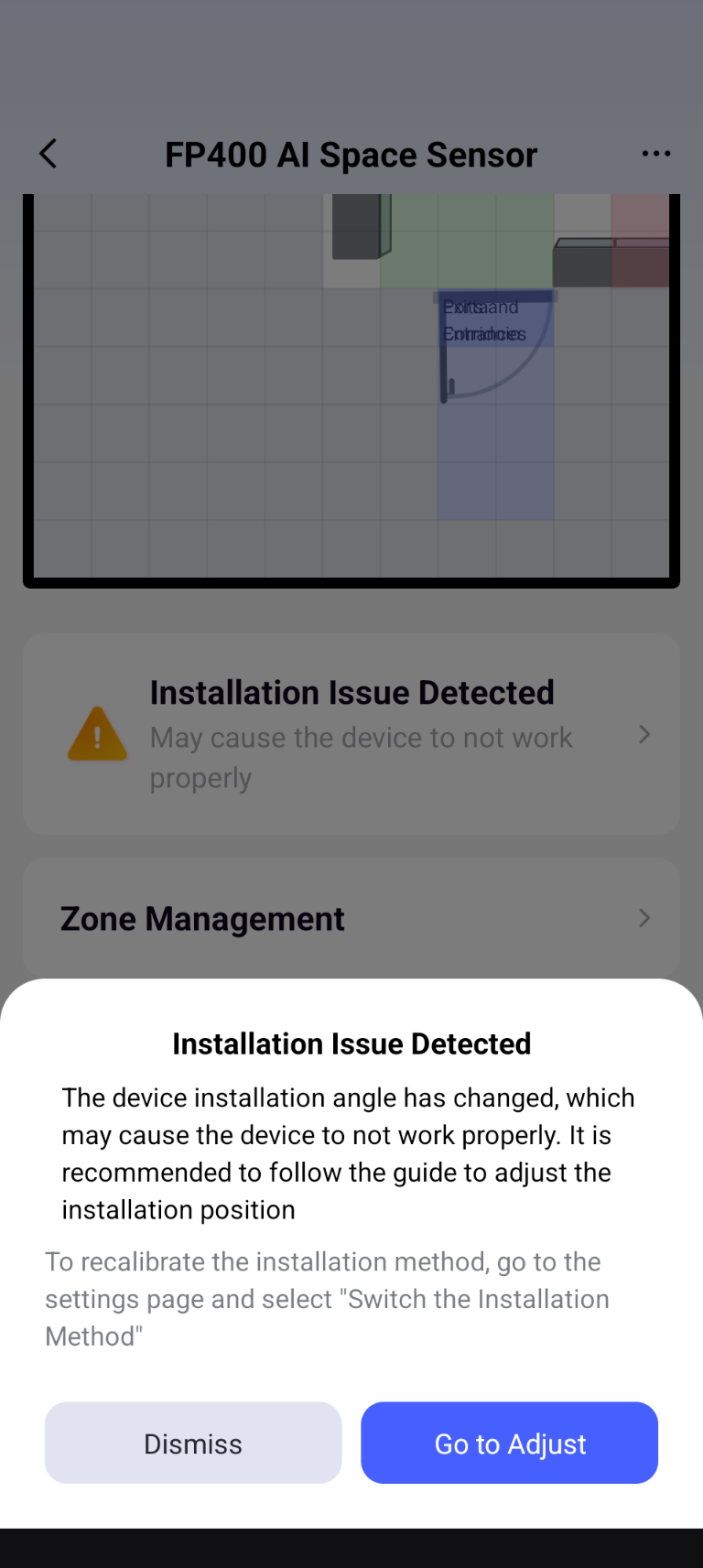
“Abnormal Installation Mode
A change in the installation angle of the current device has been detected, which may cause the device to malfunction. It is recommended to follow the guide to adjust the installation position.”

The important points are:

  • The FP400 has not been physically moved or reinstalled.
  • The warning persists after performing a factory reset .
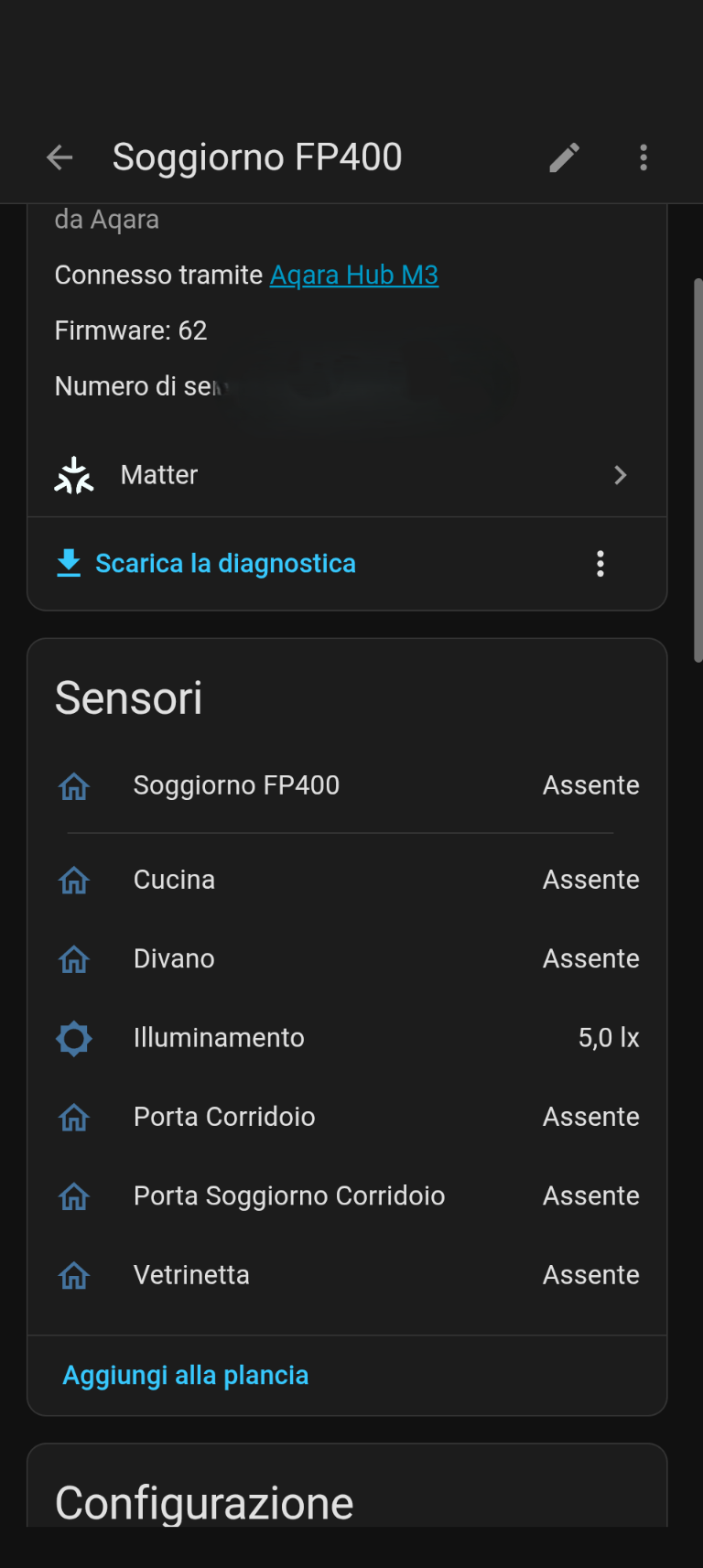
  • I initially had the FP400 connected to an M3 via Zigbee, running firmware 0062.
  • I then switched the FP400 from Zigbee to Thread by changing the firmware/protocol.
  • The same installation-angle warning was still present on Thread.
  • I then switched back from Thread to Zigbee.
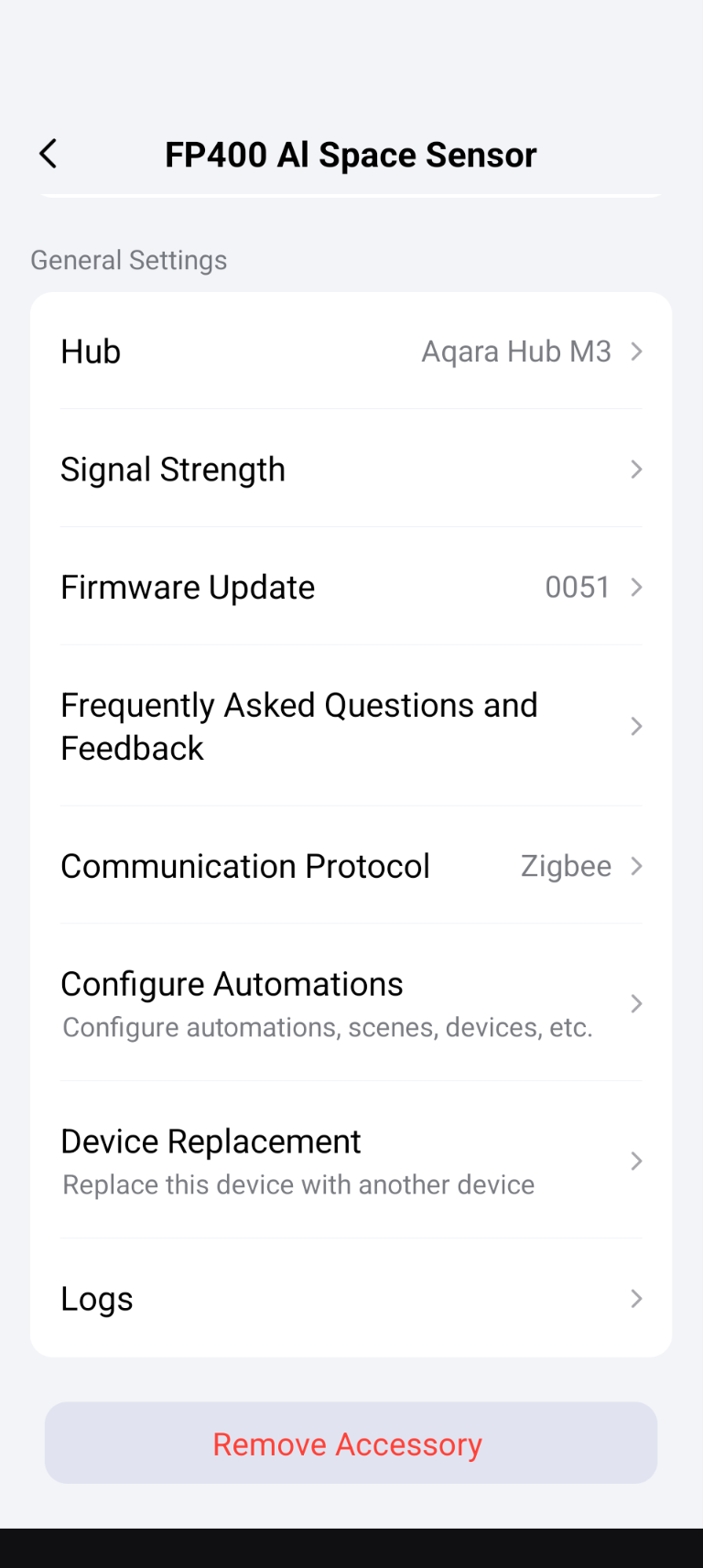
  • After switching back to Zigbee, the FP400 is now showing firmware 0051 whereas it previously had 0062.
  • The installation itself has remained exactly the same throughout this entire process.

My questions are:

  1. Why did the FP400 go from Zigbee firmware 0062 back to 0051 when switching from Thread back to Zigbee?
  2. Is this expected behavior, or is 0051 an older firmware branch that should be updated to 0062?
  3. Could the persistent “Abnormal Installation Mode” warning be related to the firmware/protocol transition?
  4. Is there a way to recalibrate the installation angle/IMU without performing another factory reset?
  5. Has anyone experienced this warning even though the FP400 was never physically moved?

At this point, I have reproduced the issue on both Thread and Zigbee, so I’m wondering whether this could be a firmware/calibration issue rather than an actual installation problem.

Any advice from Aqara staff @AqaraOfficial @expert @Caroline_Zzz @coccolino_26 or other FP400 users would be greatly appreciated.

Thanks!

2 Likes

Hi there, it looks like you’re experiencing a support-related issue. We’ve automatically created a support ticket for you and will reach out via the forum email within the next two business days.

If other members have any suggestions or insights on this topic, feel free to share!

2 Likes

Reset the device and lay it flat on a table in front of you and install it. Mount the FP400 later after the install.

Others have had similar issues in the early days of the FP400 release

2 Likes

I have 6 units of this model, my last unit is having this issue

1 Like

Well i had that issue when I switched from thread to zigbee when i first got it but also was because the device wasn’t mounted or in an flat surface then i made an factory reset and start all over but this time i had it on an flat surface and that notification didn’t appeared anymore.also I made sure to measure the height to set it right.

2 Likes

I tried all of that and the message is still there, lol

Mine is positioned at a height of approximately 180 cm, in a corner, on a shelving unit with flat wooden shelves. It is placed vertically, with the Aqara logo and the LED status facing downward.
But in addition to this, the issue now is that after switching from Thread to Zigbee, it hasn’t downloaded firmware version 0062.

1 Like

Well then could be also an issue with Aqara app as last week now that I remember i reset my FP2 and even if was set correctly i got same notification but not sure how i reset it again and then that notification disappeared.about the last update my be Aqara remove it since you and some has issues and when you switch it download the other one witch is ok till they investigate the issues ppl have.but I am not sure as mine is set on thread mode since i have it and it works perfectly fine.

2 Likes

Did you report it to Aqara support?as I mention my also be an app issue.since Aqara never mention what exactly did they fix with each updates we have no idea and other issue my apear.

2 Likes

Update:

Maybe I found the cause of the “Abnormal Installation Mode” warning.

I slightly moved the FP400 on the shelf, changing its position/inclination by just a small amount, and the warning immediately disappeared.

So it seems the sensor was detecting an installation angle that was just outside its acceptable range, even though it had not been intentionally moved.

One additional thing I noticed: the FP400 was originally running Zigbee firmware 0062. After switching to Thread and then back to Zigbee, it was running firmware 0051 instead.

The installation warning is now gone, but I’m still wondering why the Zigbee firmware changed from 0062 back to 0051 after switching protocols.

@coccolino_26 @srl77411 @AqaraBot @jcgiraldoh1 @AqaraOfficial @Caroline_Zzz @expert @zhaoze_zeng

3 Likes

@gtxteo Great detective work on narrowing down the “Abnormal Installation Mode” warning! It’s fascinating that such a tiny positional shift was enough to push the IMU past its threshold—really highlights how sensitive the FP400’s angle detection is. Your systematic testing across both protocols definitely helped isolate that it wasn’t a firmware-specific glitch.

Regarding the firmware rollback from 0062 → 0051 after your Thread → Zigbee transition: this is actually a known behavior with some Aqara devices that support dual-protocol switching. When you switch from Thread back to Zigbee, the device doesn’t always retain the latest Zigbee firmware; instead, it may revert to the Zigbee firmware version that was bundled with the current hardware revision or the “safe” baseline stored in the bootloader. The Thread firmware and Zigbee firmware are separate images, and the transition process doesn’t preserve the previous Zigbee firmware state—it essentially does a fresh Zigbee provisioning from whatever factory image is available.

This isn’t necessarily a “downgrade” in the traditional sense, though it can appear that way. The 0051 firmware is likely a stable branch for the initial pairing flow, while 0062 may have been delivered as an OTA update after your original Zigbee setup. Once you’re back on Zigbee, the device should eventually check for updates and pull 0062 (or newer) again, though this can take some time depending on rollout schedules.

A couple of things worth keeping an eye on:

  • Does the FP400 auto-update back to 0062? If it stays on 0051 for several days, that’s worth flagging.
  • Any functional differences between 0051 and 0062? You mentioned the original thread about 0062 issues—curious if 0051 behaves differently for your use case.

For the deeper firmware versioning question and whether this reversion is expected vs. a bug, that probably needs official eyes on it. The community insight only goes so far on internal firmware branching strategies.

Contact the Aqara Home App Customer Service Team (Profile> Help & Feedback > Customer Service) or scan the QR code:


This will be more efficient. If you do not have an Aqara Home account, “Please click here” to create a ticket. Apologies for the inconvenience, and thanks for sharing such detailed findings with the community

1 Like

I still don’t know whether the installation warning was caused by a firmware issue or by a microscopic change in the FP400’s position.

The only thing I noticed is that with firmware 0062, which was installed via OTA, the FP400 seemed slightly more responsive when detecting the presence or absence of people.

1 Like

@gtxteo Hi there! Thanks for sharing this fascinating follow-up on your FP400 troubleshooting journey.

It’s really interesting to hear that the “Abnormal Installation Mode” warning might have been triggered by such a microscopic shift in position rather than a firmware bug. The FP400’s IMU (Inertial Measurement Unit) is indeed quite sensitive, and even tiny vibrations or settling of the shelf can push the angle detection outside its optimal threshold. This highlights the importance of a very stable mounting surface for ceiling or shelf-mounted sensors.

Regarding your observation about firmware 0062 being more responsive, it’s possible that different firmware versions have slight variations in their detection algorithms or sensitivity thresholds. Since 0062 was an OTA update, it likely included optimizations that improved detection latency or accuracy compared to the baseline 0051.

If you decide to stick with 0051 for now, keep an eye on the app for any OTA updates that might bring you back to 0062 or a newer version. In the meantime, ensuring the sensor is securely mounted and perhaps using a bit of adhesive or a non-slip pad under the shelf mount could help prevent those microscopic shifts from triggering the angle warning again.

Thanks again for keeping the community updated with your detailed findings! If you have any other questions or updates, feel free to share.

Contact the Aqara Home App Customer Service Team (Profile> Help & Feedback > Customer Service) or scan the QR code:


This will be more efficient. If you do not have an Aqara Home account, “Please click here” to create a ticket.

1 Like

I’m constantly checking for an update to firmware version 0062, but the app keeps reporting that no updates are currently available.

2 Likes

@gtxteo @gtxteo That’s definitely frustrating when you’re stuck on an older firmware and the update pipeline seems dry. A couple of things worth trying to nudge the OTA check:

  • Force-close and reopen the Aqara Home app, then navigate to Profile → Firmware Update and pull down to refresh.
  • Toggle Automatic Update off and back on in the Firmware Update page (tap the “…” menu in the top right) — sometimes this re-registers the device in the batch update queue.
  • Power cycle the FP400 briefly by removing it from the shelf for ~30 seconds, then let it reconnect fully before checking again.
  • Move your hub closer during the check if possible — a stronger mesh link can sometimes make the difference in whether the update offer surfaces.

That said, since 0062 was already deployed to your device once before, its absence now might indicate a staged rollout pause, a regional server difference, or that 0051 is currently being treated as the “safe” baseline for re-provisioned units following protocol switches.

Given the protocol-switch behavior and your observation that 0062 felt more responsive, this is edging into territory where the community can only speculate about Aqara’s firmware branching and rollout logic. For a definitive answer on whether 0062 will return to your device — or whether there’s a manual push option — your best bet is to get this in front of the support team directly.

Contact the Aqara Home App Customer Service Team (Profile> Help & Feedback > Customer Service) or scan the QR code:


This will be more efficient. If you do not have an Aqara Home account, “Please click here” to create a ticket.

1 Like
2 Likes

Thank you for sharing your detailed feedback and troubleshooting experience!

Regarding firmware versions, version 0062 was rolled out gradually during the beta/staged rollout process. Unfortunately, we discovered an unexpected issue that could cause third-party automations to stop working, so we had to urgently roll back the release. As a result, version 0051 remains the latest publicly available firmware for now.

A new version, 0063, is expected to be released within the next few days . It is expected to address the issue mentioned above and improve the “ghosting” behavior observed in some scenarios. If you encounter unexpected behavior with your FP400, we recommend waiting for version 0063 and giving it a try.

Regarding the “Abnormal Installation Mode” warning, we are not currently aware of any known issues related to IMU calibration or false installation-angle detection. If the warning persists, please make sure your Aqara Home app is updated to the latest version. If the issue remains, please send the device logs directly to our Support team so they can investigate further.

It would also be extremely helpful if you could provide the selected installation mode (side-mounted or ceiling-mounted), along with photos showing the actual installation and the sensor’s position. This information would help us better understand and identify the root cause.

At this stage, we do not believe a factory reset is likely to resolve the issue. Rather than repeatedly resetting the device, we recommend first identifying the underlying cause so that the problem can be addressed appropriately.

Finally, we appreciate your feedback regarding firmware release notes. We will work on providing more detailed descriptions of changes and fixes in future firmware updates to make it easier for users to understand what each version includes.

Thank you again for your patience, detailed observations, and valuable feedback. We really appreciate your help in improving the FP400 experience!

4 Likes

I tried; it doesn’t work for me! :worried: