How should manual control hand a room back to Aqara presence lighting?

A presence rule can be technically correct and still be annoying if it immediately undoes the brightness someone chose by hand. Before building the rule, I would agree on when automatic control is allowed to resume.

For a noncritical room light, this is the behavior I would aim for:

  • Automatic: presence and the chosen lighting conditions can control the light.
  • Manual hold: an explicit button or scene preserves the selected setting; both automatic on/brightness changes and automatic off respect the hold.
  • Return to automatic: use a clear action such as “Resume automatic lighting,” or a deliberately chosen vacancy period. A fixed timeout alone could expire while someone is still sitting there.

The tricky part is identifying manual intent. A light changing brightness does not necessarily prove someone touched it—another scene or controller may have caused the change. An explicit override button seems easier to reason about than guessing from the light state.

I would keep the hold and its reset in one automation platform, then check what happens when someone uses Apple Home or a physical switch as well. Resuming automation should also have a defined outcome when the room is already occupied, rather than relying on the next presence transition.

This is a proposed behavior, not a claim that every Aqara device exposes a built-in override flag. Which approach have you made reliable in Aqara Home: an explicit resume scene, a vacancy reset, or something else? Please include the sensor, control device, and platform handling the hold.
2 Likes

Hi James,

Thank you very much for your feedback. This is indeed a real‑world usability issue.

As a workaround, you may try using nested automations or scenes to temporarily disable or re‑enable your presence‑based automation after manual adjustments.

For example:

  • Create one automation: When the switch is turned ON, set the brightness and color temperature of your light strip to your desired values, and disable Automation A at the same time.
  • Create another automation: When the switch is turned OFF, turn off the light strip and re‑enable Automation A.

These are just simple examples. You can adapt the configuration to fit your actual usage scenario. Hope this suggestion is helpful. Thanks again.

4 Likes

You just gave me a crazy idea.

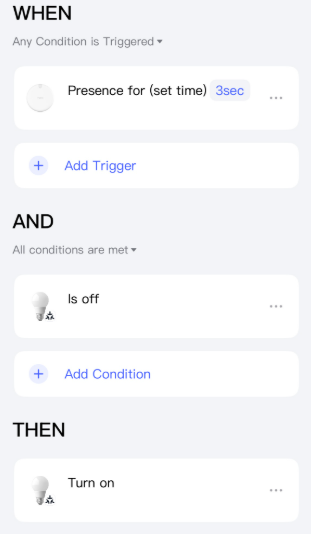
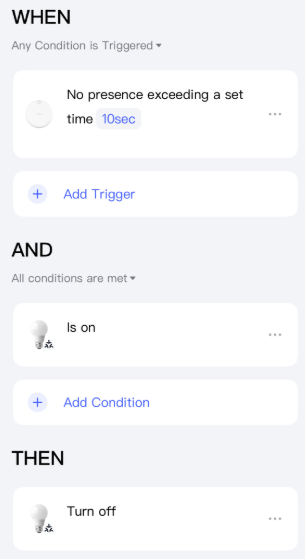
If you have an automation in the Aqara Home app to turn on the light when presence is detected, something like this picture:

And an automation to turn off the light when absence is detected, something like this picture:

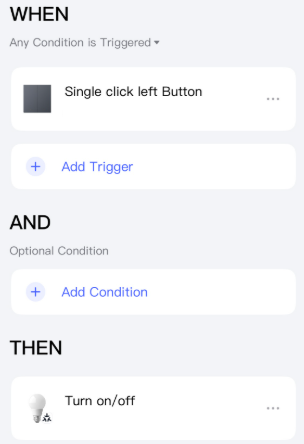
As well as an automation to turn the light on/off via a light switch, like in this picture:

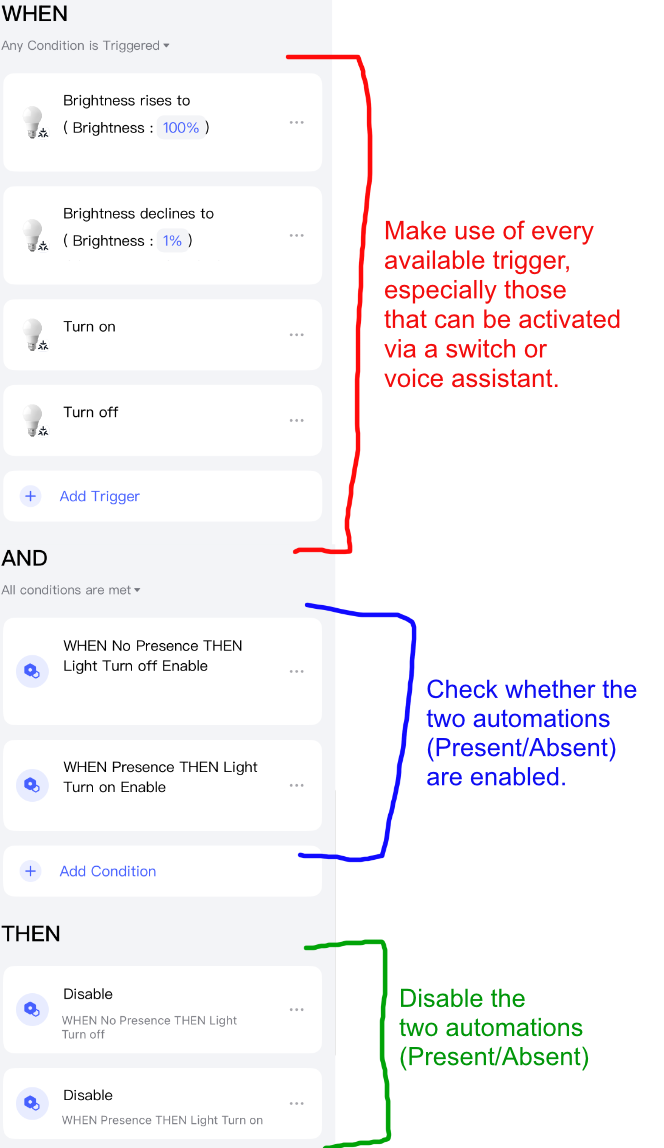
Then you could add another automation, something like this:

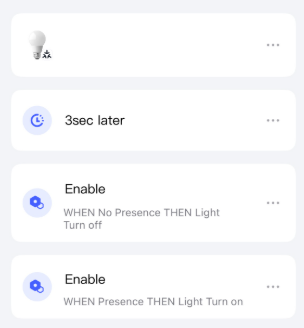
And then add the following actions (under THEN) to both the “turn on on presence” and “turn off on absence” automations:

Together, this serves the following purpose:

If the light switch is pressed or a voice assistant is used to adjust the brightness, turn the light on, or turn it off, the automations tracking presence and absence are disabled and stay disabled.

Only the automations for turning on the light upon presence and turning it off upon absence re-enable themselves as quickly as possible, ensuring that only external events cause them to be disabled.

@jamesfengyuyang this way, you get the desired manual hold. You can then optionally add further scenes and/or automations to re-enable the two disabled automations.

If you have additional automations in external ecosystems, such as Apple Home, that you want to be able to re-enable the “Tracking Presence and Absence” automations, you can also create a scene in Aqara Home for this purpose that you can run via Matter (Scene Sync).

Do you have a specific idea of when you would like to reactivate the motion detection, for example after 3 hours with no motion detected?

3 Likes

For an occupied room, I would not use a three-hour timer as the only reset. I would keep the manual hold until the room has been continuously vacant for about 10 minutes, with an explicit “Resume automatic lighting” scene for anyone who wants to hand control back sooner. Your self-re-enabling actions solve the key distinction between changes caused by the automation and outside control; I would test physical-switch, voice, and Apple Home changes separately because they may not expose the same state change to Aqara Home.

What exactly do you mean by that?

I don’t think it is possible to tell if, for example, Siri caused a state change on an Aqara device. But that is an interesting point. On the other hand, I wonder if such a distinction is even technically possible. At least with Matter devices, the signal does not necessarily travel from one ecosystem to another, but directly to the device. The other ecosystem only finds out about the state change if it has explicitly subscribed to updates. I highly doubt that it also receives information about the origin of that change. The Matter standard would definitely need to be adjusted for this, and all manufacturers would have to implement it.

1 Like

I agree that source attribution is usually not exposed. I meant testing whether each external control path produces an observable power or brightness update in Aqara Home quickly enough for the hold logic—not trying to identify whether Siri, a physical switch, or Apple Home caused it. If all three changes look identical but reliably propagate, the design can react to “external state changed” without knowing the origin; if one path does not propagate, it needs a separate explicit hold or resume scene.