Hi everyone,
I’m having a bit of an issue with my Aqara Hub M3 and hope someone here can help me out.
I initially set up the hub using Wi-Fi, and everything worked fine. Recently, I plugged in an Ethernet cable because I wanted a more stable wired connection. However, the app still shows that the hub is using Wi-Fi.
It didn’t automatically switch over to the cable connection when I plugged it in. I’ve looked through the settings in the Aqara app, but I can’t find any option to switch to Ethernet or turn off the Wi-Fi completely.
Has anyone run into this problem before? Do I need to re-configure or reset the hub from scratch to get it onto Ethernet, or is there a trick to force it to use the wired connection?
2 Likes
Hey there and welcome to the forum.did you try unplug the M3 from the power source wait for 1/2 min and plug it back?if this doesn’t work I suggest to you to reset it having the cable connected.
2 Likes
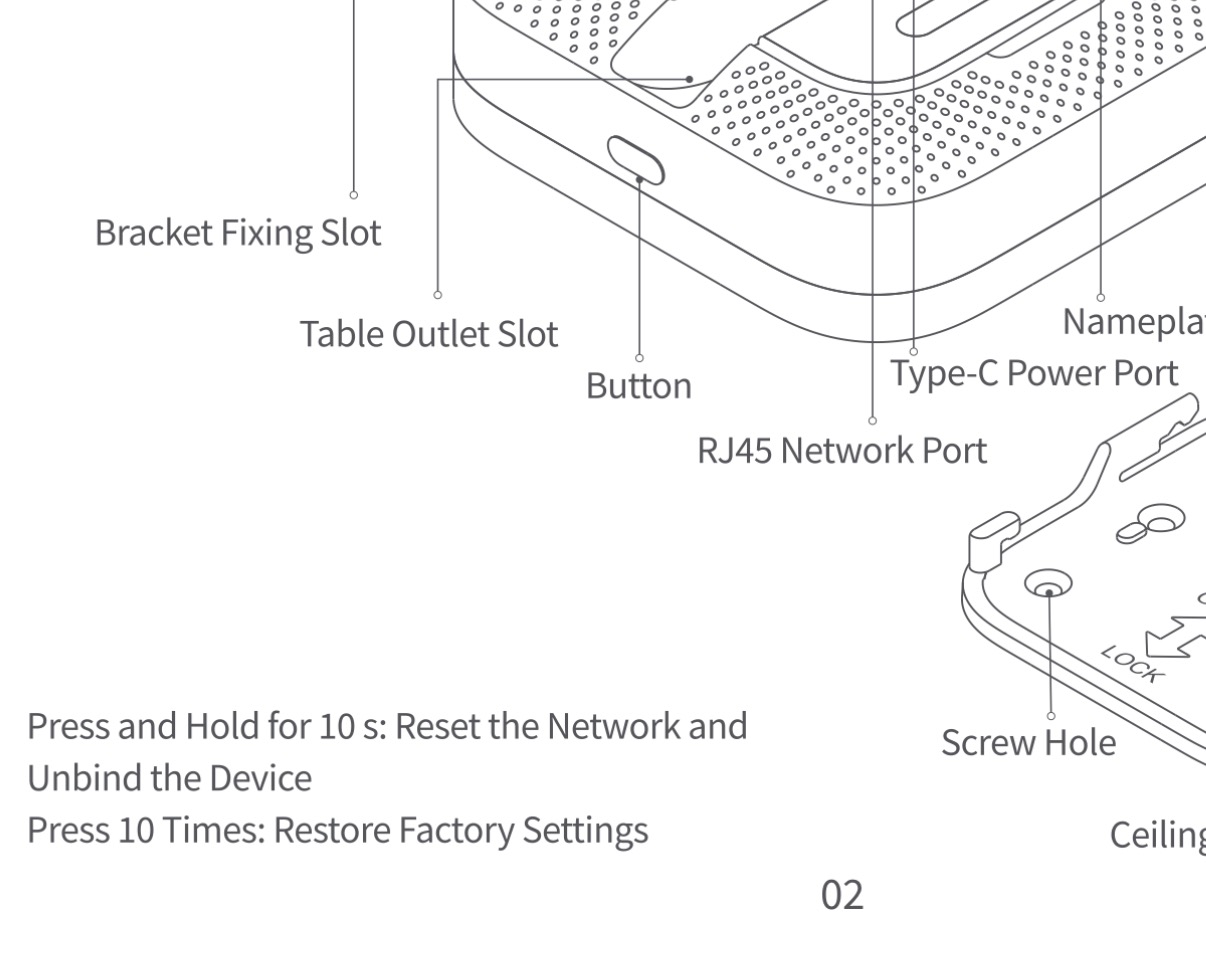
Have you tried holding the button for 10s? It should reset network settings - you will be able to bind it in your app again. Aqara apps don’t “forget” their settings after re-binding, so it won’t break anything.
4 Likes
Thanks for the confirmation on this. I thought I would have to reconnect all my devices if I did that so I kept trying to do it from the app.
I actively assumed that such an expensive product would be smart enough to detect it has Ethernet so I was very confused.
2 Likes
This is a security measure - the device cannot detect if the Ethernet port is physically connected (no device is) unless there is some signal (that’s generally how Ethernet ports work in any device).
Suppose the cable was cut off (or the router/switch on the other side died) when you’re not home. Would you like your Hub to automatically try to connect to a WiFi network (which may have outdated credentials and someone set up identical WiFi network, so called WiFi spoofing)? Or maybe should it enter pairing mode and allow anyone to reconfigure your hub?
When you connect it via Ethernet, you tell the device it now uses the Ethernet. And the device, to prevent “hijaking” it (or hijacking the network traffic it generates), sticks to the Ethernet until you press the button.
2 Likes
Sorry, misunderstood the original question. The reason why Hub M3 does not switch from WiFi to Ethernet automatically is Power over Ethernet. You might want to use PoE for power only, but WiFi for data (as your Ethernet cable may have PoE injected, but is connected to a different network/subnet/VLAN). And changing network settings mid-operation may break your hub/automations. That’s why manual action is required.
1 Like
Had this same issue and a reset was required to fix it.
2 Likes