Title: G410 Thread Network Conflicts and Request for Thread 1.4 Support or Radio Disable Option
I’m having persistent issues with the G410’s Thread Border Router functionality. Thread devices seem to strongly prefer joining the G410’s Thread network, and some subsequently refuse to pair with other Thread networks, even after being factory reset.
My understanding is that Thread 1.4 introduces standardized credential sharing between Thread networks and border routers. I’d like the G410 to properly share Thread credentials with Apple Home and Home Assistant so that devices can work seamlessly across my existing ecosystem.
My Apple TV and HomePod are both more capable Thread Border Routers for my setup, and they already work well with Apple Home and Home Assistant. Unfortunately, the G410 seems to introduce conflicts rather than complementing this setup. When the G410 is added to Apple Home, credential sharing doesn’t appear to work as expected. I’ve had Thread-enabled bulbs and remotes from multiple manufacturers that wouldn’t re-pair with my existing Thread network when the G410 was unplugged. Until I powered the G410 back on, they wouldn’t rejoin Apple Home or Home Assistant.
Ideally, I’d like to see one of the following:
Thread 1.4 support and proper credential sharing , allowing the G410 to coexist with other Thread Border Routers without fragmenting the network or preventing devices from joining other ecosystems.
An option to completely disable the G410’s Thread radio , for users who already have preferred Thread Border Routers and don’t want the G410 participating in their Thread network.
Is Thread 1.4 support planned for the G410, or could a setting to disable its Thread functionality be added in a firmware update?
Starting with Thread 1.3, multiple Border Routers from different manufacturers can theoretically form a single Thread network. Cross-manufacturer credential sharing works, but it still heavily relies on the respective OS APIs (like the iOS or Android Keyring).
From what I have heard from other users, Thread 1.4 is already implemented in the M3 Hub. Since it is the flagship model, it usually gets updates first, so I would assume the other Aqara Hubs will follow.
However, Thread 1.4 alone is not the whole story. Matter 1.4 introduces the Home Router and Access Point (HRAP) device type as part of the CSA’s broader Network Infrastructure Manager (NIM) initiative. This provides a standardized and secure storage area where Thread credentials can live and be managed.
Thread 1.4 solves a significant part of the problem by standardizing credential sharing between Border Routers. Yet, the overall user experience still depends on how vendors implement the corresponding Matter infrastructure features. Until these capabilities are widely adopted across ecosystems, we will probably still need to rely on platform-specific mechanisms to get everything onto a single Thread mesh.
Why disable it when you could use it to improve your existing network?
Isn’t it true that a hub doesn’t actually have to create or join a Thread network? So, if you factory reset the G410 and simply don’t create or join a network, wouldn’t it essentially be disabled anyway?
I’m not given a choice for whether or not it joins my Thread network if I add the device to Apple Home as a doorbell, which is what I intended to do.
For some reason, when I have bulbs that link directly to the G410 as a TBR, factory resetting them does not actually clear their attachment to the G410. With my IKEA bulbs and my Nanoleaf bulbs, unplugging the G410 and factory resetting these bulbs seems to do nothing. They straight up will not pair to Apple Home or via Home Assistant ever again until the G410 is plugged back in, then they’ll instantly be recognized and added to Apple Home/HA.
I have factory reset the G410 several times in the past as it absolutely wreaked havoc on the Thread network in my bedroom, where the G410 chime resides. The weird clingy behavior I mentioned before never dies.
Search for “_meshcop._udp.” All hubs should be listed there. Check if each one is using the same name under “nn=” and which version is displayed under “tv=.” If different names are displayed, then you already have different Thread networks.
In Home Assistant, go to Settings → Connectivity → Thread and check which network is listed under “Preferred network”.
If you reset the devices, check afterward to see if they still appear in the iPhone under Settings → Matter Accessories, and if so, remove them from there.
Question: Have you always set up all devices (such as the Apple Thread Border Router, Aqara Hubs, Bulbs, and other devices) using the same iPhone with the same iCloud account?
And do you add the devices via Multi-Admin on each Matter controller (Aqara Hub / Apple Home Hub / Home Assistant Matter Server app)? Always connect a Matter controller to the device using the Matter code first. After that, do not use the Matter code on the device anymore; instead, use the code generated in Aqara Home, Apple Home, or Home Assistant.
And if you reset a device, you must, of course, start again with the code on the device itself and not use the code generated, for example, in the Aqara app.
So I went ahead and factory reset the doorbell chime and set it up with the code on the chime’s Matter sticker. I removed the device from the Aqara app as instructed, held the chime button down for 10 seconds, then, once it said to open the Aqara app to add the doorbell, I unplugged the thing, then let my Thread network reconverge with my ATV as my primary TBR. All of my automations and various Thread devices started working properly and reliably again now that the chime is unplugged. Should be noted that the aforementioned HomePod is currently unplugged as it just developed the common “phantom touch” issue on its top display.
I have two VLANs, but Home Assistant has access to both and would tell me if there were another TBR in the mix in Matter Server. My U7 In-Wall APs do not have Thread and nothing else in my home would have it as I don’t have any vendor-proprietary Thread hubs apart from the G410, which was unplugged at this point in the process, leaving just my Apple TV showing as a TBR in Matter Server within HA.
I went ahead and carefully set the G410 up from scratch again. Not sure why it saved my network credentials (perhaps the app does this?) but it automatically auto-filled my main SSID’s credentials upon setup. When I got to the step where it asks if I would like to create a new Thread network or join the existing one, I told it to create a new one, thinking this would prevent the G410 from joining my Thread network. Alas, it did not. The Thread network now has a different series of numbers after “Home2026” in Home Assistant and in the Aqara app. Matter Server in HA shows that it’s joined again, and it has created a direct connection to a light in my kitchen. I moved all other Thread bulbs that were in my bedroom (where the chime resides) to another room and traded them out with Zigbee ones so that the doorbell chime wouldn’t attach to them.
Unfortunately, the kitchen light is directly below my bedroom and re-attached to the chime’s Thread radio. Automations involving that light such as turning off the “all lights” entity when we leave or turning the kitchen light on at 5 AM no longer work. The ATV is and always has been my preferred Thread network in HA unless the ATV goes offline and the G410 chime becomes my primary (or “preferred” as you will) TBR as a failsafe. I’ve noticed in the past that, when trying to commission devices to Apple Home when the G410 is my primary TBR that devices will straight up refuse to connect to my Thread network until the G410 is unplugged, and then they will instantly join when this occurs.
As it stands, I cannot do much to prevent the Thread chipset from talking to other devices. I can’t use RTSP for the doorbell to a NAS or anything since the doorbell is on battery power. This is super frustrating, and I’m not certain what I can do about it. Whether or not the chime is added as a hub/bridge in Apple Home, this behavior occurs. I’m out of ideas, apart from converting the IKEA Thread bulbs to Zigbee so that they can’t be rendered dysfunctional by the G410.
Thank you! I’d like to believe I know more than the avg. bear about these sorts of things. Cisco CCNA and jack-of-all-trades IT guy here.
I realize I forgot to respond to this section from @JohnD:
For Matter devices, if I need them to be accessible to my family in Apple Home, I add them there first and then generate a Matter pairing code to give to Home Assistant. The affected devices that have not played nice with the G410 chime are all Apple Home first, then HA second. Same iPhone for the whole time, plus the same iCloud account. I have not added devices to my Thread network via any sort of Aqara GUI.
Not sure exactly how Matter Multi-Admin in my case handles Matter devices being reset and lost, but when I converted my Bilresa remotes to Zigbee, I had to manually remove each remote from both HA and Apple Home before pairing them to Zigbee2MQTT. Removing them from Apple Home and choosing “remove from all services” seemed to put the thing into a stalemate. Can’t remember if I had plugged the doorbell chime back when I went through this process. I don’t believe so.
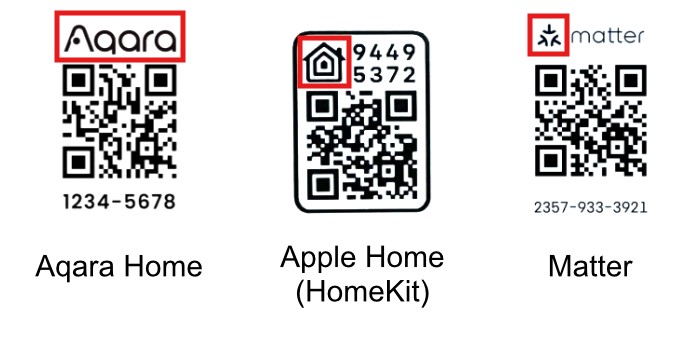
Actually, my G410 does not have a Matter sticker. Instead, it has one sticker for Aqara Home and another for Apple Home.
The G410 is not natively a Matter doorbell. It operates as a doorbell within the Apple Home app via the HomeKit protocol over Wi-Fi, or “directly” via Wi-Fi with the Aqara Home app. However, it also serves as a hub that functions as a Matter controller, a Matter bridge, and a Thread border router. This means that while the doorbell itself works via HomeKit, you can connect other Matter devices to its hub, or use it as a Matter bridge to integrate Aqara Zigbee devices into platforms like Home Assistant.
In such a setup, adding another TBR like the G410 makes it essential for all TBRs to communicate seamlessly via IPv6 and mDNS broadcasts. These TBRs form a Thread backbone that routes communication over your LAN and WLAN. Furthermore, if multiple Thread networks exist, packets must be able to exit one Thread network and reach the other Thread network or the Apple TV via your local network. If they cannot, the IKEA Thread bulbs could end up connecting to the G410 Thread network and becoming completely unreachable by the Apple Home Hub.
Are the Apple TV and the G410 on the exact same VLAN? How are you handling mDNS (Multicast DNS / Bonjour) and IPv6 routing?
Choosing “join” instead of “create” would have established a single shared Thread network between your Apple TBR and the Aqara TBR, allowing all communication to occur internally within that Thread network. The G410 would have also pulled the access credentials for your existing Thread network from your iCloud storage to join it.
By creating a second Thread network instead, you likely introduced multiple problems.
First, new Thread credentials may have been generated and stored in the iCloud Keychain. When adding new devices like the IKEA Thread bulbs, they are automatically assigned the most recently saved credentials, which belong to the newest Thread network. Consequently, all newly added devices will default to the G410 Thread network.
Second, maintaining two separate Thread networks is counterproductive. They act as isolated radio islands rather than forming a cohesive mesh network, eliminating the benefit of devices extending the range of others. Other advantages of Thread, like self healing routing during outages, are also lost.
Finally, the most critical issue is that commissioning new devices via the Apple Hub stops working, as you noted. While communication between the two Thread networks routing through your local home network could theoretically work as mentioned before, it typically fails in practice because some Matter controller tends to restrict its search to its own Thread network.
Did you ever import the Thread network credentials from your iPhone into Home Assistant via the Home Assistant Companion app in the past? If so, there is also a button there to send the credentials back to your phone. After that, you should be able to add devices to your Apple Hub again.
Next, reset the G410 once more and make sure to select “join” this time. As long as broadcast and IPv6 communication between the hubs is guaranteed, everything should work smoothly.
Hmm, OK. I may have misspoke, but I am fairly certain the code I scanned on the side of the chime to get it into the Aqara app was a Matter code. Might have been some other QR code, then.
Both are on the same VLAN, my main one. Matter over Wi-Fi and other dumb devices are on the IoT VLAN with specific firewall carveouts so they can talk to my ATV and HA and not to the greater internet via either IPV4 or IPV6. mDNS is set to Auto in the Network settings under Gateway mDNS Proxy. IGMP snooping is off. IPV6 is pretty basic - just SLAAC and DNS settings for Quad9 and Cloudflare’s IPV6 DNS servers.
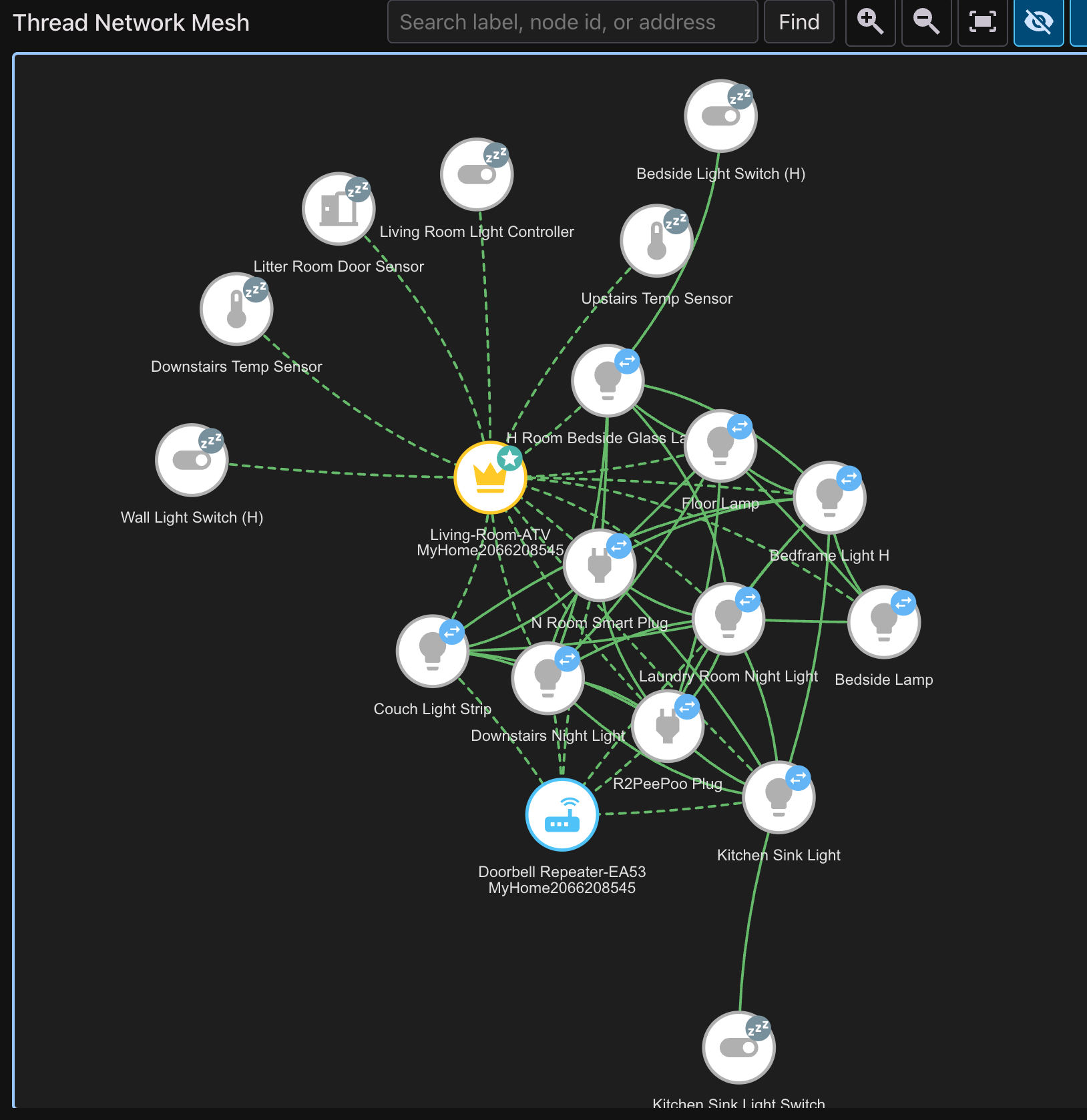
Choosing ‘Join’ back when I initially set my doorbell up was how my entire Thread network became a massive headache. Regardless, unless I’m misunderstanding what the Matter Server map demonstrates, it still ended up as part of my Thread network based on this pic from HA’s Matter Server. It currently does not show up under “hubs and bridges” in Apple Home, though previous attempts to remedy this (and I believe my initial setup when I bought the G410 months back) had me putting it in their, I think via the Aqara iOS app.
Here’s the thing - it has always reliably failed over when my ATV went offline for updates or a power outage or similar. Never had any issues with that bit. Apple Home-specific automations never worked when that happened, but most HA ones would, except for ones involving the devices that were directly connected to the G410 chime.
Yes, I’ve done this to add devices to HA but not to Apple Home. Some oddball devices don’t need added if I think they’ll make the process of using Apple Home more cluttered for grandma/my S/O. Seems to work all the same as Apple Home, which is to say that it doesn’t allow me to commission devices when the G410 is the primary TBR, but works fine when the ATV is. The “use router for Android + iOS credentials” selection in HA has always been the ATV. I don’t think I’ve ever changed it manually.
Been a couple days on this, and I’m now seeing something unusual - the G410 is on the Thread network, but I’ve moved my Thread Nanoleaf bulbs to the other room and traded those out for Hue bulbs, which use Zigbee paired to Zigbee2MQTT. With the Nanoleaf bulbs gone, all Thread devices that have attached themselves to the G410 now work as expected. I’ll have to test commissioning a device to see if everything works as expected when the G410 becomes the primary TBR during a failure, but perhaps the Nanoleaf bulbs were causing issues with forwarding commands? They have always reported subpar connection strength despite being the closest devices to my G410 - maybe 5 feet away.
Matter QR codes almost always feature the Matter logo and always use the format 0000 000 0000, which is 11 digits. In my example, it even says Matter, but sometimes only the logo is printed. Apple and Aqara codes are 8 digits for me.
Okay, if both TBRs are in the main VLAN, there should not be any problems. However, if you came up with the idea to leave the Apple TV in the main VLAN but move Home Assistant to the IoT VLAN, the “Auto” setting on UniFi, for example, would block the _meshcop._udp packets at the VLAN boundary. With UniFi, there is a list of mDNS services that are forwarded in Auto mode, and _meshcop._udp packets are not listed there. The two border routers would therefore know nothing about each other, would not be able to establish a common network, and in the worst case would fragment the Thread network.
You should also check whether your Home Assistant, the Apple Home Hub, and the G410 are receiving Unique Local Addresses in addition to Global Unicast Addresses. Just look to see if IPv6 addresses starting with fdxx:: are assigned.
That looks good so far.
However, that sounds like your Thread network might be (or was) fragmented after all. In Home Assistant, open the Matter Server app, click on the hubs, and check if the Extended PAN ID is the same everywhere. You should also check the Partition ID. If the Extended PAN ID is identical across all of them, the hubs are all in the same Thread network. If the Partition ID matches whether read normally or in reverse byte order, then the network is not fragmented.
You have to consider that the G410 runs on Thread 1.3 and relies on obtaining the Thread credentials via the iOS API. The Apple Home Hubs now run on Thread 1.4 and can, at least in theory, exchange Thread credentials with other hubs. What I do not know for sure is whether the Apple Hubs also run on Matter 1.4. If they do, they can also store the credentials provided they support the new device type “Home Router and Access Point” (HRAP). Home Assistant can be helpful here but also confusing. For example, you can assign the function “Used for Android and iOS credentials” to the G410, even though it does not support it at all. Additionally, if you commission devices via Apple Home instead of an app like Aqara, iOS might behave smarter and know exactly which credentials the Apple Home Hubs are using. In my experience with the Aqara Home app, it uses whichever credentials were most recently created via the iOS API, regardless of whether they are still valid or correct.
Can you explain that in more detail? Do you mean an automation in Home Assistant? What does the trace show?
All of these devices (G410, ATV, HA) all reside on the main VLAN.
All have IPV6 link-local and globally-unique addresses.
The extended PAN ID matches on both TBRs and the Partition ID of the G410 read in reverse order matches the Apple TV’s.
Gotcha. Currently, the option is presented for the G410 in HA’s Matter Thread settings, and the one for the ATV is grayed out, with “Used for Android + iOS credentials” presented when hovered.
There’s an automation I have that runs a script. This automation/script is intended to use two ThirdReality Night Lights I have (Matter over Thread) as notification lights. Bright red for when the Litter Robot needs emptied, flashing blue for when our Aquatru Carafe needs a filter replacement, and RGB panic mode for a particular door that has a contact sensor on it notes that it’s been closed for awhile. In my case, the Litter Robot was full and needed emptied. The ThirdReality light downstairs is directly linked to the Apple TV due to its proximity. It fired off, as we noticed it was red when we walked downstairs. The other light is upstairs and is reasonably close to the G410, and it appears that it linked to the G410 directly without connecting via another Thread router. It did not turn solid red as it should have. They work in harmony, with the exception of motion triggering the light independently of one another.
A common example of automations not firing for lights attached to the G410 include my “every light turns off when nobody is home” automation. The one in our kitchen is almost invariably going to find itself left on at least once per week due to connecting to the G410 rather than making an extra hop to the Apple TV.
No trace on this one… sorry. It fires far, far too frequently to pinpoint where/when the failure point was on the merit of the lights being motion-detecting. When I next notice it fail, I’ll let you know and post what I can find. I seem to remember HA recognizing that the “all lights off” command for the kitchen light made it to the light despite the light remaining on and showing as such in both HA and Apple Home, so it’s possibly due to congestion, but again, these all work perfectly fine when I unplug the G410.
I’m experiencing a similar issue with my G410. It shows up in my Apple Home Thread network scan as disabled-detached, rather than participating as an active Border Router. Its Extended PAN ID matches my Apple Thread network, but its Partition ID appears byte-reversed compared with Apple’s.
I’ve temporarily disconnected the G410’s Thread I’d really like to see Aqara provide proper Thread 1.4 interoperability with Apple Home, or at minimum an option to disable the G410’s Thread radio.
In Home Assistant, the Matter Server app gives you a bit of insight to your Thread network, kind of like the Eve app, or whatever I suspect you may have used with Apple Home. Mine shows "BBR (secondary), Thread detacted, initialized, active. It does reliably work as a failover for my ATV. Does yours if you unplug your ATV from power and start fiddling with your Thread network devices?
I recently bought the new HomePod Mini 2 to replace our old one and its Thread antenna/chipset seems to be a little bit stronger than the old one and completely dominates a connection to other Thread devices that my G410 would previously have been the proprietor of for a connection to Apple Home/Home Assistant. Not sure why, but I’m not complaining. The G410 does great as a smart doorbell on battery compared to most other devices, but it has not been a fun time dealing with its Thread funkiness, and there’s currently no way to use the doorbell without the chime if you use the doorbell on battery power. Frustrating.
Hopefully you can find the source of your problems or an update fixes yours/ours situations.
In Thread there is always the Thread backbone which uses your existing home network like your Wi Fi or Ethernet. It acts as an alternative communication path or bridges the gap if your Thread radio networks do not physically overlap. I constantly see issues in this forum because home networks are not configured correctly or because certain internet routers simply do not support the required features.
For example, having IPv6 configured properly is absolutely critical. Take a look at this post:
These home network configuration problems often go unnoticed if your Thread Border Routers are close enough to communicate directly over the Thread radio mesh and your smartphone and HA Server has a Thread radio. In that scenario the devices completely bypass the broken local network routing.
Adding better or more Border Routers or mains powered Thread devices like smart plugs and bulbs will naturally strengthen the radio mesh. This can sometimes make the connection problems disappear because the radio signal becomes strong enough on its own.
However the underlying network routing issues remain completely unresolved. I highly doubt that the upcoming Thread 1.4 update will magically fix these fundamental local network problems.
There was actually this discussion happening in the forum at the exact same time, which is also very interesting:
I just keep learning with every expert post on this forum!
My experience has been that my Thread network is usually improving and adjusting nodes to get the best signals. I am looking forward to seeing what happens tomorrow as I add the newest ATV to my network.
Hopefully it went as well as mine did with the HomePod Mini 2! I swear the Thread chipset is way more potent than on the old HomePod Mini, so maybe the updated the one in the 4th Gen 4K ATV. I definitely have fewer Thread issues having added one of those back to the mix.
I’ve noticed this also, I have no proof other than how the mini 2’s always seem to be the chosen leader and I also noticed the mini 2 touch screen is now lit like it’s being used and in the past this was never lit up.
The big HomePod (Gen2) don’t light up when they show as a Thread Leader.
Interesting observation. This is an odd network setup choice for Thread to rely upon. I used SLAAC as that’s what I’ve always felt was best for my own home IPv6 network. I’d wager that most people do not configure IPv6 manually, and that SLAAC is what most ISPs would opt to configure on their provided equipment.
I suppose I can test this over the weekend and see if using a static fdxx:xxxx:xxxx::/48 address range can fix this, as it appears supported by Ubiquiti. This is way beyond what should be required to get this all working, though. It’s also interesting that, since the Thread spec explicitly requires NAT6to4 translation, the devices should be able to work as intended without IPv6 being enabled anywhere. Looking back on it, I believe I manually enabled IPv6 on my network mere days before acquiring my G410. I wonder if I would have never encountered problems had I left that bit alone.