So I was hoping to get this working… but I don’t see a way to be notified when vibration stops?
Any advice would be much appreciated!
Thanks!
You can emulate this feature by creating 3 automations:
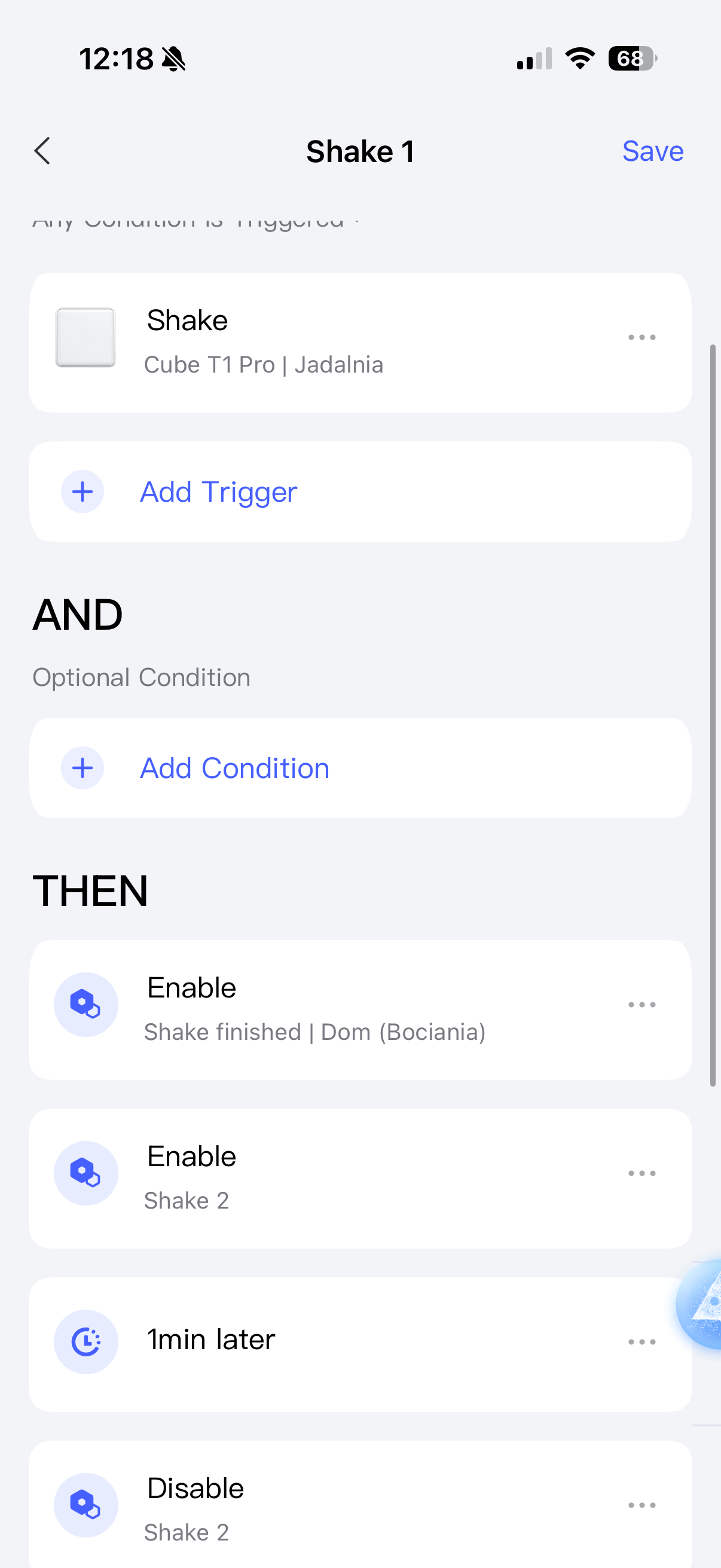
First automation (called Shake 1)
WHEN vibration detected
THEN
- Enable automation “Shake finished”
- Enable automation “Shake 2”
- Delay 10min
- Disable automation “Shake 2”
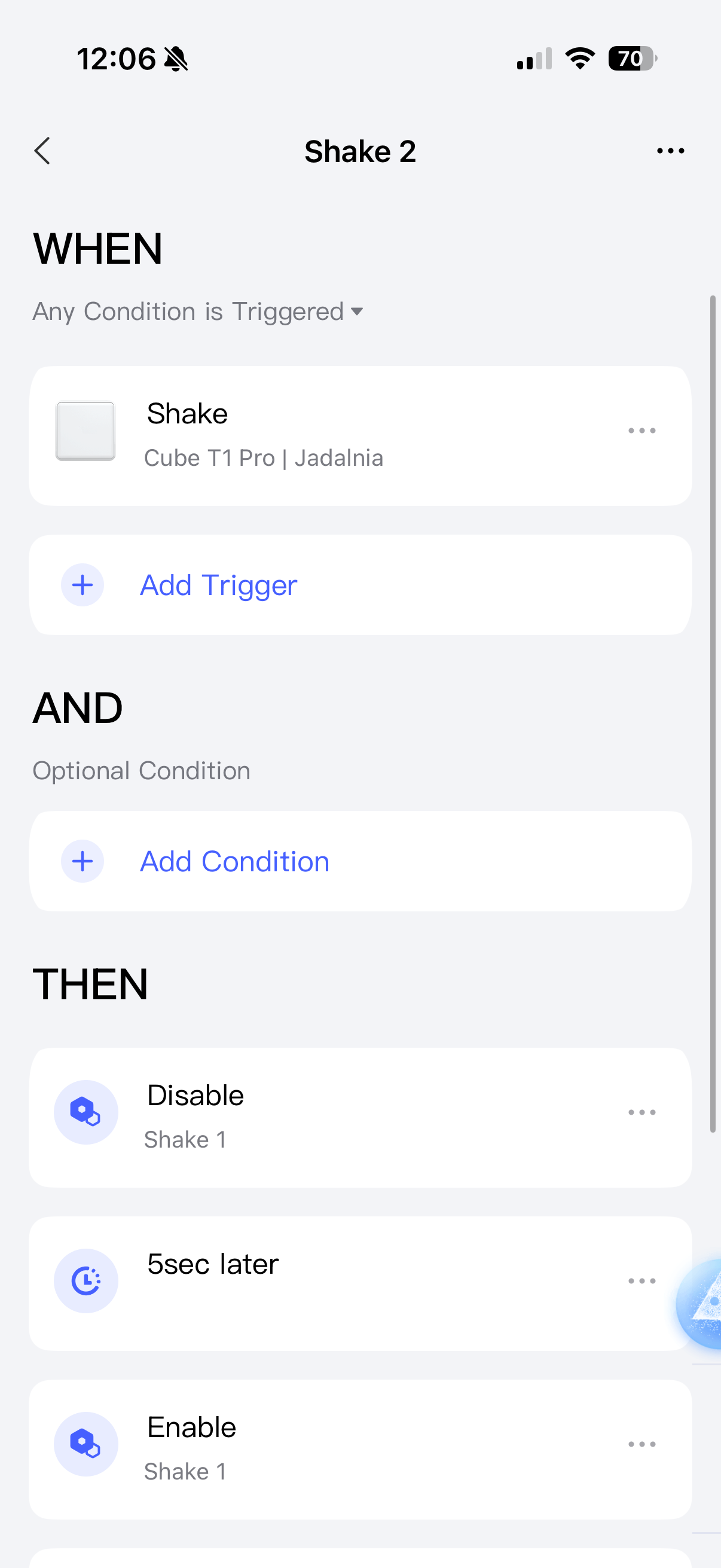
Second automation (Shake 2)
WHEN vibration detected
THEN
- Disable automation “Shake 1”
- Delay 5s
- Enable automation “Shake 1”
Note: disabling an automation cancels it if it has “delay” action. So this automation basically prevents “Shake 1” from disabling “Shake 2” if the washing machine is still vibrating. Of course, we need to reenable it, so it can resume the “countdown” of no vibration
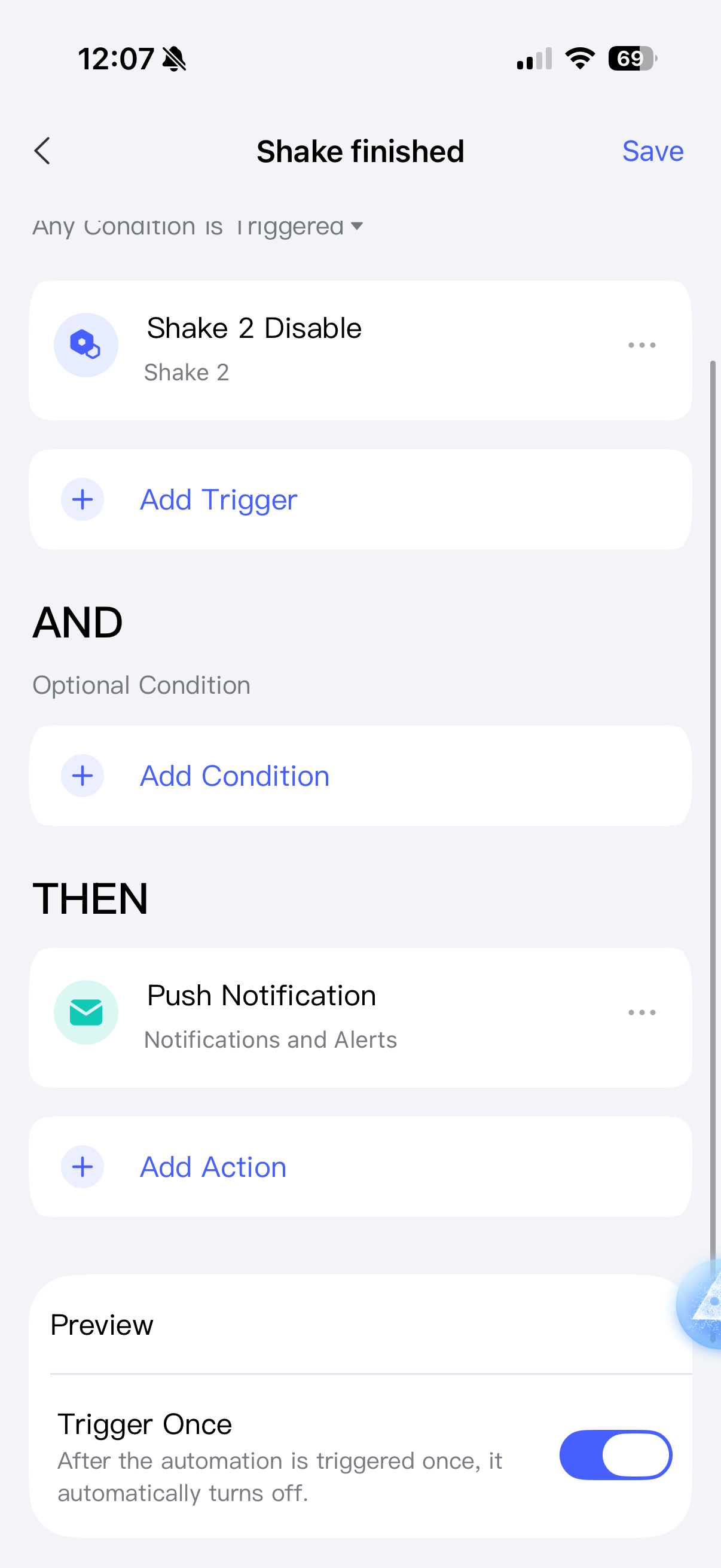
Third automation (Shake finished)
WHEN “Shake 2” is disabled
THEN
Send push notification
Note: remember to check “trigger once” in case of this third automation to prevent multiple notifications.
This third automation is triggered when the “Shake 1” can finally disable “Shake 2” after the delay, which means that “Shake 2” did not interrupt it (so vibrating stopped basically).
It might be tricky to set up, because the Aqara app won’t let you save empty automations. So you need to make “draft” versions with different actions (like turning on the light) and then editing it to make it correct.
I was able to setup those automations with my Aqara Cube to test if it would detect when I stopped shaking it.
Thank you so much for the info! I’ll be setting this up to test this evening! I’ll report back with how it’s working.
Do you use it with Apple Home? If so it’s much easier and cleaner to setup. It also depends on what other devices you have installed to help with the type of notifications.
Apple Home will send notifications when “vibration is detected” or “vibration stops”.
Unfortunately I couldn’t get it to work properly with the Aqara one since it wasn’t sensitive enough for my dryer. I ended up using the Third Reality sensor instead and that one does the job.
That said, I’m still hopeful that the new P2 sensor might solve this. If the sensitivity has been improved, it could finally make dryer monitoring reliable without needing a workaround. Fingers crossed Aqara nailed it this time ![]()
You can also probably use a smart plug to monitor power usage. And you can make automations triggered when power drops to 0W (or maybe something around 2W) - then you can get a notification that the cycle ended
I use a smart plug for the washing machine. But there is no smart plug for US dryer. Its 240v
Sorry, forgot to ask where you are. I’m from Poland and we have 230V in every outlet, no matter if it’s for a washing machine, dryer or an air fryer. And the EU smart plug just works with 220-250V.
As an alternative you can use the T2 relay and wire it to your outlet in wet contact mode. The relay can also monitor power usage and you can setup automations based on power decrease, like with the smart plug.
No worry and thanks for trying!
But the t2 relay have a limit of 10amp. In North America, the dryer is using between 20 and 25 amp.
I will put my hope in the P2🤣
The only other idea I have is also having an Aqara temperature sensor on the dryer, near the vent (but not too close). When the dryer is done then this area should cool down in a noticeable way. But it will be a bit of trial an error to check how the temperatures look and to find a good place to put the sensor
I’m in the US as well… however I’ve got an old gas dryer and it works in a standard plug along with my wash machine. So… it sounds like the smart plug is my best option.
I did try the automation you suggested. But I too found that it’s just not sensitive enough to be reliable.
However… I’m very new to all this automation stuff… so this was a very interesting lesson regardless of the unreliable results!
I’ve got the smart plugs. Now I need to set up the automation for notifications when laundry cycle is complete. Would you be able to assist in this task?
You might find this topic useful. ![]()