Subject: Aqara G2H cannot be added to Aqara Home but works in Apple Home
Hello Aqara Support,
I have an Aqara Camera Hub G2H that I previously used without any issues.
I have factory reset the camera several times. It always says “Reset successful”.
The camera scans the QR code correctly, but Aqara Home always fails with “Failed to connect to Wi-Fi”.
I have already tried:
- Factory reset of the camera
- Factory reset of my router
- 2.4 GHz Wi-Fi with WPA2
- Mobile hotspot
- Different iPhone
- Different USB cable and power adapter
The important part is that the camera can be added to Apple Home successfully and live video works perfectly. This confirms that the camera can connect to Wi-Fi.
The issue only occurs when adding the camera to Aqara Home.
Could you please check if this is a known binding issue or if there is a firmware recovery or another procedure available?
Thank you.
2 Likes
Hello, welcome to the forum. First, remove the camera from HomeKit. Then re-add the camera (reset to factory settings) to Aqara Home. From the Aqara Home app, train the camera to HomeKit.
4 Likes
Thank you for your reply.
I have already tried exactly this procedure.
I removed the camera from Apple Home, factory reset it, and tried to add it to Aqara Home before adding it to HomeKit.
The result is always the same: Aqara Home reports “Failed to connect to Wi-Fi.”
However, if I add the camera directly to Apple Home, it connects successfully and live video works perfectly.
This confirms that the camera can connect to the Wi-Fi network.
Could you please check whether this is a binding issue with my camera or account, or if there is a firmware recovery procedure available?
2 Likes
Pressing it quickly 10 times resets it to factory settings.
Be sure to REBOOT the router!!!
1 Like
Is the camera for global use? Maybe you have a camera for the Chinese region?
1 Like
Pressing it quickly 10 times resets it to factory settings. When it says" rest to factory successfully", in 3 seconds ,press it one time then you will here “ding” sound , maybe it will be ok for next
2 Likes
I tried the 10 quick presses. The camera says “Reset successful”, but I never hear the “ding” after pressing once more within 3 seconds. It still fails to connect in Aqara Home, but it works perfectly in Apple Home with live video.
The camera is EU
Hi @jorgeavilas can you try this….
Go to Profile - connect to ecosystems - Apple home - HomeKit devices
Can you see it there and bind it over there? Press the button on the G2h for 5 times sometimes helps also while trying to bind
@jorgeavilas, did do that?
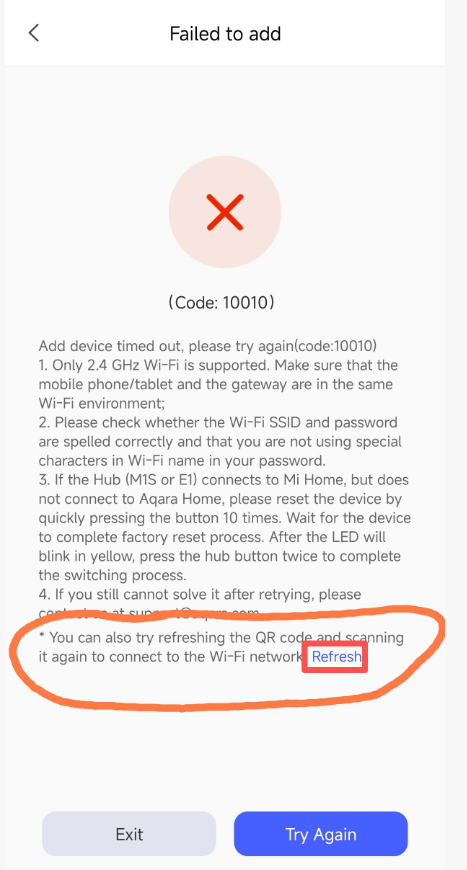
After the app prompts an error, you can refresh the QR code as shown in the following figure and try scanning the code again.
1 Like