I have Aqara G5 PoE and WiFi, Which one should I use?
1 Like
Hey
POE every day of the week mainly for connection stability
2 Likes
Go for the PoE (wired) version. Cable is always better because:
- Immune to Wireless Interference: Unlike Wi-Fi, which constantly competes with your microwave, Bluetooth, Zigbee/Thread devices, and your neighbors’ routers, a wired connection is shielded. It provides a dedicated lane for your data.
- Lower Latency: Instant notifications and faster response times for two-way talk and video streams.
- No Wi-Fi Backhaul: By avoiding an extra Wi-Fi radio link after the Thread mesh, a wired connection delivers more consistent performance and lower latency.
- Maximum Security: Wired connections are immune to wireless jamming. Some intruders use portable signal jammers to knock WiFi cameras offline before a break-in so they don’t record or send alerts. With a cable, your camera stays online and keeps recording.
- Superior Security: A physical cable is much harder to “sniff” or hack than a WiFi signal. Hackers can’t exploit a weak WiFi password if the data never leaves the wire.
- One-Cable Simplicity: A single Ethernet cable provides both power and high-speed data. You don’t have to worry about being near a power outlet or dealing with signal-blocking walls.
7 Likes
Hi, your choice depends on the conditions of use of the G5. Functionally it will be the same, only the power supply and data transfer will be different
2 Likes
I have four Aqara cameras that support PoE. To avoid overloading my Wi-Fi network, I chose cameras with PoE-enabled Ethernet connections. However, it would be great if Aqara could design devices that support both options, allowing users to switch between them when needed.
4 Likes
So, the Doorbell Camera G400 without a doorbell 
2 Likes
Yes, actually, products that offer both options can be much more practical.
1 Like
My vote is POE wired version if you have or purchase POE network switch
2 Likes
I have both versions currently in use. My clear recommendation is to go with the POE version. It’s much more stable and reliable.
Although I have my WiFi version G5 bound in a mesh WiFi network where it should be able to connect to 3 different available access points (for redundancy reasons) it chooses not always the AP with the strongest available signal and sometimes it switches between 2,4 and 5 GHz network for no clear reason. When I reboot the cam it instantly chooses the right AP with the strongest signal and the highest available bandwidth. But for that, you need to reboot it periodically.
You avoid all that with the POE version.
Hope that helps you to decide. 
5 Likes
Would setting different SSIDs and passwords for your 2.4 GHz and 5 GHz networks, and configuring the device to connect only to the 5 GHz network, solve your issue?
2 Likes
Hi! Quick question first: What exactly do you mean by “redundancy” in your setup? In practice, three heavily overlapping APs often interfere with each other (Co-Channel Interference) rather than protecting against failures.
With the Aqara G5 Pro, this issue becomes even more complex in the 2.4 GHz band: You have 3 Wi-Fi networks, a Thread network (via the Border Router), and a Zigbee router all broadcasting here. All these protocols share the same frequency range, can interfere with each other, and severely reduce the available airtime.
My tip: You should definitely optimize your AP channels and transmit power manually.
• 2.4 GHz: Exclusively use the non-overlapping channels 1, 6, or 11 for your APs. Keep them as far away from your Zigbee/Thread frequencies as possible, and keep your neighbors’ Wi-Fi networks in mind. It often helps to slightly reduce the transmit power (TX power) of your APs. Since the camera apparently doesn’t support seamless roaming, this prevents it from “sticking” to a weak AP forever.
• 5 GHz (in Germany): There are important regulatory differences here. On the lower channels (36–48), the maximum allowed transmit power is lower, but they are radar-free and extremely stable. On the higher channels (e.g., 100+), a significantly higher transmit power is legally permitted (up to 1000 mW instead of 200 mW). This often provides more usable power, which practically feels like better range – even though the signal is physically attenuated slightly more by walls at this higher frequency. The catch: These high-power channels are subject to Dynamic Frequency Selection (DFS). If the AP detects radar (e.g., air traffic control or weather radar), it has to shut down the channel temporarily, which often leads to connection drops and aimless roaming for cameras.
Test out what works best for your specific environment: maximum stability on the lower channels or higher transmit power on the DFS channels.
Feel free to send me a private message (happy to chat in German, too!).
No, because that would mean to give up all the advantages of WiFi 7 and MLO I like to use with my other devices.
Redundancy means here, that the WiFi cam is potentially able to connect to each one of the 3 APs, in case one fails or has a hiccup. All are in a Mesh setup and in reachable distance for the camera (signal strength). The single point of failure is of course the router to the internet for the whole home network, because I think only a very small minority of home users has a second connection with a secondary router as fallback link to the internet.
For the 2,4 GHz network I’m using the auto channel setting, which normally choose channel 13. This one is the less crowded in my neighbourhood, because most people left their routers in the factory setting and do not expand their network to channels 12 and 13. This also partially avoid some interferences with other devices or networks like you mentioned or e.g. Microwave ovens etc.
For the 5 GHz network I manually choose the channel and use channel 104 for the reasons you already mentioned (higher transmit power). The DFS problematic solves my Router with Zero Wait DFS and Band steering and seamless roaming, the G5 is able to use 802.11k/v/r, therefore this shouldn’t be a problem. In case a radar is detected in these upper channels it should redirect all connected devices to an other channel instantly without waiting time or disconnect.
Regarding the overlapping APs, since the APs are all in a Mesh, the devices are free to roam and become steered by the Mesh Master to their best available AP.
To give you a better idea, I’ve drawn a small sketch of my home setup here.
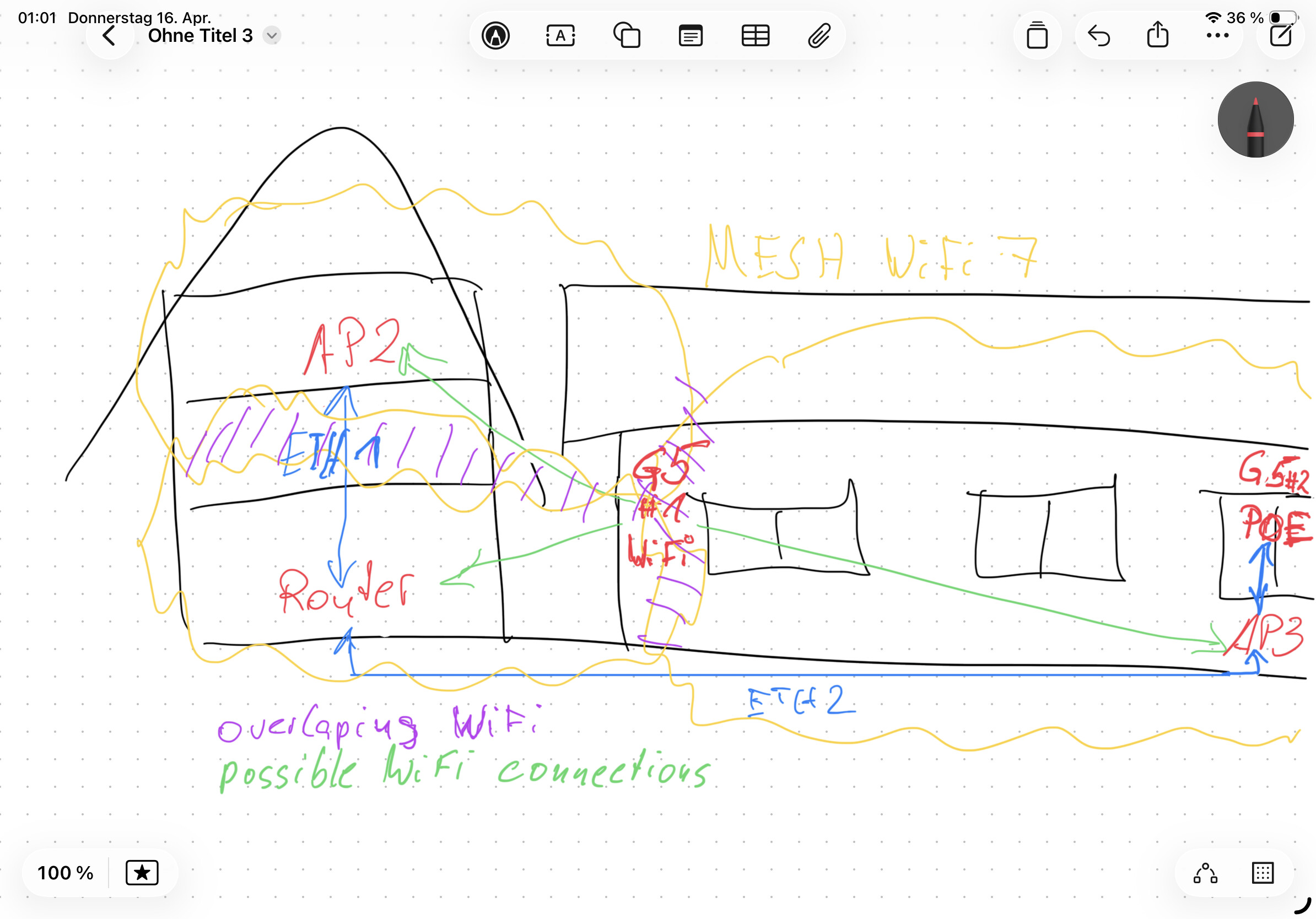
Weiter auch gerne auf Deutsch per PM.
If the camera were to use roaming correctly, that would contradict your other statement:
The fact that a reboot resolves the issue is a very strong indication of a sticky client: during boot, the camera performs a full scan and selects the best AP, but during normal operation it does not actively roam because the signal conditions never cross its internal roaming threshold.
Even with 802.11k/v/r active, roaming is always a client decision. The Mesh Master can only send suggestions (BSS Transition Requests). If the G5 considers its current connection to AP2 “good enough” (because it sits in an overlapping coverage area with similar signal levels), it will simply ignore the steering request.
Potentially, yes. But having that potential doesn’t prevent the APs from physically interfering with each other (Co-Channel Interference) while they are all active at the same time.
I would honestly consider the redundancy aspect to be secondary here. It shouldn’t be viewed purely as an advantage, because in a dense overlapping setup, it actually acts as a permanent disadvantage.