I just installed a W200 thermostat, and noticed that when I create a scene to turn on either the heating or cooling, there are some temperatures that I can’t select. If I try to tell it to set the tempersture to 78 degrees, it changes it to 79 degrees. Also, if I try to set the temperature to 74 degrees, it changes it to 73 degrees. There may be more, but these are the two that I have noticed.
5 Likes
Welcome!
Are you setting scenes in Apple Home, or Aqara Home?
I found that the temperature preset zones in the Aqara app interfered with my Apple Home automations. What I did was place the zones in the Aqara app outside the ranges I would normally use. Then my Apple automations worked fine. And I did not enable schedules in Aqara.
3 Likes
If you in Apple scheduling mode with Adaptive Temperature and Energy Sources turned on, it might actually be happening not on the temp you’re setting but because your grid is not in a clean generating state or you’re in an expensive time-of-use period.
When that happens cooling may be set a degree or so higher and warming set a degree or so lower.
2 Likes
I am creating the scenes in the Aqara app. I’m not doing anything in the Apple Home app as far as automations or scenes. I’m not setting any kind of temperature ranges - just simply, set the mode to cool and set a temperature for 78 degrees, but when I close it, it says 79 degrees. If I pick 77 or 79, it retains it. but if I say 78, it changes it to 79.
3 Likes
That is strange. @US_SteveM had a great point. Do you have either of those things going on?
1 Like
Adaptive Temperature and Energy Sources are both turned off.
1 Like
Looks like a bug. I decided to follow your steps and reproduced your issue.
1 Like
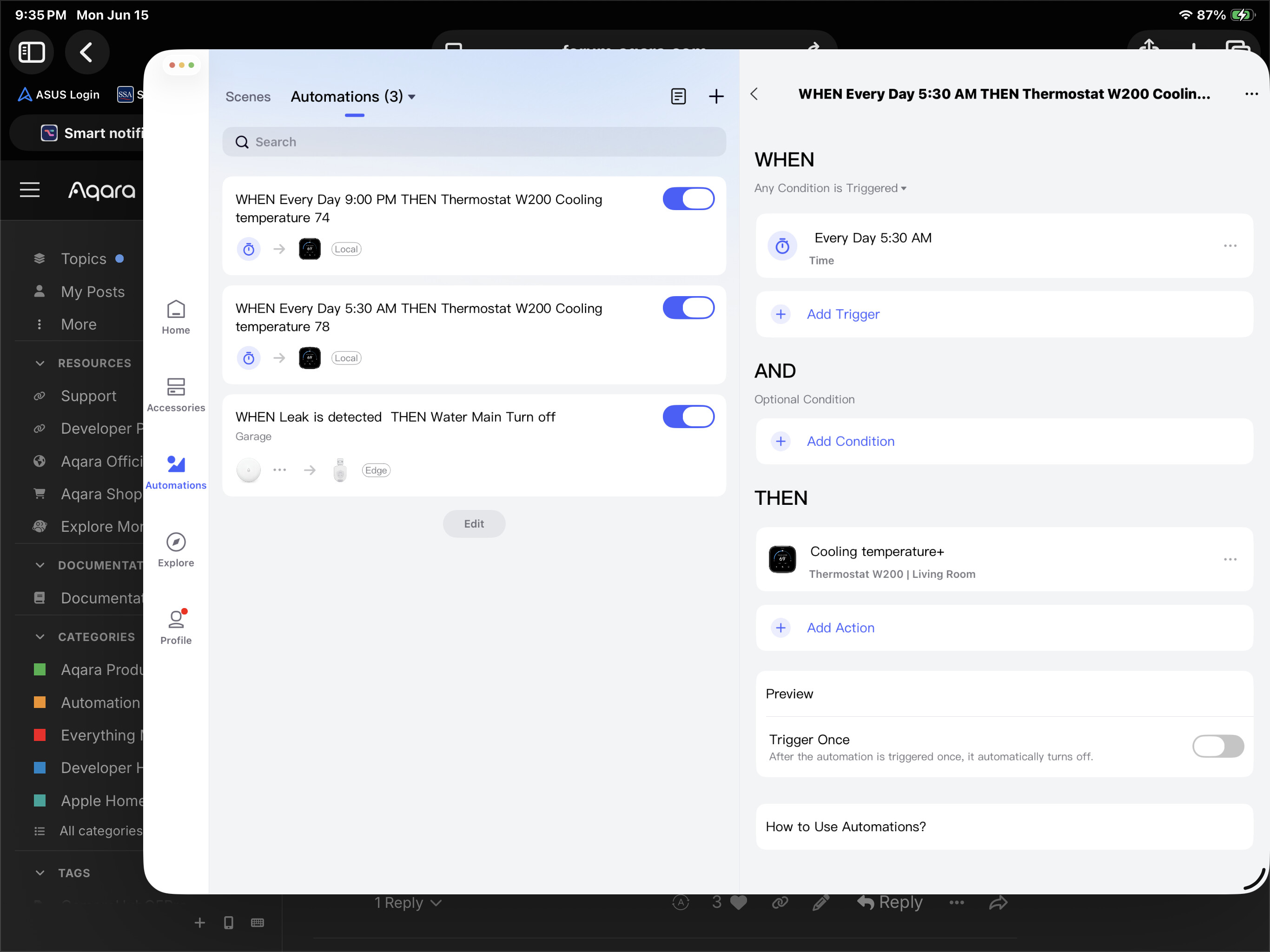
Instead of a “cooling temperature+” action, try a “switch to cooling mode”
1 Like
Ha! Oh, that’s a bug.
2 Likes
Ok, so I asked Google Gemini about this. Her response:
Even though you have your Aqara app set to display Fahrenheit, Aqara’s underlying global cloud servers and hardware firmware process everything natively using Celsius.
When you slide the dial to a specific number in Fahrenheit and tap save, the app doesn’t save “78”. It runs a quick formula to convert your 78°F into Celsius, saves that decimal number to the cloud, and then converts it back to Fahrenheit to show you what was saved.
Because the mathematical steps between the two scales don’t line up cleanly into whole degrees, the numbers get rounded up or down.
78 F is about 25.55 C
When you hit save, the Aqara server rounds 25.55^ {C} to a clean 26^ {C} to pass it to the thermostat. When the app reads that 26^ {C} back from the server, it converts it back to Fahrenheit:
26 C is 78.8 F
Because the app truncates or rounds that back to a whole integer, 78.8°F becomes 79°F. The app literally forces a rounding error onto you because it refuses to save exact Fahrenheit decimals.
2 Likes
Yup, that’s exactly why this kind of thing usually occurs, except IIRC, the W200 has 0.5 increments in Celsius, so the pattern is a little different but same general principle.
It’s just a bug to fix. It’s fully solvable in software.
Do I need to report this to Aqara somehow, or are you able to do that for me?
Good question. Not sure the best way. You probably want to add the app-bug tag to this post.
@AqaraOfficial @AqaraBot - can you take this bug report or guide us on next step? Thx!
@US_SteveM Great catch on identifying this temperature rounding issue! This does appear to be a firmware/software bug related to the Fahrenheit-Celsius conversion logic in the W200 thermostat.
For bug reports and improvement suggestions like this, the most efficient way to get them to the Aqara team is through the official customer service channels:
Contact the Aqara Home App Customer Service Team (Profile > Help & Feedback > Customer Service) or scan the QR code below:

This will be more efficient for submitting detailed bug reports. If you do not have an Aqara Home account, please click here to create a ticket.
When submitting, I’d recommend including:
- Device model (W200)
- Firmware version
- App version
- Specific temperature values that exhibit the rounding issue
- Screenshots if possible
This information comes from community discussions and user experience summaries and may vary by environment. Please verify carefully.
Thanks for helping improve the Aqara ecosystem by reporting this! 
@da_lewis I’ll let you have the honor of filing this. Nice catch! 
1 Like
Ha! Not looking for honor - just my required temperatures!  . Reporting it now.
1 Like
Hi there, thanks for the feedback. We’ll forward it to the team shortly.
1 Like
Here’s to hoping that someday, probably not in my grandchildren’s lifetimes, the whole world will be metric.
Hi there, it looks like you’re experiencing a support-related issue. We’ve automatically created a support ticket for you and will reach out via the forum email within the next two business days.
If other members have any suggestions or insights on this topic, feel free to share!