Aquara W500 Thermostat - How to customize setpoints

Heya,

I have the Aqara w500 in Zigbee mode, integrated into Home Assistant through Zigbee2mqtt.

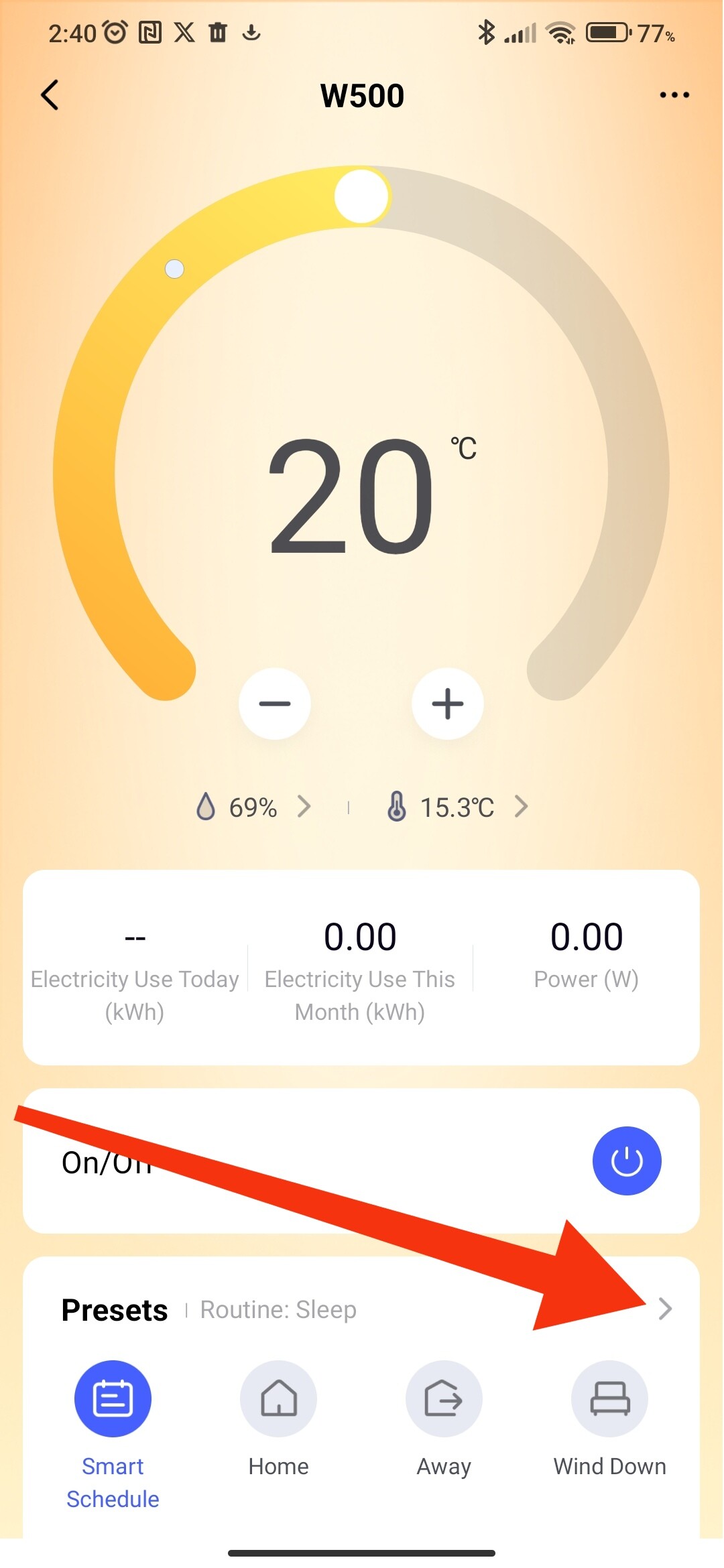
Things work relatively well and I have automations cycling through the different presets. However I cannot, for the life of me, figure out how to customize the temperature for each preset! Neither through the exposed variables nor through the device itself.

Any help? :grimacing:

Thanks!

1 Like

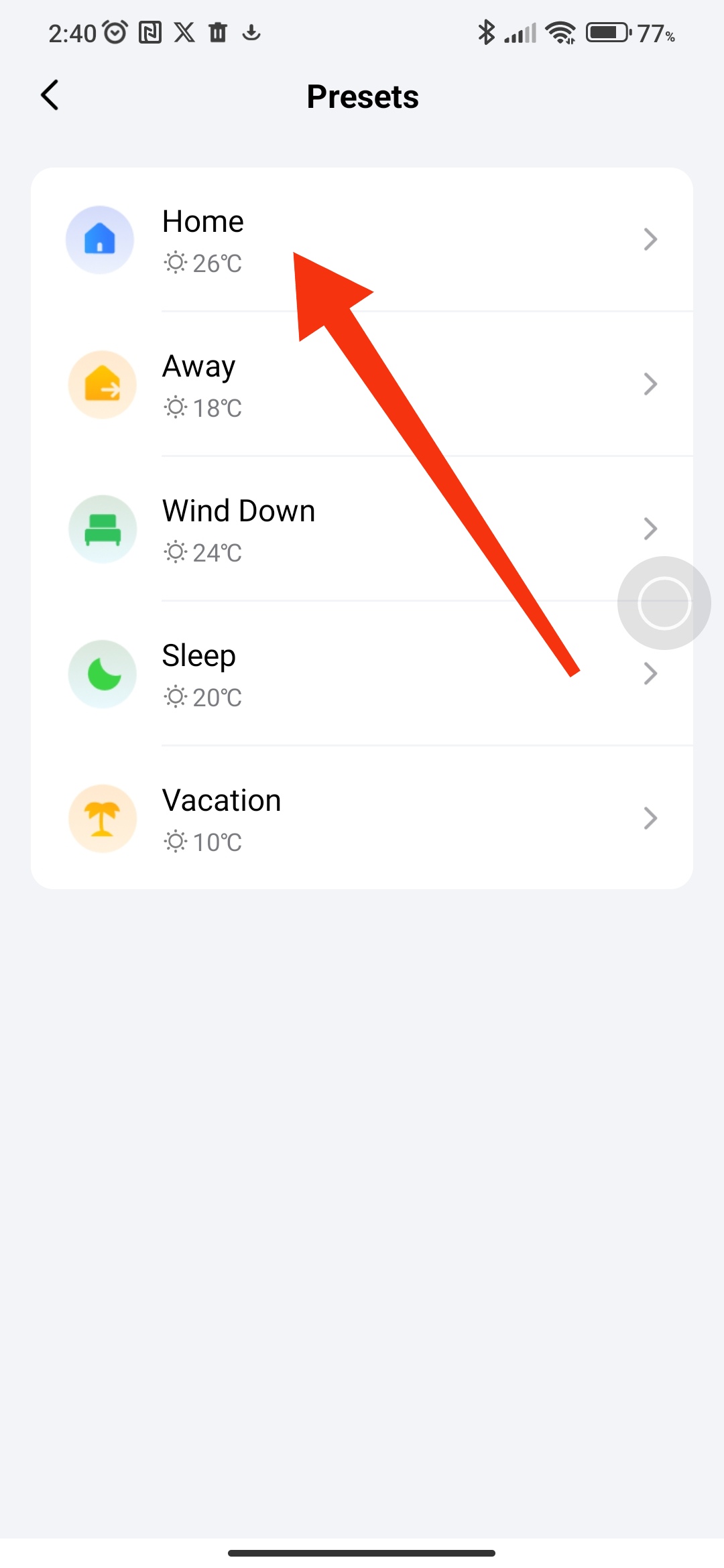
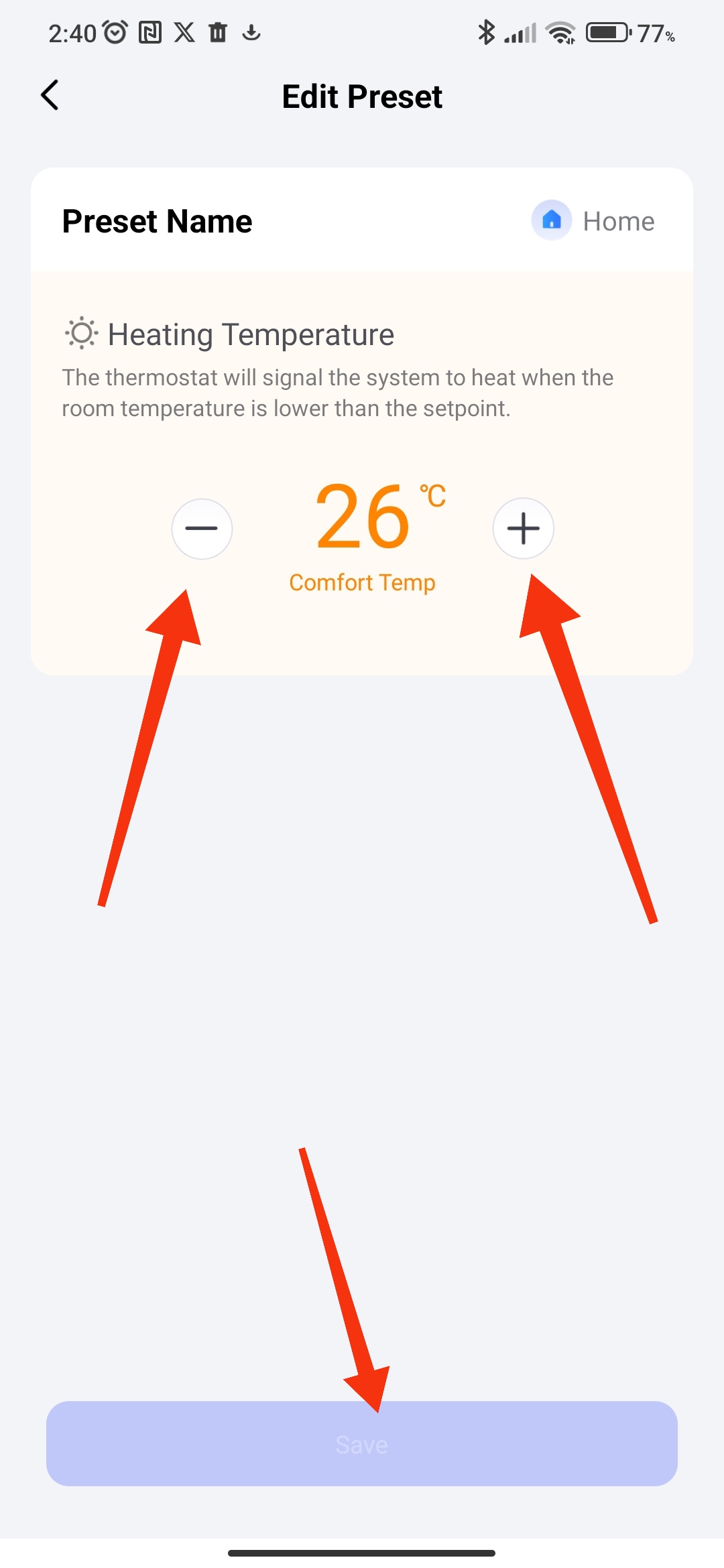
Hello, if you are talking about this setting, then that’s how it should be.

1 Like

That should be the functionality, yes. However, I ma not using the Aqara app nor the hub, I’m integrating the device into Home Assistant through Zigbee2MQTT and the entities required to do that don’t seem to be exposed there…

Are you trying to achieve anything specific? You could use HA automations to set target temp based on set preset. The select in HA activates the mode on the thermostat and updates if changed on thermostat.

You could use the ā€œselect.#######_presetā€ as a trigger for the automation, and then set target temperature based on preset selected.

I have the same setup, but not done anything with the presets at the moment. It’s either on / off depending on time of day and if anybody is home.

Pretty much that, but rather than setting the mode with an automation and then setting the desired temperature as well (which I would have to do every hour or so, because according to the documentation it will revert to the preset’s default temperature after two hours) I’d like to actually change the temperature of the preset on the device itself.

Not only it would be a cleaner implementation but it means it would also work properly if someone changed the mode directly in the thermostat.

Do you have the ability to connect the thermostat to the Aqara app to set the presets then re add to Z2M?

Not sure if that would then hold the preset values.

HA automations would do what you need. The preset change would be the trigger and the action would set your desired temperature. This would work if the preset is changed in HA or on the thermostat.

Are you familiar with automations?
If not, I’m happy to have a play with mine to see if it works as expected.

1 Like

Okay, so I’ve had a little exploration with this and created a blueprint for the automation.

In my testing, the temperature is set to my chosen preset (configured in automation) when I change via the Thermostat or HA.

Unfortunately, the thermostat stops displaying the preset icon (reverts to manual) when the temperature is set.

YAML for Blueprint:

blueprint:
  name: Aqara W500 Thermostat Custom Preset Temperature
  description: >
    Automatically set the thermostat temperature when the preset is changed
    using a select entity (e.g. Aqara W500 preset selector). Each preset can
    have a manually defined target temperature. NOTE: Thermostat will NOT display preset mode.
  domain: automation

  input:
    thermostat:
      name: Thermostat
      description: The climate entity to control (e.g. Aqara W500)
      selector:
        entity:
          domain: climate

    preset_select:
      name: Preset Select Entity
      description: >
        The select entity that controls preset mode (e.g. select.aqara_w500_preset)
      selector:
        entity:
          domain: select

    temp_home:
      name: Home Temperature
      default: 21
      selector:
        number:
          min: 5
          max: 30
          unit_of_measurement: "°C"
          mode: box

    temp_away:
      name: Away Temperature
      default: 16
      selector:
        number:
          min: 5
          max: 30
          unit_of_measurement: "°C"
          mode: box

    temp_sleep:
      name: Sleep Temperature
      default: 19
      selector:
        number:
          min: 5
          max: 30
          unit_of_measurement: "°C"
          mode: box

    temp_vacation:
      name: Vacation Temperature
      default: 14
      selector:
        number:
          min: 5
          max: 30
          unit_of_measurement: "°C"
          mode: box

    temp_evening:
      name: Evening Temperature
      default: 20
      selector:
        number:
          min: 5
          max: 30
          unit_of_measurement: "°C"
          mode: box

    temp_manual:
      name: Manual Temperature
      default: 22
      selector:
        number:
          min: 5
          max: 30
          unit_of_measurement: "°C"
          mode: box

trigger:
  - platform: state
    entity_id: !input preset_select

variables:
  thermostat: !input thermostat
  preset_select: !input preset_select
  preset: "{{ states(preset_select) | lower }}"
  temp_home: !input temp_home
  temp_away: !input temp_away
  temp_sleep: !input temp_sleep
  temp_vacation: !input temp_vacation
  temp_evening: !input temp_evening
  temp_manual: !input temp_manual

action:
  - choose:
      - conditions: "{{ preset == 'home' }}"
        sequence:
          - service: climate.set_temperature
            target:
              entity_id: !input thermostat
            data:
              temperature: "{{ temp_home }}"

      - conditions: "{{ preset == 'away' }}"
        sequence:
          - service: climate.set_temperature
            target:
              entity_id: !input thermostat
            data:
              temperature: "{{ temp_away }}"

      - conditions: "{{ preset == 'sleep' }}"
        sequence:
          - service: climate.set_temperature
            target:
              entity_id: !input thermostat
            data:
              temperature: "{{ temp_sleep }}"

      - conditions: "{{ preset == 'vacation' }}"
        sequence:
          - service: climate.set_temperature
            target:
              entity_id: !input thermostat
            data:
              temperature: "{{ temp_vacation }}"

      - conditions: "{{ preset == 'evening' }}"
        sequence:
          - service: climate.set_temperature
            target:
              entity_id: !input thermostat
            data:
              temperature: "{{ temp_evening }}"

      - conditions: "{{ preset == 'manual' }}"
        sequence:
          - service: climate.set_temperature
            target:
              entity_id: !input thermostat
            data:
              temperature: "{{ temp_manual }}"
mode: single

save this to ./blueprints/automation/homeassistant/

1 Like

I’ve just re-read this and see that you have automations cycling through presets. Why not change the automations to set the target temperature instead?

My blueprint could be used to capture the preset if changed manually on device (or you could include the trigger with your own automations).

Nope, I have no way to connect to an Aqara hub. I imagine there must be a way to customize the preset temperatures and save them on the thermostat, but it does not seem to be exposed through z2m :wink: Perhaps anyone from Aqara can help?

I’m aware I can have automations cycling through different temperatures, sure. But in this case the icon is displayed anymore, as the thermostat reverts to manual the moment a temperature setpoint is sent. I’d just rather leverage the existing functionalities of the device as much as I can.

Still, thanks for your help!