I am new here to these forums as I just finished setting up the Aqara U400 Smart lock and I had a question about the benefits of pairing it with a Matter over Thread compatible hub?
Currently I have the lock paired with the Aqara app and went through all the calibration steps, I setup passcodes, I setup relock timers, and I told it I have a storm door as well.
Once I was done with that, I went and tried to pair it with my AppleTV to get it paired with a Matter over Thread hub but realized that that would not work because my AppleTV is too old and does not support Thread, so I went into Apple Home and added an Accessory and scanned the QR code on the lock and once it added it to my home it created digital keys for me. I was able to then share it with my mother and her boyfriend who visit my home often enough that I felt it would be easier if they had keys of their own.
Lastly after I was done setting it up in Apple Home, I tested the lock by leaving my home, confirming it did lock immediately and then walking away from home, then turning around and walking up my driveway at which point the lock unlocked automatically and I saw the flashing green UWB on the lock unit itself. I am also able to unlock/lock the app from the home widget on my phone and ask Siri to lock/unlock my door with voice commands. I can even get a status on the door by asking if it is locked or not.
Is there anything I am missing by not having it paired with a Matter over Thread hub? I mean I seem to be getting all the features I wanted from this lock so I am not sure if I am even missing any features by not having it paired to a Matter over Thread hub? Any info on this would be greatly appreciated.
Hello @Anthony Parisi
Check to see if you can control the lock remotely if you’re not on the same local network, and opening the lock through the app might not be possible for you.
If this works, then everything is fine and you don’t need the Apple TBR. But you still won’t be able to add matter over thread devices to Homekit without a Thread boarder router. @Caroline_Zzz
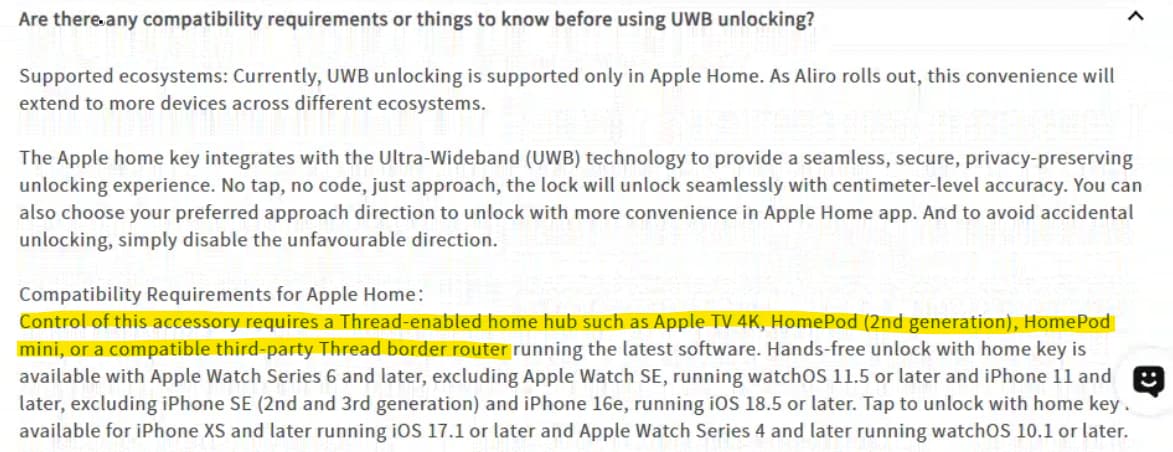
According to the U400 FAQ, the connection can be established via either Bluetooth or Thread. With Bluetooth, a direct connection is established between the smart door lock and your smartphone with a maximum range of over 100 metres/33 feet. With Thread, a connection is established between the smart door lock and your Apple Home Hub. The Home Hub then connects to iCloud via the internet. As your smartphone also connects to iCloud via the internet, you can operate the door lock remotely from anywhere with an internet connection.
If you are not using Matter over Thread, you will need to be near the door lock to operate or configure it.
You have raised some interesting questions that ultimately lead me to think we need the Product Manager to clarify, but let me get there. First there’s a couple points of clarification required here.
UWB doesn’t require Thread so your experience there is probably fine once you are commissioned. You likely configured first via Bluetooth and now UWB works between the phones.
Now in terms of what you are asking, you may benefit from both:
Matter Controller - this will allow remote access, as well as the use of the lock in scenes and automations. Without this, the lock works standalone.
Thread Border Router (TBR)- this allows the lock to actually use the thread networking to bring it online and do the points listed in number 1. Without a TBR Right your device shouldn’t be “online” and functions only with a direct connection between the lock and the phones. If you are using the home app and Siri in proximity to the lock and on the same network, that makes sense. If remotely, my instinct would be that that you must have a TBR somewhere, though I saw on Reddit where you listed plenty of devices present that are not TBRs.
Can you confirm if any the actions you tried work remotely - off the network and out of range?
You’re right to point out the Apple TV, as it can serve as both Matter Controller and Thread Border Router. Older Apple TVs like yourscan be a Matter Controller, but not support Thread.
This is where @KinseyCreateGoods might need to provide insight - because based on your architecture my opinion is that you should not have remote access or siri control currently. This is where it gets interesting. Before Thread was a common standard, Apple Home leveraged a bluetooth connection between the Hub and the lock for control and remote access. This is how older smart locks like the original Schlage Encode did it. Could it be possible that the Apple TV is supporting remote connection via Bluetooth? This is pure speculation as my previous understanding was the BT was only used for commissioning and direct access in the app - and not part of the Matter Controller function the same way it was under the HomeKit schema.
But in the end, yes, I think you would have a better experience with a Thread Border Router present but your current set up is an enigma to me.
that it’s only the 32 GB 4 K WiFi+Ethernet model and that it does not support Matter over Thread
There is an Apple TV 4K 32GB model from 2017without Thread, and another 32GB model from 2021 that does support Thread. Are you sure yours is the 2017 model? You might want to check the model number (A-number) in the settings just to be certain.
Update:
He posted on Reddit:
The AppleTV model I have is the A2169 with only 32gb of storage, which was released in May 2021. I didn’t think that that model support Matter over Thread.
This model fully supports Thread. It is an official Thread Border Router and a Matter Controller right out of the box. With the 2nd generation (2021), both the 32GB and the 64GB versions had Thread on board.
The reason why I thought my model AppleTV was not a Matter over Thread hub was because in on of the U400 threads on reddit I was told that the only AppleTV that was Matter over Thread was the WiFi+Ethernet 128gb version, which mine is definitely not…
Once I got my U400 paired with Apple Home and had digital keys created and was receiving notifications and what not I figured I must’ve been given bad info about my AppleTV, but I am glad you guys were able to confirm it.
Glad I could help. It’s really easy to get these mixed up! The fact that only the 128GB version has Thread is only true for the 3rd generation. But Thread support in the 3rd generation depends on the Ethernet model, not the storage itself.
Here is a quick table for an overview:
Model
Released
Storage & Ports
Model Number
Thread Support?
Apple TV HD
2015
32 GB / 64 GB (Wi-Fi + Ethernet)
A1625
No
Apple TV 4K (1st Gen)
2017
32 GB / 64 GB (Wi-Fi + Ethernet)
A1842
No
Apple TV 4K (2nd Gen)
2021
32 GB / 64 GB (Wi-Fi + Ethernet)
A2169
Yes
Apple TV 4K (3rd Gen)
2022
64 GB (Wi-Fi only)
A2737
No
Apple TV 4K (3rd Gen)
2022
128 GB (Wi-Fi + Ethernet)
A2843
Yes
Let’s see if a new model gets released soon. The rumor mill has certainly been churning a bit.
I’m just glad that my AppleTV supported it and I was able to get the Lock working with all of its features…
In an unrelated topic, are you able to have the U400 linked with the Alexa eco-system at the same time with the Apple Home eco-system? Or is it one or the other? I have no real preference, I just noticed that it supports both and I have some echo devices in my home and was curious if it would work with both eco-systems at the same time?
If your echo device is a Matter controller and a Thread Border Router, then it should work with “Multi-Admin”. The Matter standard enables devices to be operated and configured simultaneously. You’ll also need to commission the U400 in the other ecosystem.
If you don’t have a compatible Echo device, you may alternatively be able to use the Aqara third-party integration. You can find this at:
Aqara Home app → Profile → Connect to Ecosystems → Amazon Alexa
I don’t use Alexa or the U400 myself, so I can’t guarantee that it will work. I would still give it a try, though.


 No
No Yes
Yes