I wonder if the FP2 can detect presence of my car in garage, when i came home or when I leave
1 Like
Anyone?
An mmWave sensor like the FP2, which is optimized for human presence, is actually the wrong tool for static car detection. For reliable garage occupancy tracking, ultrasonic sensors (distance measurement to the car) or simple magnetic switches/light barriers are the better choice. Currently, the best option Aqara offers would be vehicle detection via a camera like the G5 Pro.
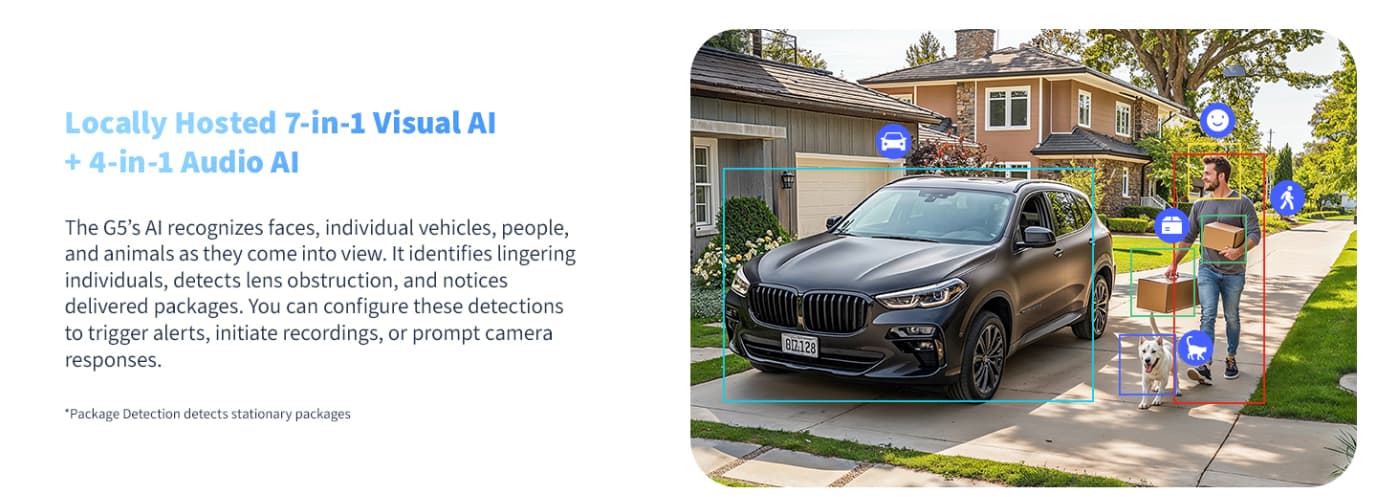
Image Source: Camera Hub G5 Pro - Aqara
2 Likes
Thanks.
I wonder if anyone tried.
Anyway my goal is an automation that safety close the garage door when I leave.
I can’t close manually by carplay because poor mobile recieve
On the map in the Aqara app, the FP2 only displays dots for moving people (blue icon) or objects that are not recognized as people (gray icon). Please feel free to correct me if I’m wrong, but I believe the automations (presence/absence) only work when people (blue icon) are detected. In other words: I don’t think you can get automations to work with inanimate objects unless the car happens to be misidentified as a person (blue icon).
You could extend your Wi-Fi coverage using a repeater or an outdoor Wi-Fi router. Alternatively, you could expand your Zigbee network by installing a Zigbee socket in the garage and using an Aqara Wireless Mini Switch to remotely control the garage door next to it.
1 Like
It’s the way carplay works.
I have a good wifi coverage but when phone is paired (Bluetooth is used only for pairing)with my car stereo with CarPlay , than phone use wifi to use carplay (like wifi direct). And disable wifi for my home connection
So, carplay use mobile connection for data ( maps,music ect) but my issue is the position of my garage is underground and have a poor mobile signal .
So when i try to close garage tapping on the carplay screen, operation fail due to no-connection.
1 Like
Yes, you’re right. I hadn’t thought of Wi-Fi Direct. In that case, the only option is probably CarPlay via a USB cable.
Do you generally trust location-based automations (geofencing) for your garage door?
Are you strictly using native Apple Home, or do you happen to use third-party platforms like Aqara Home, Home Assistant, Homey, or Homebridge as well?
Geofencing in Apple Homekit works in a radius of 200m
Unusable for the most automations
I use Apple HomeKit (Aqara is perfect for this)
And Homebridge (Docker) for many devices that are no Homekit compliance.
I figured that geofencing might be too imprecise for your use case. The smallest adjustable radius in HomeKit is 100 meters, but in reality, as you mentioned, it often takes about 200 meters or more to actually trigger.
I’m not super familiar with Homebridge myself, as I mainly use Home Assistant and have experimented quite a bit with presence tracking over there. However, theoretically, you might have the following options with your setup:
- Bluetooth Tracking (BLE Beacon): If you can connect a Bluetooth dongle to your Homebridge server, you could place a dedicated BLE beacon inside your car. Just a heads-up: tracking your smartphone via Bluetooth likely won’t work reliably, as Apple constantly randomizes the Bluetooth MAC address for privacy reasons. A standalone beacon avoids this issue.
- Wi-Fi Tracking: If your car is capable of connecting to your home Wi-Fi network, you could track its network presence (e.g., via a network ping plugin). This heavily depends on how and when your car decides to connect to the network, though. But it probably won’t work.
- 433MHz TPMS Sensors: I once read that you can use a specific receiver connected to your server to intercept 433MHz signals, which includes the tire pressure sensors of cars nearby. Some people successfully use this to detect vehicle presence in their garage.
- Native Car API: For my car, there’s a native integration that returns a “moving” status almost immediately after I turn on the ignition. But since this relies on the car’s built-in cellular module communicating with the manufacturer’s cloud, the bad reception in your underground garage might still be a dealbreaker here. Plus, your car manufacturer needs to offer an accessible API, and in my case, it requires a paid subscription after 3 years.
Perhaps there are a few ideas here that might help you or someone else, and it’s worth looking into them.
2 Likes
Let me explain the real sequence i Do using car.
Getting in Garages places I can open garage door remotely with smartphone via homekit
Phone is connected wifi
Car is still in there
Getting inside, car phone switch to apple carplay so wifi is connected to car stereo and no more to my wifi
Tapping on carplay screen to close garage door , sometimes fails because poor signal 4g/5g recieve.
When i come home i can open garage untill i’m on the road , not when getting garage ramp ( lost mobile signal underneath groundlevel) due for the same issues.
I’m in search of a solution for closing garage door without:
-Exiting car and close manually
-Use door original remote control
Thanks for detailing your sequence! That confirms exactly the workflow I assumed you were dealing with.
The core issue remains: as long as you try to manually tap the HomeKit button on your CarPlay screen, it will unfortunately fail in that dead zone. There is no software workaround for how aggressively iOS handles the Wi-Fi-to-Cellular handover when the ignition turns on.
I suppose you could try using the Shortcuts app to do something like this: disconnect from CarPlay, connect to your home Wi-Fi, close the garage door, and then reconnect to CarPlay. But in my experience, iOS is too restrictive in this regard and keeps asking whether the shortcut should be run or not, and there are other issues as well.
Since the original topic of this thread is about “Car presence detection with FP2 presence sensor”, my previous suggestions were entirely focused on achieving exactly that. The FP2 radar sensor isn’t really suitable for tracking a vehicle reliably in this specific garage/network scenario.
The solutions I mentioned in my previous post (like the BLE Beacon, Wi-Fi, API or TPMS) were not meant to fix the CarPlay button. Because we are talking about true car presence detection, they were meant to completely automate the process in the background, so you wouldn’t even have to tap anything at all. This perfectly solves your requirement of closing the door without exiting the car or using the original remote.
Tracking the car with a Bluetooth beacon, for example, can be tuned with a reasonable degree of accuracy. You can theoretically set the signal strength (RSSI threshold) required to trigger the automation for opening or closing the garage door. Since this automation would run locally on your Homebridge setup, the CarPlay network issue wouldn’t matter at all anymore—unless you absolutely insist on using the CarPlay screen as your solution. But in that case, the only reliable workaround left is probably connecting your iPhone via a physical USB cable.
And since you are already using Aqara devices anyway, another option would be AI car recognition using a camera like the G5 Pro. It can trigger specific automations as soon as it visibly detects your car. Because the G5 Pro acts as its own hub, the automation would run locally on the camera, completely independent of the CarPlay network issue. You could also easily pass a Matter signal (“car detected”) to Apple Home to trigger an automation that runs directly on your Apple Home Hub.
1 Like
Thanks .
I’ll try to find another way
Actually, in automations, you can go down to 10m. I found that out by accident as I did an automation for when I wake up in the morning and I didn’t want it to happen when I wasn’t at home.
It’s actually “Get Current Location” and an option is Precision, which can be:
- Best
- Nearest 10 Metres
- Nearest Hundred Metres
- Nearest Kilometre
- Nearest Three Kilometres
re shortcuts asking if they should be run or not is an option switch. On by default, but you can turn it off.
1 Like
Yes, thank you, I know. Unfortunately, after a while, my iPhone still asks me again. It might be an additional security measure for opening doors, but it’s still annoying.
1 Like
AH, unlocking doors… yes it does that. It is a security measure. Locking/closing, it shouldn’t do that.
2 Likes