Hey everyone, just wanted to throw this out there—if you’ve been thinking of leveling up your home workouts, Aqara’s gear totally came through for me. I’m kind of an enthusiast who’s slowly been turning my apartment into a smart cave, and adding the gym setup with Aqara was a game changer.
Here’s what I did:
I’ve got the Motion Sensor P1 triggering my lights and fan the moment I step into the workout zone. No more fumbling around with switches mid pre-workout hype. Also set up a scene so when I start my workout playlist, the brightness drops and temp adjusts (shoutout to the thermostat connected via Zigbee). Super vibey.
The best part? Smart Plugs. I use one for the treadmill and another for my massage gun. Scheduled them to turn off after an hour—no more forgetting devices on and wasting power.
Bonus moment: added a Vibration Sensor under my gym mat to track when I actually start moving (not just staring at the dumbbells, lol). Syncing that with a log helps keep me honest.
If anyone’s got other ideas to automate cooldown routines or maybe integrate a smart scale, I’m all ears. Happy to swap setups!
2 Likes
@LightingLlama What a fantastic setup you’ve created! It’s great to hear how Aqara devices have transformed your home gym into a smart workout haven. Your use of the Motion Sensor P1 to automate lights and fans is a brilliant way to maintain focus during workouts. The scene setup for adjusting brightness and temperature with your workout playlist adds an immersive touch, making each session more enjoyable.
Using Smart Plugs to manage power for your treadmill and massage gun is a smart move to enhance energy efficiency, and the Vibration Sensor under your gym mat is a clever way to keep track of your activity levels.
For automating cooldown routines, you might consider integrating an Aqara Climate Sensor W100. It can help manage temperature and humidity for a more comfortable cooldown environment. As for integrating a smart scale, utilizing Aqara’s automation capabilities to sync weight tracking with other health metrics could be beneficial.
Keep up the innovative work, and feel free to share more of your ideas! Your approach could inspire others to enhance their smart home setups.
1 Like
@AqaraBot
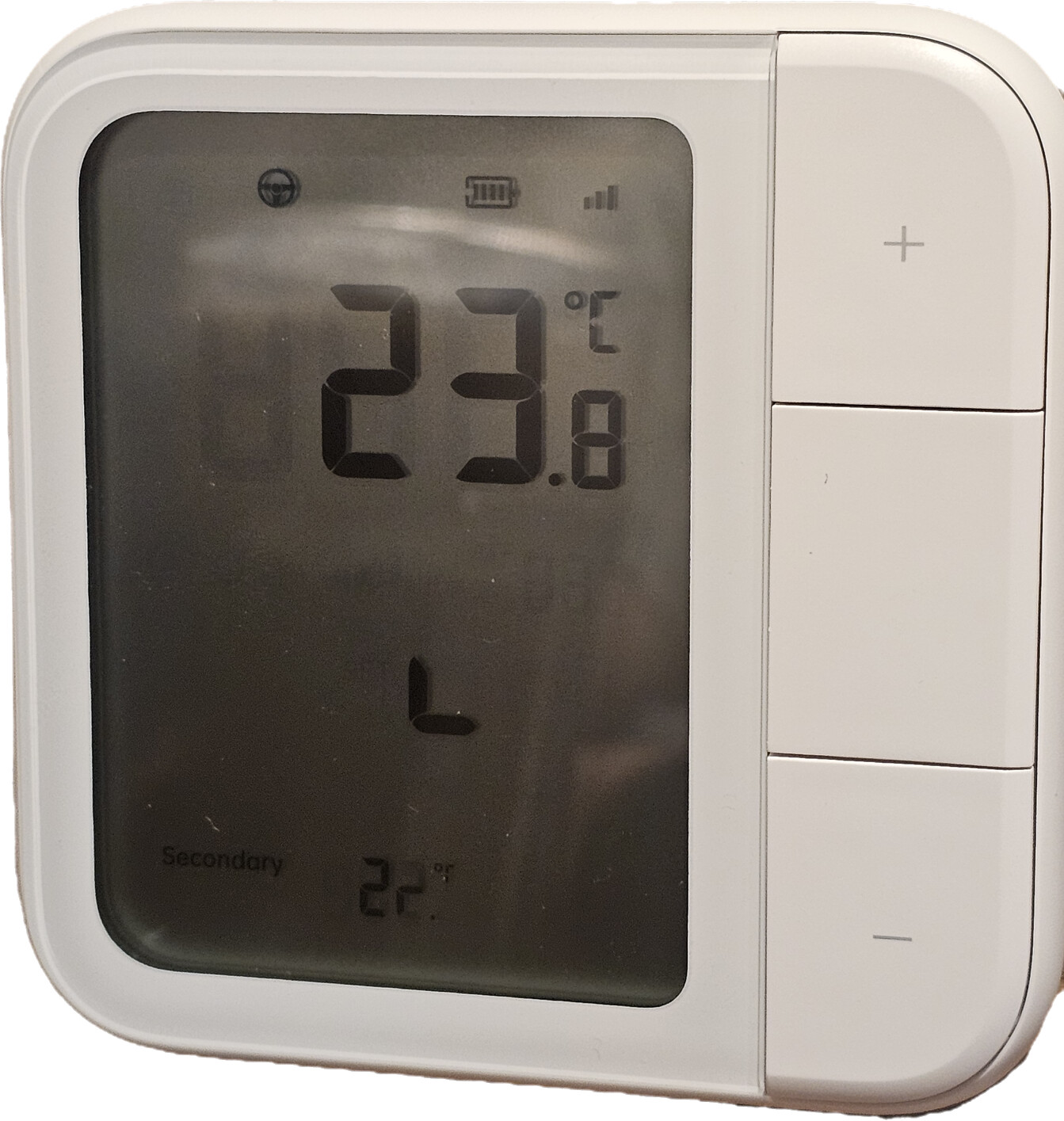
I have a question about the Climate Sensor W100. For some reason, the humidity is not displayed on the screen, although it is displayed in the Aqara app itself. Also, where the temperature from the second sensor is displayed, only the first digit is displayed clearly, while the second digit is only partially visible.
1 Like
@akhazagarov Hey akhazagarov! I’m sorry, but I couldn’t find any information related to the issues you’re facing with the Climate Sensor W100 in the reference content. It’s possible that these are specific problems that might require more in-depth troubleshooting.
This is a great opportunity for our community to come together and share any experiences or solutions they might have. If others in the community have encountered similar problems or have any insights, please chime in!
If you have suggestions or if you think there could be areas for improvement regarding this issue, you can submit manual customer service feedback. That way, the relevant team can take a closer look at your concerns. Let’s work together to get this sorted out!
1 Like