Hi im owner of G410 and jut starting to use it 1 week ago. When i just connect / pair it everything is fine it capture every movement and notify me for every movement, however i found it irritating and i off the notification and make some changes on other setting. After that now i notice the camera did not capture every single movement (1 day just 2 or 3 empty movement capture) that not make sense and i even enable back the movement notification but it did not notify me. If also did factory reset hoping the setting go to default but is not helping. Ive played around all the setting but no hope
Can i get advice on this.
1 Like
What exactly is set under:
Detection Settings → AI Detection → Lingerer Detection
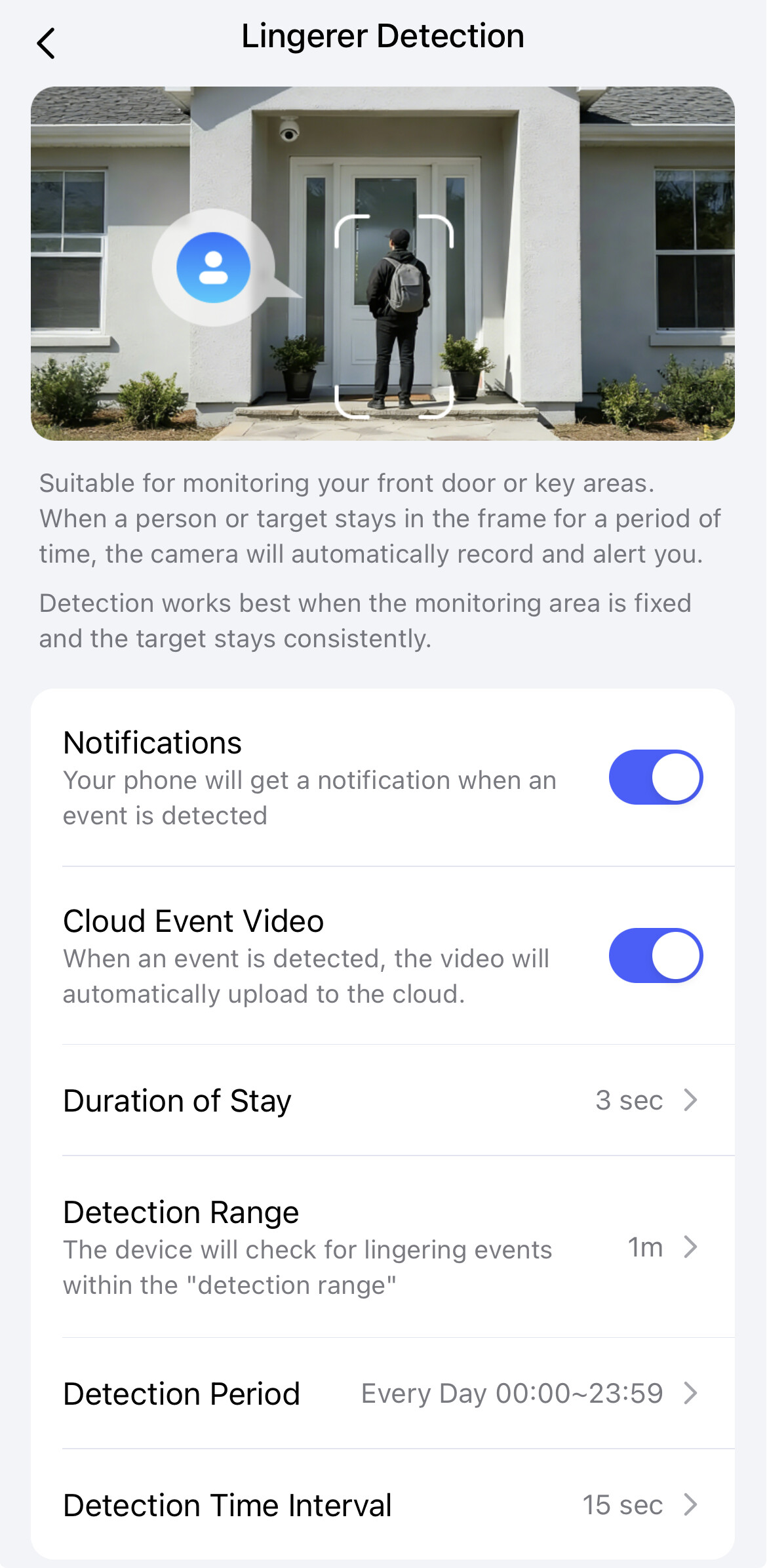
And under:
Detection Settings → Notifications → Notification Preferences
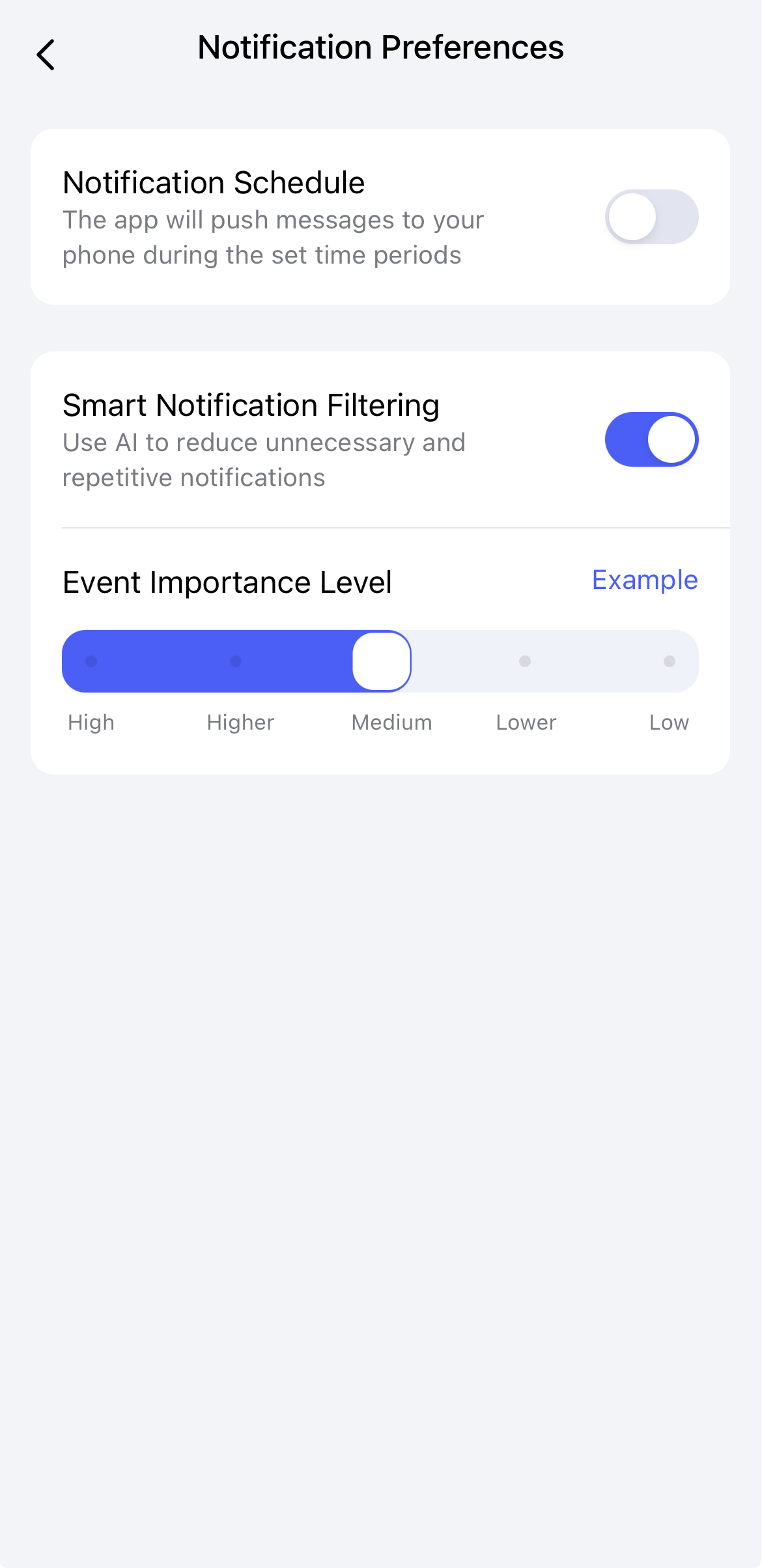
I’m not even sure if a factory reset resets the settings in the Aqara Home app. I suspect that it does not.
1 Like
Yes ive place around the setting for the past week, every day i will change to other setting to monitor but the sensitivity is not great. In a day only 1 or 2 movement recorded which is not possible as is a housing area which neighbours will passby regularly. And even the movement recorded is only sound recording there’s no object
If i can get advice on the best sensitivity will be great meaning that whenever there’s object passed by it will recorded.
1 Like
Ive also found that the recording is recorded via cloud (free for 2 month if nt mistaken) how do i change it to my SD card? Or after the free trail ended only it will go to my sd card?
1 Like
This is actually Loitering Detection and not Motion Detection. If people are just walking by, no recording will be triggered. This is also stated in the description within the Aqara app: “When a person or taget stays in the frame for a period of time… Detection works best when … the target stays consistently”
Furthermore, the AI must first recognize that a person is actually lingering. There are two versions of the doorbell: the G410 and the G410 Pro. The “Pro” in the name stands for an NPU (Neural Processing Unit), which is a specialized processor that allows such AI detections to take place locally on the device. If you have the version without “Pro” in the name, the detection happens in the cloud. This means the video footage must be sent to the cloud via your internet connection, which can lead to delays depending on the speed and stability of your connection.
If you really want to record every movement, I recommend using the doorbell in Apple Home, as the video analysis is performed locally on your Apple Home Hub. Motion detection in Apple Home is very sensitive and even perceives changes in light as movement. However, to protect the privacy of your neighbours, I would advise against doing so.
Additionally, it should be noted that if you operate the doorbell with batteries, frequent recordings will lead to high power consumption, and you will have to change the batteries very often. Please also note that you should not activate Power Saving Mode, as this will disable “Loitering Detection”.
In the settings of the G410, you will find the options Cloud Storage and Local Storage where you can adjust these settings. Of course, an SD card must be inserted into the chime.
That is exactly how it works. Additionally, you have the option to automatically save the recordings to a NAS (Network Attached Storage).
2 Likes
Apologize where do i find the Loitering Detection setting as i cant any in the app
1 Like
Apologies again where is the setting to change the cloud storage to local sd card? I found the setting however there no option for me to change the recording to sd card
2 Likes
In Aqara Home App:
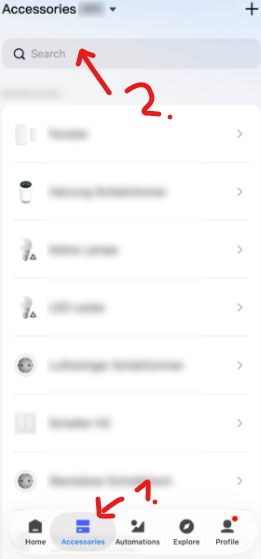
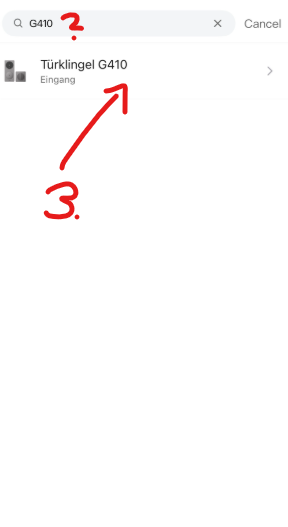
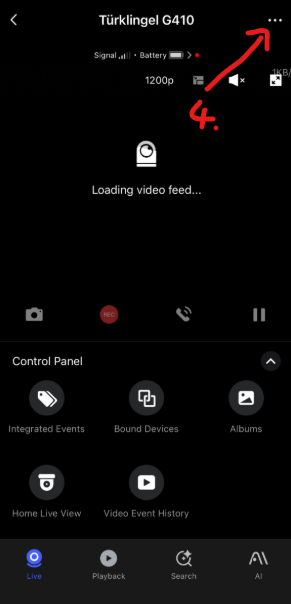
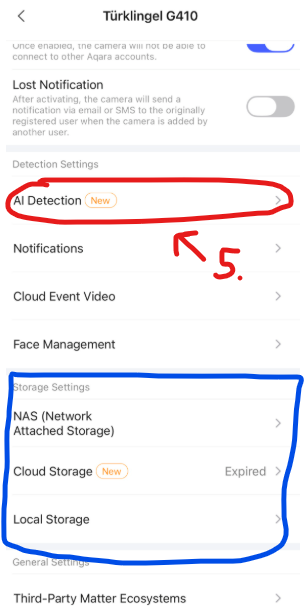
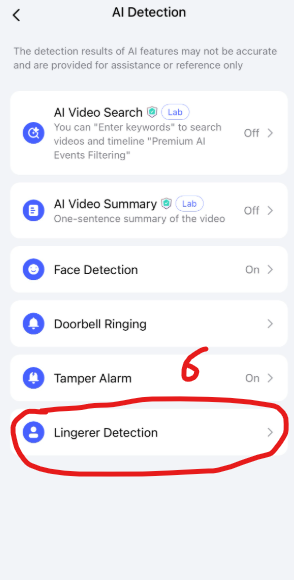
If your settings look different, then you have a different firmware. Please check whether a firmware update is available.
2 Likes
See my screen shot this is my current configuration that 1st ot hardly detect Loitering (1 days only once and it dint capture anything just a empty video) can you advice based on my screen shot anything that not rights?
2nd about the local storage that no option for me to select detault to local everything go to cloud (1 or less video per day)
Im trying to provide screen shot but unable to upload it
2 Likes
By the way my image currently is the same as your screen shot, since im unable to upload the screen shot of my setting maybe you can provide me the setting for (duration of stay / detection range / detection period / detection time interval) setting for the most sensitive sense as in whenever there’s motion it will alert / detect / record
2 Likes
- duration of stay → The value determines how long no recording should take place. So the smaller the value, the sooner a recording will take place. So in your case, set it to 0.
- detection range → It depends on how big the space in front of the camera is and how much space you want to cover, but if in doubt, just set the largest possible value. So in your case, set it to 5m (~16ft).
- detection period - > This is the setting for the times at which detection is activated. If “Every Day 00:00-23” is set, detection is always active. In your case, probably leave it as it is.
- detection time interval → I’m not 100% sure about this setting, as with motion detectors it refers to how long the device waits after detecting movement before checking for movement again. However, in this case it could also refer to how long a recording lasts, or both. Therefore, it depends on whether a large number of people walk past the doorbell in a short period of time or whether one person enters and leaves the motion detection area multiple times. It is best to try 15 seconds, 30 seconds, and 1 minute and see what produces the best results.
If the cloud subscription is active and you have inserted an SD card and the “Recording Mode” is set to “Event video” under “Local Storage,” then the videos should be saved to the cloud and the SD card. And if you set “Recording Mode” to “Stop Recording,” then only to the cloud. Or what exactly do you mean?
Ive set to event mode in local storage since day 1 i use it but all the recording still go to cloud (day 1 ive also inserted sd card) but no worries for this as i think after the free cloud subscription ended it will go to sd card
Perfect this is great let me set the setting as your advice and monitor. Thank you so much for the advice