Feature Request: Direction/Vector-based triggering for mmWave sensors (FP2)

Hey everyone,

I’ve been thinking about an out-of-the-box idea for the mmWave radar products, specifically for devices like the Aqara Presence Sensor FP2. I know that setting up zones (Zone Positioning) already works great, but I think we can take it an extra step further: Direction-based (or Vector-based) triggering.

Imagine this scenario: I have an FP2 mounted in my hallway, which connects to 4 different doors leading to other rooms. Right now, I can create a static zone in front of each door. But it would be amazing if the sensor could trigger an automation based on the direction I am walking.

If the radar tracks my movement and detects me walking towards Door 1, it could proactively turn on the lights in that specific room before I even reach or open the door. When I walk out of that room back into the hallway, it could immediately turn the hallway lights back on based on my new direction of travel.

A static zone isn’t quite enough for this. However, since mmWave continuously tracks live coordinates and movement, the vector/direction of a person should mathematically be available. Adding this as an automation condition would be a game-changer for seamless transitions between rooms.

What do you guys think? Would love to hear if others would find this useful, or if this could be possible in a future firmware update or through the Developer Hub!

Kind regards,
Stefano
3 Likes

Hi and welcome to the forum.

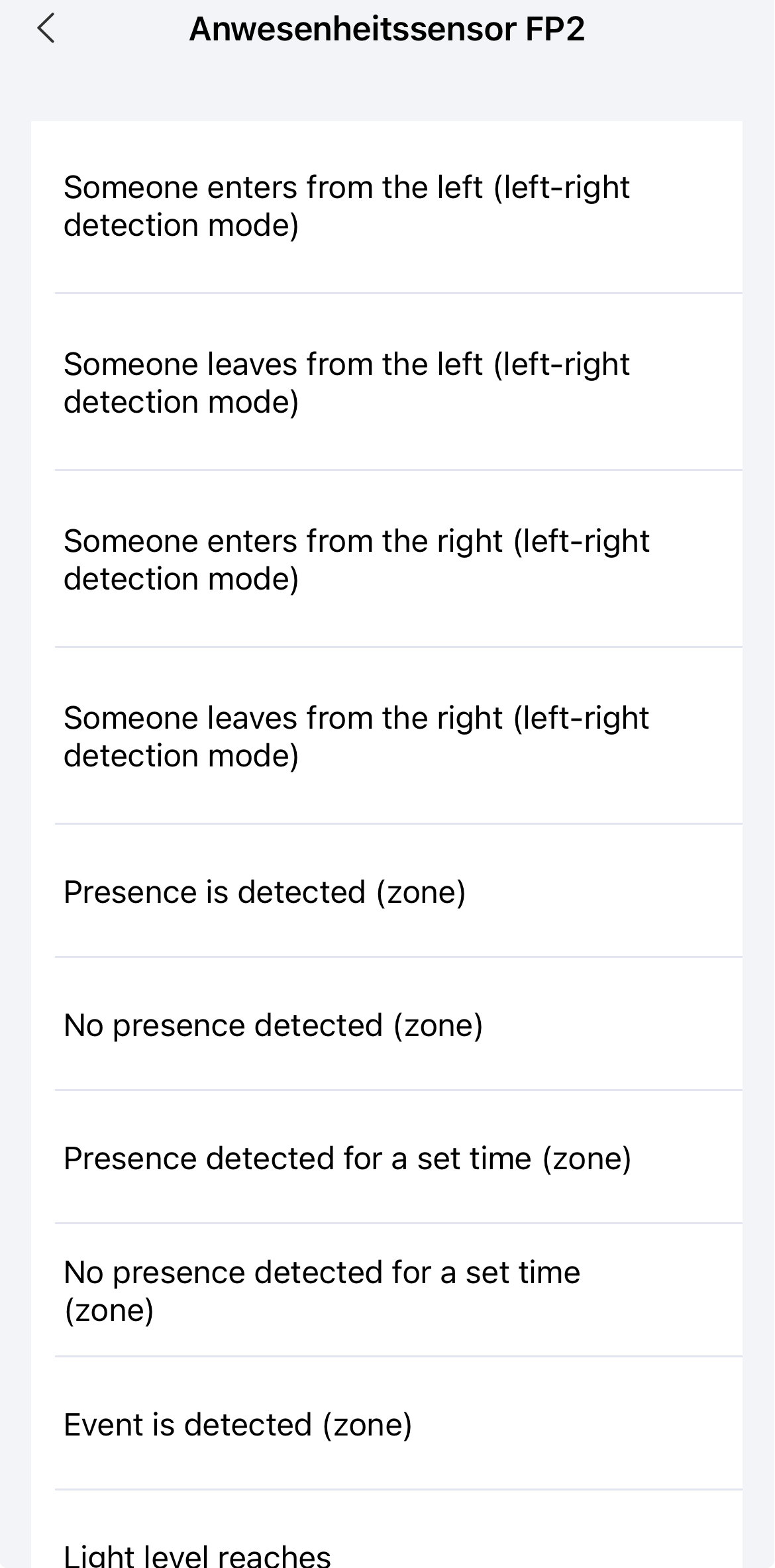
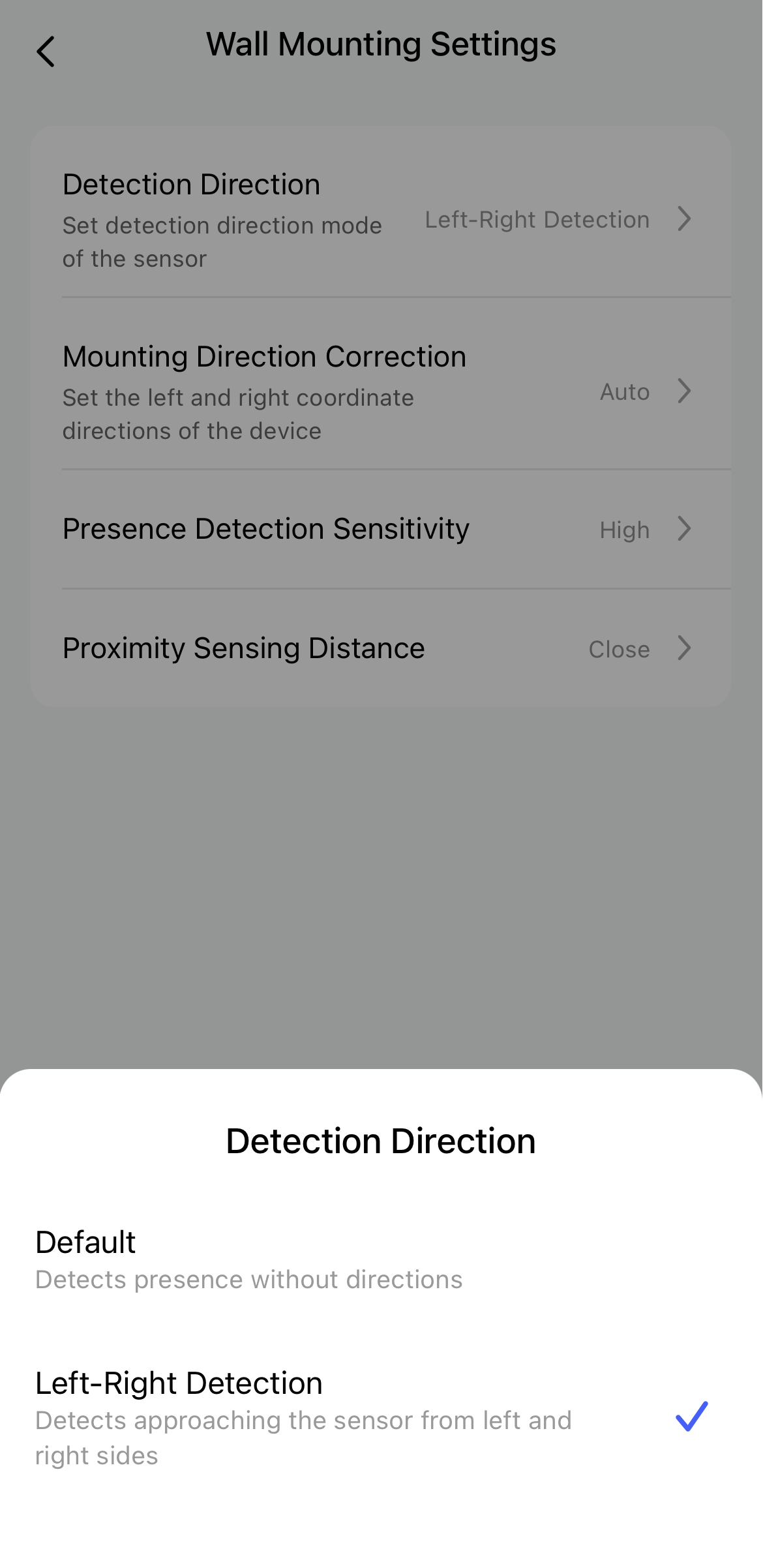
It should work in the left-to-right direction mode with the FP2. You just need to change the settings (Screenshot 1), and then you can select the appropriate trigger in the automations (as shown in Screenshot 2). I haven’t tried it yet, though!


Alternatively, it should also work with zones. If you pass through several zones, you can theoretically determine the direction.

We were just talking about this in relation to the bed:

4 Likes

Learn something new every day. I didn’t know the FP2 could do this!

1 Like

Hey @JohnD,

Thank you so much for the warm welcome and the incredibly detailed reply! The screenshots and your idea of using overlapping zones to determine the direction are actually brilliant. I hadn’t thought about approaching it that way, and it looks like a great workaround.

I do have a couple of questions about it:

  1. Do you use this specific setup yourself, and if so, does it work reliably in day-to-day use?
  2. Do you think this would be feasible in a relatively small hallway (about 2 by 3 meters) that has 5 doors in total? I’m a bit worried that the individual zones might be just a bit too small or too close together for the sensor to accurately track the transitions.

Would love to hear your thoughts on this!

And @coletti.robert, right?! It’s amazing to see what the FP2 is already capable of.

3 Likes

As mentioned above, I haven’t tried the left-to-right direction mode yet. Same goes for the sleep tracking or fall detection modes on the FP2. That’s simply because you’d have to change the physical installation for each mode, like mounting it right above the bed or on the ceiling. And honestly, I really don’t want to constantly move the sensor around :man_factory_worker:

I do actually use those kinds of “trigger in sequence” automations every day. I have to admit though, I’ve moved almost all of them over to Home Assistant. Not all of them, but most. A few are still running directly in Aqara Home. As they say: never change a running system :running_man:

Personally, my zones are pretty large, and I mostly use a combination of sensors to verify routines. For example, I have several cameras with person detection, as well as door contacts, regular motion sensors and presence sensors. So, if my face is recognized, the front door opens and the motion sensor in the hallway triggers. Next, the FP2 detects presence in the hallway zone, and this triggers specific automations. This sequence combined with facial recognition ensures that it’s actually me arriving, rather than me just leaving the house.

That being said, I can totally see this working well with smaller zones, too. Whenever I check the FP2 map in the Aqara app and watch people moving around, it really feels like the direction and positioning are tracked very precisely. I guess in a small hallway it would heavily depend on exactly where you place the sensor, but that’s hard for me to judge from a distance, so I can’t make any promises there. I think a much bigger issue might be multiple people walking through the hallway at the same time. If you want to play it safe, you might want to think about adding a few additional sensors to the mix. The more data points you have to verify a sequence, the more bulletproof your automations will be.

Oh, and speaking of small zones: someone here on the forum actually mentioned a while ago that they used every single available grid segment on the FP2 to control an addressable LED strip. That way, the LED strip always lights up exactly where you’re currently standing.

5 Likes

Hey @JohnD,

Makes total sense about not wanting to move the sensor around! Once it’s mounted and calibrated, it’s usually best to leave it alone.

Combining multiple data points (like door contacts + presence) to verify a routine is a really smart approach. I can see how relying on just the FP2 in a small, busy hallway with 5 doors might get a bit chaotic if two people walk through at the same time. I think my best bet is to just experiment with the placement and set up those micro-zones. If it turns out to be too unreliable on its own, adding a few simple door contacts to double-check the state sounds like a perfect, bulletproof backup plan.

Also, that addressable LED strip project sounds absolutely wild! It definitely gives me hope that the grid resolution is precise enough for my hallway setup.

Thanks again for all the insights, this has been incredibly helpful!

3 Likes