I. What are Aqara Agent Skills?
Aqara Agent Skills is Aqara’s official skill collection for agent-based ecosystems.
It is designed to bring Aqara capabilities into modern AI agent workflows through a growing set of reusable skills. As the collection expands, Aqara Agent Skills will continue to support more scenarios, more integrations, and more ways for users to interact with Aqara smart homes through natural language.
At this stage, the featured skill is Aqara Agent.
II. What is Aqara Agent?
Aqara Agent is the current skill in the Aqara Agent Skills collection.
It enables OpenClaw to understand Aqara homes, rooms, and devices, and to perform supported device queries and control actions through natural language. With Aqara Agent, users can connect their Aqara account, access home and room information, check device status, and send supported commands to compatible devices through a more natural and conversational experience.
III. What can Aqara Agent do?
Aqara Agent currently focuses on four core areas: account and home setup, space inquiry, device inquiry and status reading, and supported device control.
Overview of current capabilities
| Function | Description | Example |
|---|---|---|
| Account & Home Setup | Guide users through account connection, retrieve the list of homes, and select or switch the current home | “Connect my Aqara account” |
| Space Inquiry | Show the rooms and spaces in the current home | “What rooms are in my home?” |
| Device Control | Send supported control commands to compatible devices | “Turn off the living room AC” |
| Device Inquiry | List devices, locate devices by room, and read device information | “What devices are in the bedroom?” |
| Device Status | Check current device state and supported attributes | “Is the bedroom light on?” |
Aqara Agent supports a range of common smart home interactions, including account connection, home selection and switching, room and device lookup, device status inquiry, and supported device control.
Supported control types may include actions such as on and off, brightness, color temperature, color control, curtain percentage, temperature setting, wind speed, wind direction, and volume or playback-related controls for supported devices.
IV. What is not supported at the moment?
At this stage, Aqara Agent does not support certain categories of interaction, including:
-
Camera live view or playback
-
Smart lock lock or unlock actions
-
Scenes
-
Automations
-
Energy-related queries
-
Weather-related queries
For these scenarios, users should continue using the Aqara Home App.
This helps keep the current Aqara Agent experience focused, reliable, and well-aligned with supported capability boundaries.
V. How to add Aqara Agent to OpenClaw
Getting started with Aqara Agent only takes five steps:
-
Install Aqara Agent
Copy the GitHub link of Aqara Agent Skills into the OpenClaw chat and ask OpenClaw to install the skill.
GitHub:[https://github.com/aqara/aqara-agent-skills] -
Get the Aqara login link
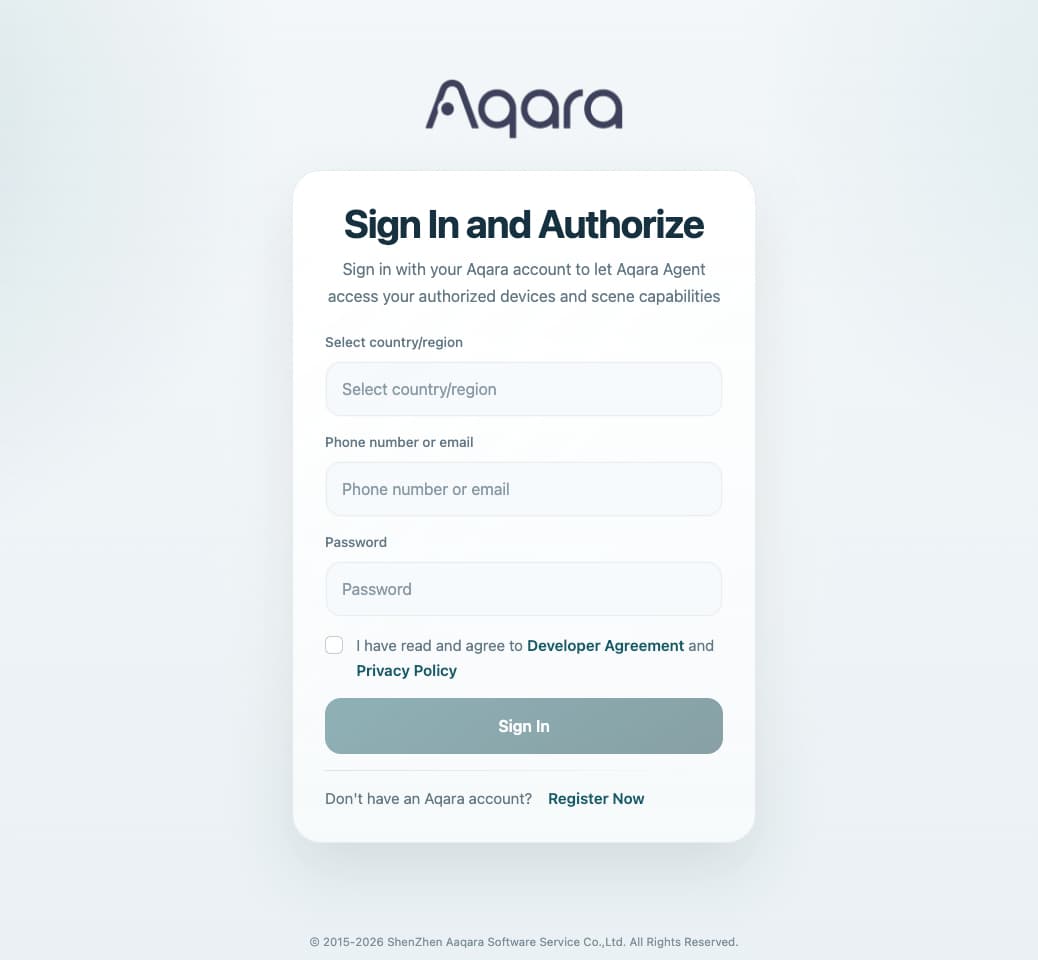
After installation, Aqara Agent will guide you to the Aqara account login flow and provide the required login link[https://agent.aqara.com/login] -
Select your account region and sign in
Choose the region where your Aqara account is registered, then sign in with your Aqara account.
After login is completed successfully, you will receive a login token.
-
Provide your token
Copy the login token and provide it to Aqara Agent so it can connect to your account.
-
Select your home and start using it
After the token is verified, Aqara Agent will retrieve the homes available under your account. Once you select the home you want to use, you can start chatting with Aqara Agent right away.

At that point, you can begin with prompts such as:
-
“What rooms are in my current home?”
-
“What devices are in the bedroom?”
-
“Is the bedroom light on?”
-
“Turn off the living room AC”
VI. Environment requirements
To use Aqara Agent, make sure the following requirements are met:
-
OpenClaw is available and ready to install skills
-
The environment can access the Aqara account login page and related service endpoints
-
The Aqara account is active and can complete the login flow normally
After installation, it is recommended to start using Aqara Agent in a fresh OpenClaw conversation so the setup flow can proceed smoothly.
VII. First-time setup experience
During the first-time setup flow, Aqara Agent will guide the user through account connection, token submission, and home selection. Once setup is complete, the user can start interacting with Aqara devices through natural language.
Example prompts:
-
“What rooms are in my current home?”
-
“What devices are in the bedroom?”
-
“Is the bedroom light on?”
-
“Turn off the living room AC”
-
“Set the bedroom AC to 26 degrees”
VIII. Reliability and privacy
Aqara Agent is designed to work with real Aqara platform data and real device capabilities.
That means it should only present information that has actually been retrieved, and it should only confirm actions that have actually been executed successfully. This helps ensure a more trustworthy and practical experience for smart home scenarios.
Account credentials and access tokens should be handled securely. They should not be exposed in public conversations, screenshots, or source control.
IX. Learn more
To explore Aqara Agent Skills and get started with Aqara Agent, visit the official repository:
GitHub: GitHub - aqara/aqara-agent-skills: Aqara's official AI skills library · GitHub
We hope this helps you get started with Aqara Agent Skills on OpenClaw.
Feel free to try it out and share your feedback with the community.