Thanks for this. I’m going to give it a try.
2 Likes
Thanks for the info!
2 Likes
Thanks, that worked for me! 
2 Likes
Sweet guide. Will have to try that for sure 
2 Likes
I followed your instructions, however the Door/Window P2 contact sensor will not pair/couple with the M3. It seems to be the only Aqara device which will not pair/couple with the M3. All my Aqara switches, motion/presense sensors pair/couple well. How can I get the Door/Window P2 contact sensor to be a child device of my M3?
Is the WiFi near by?
Yes sir
Have you created a Thread network on the M3, because that can help the coverage as well?

You do that via the M3 Hub under network information, and then Thread Network Mamagement.


Then support would be my next recommendation
Ok, I’ll reach out to support. Thank you for your suggestions.
Do you by chance have the Aqara 800 number? I can’t seem to find it, only email.
Sorry no. I normally just send them a mail 
1 Like
You seem to have an Apple device. If that is the case, there is one more thing to check.
I had a similar problem but I was using a combination of Apple Home and Aqara, and I used Keychain Access to look what was stored in the Keychain. Searching under “Thread” it showed something like this (I have 3 hubs: 1 x M3, 2 x M100)

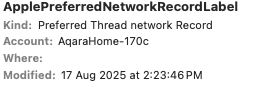
The preferred network shown was not the same as the Thread network created by joining the 3 hubs into a single network, but was using an earlier one which was created by my HomePod Mini which I deliberately took off the network. There seems to be no standard way of changing this preferred network setting. The only way was to delete all Thread related settings from the Keychain and then then the correct settings are recreated in seconds. If you don’t delete the Thread credentials too, the preferred Thread network remains blank.
1 Like