That’s not entirely correct. Scenes cannot trigger automations, but an automation can trigger another automation.
The colour changes that you probably have in an automation belong in a scene that you can then use. For example, it could look like this:
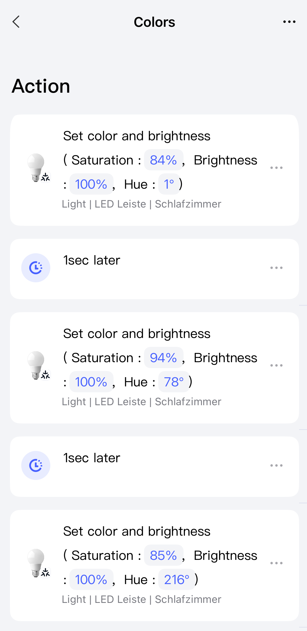
You need three automations to create a loop.
One automation as a “virtual switch” that is never triggered. In my case, a camera in the interior that will never see a car and the previously created scene:
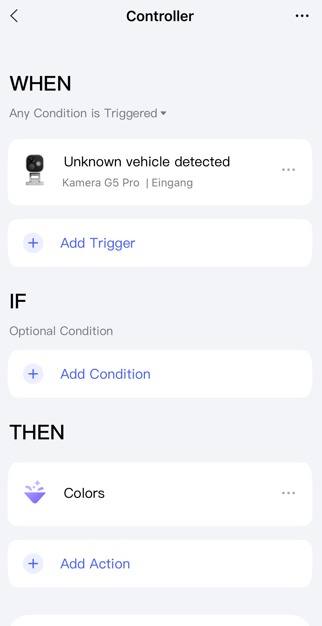
Of course, you can do other things as well.
For example, like this: Automation 2.0, lesson 12, blitz topic, VIRTUAL Aqara switch
Another automation that runs when the first automation is enabled.
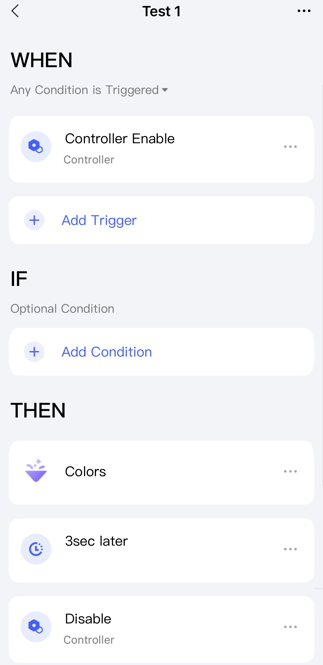
And another automation that runs when the first automation is disabled.
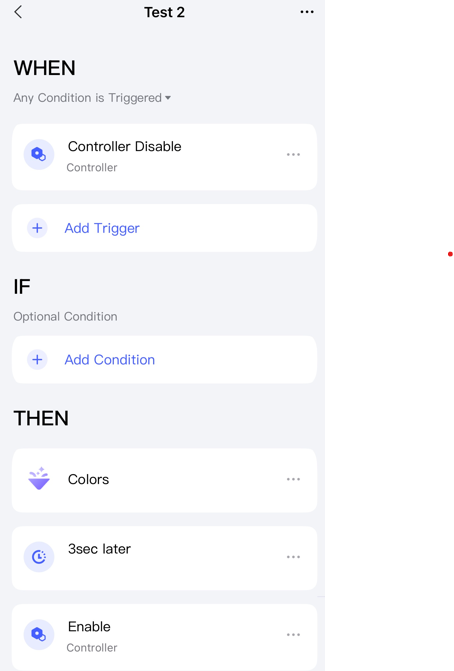
This is what it looks like… no transitions or anything like that… just on and off:
And this is what it looks like in the app:
By the way, I’ve tried out the Nanoleaf Sense+ remote control and yes, you can trigger two scenes with it.
Question: How did you create the scenes with transitions etc. in Nanoleaf yourself, or did you just use the pre-made ones?