Hi everyone,
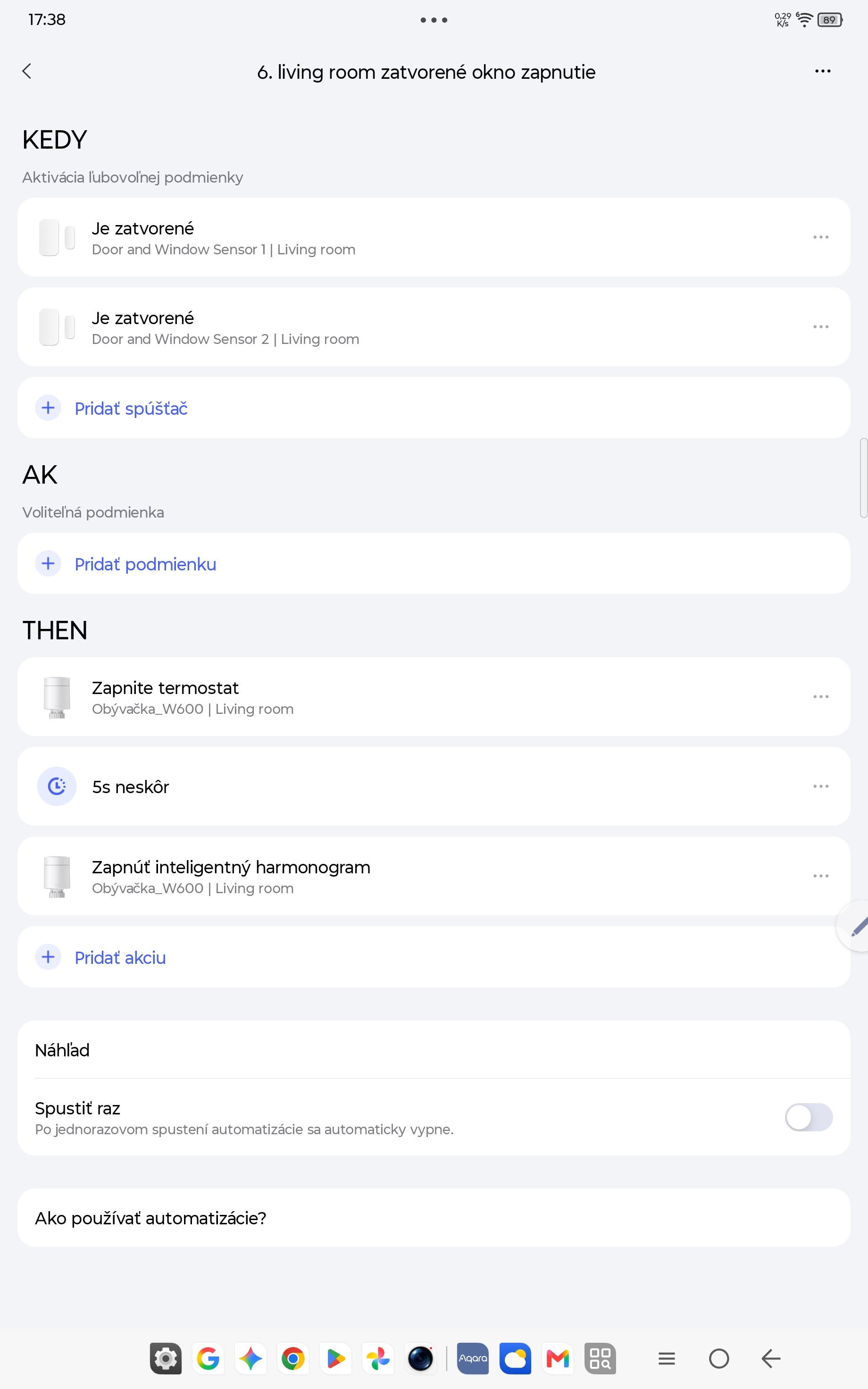
I need some help setting up automations for my Aqara Door & Window Sensors paired with a W600 radiator thermostat.
My Setup:
I have two windows in a room, each equipped with an Aqara Door & Window Sensor.
Current Automation Logic:
- If both windows are closed \rightarrow Heating turns ON.
- If any window is opened \rightarrow Heating turns OFF.
This basic setup works as expected.
The Problem:
The issue happens when I want to change a window from fully open to tilt/ventilation mode. To turn the window handle, I have to push the window briefly closed (for about 5 seconds) and then tilt it open.
During those 5 seconds:
- The system registers the window as closed and triggers the heating ON.
- When I tilt the window open right after, the sensor/app fails to register the new “open” state, and the heating stays ON.
- The only way to fix it is to fully close the window again and reopen it.
Could someone please advise how the conditions or delays should be configured in the app to make this work smoothly?
Thanks in advance for your help!
1 Like
Any idea why the sensor doesn’t respond to your tilt? Does it not separate enough? And wouldn’t a pause of say 15 seconds before turning on the heat help?
I’m sorry. I didn’t see (still don’t) where you wrote that adding a delay didn’t help. In fact, I see a request specifically for help with conditions and delays. You also wrote that the sensor/app fails to register the new open state. But now you say the sensor works fine.
So, upon a short interval between closing and opening, the heat stays on. The heat came on when you closed the window. But if you reopen the window within a few seconds the system does not turn off the heat.
It seems to me that the following would allow for you to reopen the window quickly without wasting heat.
Window close → wait 15 seconds → if window still closed → turn on heat.
Oh, I guess I didn’t express myself properly. I went through the condition, but I couldn’t find an option for when the window remains open or closed. I also tried the delay. It doesn’t work. The heating still stays on even after opening the tilt window.
I don’t have this option: if the window remains closed
Great!!!
I also see that door/window sensors have this screen.