absent
January 4, 2026, 8:44am
1
I’m pleased to announce the release of my Home Assistant Aqara lighting integration for the T1M Ceiling Light, T1 LED Strip and T2 bulbs. It’s still in beta phase (v0.3.0) but has the base features implemented now and is ready for public testing.
Overview
Features
Aqara App Effect Presets - Quick access to 24 preset effects from the Aqara mobile app
4 T2 Bulb presets (Candlelight, Breath, Colorful, Security)
9 T1M presets (Dinner, Sunset, Autumn, Galaxy, Daydream, Holiday, Party, Meteor, Alert)
7 T1 Strip presets (Rainbow, Heartbeat, Gala, Sea of Flowers, Rhythmic, Exciting, Colorful)
Segment Pattern Presets - 12 T1M/T1 Strip segment color patterns from the Aqara app
Dynamic RGB Effects - 13 different manual effects including breathing, fading, flowing, chasing, rainbow, and more
Effect Dropdown Selector - Easy-to-use UI dropdown showing all available effects and presets
RGB Color Pickers - Color picker UI for all services (up to 8 colors for effects, 6 for gradients)
Individual Segment Control - Set custom colors for each segment on T1M and T1 Strip lights
Smooth Color Gradients - Create color transitions across segments with 2-6 colors
Color Block Patterns - Generate evenly spaced or alternating color blocks
Flexible Segment Selection - Support for ranges (“1-20”), individual segments, and special selectors (“odd”, “even”)
CCT Dynamic Sequences - Create multi-step color temperature and brightness sequences with smooth transitions
T1 Strip Variable Length Support - Automatically detects and adapts to T1 Strip’s length (1-10 meters)
Light Group Support - All services work with Home Assistant light groups for synchronized multi-light control
Auto Turn-On Option - Optionally turn lights on automatically before applying effects or sequences
Unspecified Segment Control - Option to turn off segments not included in patterns
Automatic Device Discovery - Discovers supported Aqara lights through Zigbee2MQTT
Service-Based API - All features accessible via Home Assistant services, automations, and scripts
Usage
All features are available as Home Assistant services. Call these services from automations, scripts, or the Developer Tools.
Requirements
Home Assistant 2025.12.0 or newer (older versions not tested)
MQTT integration configured and running
Zigbee2MQTT 2.7.2 or newer
Full details on the Github page.
Home Assistant integration with API for Aqara lights advanced control
4 Likes
absent
January 4, 2026, 7:02pm
2
New in v.0.4.0
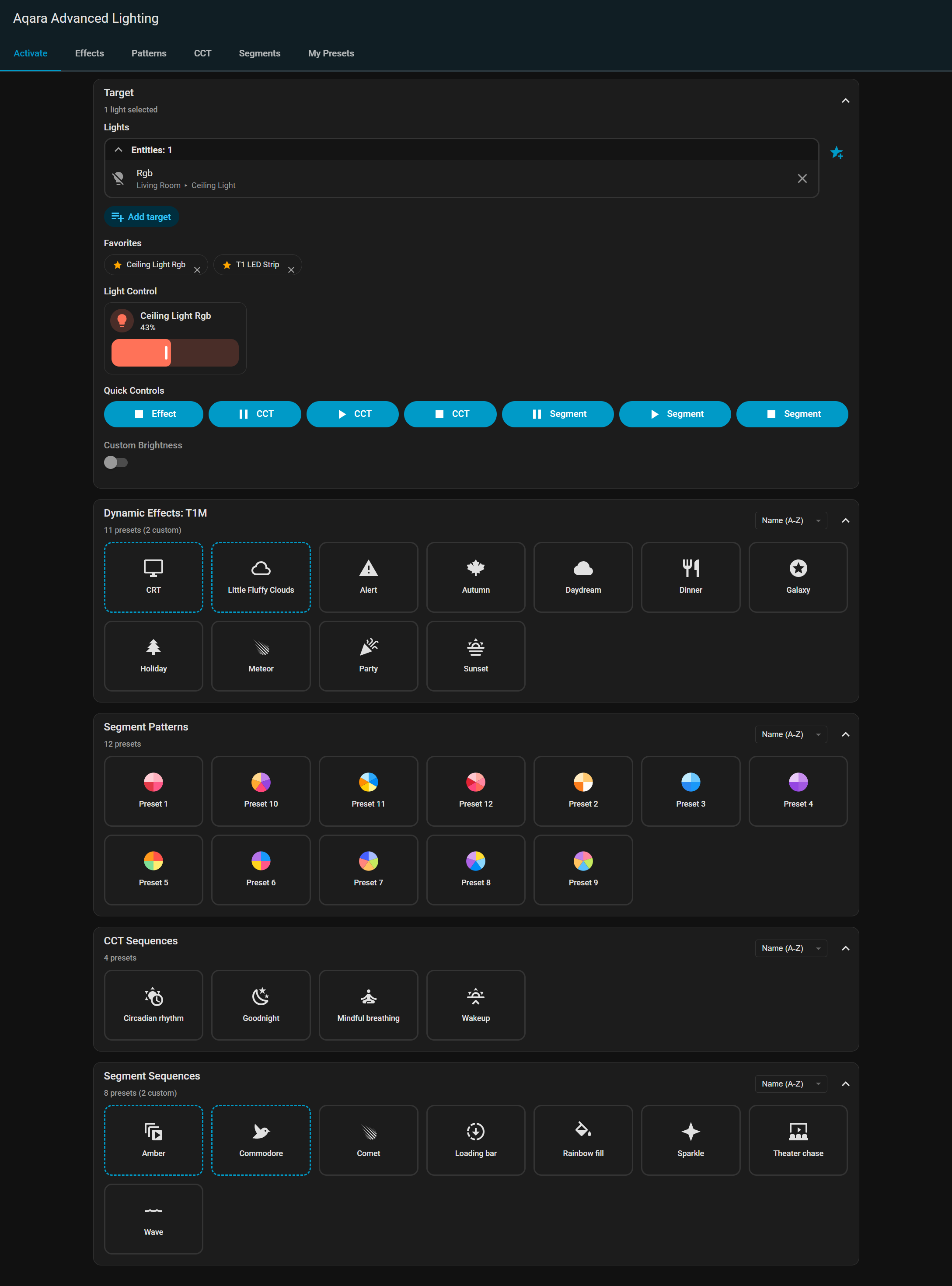
A new UI panel has been added to the Home Assistant sidebar for easy access to presets:
Sidebar Integration - Access the “Aqara Lighting” panel directly from the Home Assistant sidebarUI Buttons - Interface for managing lights, effects, and sequencesPreset Buttons - Access to all effect and sequence presetsBuilt with Lit - Modern, lightweight web component framework for optimal performanceMore features to be added soon
The panel provides a centralized location for controlling Aqara lights without needing to use the Developer Tools or create automations.
Create animated segment patterns with the segment sequence feature:
Key Features:
Up to 20 Customizable Steps - Build multi-step sequencesMultiple Activation Patterns:
Sequential forward/reverse - Segments activate one by one
Random - Segments activate in random order
Simultaneous - All segments activate at once
Pattern Modes:
Gradient - Smooth color transitions across segments
Blocks (repeat/expand) - Evenly spaced color blocks
Individual - Custom color per segment
Timing Control:
Duration - Time to complete the activation pattern
Hold - Time to hold after activation completes
Loop Options:
Run once, loop X times, or continuous loop
Choose to maintain state or turn off when complete
Pause and Resume - Control sequence playback mid-execution
New Services:
start_segment_sequence - Start an RGB segment sequence
stop_segment_sequence - Stop a running sequence
pause_segment_sequence - Pause a running sequence
resume_segment_sequence - Resume a paused sequence
The existing CCT sequence feature has been enhanced with pause and resume functionality:
New Services:
pause_cct_sequence - Pause a running CCT sequence while maintaining current state
resume_cct_sequence - Resume a paused CCT sequence from where it was paused
3 Likes
absent
January 9, 2026, 5:28pm
3
Pleased to announce v0.5.0, a major feature release that brings frontend visual effect and pattern editors, and a preset management system. This release focuses on enhancing the frontend user experience with intuitive creation tools while maintaining full backend compatibility. Update via HACS, and be sure to hard refresh the browser to clear any cached previous version.
The sidebar panel now includes interactive visual editors for creating custom effects, patterns, and sequences:
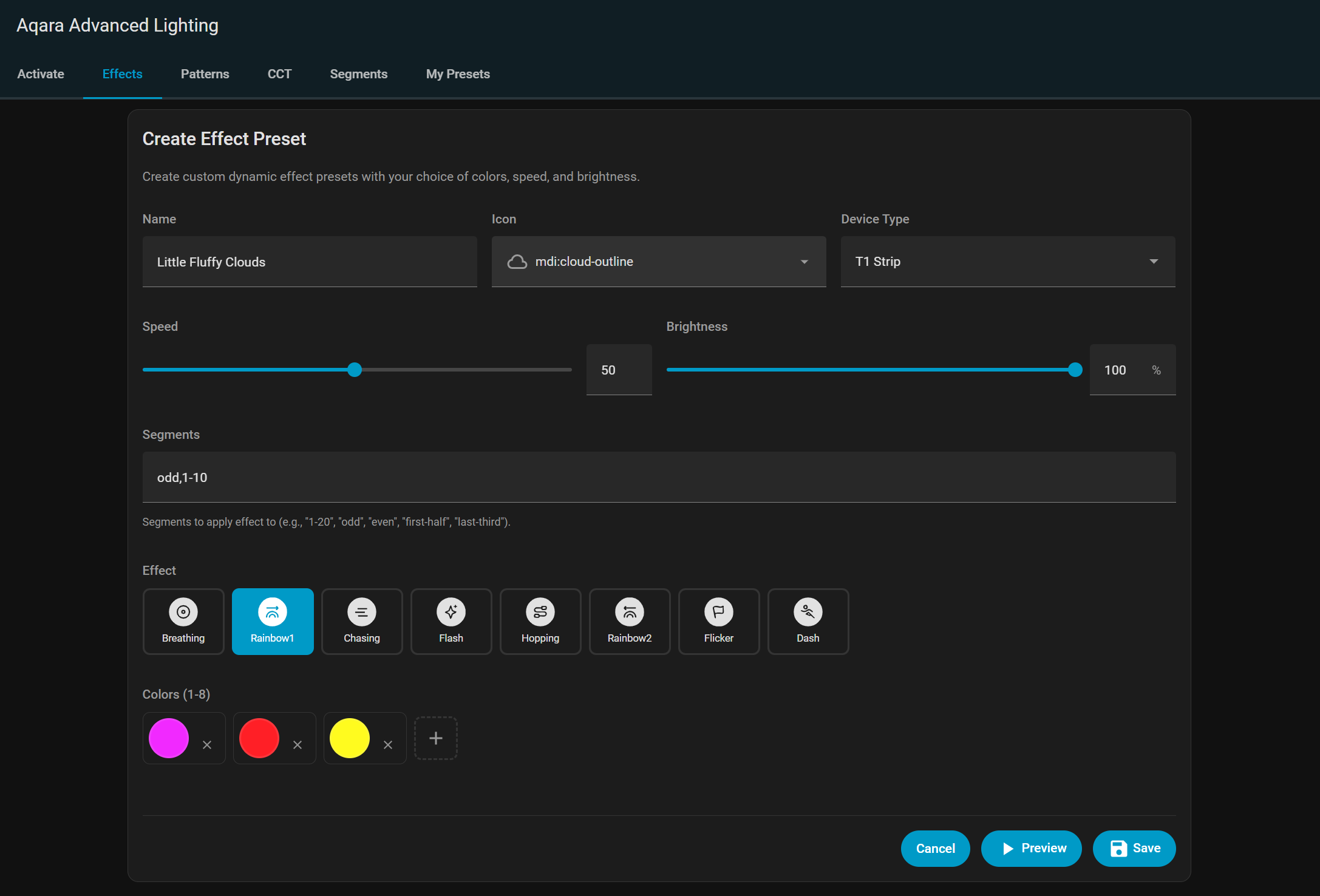
Effect Editor - Create custom dynamic RGB effects
Effect type selector
Up to 8 color pickers for effect colors
Speed and brightness sliders
Segment selector for T1 Strip effects
Live preview of effect settings
Save as custom preset
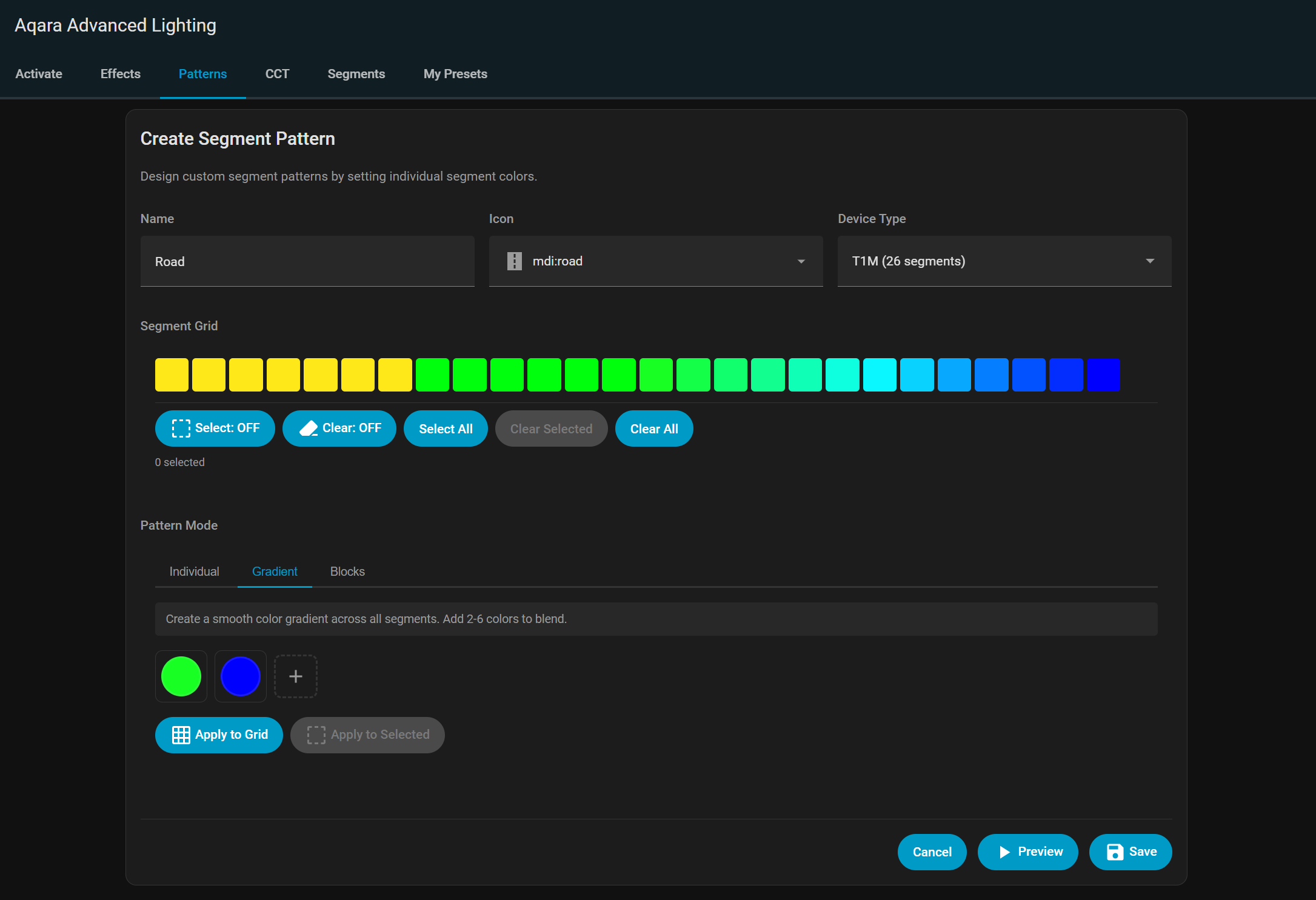
Segment Pattern Editor - Design custom segment color patterns
Visual segment selector showing all available segments
Color picker for each segment or range
Gradient and block pattern generators
Turn off unspecified segments option
Save as custom preset
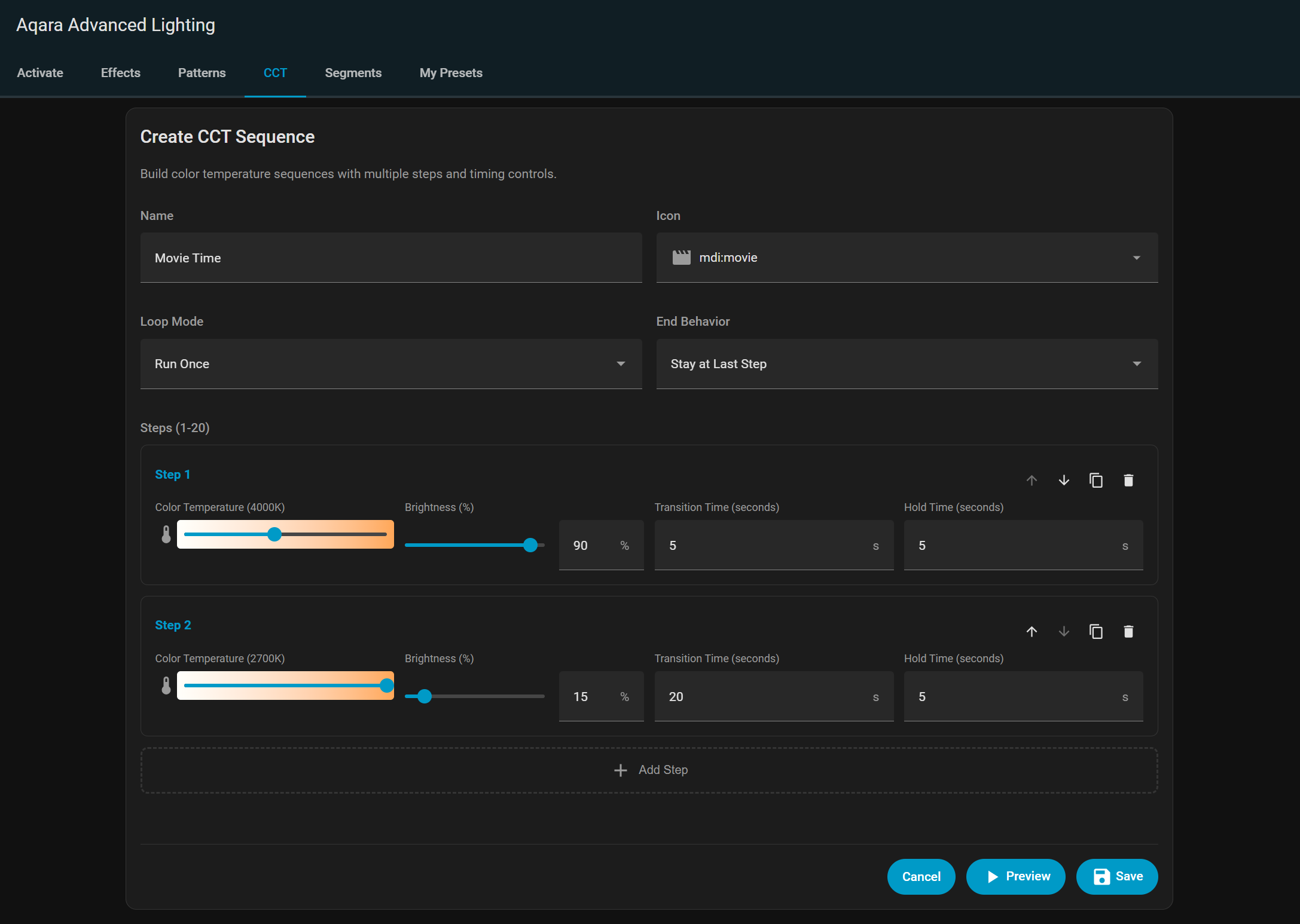
CCT Sequence Editor - Build multi-step CCT sequences
Up to 20 steps with visual timeline
Color temperature and brightness sliders for each step
Transition and hold duration controls
Loop mode and end behavior settings
Live step preview
Save as custom preset
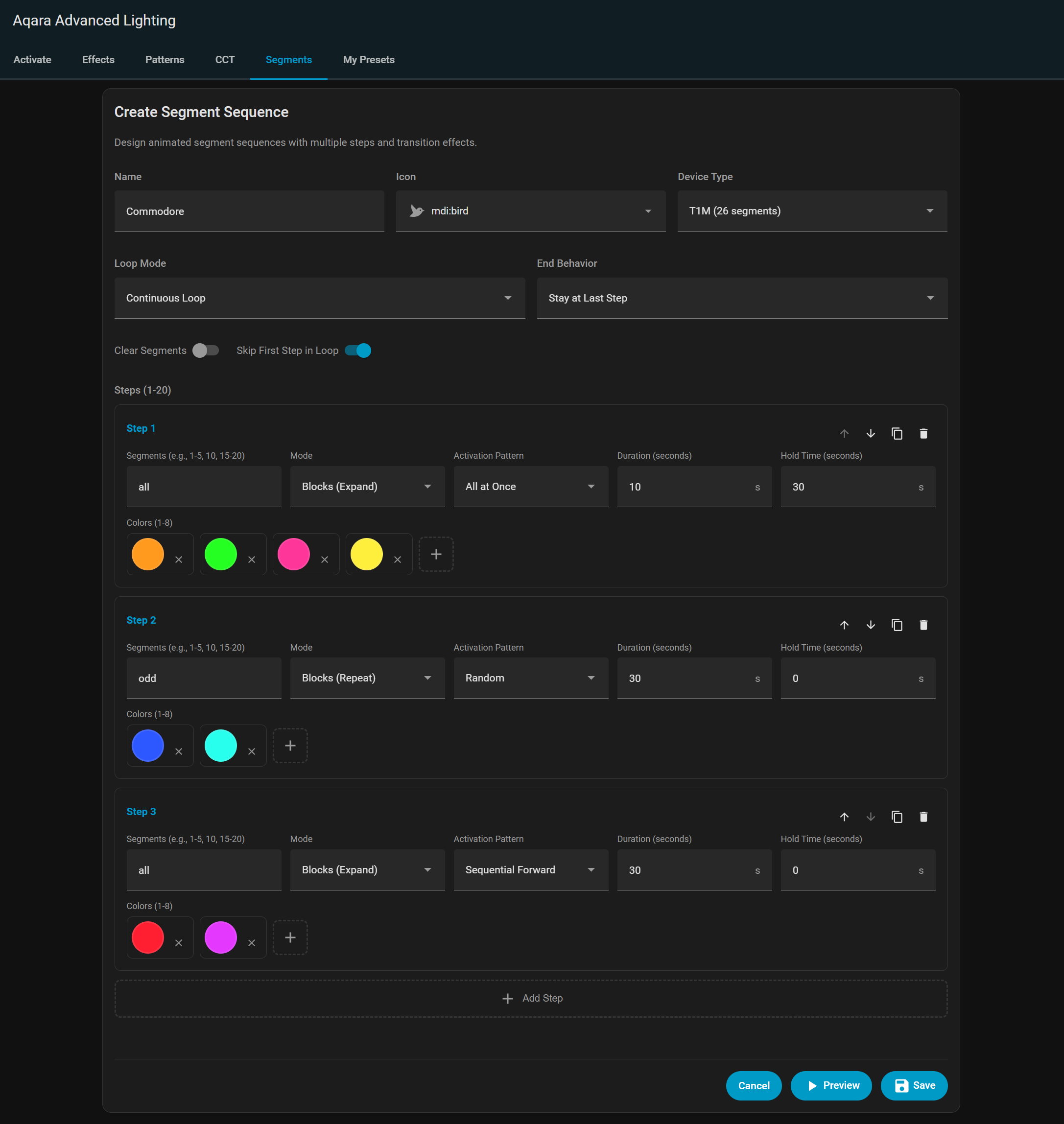
RGB Segment Sequence Editor - Create animated segment sequences
Up to 20 steps with animation patterns
Multiple color modes (gradient, blocks, individual)
Activation pattern selector with 8 options (all at once, sequential forward/reverse, random, ping pong, centre out, edges in, paired)
Duration and hold controls
Loop settings with skip first step option
Clear segments before starting option
Save as custom preset
Create, save, and manage your own custom presets for all feature types:
Preset Management - Full CRUD operations for user-created presets
Create unlimited custom presets
Edit existing presets with full customization
Duplicate presets to create variations
Delete unwanted presets
Supported Preset Types - Save presets for all features
Effect presets (dynamic RGB effects with colors and settings)
Segment pattern presets (custom segment color arrangements)
CCT sequence presets (multi-step color temperature sequences)
RGB segment sequence presets (animated segment patterns)
Persistent Storage - Presets stored across Home Assistant restarts
Automatic save on creation/update/delete
UUID-based preset IDs for reliable tracking
Timestamps for created and modified dates to allow for sorting
1 Like