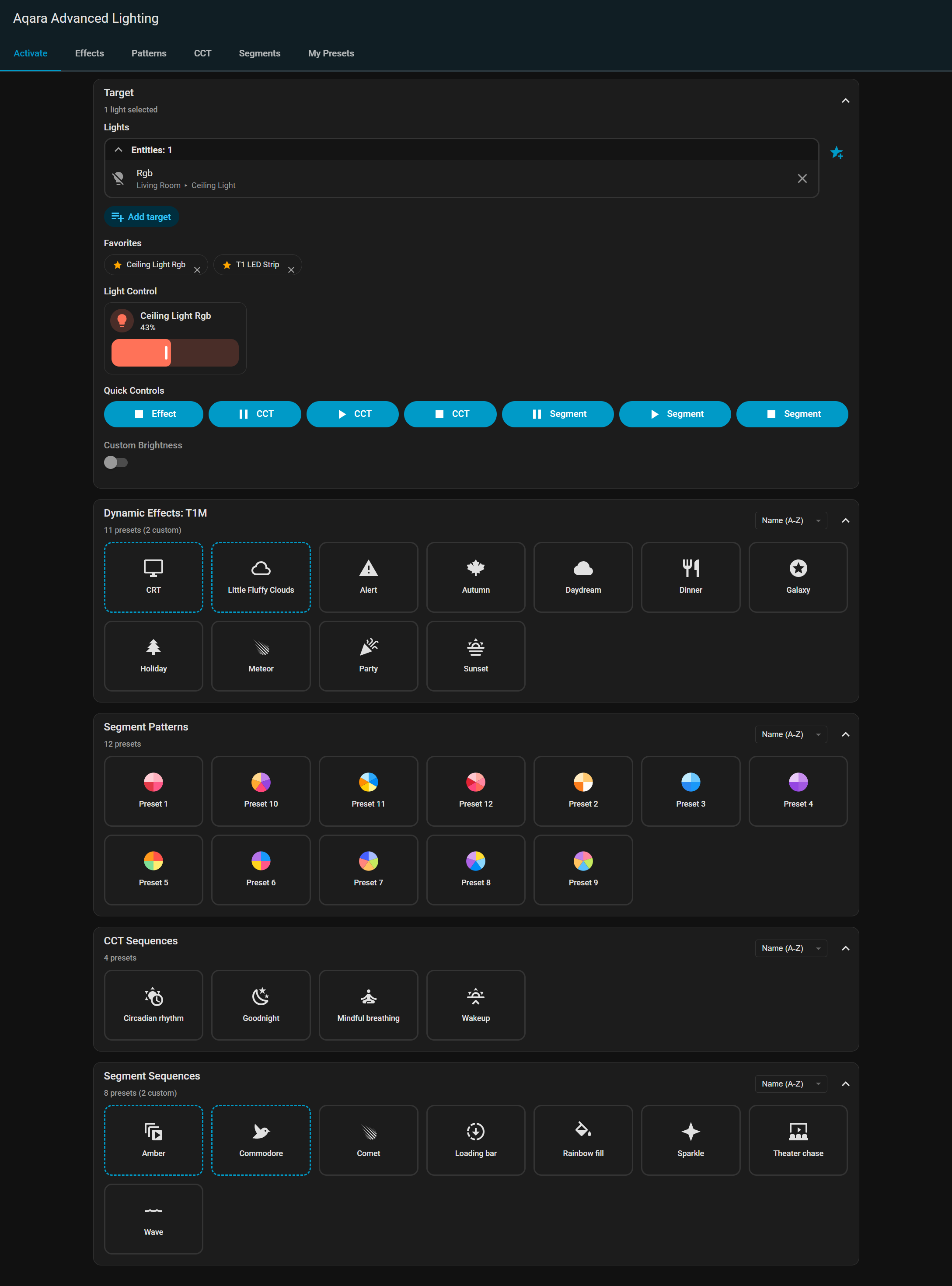
I’m pleased to announce the release of my Home Assistant Aqara lighting integration for the T1M Ceiling Light, T1 LED Strip and T2 bulbs. It’s still in beta phase (v0.3.0) but has the base features implemented now and is ready for public testing.
Overview
Easily control Aqara lights with RGB dynamic effects, individual segment patterns, gradients, CCT sequences, and state restoration.
Features
Aqara App Effect Presets - Quick access to 24 preset effects from the Aqara mobile app
Pleased to announce v0.5.0, a major feature release that brings frontend visual effect and pattern editors, and a preset management system. This release focuses on enhancing the frontend user experience with intuitive creation tools while maintaining full backend compatibility. Update via HACS, and be sure to hard refresh the browser to clear any cached previous version.
Enhanced Panel UI with Visual Editors
The sidebar panel now includes interactive visual editors for creating custom effects, patterns, and sequences:
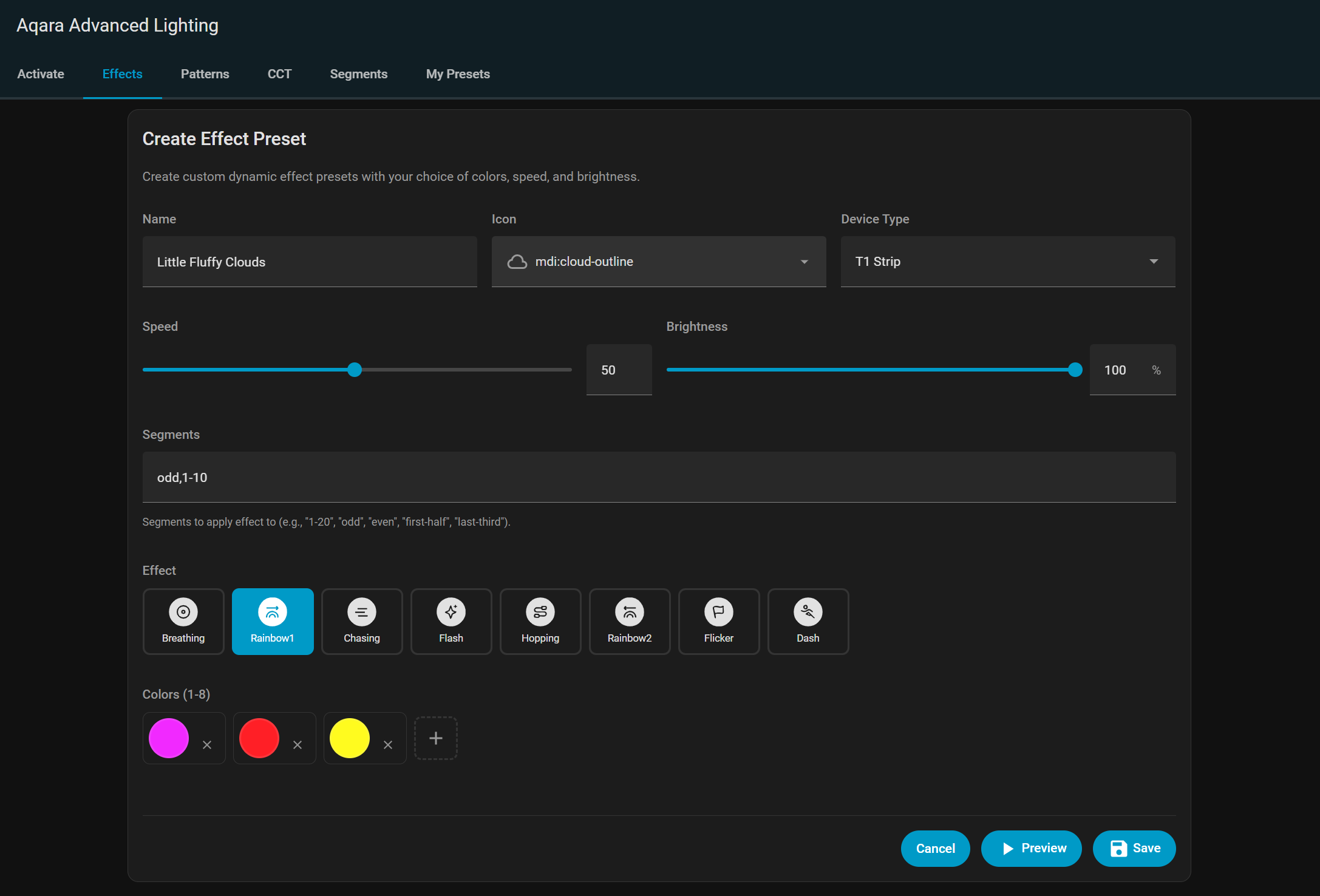
Effect Editor - Create custom dynamic RGB effects
Effect type selector
Up to 8 color pickers for effect colors
Speed and brightness sliders
Segment selector for T1 Strip effects
Live preview of effect settings
Save as custom preset
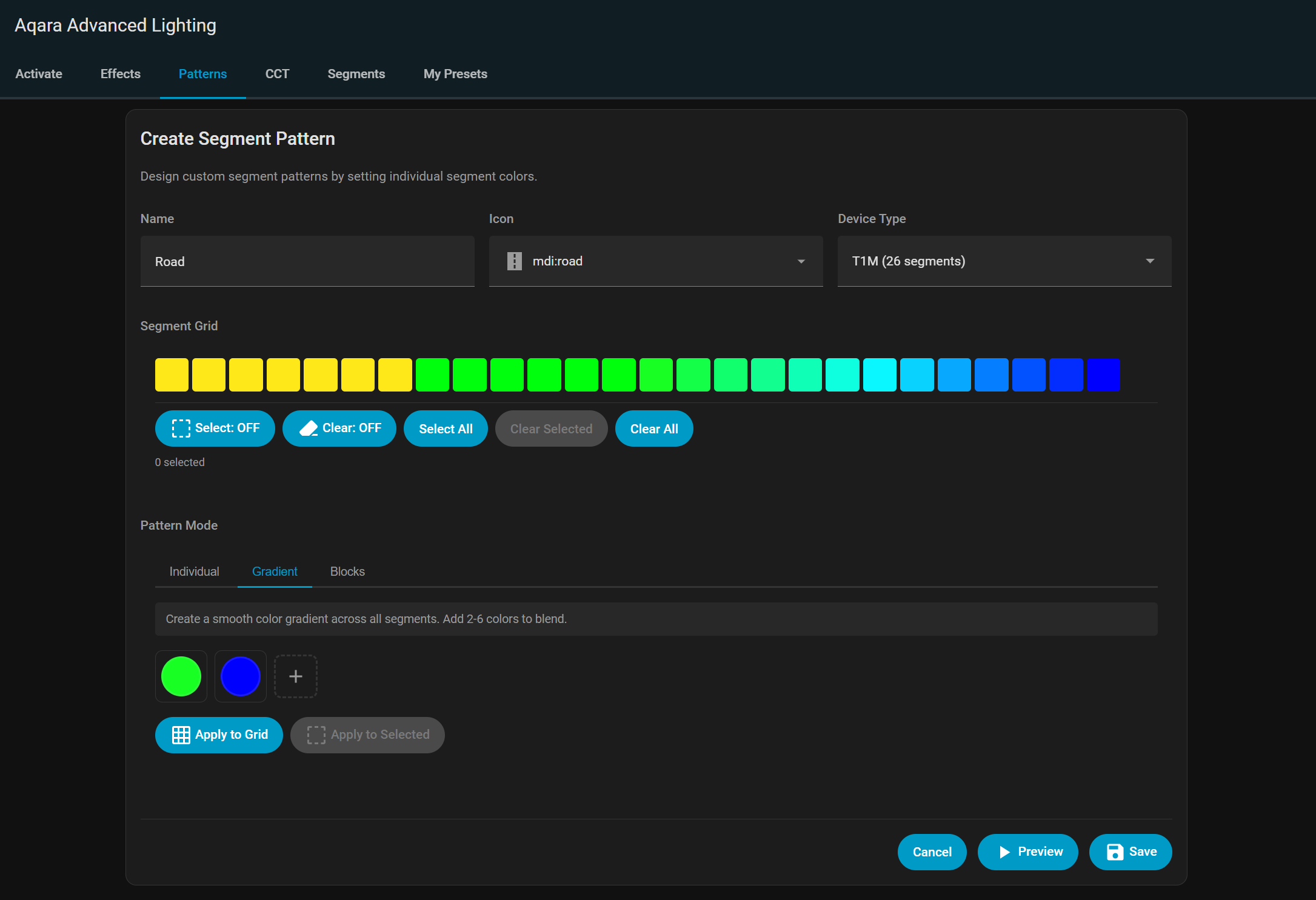
Segment Pattern Editor - Design custom segment color patterns
Visual segment selector showing all available segments
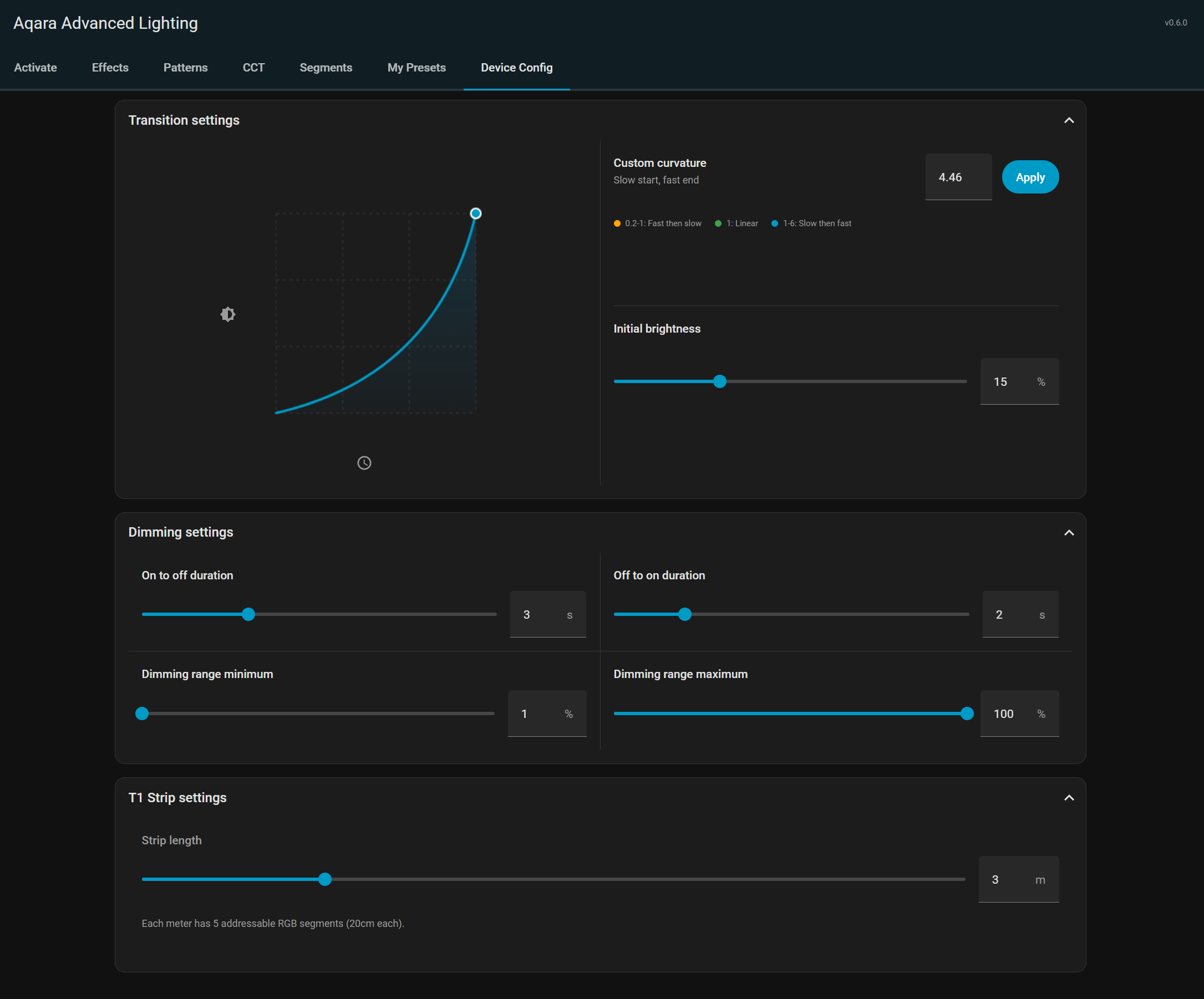
New in v0.6.0 is a Device Config panel which allows you to apply configuration settings to multiple Aqara lights at the same time. Available settings are filtered according to which kind of devices are selected, and only the compatible settings are sent to each device.
For T2 bulbs these include a visual editor for transition curvature with draggable adjustment graph.
Since my last post the integration is now up to v0.11.0, new features include:
Segment Zone Naming - Assign custom names to segment zones on each device with a visual grid editor for intuitive zone configuration
Device triggers for HA automations - Aqara lighting devices now appear in the Home Assistant automation UI device trigger selector, enabling native trigger-based automations of features
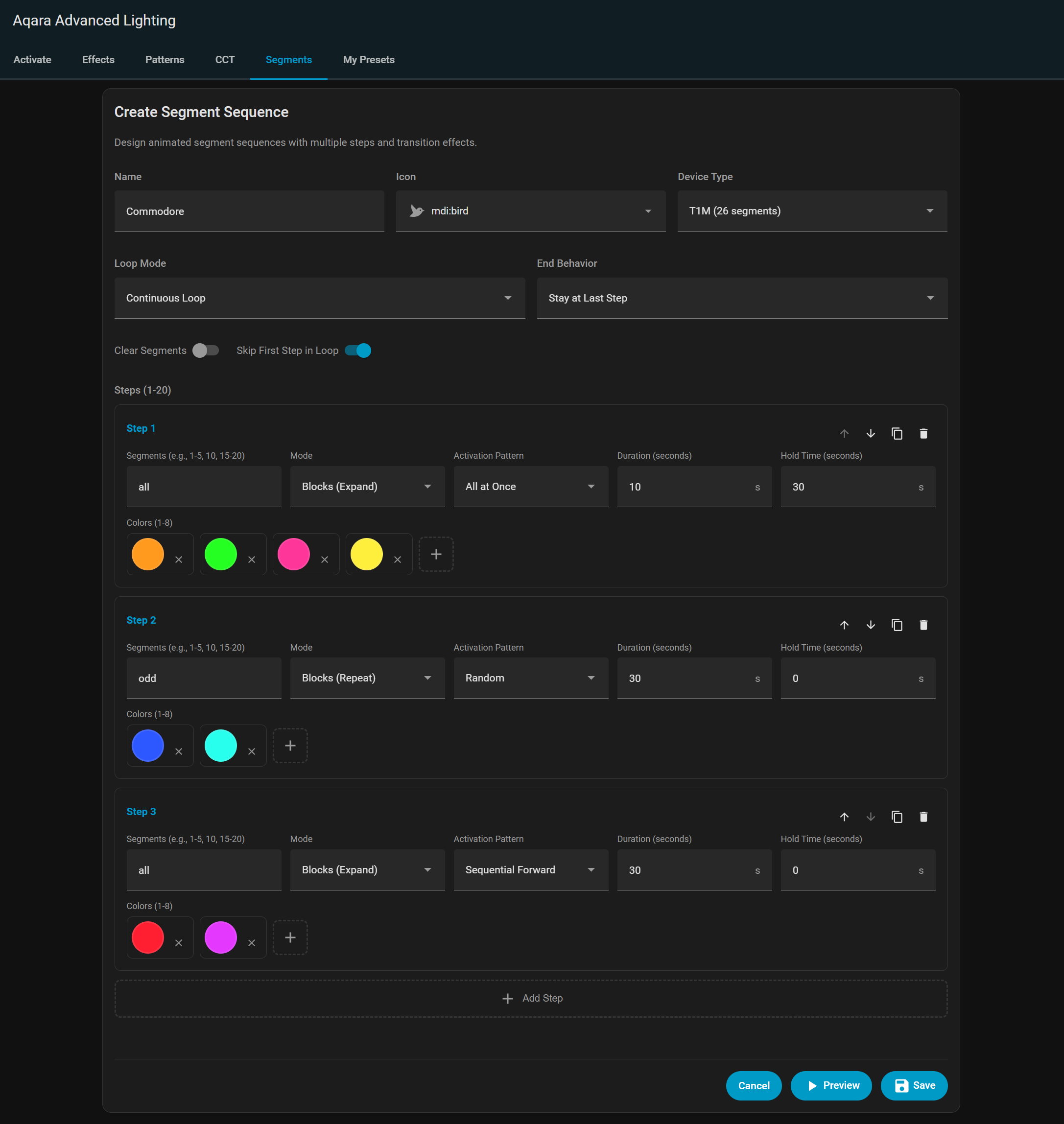
Interactive Visual Segment Selection for segment patterns and sequences
XY Color Picker Modal - with color history swatches
Dynamic SVG preset preview thumbnails - Presets now display dynamically generated SVG thumbnail previews showing the actual color pattern
Per-user preferences with server-side storage - User preferences are stored on the server, persisting across browsers and devices
REST API Trigger Endpoint- Trigger presets from external systems such as Node-RED or iOS shortcuts
Multiple Zigbee2MQTT Instance Support
User Preset Backup and Restore
Many more features and improvements have also been implemented.
It’s also now installable directly through HACS, just search for Aqara Advanced Lighting within the Home Assistant Community Store in your HA iinstallation.
wow! very nice. And such love to Aqara’s lights. I think you could expand this and see great traction if it were more open, but I understand your interests. Well done.
Thanks. In the long run I may well add support for other manufacturers once I run out of things to do with the Aqara lights I have or if they stop releasing new lights with new features to explore. I really want to get one of the new V1 Sky Mirror ceiling lights to reverse engineer.
It really just grew out my want to add the T2 bulb effects to Home Assistant and then ballooned from there as a fun side project to play around with.
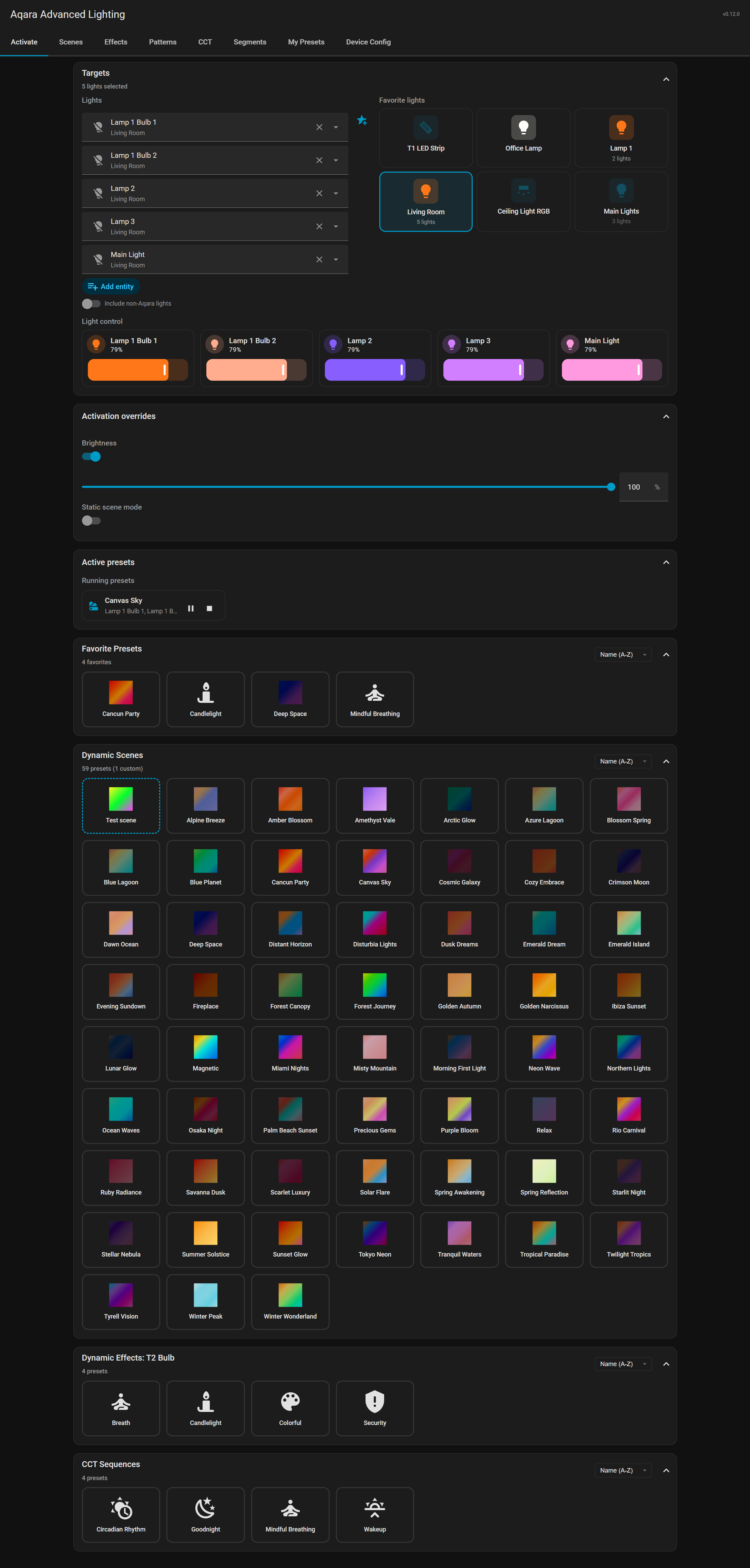
Aqara Advanced Lighting v0.12.0 is now available, the main new feature aimed primarily at T2 bulbs, allowing for the creation of Hue-like dynamic lighting scenes across multiple lights, and comes with 58 built-in dynamic scene presets.
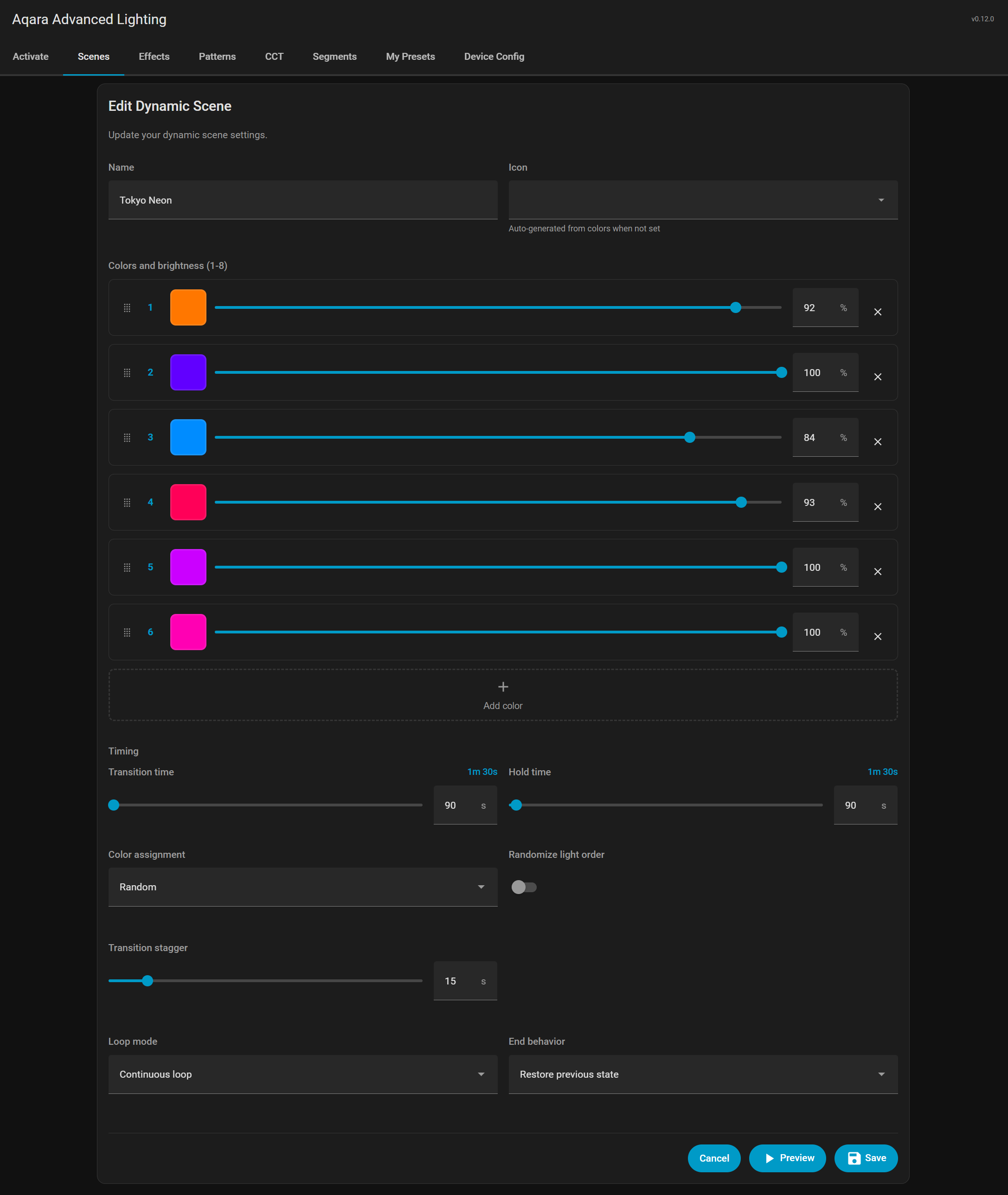
Up to 8 colors with XY color pickers and per-color brightness control (1-100%)
Transition time (30-3600 seconds) for smooth color changes
Hold time (0-3600 seconds) to pause at each color
Three distribution modes:
Shuffle and rotate - Each light gets a different color, then colors rotate smoothly through all lights along the color wheel
Synchronized - All lights transition through the same colors together
Random - Each light picks random colors from the palette
Transition stagger (0-10 seconds) to create wave effects across lights
Loop modes: once, count (1-1000), or continuous
End behavior: restore to previous state or maintain last color
Static mode option to apply colors once without transitions
Home Assistant actions, triggers and conditions for scene automations
Works with any RGB light entity, not limited to Aqara devices
Other new features include:
Device conditions for all services - These allow for the creation of advanced Home Assistant automations like “At 10pm, only turn on the fan if CCT sequence Goodnight is running on the bedroom lamp”
Active Presets Monitoring - real-time monitoring of all active operations, with controls for each displayed in the frontend
Favorite presets - Quick access to most-used presets
Dynamic preset population - Service action dropdowns now populated with current presets including custom user presets
Include-all-lights toggle - Option to include non-Aqara RGB/CCT lights for dynamic scenes and CCT sequences
With the release of v0.13.0 ZHA is now supported for all features. The integration can also handle dual Z2M/ZHA installations with some light on Z2M, others on ZHA.
ZHA Backend Support
Full ZHA integration alongside Zigbee2MQTT
Use Aqara Advanced Lighting features through the ZHA integration without requiring Zigbee2MQTT
Custom zigpy quirks for each supported device type (T2 bulbs, T1M, T1 Strip)
Direct Zigbee cluster attribute writes for effects, segment patterns, and segment sequences
Other new features in this release include:
Image Color Extractor
Extract colors from images for dynamic scene presets
Upload or link an image to automatically extract a color palette
Extracted colors populate directly into the dynamic scene editor
T1 Strip Audio Sync
Frontend controls for T1 Strip music synchronization mode
Audio sync toggle, sensitivity, and effect controls in the panel
2 device triggers: music sync enabled, music sync disabled (with sensitivity and audio effect in event data)
1 device condition: music sync is active
Dynamic Scene Color Assignment Override
Override color-to-light assignment when activating scenes
Manually assign scene color distribution
Brightness activation override for per-scene control
Ignore External Changes Toggle
Prevent external changes from pausing running operations
Toggle to ignore external state changes on entities running sequences or scenes
Prevents false external pause detection from other automations or manual adjustments
Aqara Advanced Lighting has reached v1.0.0, the first stable release. It includes Home Assistant 2026.3 compatibility, security hardening, a major UI overhaul with native HA components, mobile/touch improvements and added accessibility support, expanded diagnostics, and significant backend refactoring.
Also new:
CCT and segment sequences can now restore lights to their pre-sequence state
New “restore state” end behavior for both CCT and segment sequences
Captures light state before sequence starts and restores it on completion
State capture and restore also now works with cancel and stop-preview buttons across all editors
Software-Interpolated Transitions for T1-Family Devices
T1M and T1 Strip devices don’t fully support hardware transitions, this release adds software interpolation to simulate smoother longer transitions on these devices.
Cubic easing (ease_in_out_cubic) for natural-looking transitions
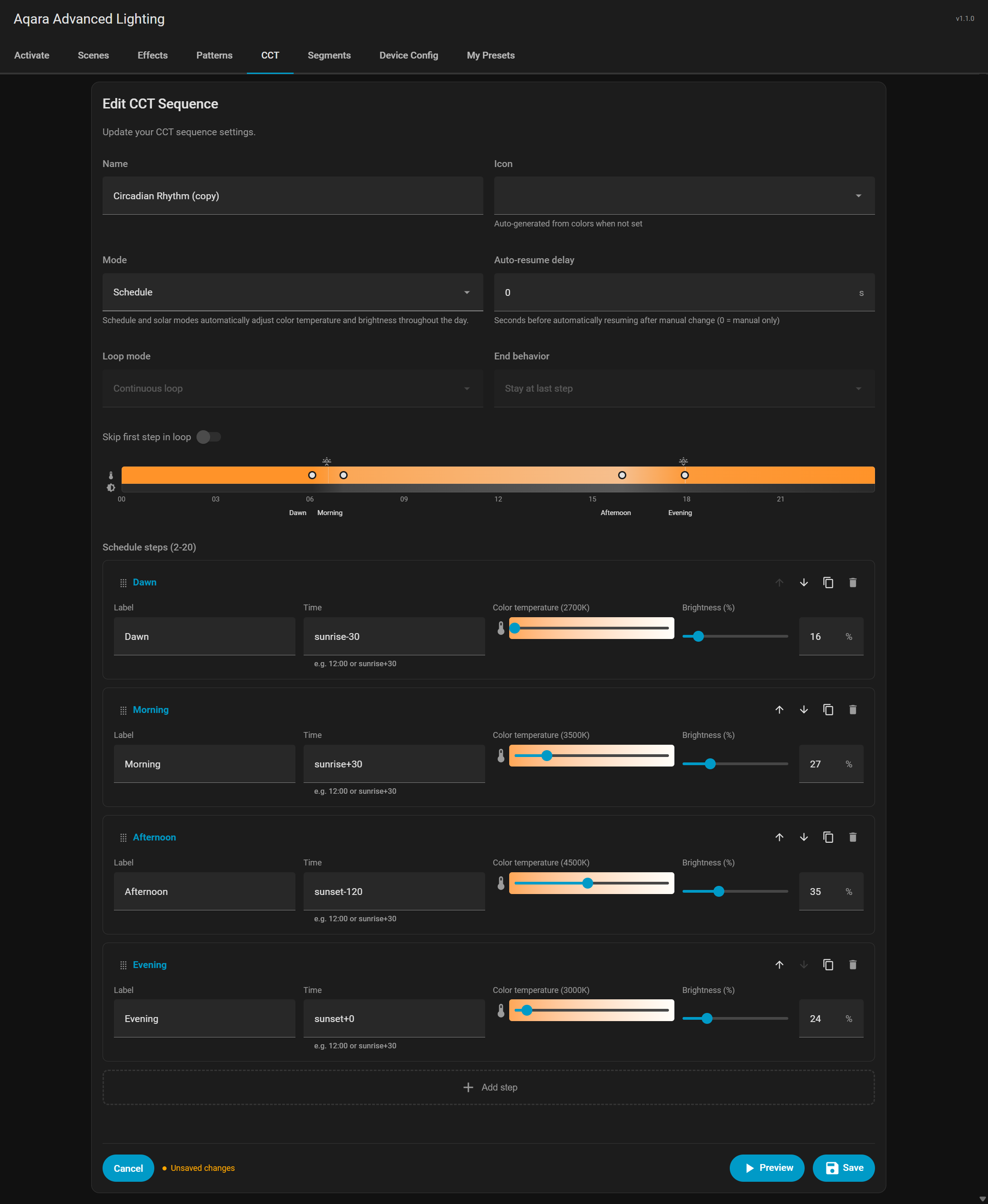
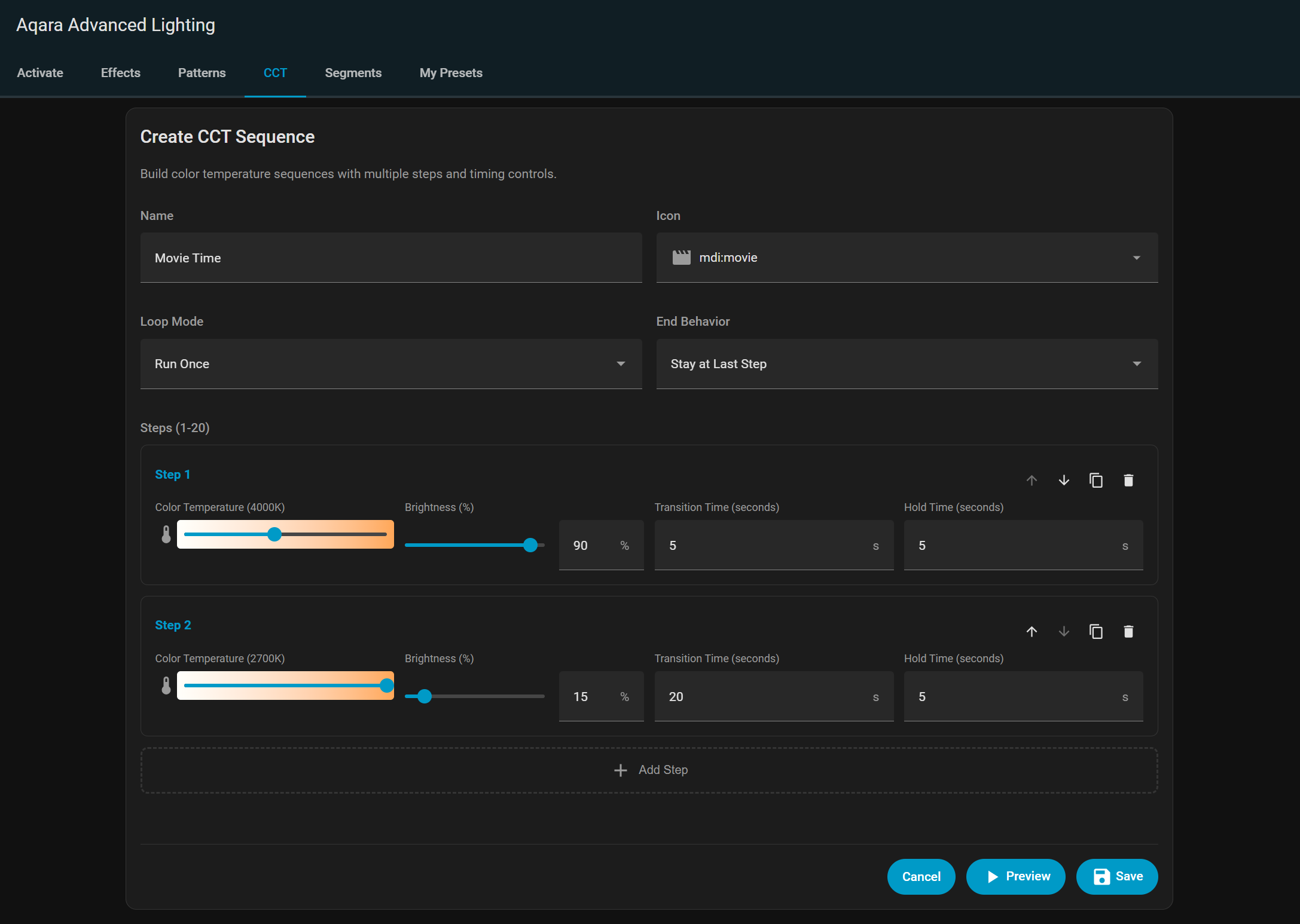
Version 1.1.0 adds solar and schedule-based adaptive circadian CCT sequences, capability-aware light adaptation for any Home Assistant light, and a new more comprehensive override detection system.
Circadian Adaptive CCT Sequences
Schedule steps use fixed times (12:00) or sun-relative times (sunrise+30, sunset-60)
Solar timeline maps elevation to time using sinusoidal sun trajectory with real sunrise/sunset positions
Automatic interpolation between steps on a 24-hour cycle
Dual-track timeline preview showing color temperature and brightness with step markers
Improved support for non-Aqara lights in dynamic scenes and CCT sequences
Software transition opt-in for non-Aqara lights via device config panel
Capability profiles classify lights as full-color, CCT-only, brightness-only, or on/off-only
Service calls adapted at runtime using XY-to-CCT conversion and color temp clamping
Context-based override detection with per-attribute control for solar and schedule sequences
Detects overrides from service call data before state changes arrive
Context-only detection replaces grace window system
Per-attribute change detection with hardware drift tolerance
Non-HA drift detection for changes made outside Home Assistant
Bare turn-on adaptation fills unspecified attributes with solar/schedule values
Per-attribute pause indicators in frontend
Improvements
Proactive adaptation: immediate value application on resume and turn-on
Per-preset auto-resume delay
Turn off light end behavior for dynamic scenes
Skip first step in loop for CCT sequences
Added Power Nap CCT sequence preset
Selective user preset exports
Bug Fixes
Loop N Times count field in Scenes tab
Signed URL preset export with selective filtering
Preset export using signed URL WebSocket command
Auth errors on API calls
Active presets panel not updating after activation
last-half, first-third, last-third keywords to parse_segment_range
Segment patterns not restoring off state when stopped
 and so passionated