Which external TTS platform did you set up? I’m just asking because I understood that it sounds better to you than Google Translate TTS.
Okay, so you can do that with automation, too. Are there any other advantages?
Which external TTS platform did you set up? I’m just asking because I understood that it sounds better to you than Google Translate TTS.
Okay, so you can do that with automation, too. Are there any other advantages?
Thanks! The HA Green is ordered. Got the antenna too, because why not. And I have seen that video from Reed. I subscribe to his channel.
I cut n pasted that. I’ll follow it when my Green gets here. It just seems like there’s always gonna be something just out of reach of Apple Home that HA can handle fairly well.
I use the official Piper TTS, which works local and on-Device with the Piper App (ex Add-on). The related integration will then shown as discovered.
Yeah you can add a lot of stuff to your new smarthome and build your custom dashboards (which may be tricky sometimes). With the 2026.7 automations and dashboards are perfect for beginners (even if I Iike the old style a little bit more…)
Thank you very much. I just installed it using these instructions here. It really is better, especially for longer texts.
Great to hear that it helps. Which voice did you use? I don’t found the right one yet… especially if you use the de_DE-mls-medium Voice with thousands options.
https://rhasspy.github.io/piper-samples/
I also read the article how to set a local Assist up 
I think I can help much more with Home Assistant and Apple Home (as long as there are no error messages to debug or build a complex integration (cause I can’t code)) than other platforms.
But I created a custom timetable card for HA with Claude
View here
de_DE-kerstin-low left a good impression on me for longer texts. And I also found de_DE-thorsten_emotional-medium quite funny when he quietly whispers, “Someone rang the doorbell.”
Interestingly, mls stands for Multilingual LibriSpeech. It is a massive, open-source speech dataset published by Facebook AI for research in speech recognition and TTS. The audio data is based on public-domain audiobooks read aloud from the LibriVox platform. For German, you can choose from 236 different speakers. Each number corresponds to the unique Speaker ID from the original dataset. In English, there are additional libraries available (such as LibriTTS, VCTK, or LJSpeech) offering an even wider selection of speakers.
Of course, I haven’t tried out all the voices yet 
Cool, I hadn’t even realized that the purpose-specific triggers and conditions are finally no longer a Labs feature. I had already enabled it beforehand because I thought it was great that you can just use an entire room as a trigger, meaning it doesn’t matter for the automations if you swap a sensor, rename it (the ID might change), remove it, or add a new one. That drastically reduces the effort when making adjustments, since you don’t have to edit countless automations anymore. And besides, the old options are still there and can still be used. I always watch Simon42’s update videos before installing the current feature release.
Did you have to use HA’s Voice Preview Edition to implement Piper TTS? Or will this work with Homepods?
It will work with any HomePod. You don’t need to install the Voice Preview Edition.
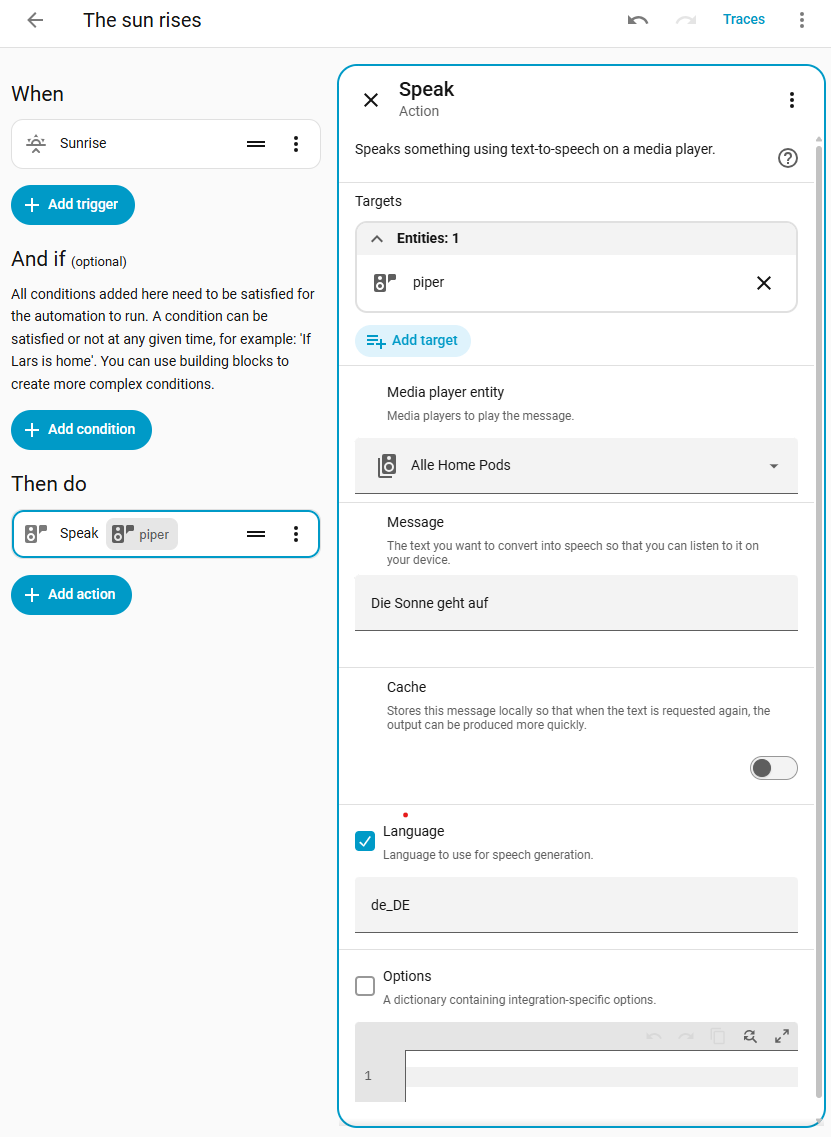
No, as srl7741 already mentioned, that’s not necessary just for speech output on a HomePod. You simply need to install the app and add the integration. Then, in your automation under Add Action, search for “piper” and set it up like in the picture here, for example.
Just a quick tip: You can also install Music Assistant and group multiple HomePods, Apple TVs, and other smart speakers together. Then you can select the entire group in your automation. See the picture showing the group “All HomePods” (“Alle HomePods”), which in my setup consists of two HomePods and one HomePod mini.
Oh, that’s great news. Thanks @KingDando !
Sometimes I watch them too…
But I always read the (Beta) Release Changelog when they’re available.
I use them mostly for single entities
That’s also something new for me. I’m still testing which voice is the best for me .
That’s always nice to hear.