• Network A 2.4g
• Network A 5g
• Network B 2.4g EXT
• Network B 5g EXT
If the EXT networks reach different places of my home because they’re further apart, I don’t know which network it would be to connect my m3 to and what problems it may cause. Do I need another m3? Are there any workarounds? Would it be best to not connect physically my m3 just to place it in the middle of both (normal and extension)? Does every device need to be on the same network? Help!!
If you don’t use Matter over WiFi, then it doesn’t matter. Zigbee/Thread devices create their own network, even if they’re no wifi.
The M3 communicates with the cloud and it allows you to control your devices through the cloud even if you’re in different network. For example, I have successfully controlled my home devices using my mobile data.
In case of a G3 camera and HomeKit, you will get more stable streaming when the camera is connected to the same network as your iPhone. But if you have WiFi extenders or separate 2.4/5 wifi networks, they are probably connected into a single LAN and it does not matter so much. Just connect the G3 to the strongest WiFi.
The Zigbee devices you connect to the G3 will create their own network, and their signal will not depend on the wifi strength, but on the strength of the Zigbee network. You can extend the Zigbee network by connecting devices with neutral (like lightbulbs, smart switches with N, smart plugs, LED strips), those will automatically extend your smart device network
Further to this, these could all be on the same network, the fact to for EXT intensions does not mean they are working independently.
Check this with your phone, connect to each one and check your internal IP address that has been given something along the lines of 192.168.1.??? or 192.168.0.???
The questions are not that easy to answer. I’m afraid we need a little more information, otherwise there are simply too many possibilities.
Based on just two or four Wi-Fi networks, it’s not possible to say where you should place the M3. We need some information about the premises and the distances involved. As cezary806 already mentioned, the M3 creates a Zigbee and a Thread network. These are two different mesh networks.
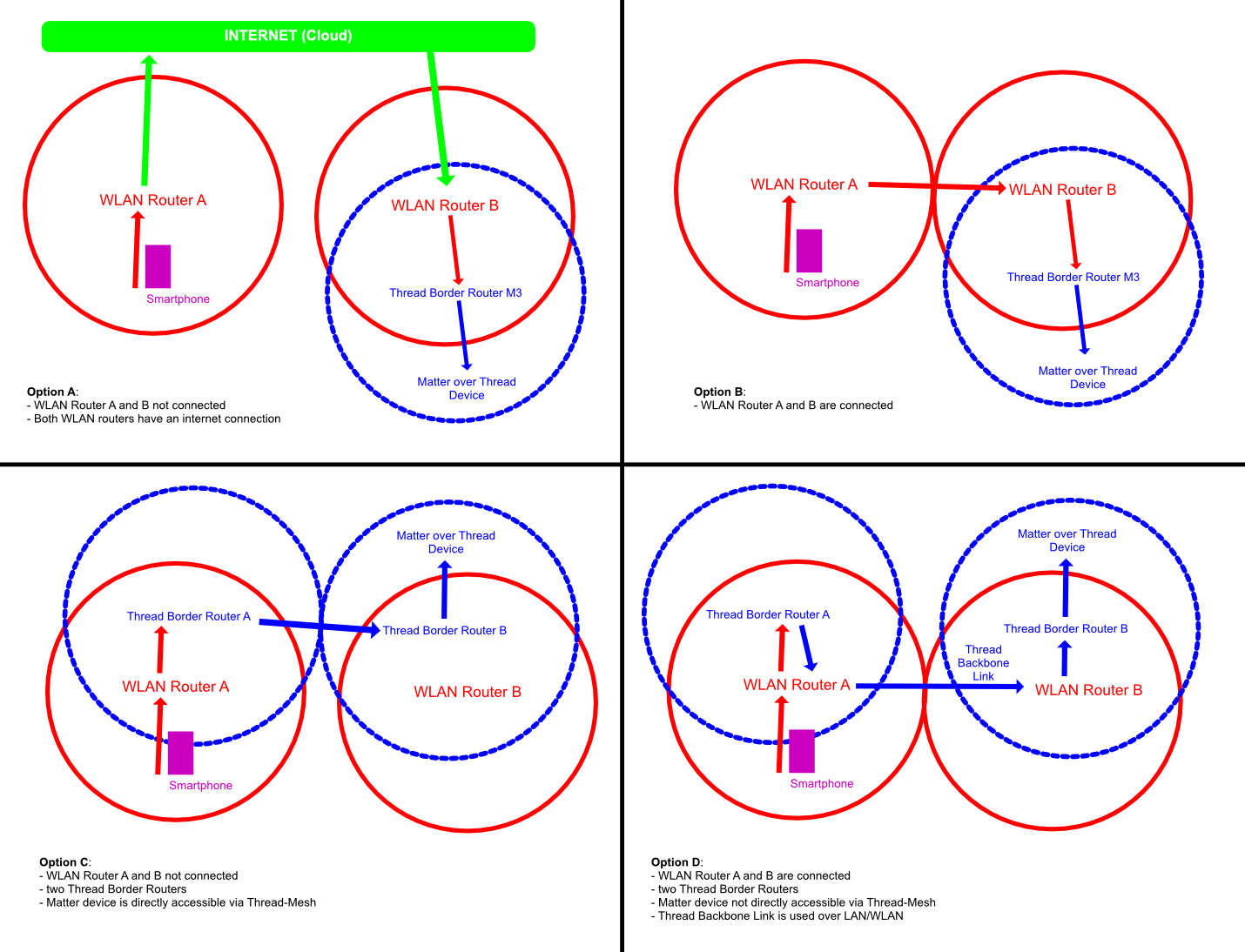
Not necessarily, but it would have advantages in terms of response speed. Whenever the connection is local, it is naturally faster. In addition, it would be advantageous to have multiple Thread Border Routers, as the routers connect/synchronize via LAN/WLAN. And if two parts of your Thread mesh are too far apart to communicate directly via radio, the Border Routers will automatically route the traffic over your Wi-Fi/Ethernet backbone instead. I tried to illustrate this using these graphics with Matter over Thread as an example.
You can’t say that for sure based on the IP addresses. If you have two separate networks and two DHCP servers with the same IP range, it can be confusing.
How to Check if Your Networks are Bridged
Install a Network Discovery App: Download Fing or Network Analyzer (both are free on iOS/Android).
Scan Network A: Connect your smartphone to Network A and run a scan. Take note of the listed devices, such as your router, TV, or printer.
Scan Network B: Move to the area where only Network B is reachable. Connect to it and run a new scan.
Compare the Results: If the app displays the exact same devices with identical IP and MAC addresses as before, your networks are bridged (acting as one single local network).