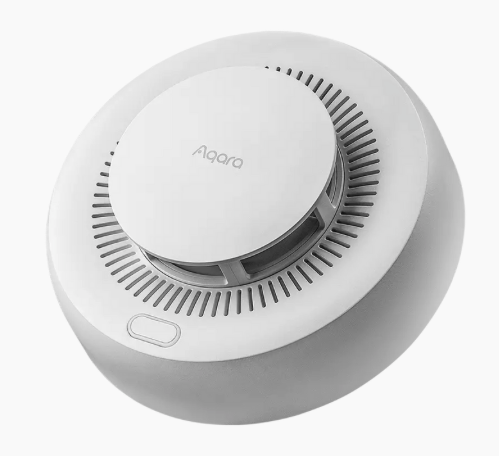
Smoke alarms from Aqara have an obvious advantage: their price. But it would be reductive to stop there. They are also discreet, visually unobtrusive, and most importantly equipped with replaceable batteries. This is a key point, as many competing products use sealed batteries, meaning the entire device must be replaced at the end of its battery life.
Over time, I have therefore equipped my home with three smoke alarms, strategically placed in different areas.
Connected smoke alarms provide another major benefit: remote alerts. As soon as smoke is detected, a notification is sent to your smartphone. This gives you time to warn a neighbor or contact the fire department if necessary.
It is important to note that these alarms remain fully operational even without a network connection. In the event of a fire, the built-in siren (around 85 dB according to Aqara) will sound even if Wi-Fi or Internet access is unavailable.
Aqara smoke alarms operate exclusively using the Zigbee protocol. They can therefore be paired directly with Home Assistant, Homey, or an Aqara hub, depending on the ecosystem you use.
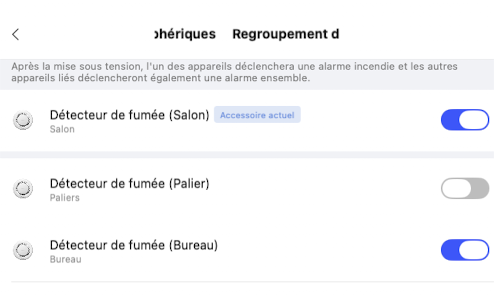
On this type of device, the available options are deliberately limited. However, the Aqara Home application includes a particularly useful feature: alarm grouping. The concept is simple and very effective. As soon as one alarm detects smoke, it immediately notifies the other alarms in the group, which then trigger as well. The alert becomes impossible to miss, even in a large home. When properly distributed across rooms, these alarms fully serve their purpose.
Contrary to what one might expect, this grouping is not configured in the same way as lighting or smart plugs. It is not a generic grouping feature. Aqara chose to implement a dedicated section directly within the smoke alarm’s own settings.
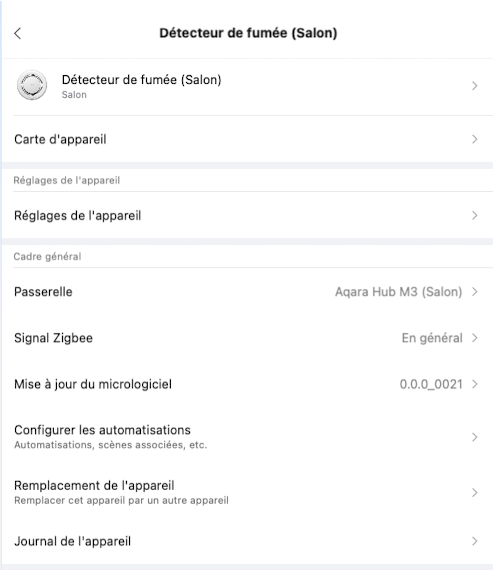
To enable it, start by selecting one of the alarms in the Aqara Home app. Then go to its settings and open the Settings sub-section. There you will find the option “Peripheral alarm grouping”. Simply activate the alarms you want to include in the group. Once configured, the detectors will operate in a coordinated manner.
One important point should be highlighted. Aqara smoke alarms spend most of their time in deep sleep mode in order to preserve battery life. Aqara specifies an expected battery lifespan of approximately more than 5 years. As a result, configuration changes are only actually applied when the alarm wakes up.
Rather than waiting for this natural wake-up cycle, it is strongly recommended to physically go to the alarm and press its button once. This action wakes the device immediately and forces the new settings to be applied without delay. It is a simple but essential step to ensure that the grouping is fully active and reliable, without any unpleasant surprises.
Hope this helps