My Aqara Doorbell Camera Hub G410 has a weak signal between the Doorbell Camera and the Chime and sometimes no connection at all. You notice this when someone rings the doorbell, and the live video in Apple Home takes way too long to load and then it’s usually too late.
Unfortunately, there is no way to place the Chime and the Doorbell closer to each other.
Is there a way to improve the signal through a signal amplifier halfway? That would be very practical.
It’s my understanding that the G410 uses a proprietary radio connection between the doorbell and the chime rather than your WiFi network so a regular WiFi range extender won’t work in this case, and unfortunately Aqara doesn’t offer a radio amplifier/repeater.
I think your only option is to figure out a way to move the chime closer to the doorbell. Is the issue with moving the chime closer to the doorbell a lack of avaliable power sockets?
I actually already knew that they had their own radio protocol, probably with 2.4GHz.
It’s actually not my problem that I don’t have sockets, but rather the problem that the Chime hangs on the third floor.
more…
I actually hung the chime deep on the ground, about 15 cm above the ground, to improve the signal. I glued the Chime right at the bottom at the time. Before that he lay on a cabinet 1.5 m higher. You can already notice the difference in the signal strength.
Otherwise there is unfortunately no way to move the chime closer to the doorbell.
Tummeln sich dort viele Nachbar-WLANs auf demselben Kanal?
Du hattest doch einen Laptop mit Windows, oder?
Kannst du dort den folgenden Befehl eingeben?
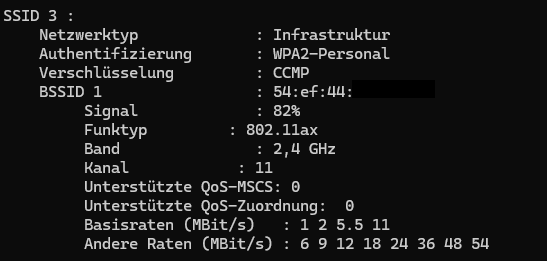
netsh wlan show networks mode=bssid
Wenn du dann ein Netz ohne Name (SSID) siehst und die BSSID mit 54:ef:44:... anfängt, dann ist das sehr wahrscheinlich das WLAN der Türklingel. Dort siehst du auch den genutzten Kanal. Wenn dieser stark belegt ist, ziehe den USB-Stecker des Türgongs, warte kurz und verbinde ihn wieder. Danach sollte sich das WLAN neu aufbauen und der Kanal wird, soweit ich das beobachten konnte, neu ausgewählt. Eine leichte Verbesserung des Empfangs ist mit etwas Glück möglich.
Ach ja, versuch doch mal, den Türgong entweder hinzulegen oder aufrecht hinzustellen, und schau, ob sich der Empfang verbessert. Je nachdem, wie die Antenne verbaut wurde, kann dies eventuell auch den Empfang verbessern. Wenn der Türgong sehr nah am WLAN-Router ist, versuche ihn gegebenenfalls etwas weiter davon zu entfernen.
Falls alles nichts hilft, kannst du versuchen dir eine “Cantenna” selbst zu bauen. Du brauchst lediglich eine Dose, in die der Türgong hineinpasst, und richtest die Öffnung zur Türklingel aus. Das ist zumindest einen Versuch wert. Wenn du Pech hast, führt das aber dazu, dass du den Empfang zu deinem Router abschirmst.