For context, I own quite a few Aqara devices and have generally been very satisfied with them. These FP2 sensors are the only products that consistently give me trouble.
I’ve been using four of them at home for nearly three years, and I keep running into the same issues:
Entry detection is slow — it often takes 15–20 seconds before the sensor recognizes that I’m in the room.
Sometimes, it doesn’t detect me at all.
Exit detection is just as delayed — again 15–20 seconds before it registers that I’ve left.
In some cases, it fails to detect my exit entirely.
The app frequently shows a “ghost” presence whether the room is empty or not.
If I’m in a room and someone else briefly enters and leaves, the sensor often reports the room as empty and turns off the lights, even though I’m still there.
Zone detection is too inconsistent to be usable — I’ve stopped relying on it altogether.
When I’m relatively still (e.g., sitting at a desk), the lights may suddenly turn off as if I’ve left. And then, even obvious movement right in front of the sensor sometimes doesn’t restore detection.
All devices are up to date. I’ve also performed a full reset on one unit to rule out configuration issues, with no improvement. Placement guidelines (height, tilt, etc.) have been followed in most cases.
At this point, I’m trying to understand whether this is expected behavior or if something is fundamentally wrong with these sensors. What has your experience been with them?
Hello, I’m sorry to hear your bad experience feedback.
It sounds that this is definitely not the proper use of normal equipment. Generally speaking, if the cause of equipment failure can be eliminated, I would suggest checking whether there is inevitable interference in the installation environment first. Of course, if all methods are not feasible, I judge that there may be equipment failure.
However, the following installation guidelines are worth trying, hoping to help you by adjusting the installation methods and settings:
As for the departure feedback delay you mentioned, millimeter-wave radar really needs a judgment time to feedback that there is no one in the space. If this delay is long, I would suggest that “presence” or “absence” should not be used in automation conditions, but “entry” and “departure” should be used as conditional attempts.
If there is no interference from pets and sweepers at home, it is recommended to turn off “AI high-precision human body recognition” and set the sensitivity to high to improve the detection speed.
I use 2 FP2 sensors in our home. Both detect presence/motion in the room within 1 second of entry. Not quite as fast as a traditional PIR sensor, but not bad at all, IMHO.
I have no issue with this behavior whatsoever. I’d much rather have it leave a light on for a few extra minutes, versus having it falsely result in the lights turning off while I am still present.
Have you vacated the room and tried turning on the “AI Learning” in the Device Settings section of the device in the Aqara App? I have used this to set up new sensors, and whenever a room gets rearranged. Seems to help quite a bit.
My FP2 is one of my most reliable devices. I have it set up in the kitchen covering two zones, the kitchen and the hallway leading away. Presence is detected and tracked and cleared almost instantly. I didn’t do anything special… perhaps you have a faulty unit?
I occasionally still see ghosts on mine, but not often. The delays you’ve mentioned on entry are extremely high. Exit seems plausible to have a slight delay.
Thank you all for your replies, and apologies for the late response — it’s been a busy week.
Thanks — I’ll give those installation guidelines a try.
Yes, I’ve tried that multiple times, but it didn’t help.
One faulty unit, maybe — but four? All of mine behave more or less the same.
Yes, all four. There’s also a lot of variability: sometimes they work as expected for a while, then start behaving as I described. Nothing in the rooms changes that could explain this inconsistency.
Since none of you seem to be experiencing these issues, I assume the problem isn’t with the units themselves but rather with the environment or the settings. I’ll try the installation guidelines mentioned above, but my placement options are quite limited.
I experienced the ghosting issue as well, particularly in a walk-through room. In my case, it was quite noticeable that the “ghosts” always got stuck at the edges of the room.
Starting with firmware version 1.3.2 / 1.3.3, they added the “entrance and exit self-learning” feature, which according to the release notes “reduces the ghost effect problems”. I’m not exactly sure how their algorithm works or if it uses AI, but I imagine it simply takes some time for the system to correctly learn the entrances and exits.
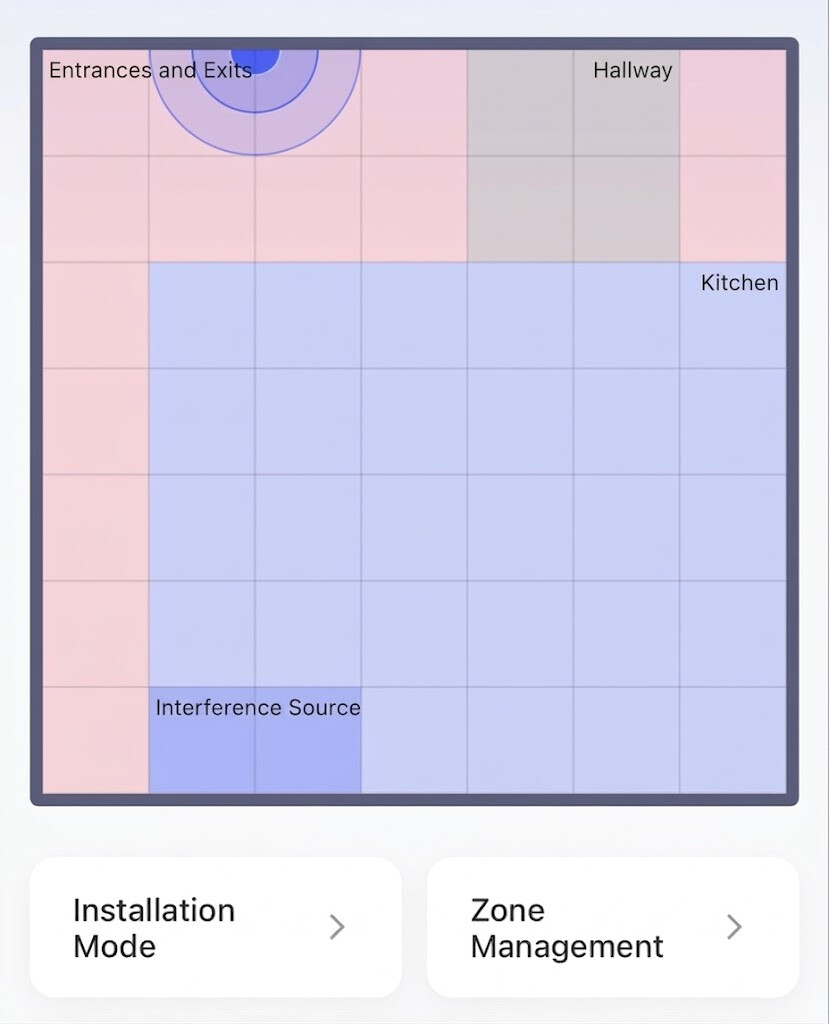
I just didn’t have the patience for that, so I decided to manually mark the entrances and exits on the map. The problem, however, is that the app only allows you to mark a single, continuous entrance/exit area. Since I have a walk-through room, I actually needed to place two separate markers on the map (one on the left and one on the right).
I managed to work around this problem by drawing an “L” shape on the map for the entrance/exit (though a “U” shape would also work). Afterwards, I was somehow able to designate the section that isn’t actually an entrance or exit as an additional regular zone.
Since using this workaround, I haven’t had any more ghosting issues, and my lights no longer stay on unnecessarily.
As an additional tip: If you notice that the “ghosts” always appear in one specific spot on the map, you can also mark that area as an “Interference Source”.
Hi there, as this issue has already been resolved with our support team via email, we’ll be closing this topic on the forum as well. If you have any further questions or run into any other issues, please feel free to reply directly to our support email. Thanks for your support and understanding!