Is my Aqara Hub M3 just… broken? Matter absolutely refuses to work (UniFi setup)

Right. I’m hoping someone here has either had this exact issue or can at least tell me I’m not going mad.

I picked up an Aqara Hub M3, having been assured (by reviews, marketing, and my own optimism) that it was the sensible way to get into Matter without selling a kidney. Unfortunately, Matter appears to want nothing to do with it.

My setup (for context):

  • UniFi Dream Machine Pro
  • Separate IoT Network and SSID (also tried on the flay Default Network)
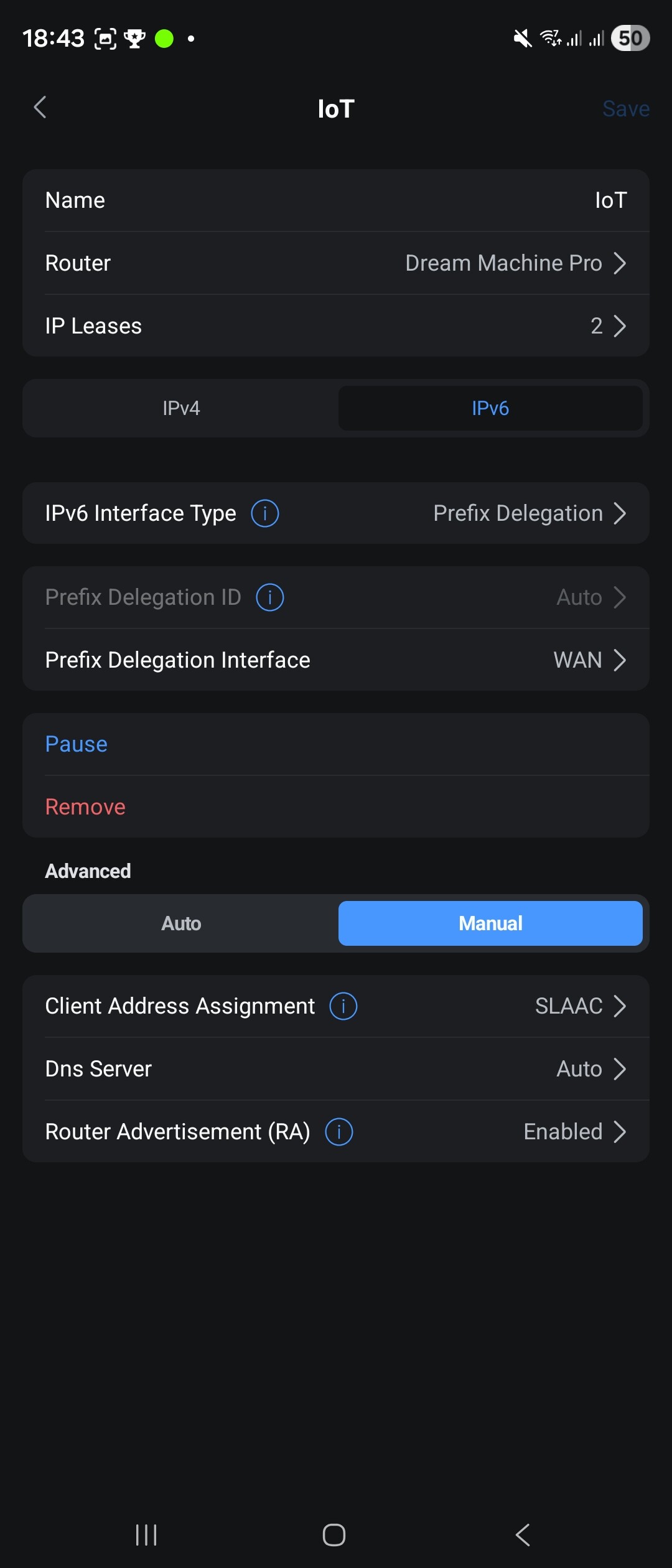
  • IPv4 + IPv6 on
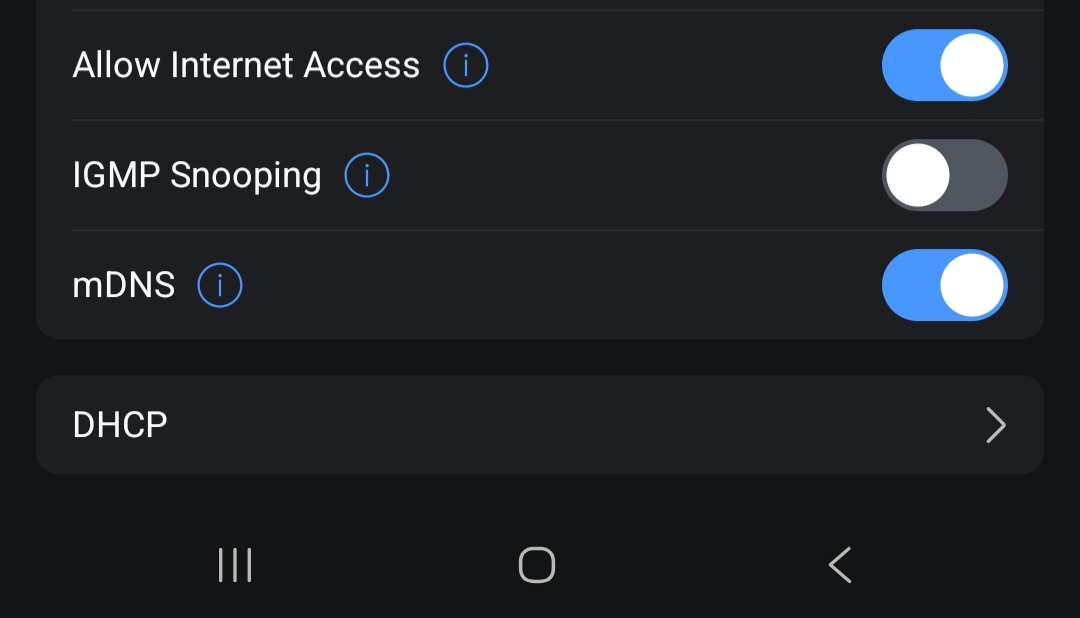
  • mDNS on
  • No client isolation
  • 2.4 GHz Wi-Fi for IoT
  • Hub M3 is on same SSID (also tried via Ethernet)
  • Android phone (Private DNS off, because yes, I’ve been there)

What I’m trying to do:
Add literally any Matter device to the M3.

What I’ve tried adding:

  • Nanoleaf GU10 Matter bulb
  • Aqara Motion & Light Sensor P2 Matter (because I was told the M3 has a weird bug that it can’t add third-party Matter devices before an official child device exists… so I went and purchased one of these)

What happens every single time:
During Matter setup I get:

“Failed to bind – The LAN cannot connect to the Primary Matter Controller”

Every. Time. Doesn’t matter if it’s an official Aqara device or a Nanoleaf bulb.

The really fun part is:

  • The M3 proudly declares itself the Primary Matter Controller
  • Under Third-Party Matter Ecosystems, it shows:
    • Connected Ecosystems: 0
    • No option anywhere to reset or remove the Matter fabric
  • Devices sometimes say they’ve connected successfully… then vanish like my patience

What I’ve already done (before anyone suggests it):

  • Factory reset the hub
  • Factory reset the devices
  • Checked mDNS (on)
  • Checked multicast / IGMP (on)
  • Turned off Private DNS
  • Removed and re-added the hub to Aqara
  • Wired and Wi-Fi commissioning attempts
  • Probably aged a bit

It’s a UniFi setup as stated above. As far as I can tell everything seems to be setup ok and as suggested via online searches, AI and Aqara support.

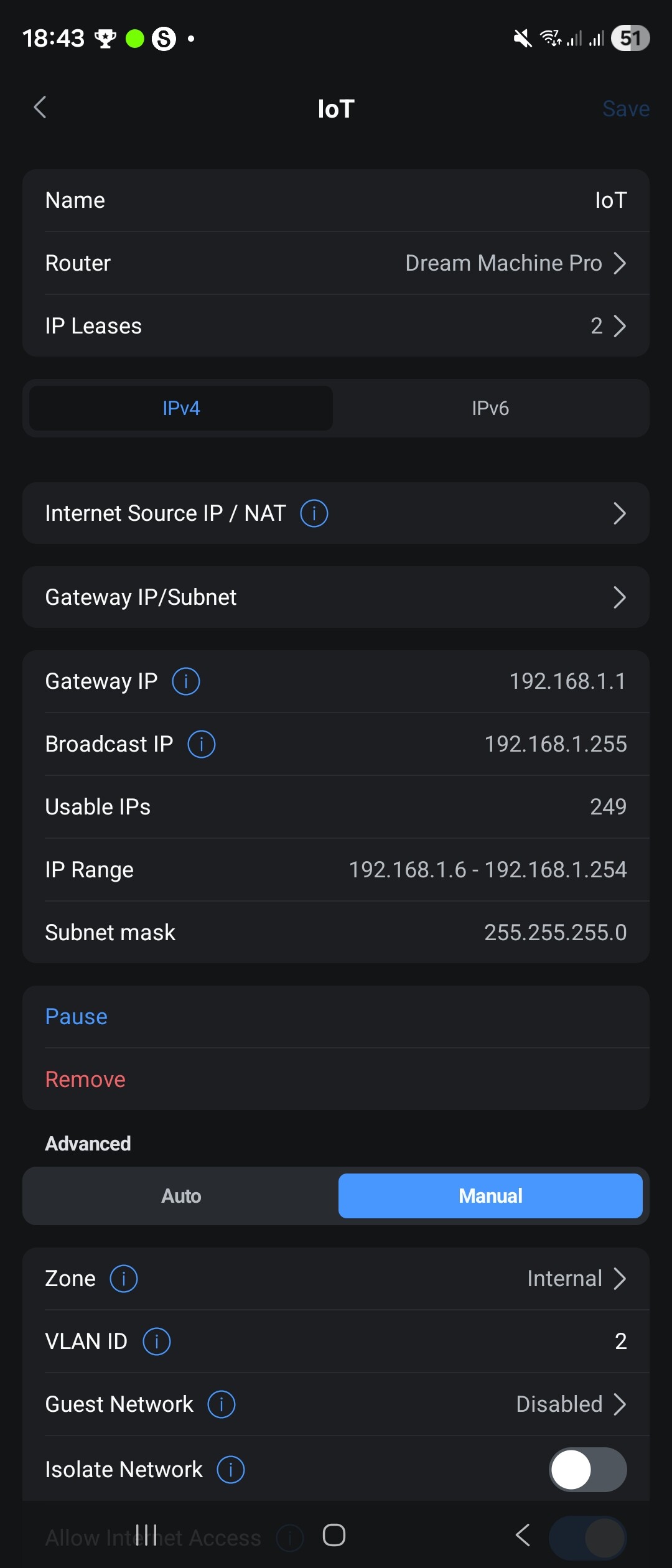
Network settings:
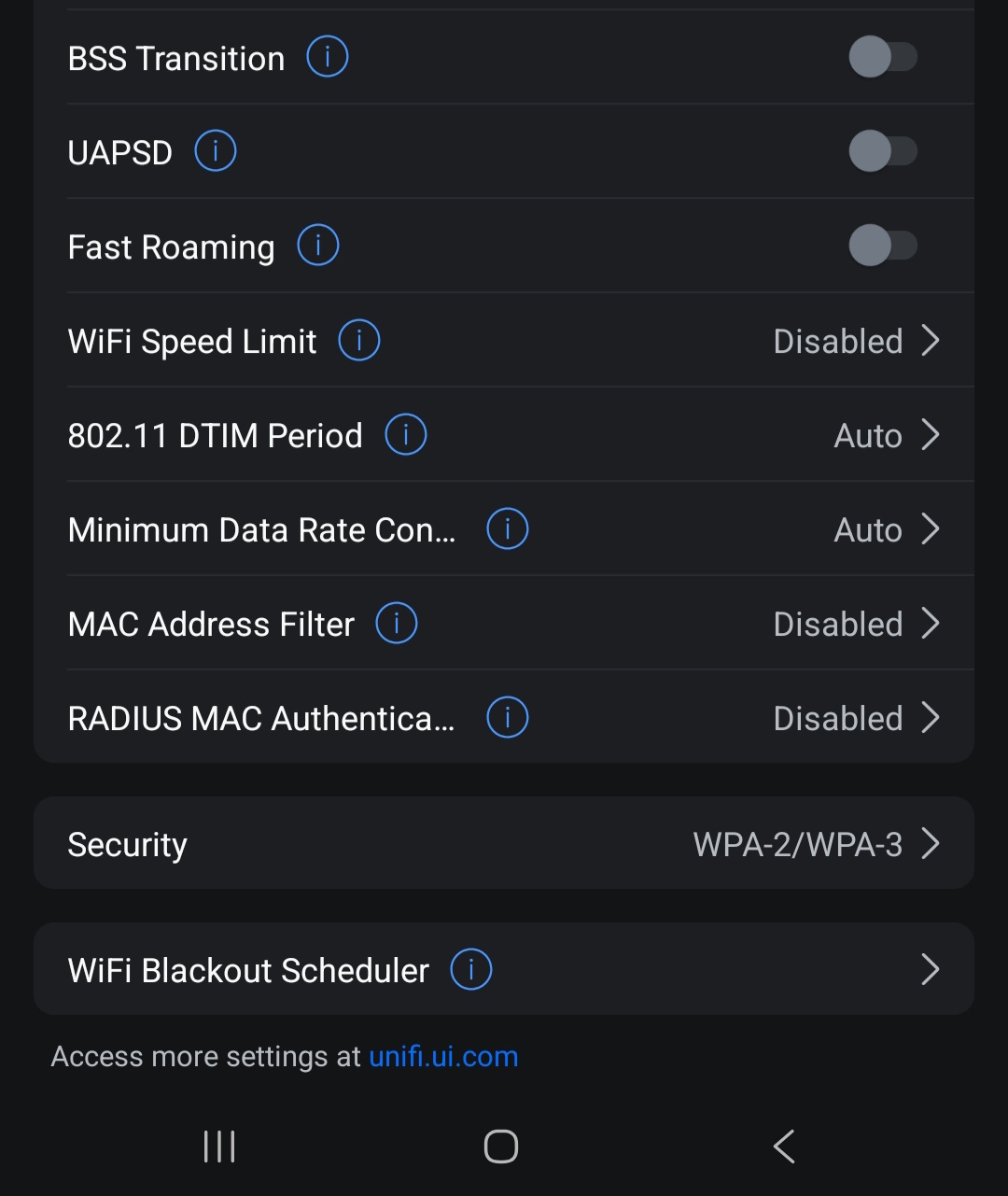
SSID Settings:
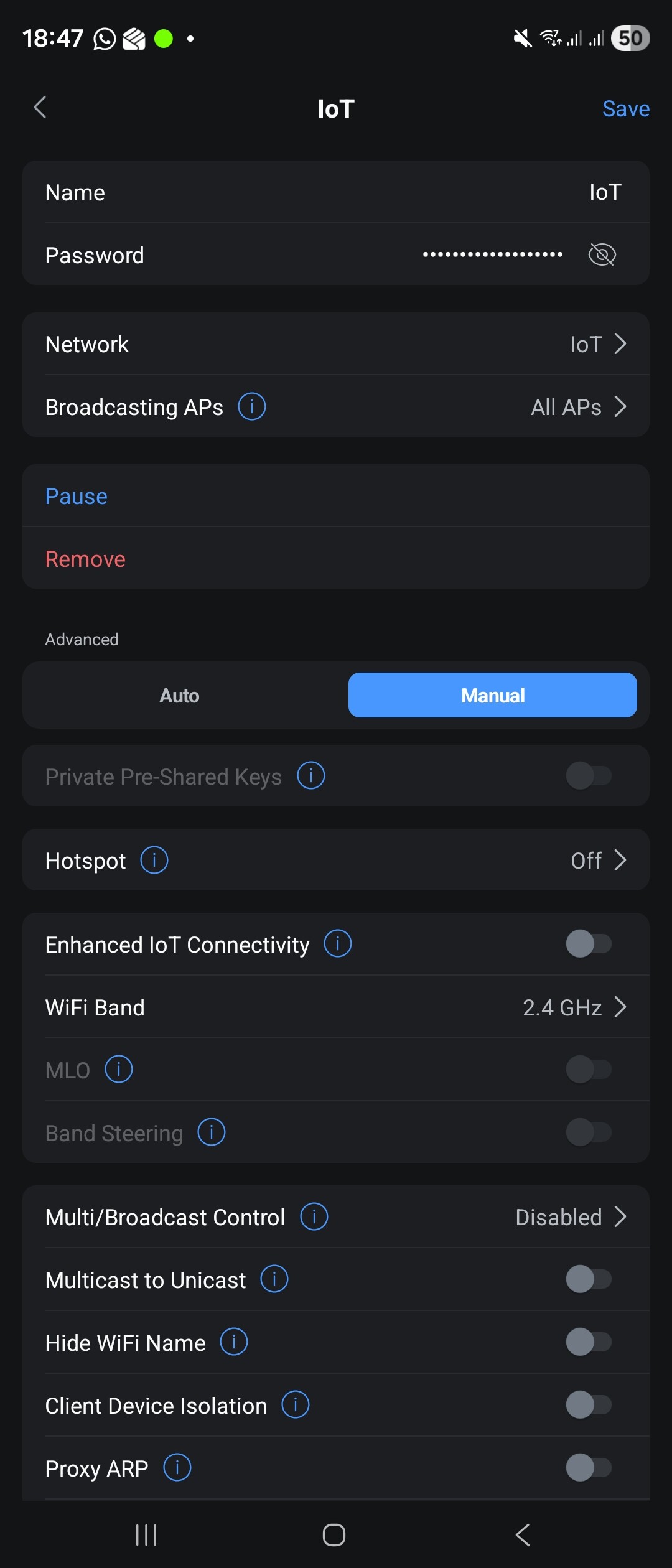
At this point, it feels like the Matter fabric on the M3 never actually initialised, even though the app insists everything is fine.

So my questions, before I lose the will to live:

  • Has anyone had an M3 stuck with Connected Ecosystems = 0?
  • Has anyone not had a “Reset Matter Fabric” option appear?
  • Did this end in a firmware fix… or a replacement hub?

I’m very close to accepting that I’ve just got a faulty unit, but I’d love to hear if anyone else has been through this particular circle of smart-home hell.

I am waiting further help from Aqara Support but they seem pretty clueless to the problem at the moment.

Cheers :beer:

3 Likes

Forgot to say that my phone is running Android 16 and is connected to the same IoT SSID as the M3 Hub. Have also attempted this with a Fire Tablet as well and it fails at the same point.

Perhaps that is the reason:

5 Likes

Yeah that’s what Aqara support asked me to do. However it unfortunately didn’t make a difference.

Did you tried just the P2 from Aqara or also some other Aqara products / 3rd party Matter devices?

Too bad, it could have been.


Resetting the hub has permanently deleted the stored Matter fabrics on that device. However, please note that your smartphone also retains a local copy of these fabric credentials. To delete them on Android 16, navigate to Settings > Google > Devices & sharing > Matter devices, select the entry, and tap “Remove device”. I hope that applies to your smartphone, as I only have an iPhone and can’t check it.


Prefix Delegation Interface WAN

This means that your Matter over Thread devices will receive a Global Unicast Address (GUA). You should change this setting, as it may cause problems later on. It is safer to delegate a Unique Local Address (ULA) prefix. That’s why it can cause problems:

But it seems improbable that the prefix changed during the pairing process, though it’s impossible to say for sure.


IP Leades: 2

Which devices are listed there?


You can also check whether mDNS is working correctly.
To do this, install the app mDNS Discovery:

  • Check if you can see the Hub under _aqara._tcp. _matter._tcp., _hap._udp. or _meshcop._udp.
  • You should be able to find the hub at least under _aqara._tcp. and _meshcop.udp.
  • Also check which IP addresses the hub has received under _aqara._tcp.
  • When adding a matter device, could you also check what is located in the mDNS app under “_matter”, “_matterc” or “_matterd”?

Finally, you can check if the Matter device is in pairing mode.
To do this, please install the following app Bluetooth Finder:

  1. Make sure your Matter device is powered on and in pairing mode (LED usually blinking).
  2. Open the Bluetooth Finder app and start a scan.
  3. Look for your device in the list. Note that it might appear as “Unnamed” or show a generic name.
  4. Tap on the device to view its details.
  5. Look for the Service UUID 0xFFF6 (often displayed as 0000FFF6-0000-1000-8000-00805F9B34FB).

Result: If you can see the UUID 0xFFF6, the device is correctly in pairing mode and broadcasting via Bluetooth. If this ID is missing, the device has not entered pairing mode correctly.

3 Likes

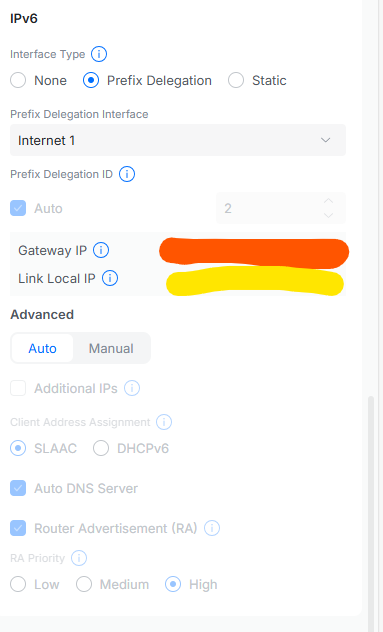
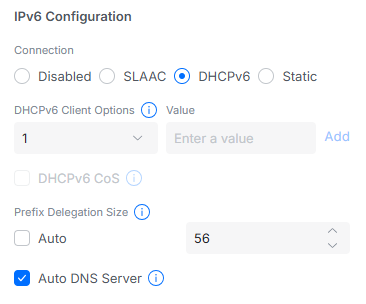
Do you have IPV6 addresses showing for both Gateway and Local link. My UCG-Ultra shows both in the Network settings as below…

The Internet settings show…

These settings (selecting DHCPv6 and 56) were provided by Sky Broadband.

1 Like

In addition to your post:

2 Likes

I’m having the same issue with my M3. Matter was working.

Had to move my network around as part of renovations. Now nothing can be added via Matter.

It’s like you get one chance. Once Matter fails it’s unrecoverable. I know a little bit about networking but some of the advanced solutions discussed here are beyond me.

Whenever this happens to me I just power cycle the router, the M3 hub and the matter device I’m trying to connect and usually that’s what fixes it for me when this happens.

It’s actually not as complicated as it seems. You don’t need to know all the background information for it to work. In most cases, the following should work:

  • Factory reset Smart Hub and Matter Device
  • On the internet router
    • Deactivate 5Ghz Wi-Fi (can be reactivated afterwards)
    • Activate IPv6 for the home network
  • Delete all old connections on the smartphone (also in the settings)
  • Set up the Smart Hub again and create a new Thread network or join an existing one
  • Make sure the Matter device is in pairing mode
  • Scan the QR code and wait to see if it works

From my own experience, I can say that you should try the last steps several times. And only if that doesn’t work should you take a closer look at what the problem might be.

If you need help or have any questions, just write to us. Many people have already written here in the forum that it worked in the end, you just have to be patient.

In addition, things will hopefully get a little better in the future with Thread version 1.4 and Matter 1.4.

1 Like

Thank’s for your help, John.

Prior to reading your last post I did try these things:

  • Remove the Matter device from Aqara Home
  • Factory reset Smart Hub and Matter Device
  • Set up the Smart Hub again and create a new Thread network or join an existing one
  • Make sure the Matter device is in pairing mode
  • Scan the QR code and wait to see if it works

I was able to add via Matter, the “Aqara Motion and Light Sensor P2” but not the H2 switches. I didn’t do anything with the router yet.

Also, I think I must have originally added the Hue Bridge to Home app using Matter because even after I did the “create and join” a new network step, in Aqara, the Hue Bridge logo in Aqara Accesories still has the little Matter badge on it (as do all it’s child devices.)

Q:
Before I factory reset the Matter device, should I be removing it from the Aqara app first, or leave it there?
Should I be removing all of the same type, or everything, or one at a time?

Here’s what is connected to Aqara Home right now.

Aqara

Cameras:
G4 Doorbell *
Camera E1
Camera Hub G3
Camera Hub G2H Pro

Switches:
4 x Light Switch H2 US

Sensors:
3 x Temperature and Humidity Sensor
3 x Water Leak Sensor
1 x Motion and Light Sensor P2

Hubs:
Hub M3
Hub M2

Philips Hue Bridge
26 x child devices of lights, plugs, sensors, and switches.

  • I heard it from an elf on the inside, Santa is giving me G410.

It’s actually the H2 Swtiches that I wanted to get working first using Matter because they’re scattered about, using constant power, so I thought they’d help everything else talk easier.

In my case I had to isolate power to my security system so I can power down the breaker to the DSC panel without killing my network, which was on the same circuit.

So I had to move all the networking, which gave me the chance to add a 10 port PoE eithernet switch, and finally do some cable management!

I think the result was everything having broken addresses, to sum up what others are saying.

So, if I understand you correctly, the Thread network is actually working fine, since you were able to successfully add the P2 sensor to the M3 after your rewiring and after resetting the Thread network, right? This means your smartphone likely has the correct Thread credentials. Therefore, the P2 sensor and the H2 switches should be receiving the correct access data for the Thread network via Bluetooth during pairing.

However, it occurs to me that the P2 is a pure Matter-over-Thread device, while the H2 supports dual protocols (Zigbee or Matter-over-Thread). So I wanted to ask just to be sure:

  • Did you explicitly select Thread mode during the initial setup of the H2 switches?
  • Which reset did you perform on the H2? Just the “Network Reset” (holding for 5 sec) or the “Factory Restore” (pressing quickly 10 times)?
  • Important: Watch the LED after the reset. Is it flashing Blue/Green? Then it is ready for Thread/Matter. If it is flashing Yellow, it is in Zigbee mode (and is often ignored by the Matter scan).

To answer your specific question: Yes, you should definitely remove the device from the Aqara app first. The app sends the command to the Matter Controller (Hub M3). The controller then deletes the Node ID and the association from its internal Fabric Table. If the entry is still “stuck” there, the Hub often blocks the re-adding of the same hardware ID.

If deleting it from the Aqara app and performing the network reset doesn’t help, the next step is to check your phone’s system settings (on iOS: Settings → General → Matter Accessories) and delete the device there if it is still listed.

My advice: If you have only done a “Network Reset” so far, please make sure to perform the full “Factory Restore” (press 10x). If that still doesn’t work, try switching to Zigbee mode (select it during setup) and then switch back to Thread mode afterwards. I saw this in a YouTube video once; the explanation was that the firmware/configuration gets fully reloaded during the protocol switch, which can sometimes solve these connection issues.

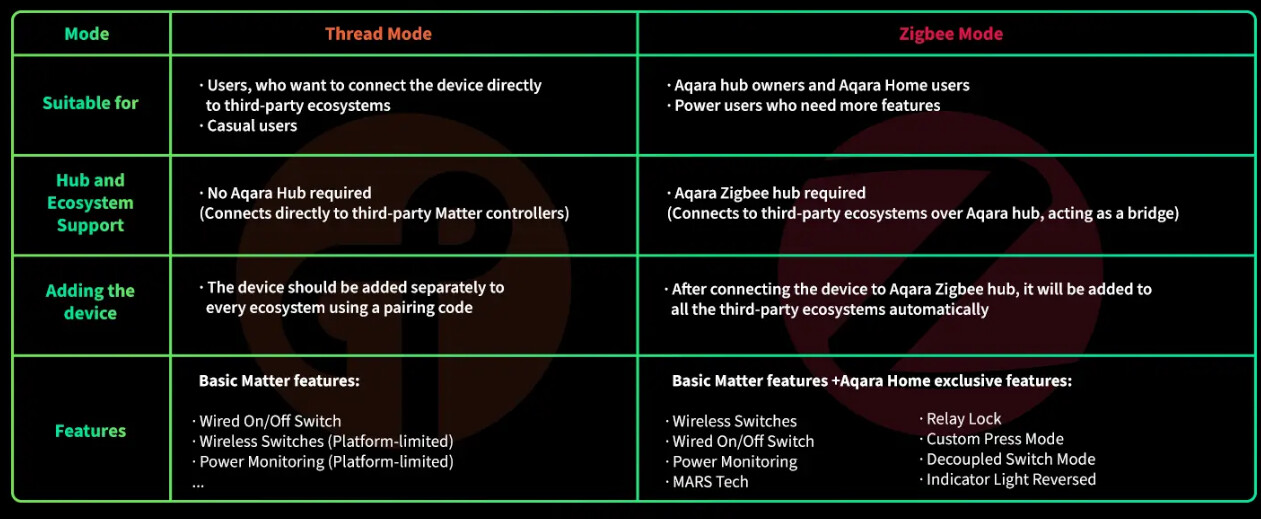
Here also a comparison of the modes for the Aqara Light Switch H2:

Based on your screenshots and description, this does not look like a basic network misconfiguration anymore. It looks like the Matter fabric on the M3 never initializes correctly.

A few concrete things worth suggesting or testing:

  1. Commission on a flat network first
    For initial Matter commissioning, avoid IoT VLANs entirely. Put the phone, Hub M3 and the Matter device on the same SSID, same VLAN, no client isolation. Only after a successful bind should segmentation be reintroduced.

  2. Verify IPv6 is truly working on LAN
    Matter over WiFi relies on IPv6 (SLAAC + RA). Ensure clients actually receive IPv6 addresses and that Router Advertisements are enabled on the LAN, not just globally “on”.

  3. Disable UniFi features known to break Matter discovery
    Temporarily turn off:

    • Multicast to Unicast
    • Broadcast / Multicast Control
    • Any advanced multicast filtering
    Leave mDNS enabled.

  4. Ensure the device is not already in another Matter fabric
    Factory reset the Matter device itself before each attempt. This applies even if it was “never successfully added”.

  5. Connected Ecosystems = 0 + no Reset Matter Fabric option
    This is the red flag. If the hub was factory reset and still cannot create a Matter fabric, that points to either a firmware bug or a faulty unit.
    If the same behavior happens on a very simple test network, I would strongly suspect RMA territory.

In short: simplify the network completely for commissioning. If the M3 still cannot bind anything and never exposes a Matter fabric reset option, it is very likely not a user or UniFi issue.

You can buy a new m3 and try. Does it work. Then are your m3 garbage…

Thread network is working, that’s right.
You’re also right about the P2 Matter over Thread only, and why it connected while Zigbee stuff did not.

The very first time I paired the H2 switches, I chose Matter over Thread.

I had the P2 sensor a couple months before getting the H2 switches. It’s just at the edge of range and occationally fails. So I figured it would help my sensor having all these switches in Thread mode. It’s not why I got the switches, just thought it would be beneficial to use that mode, especially because Thread claims quicker activation response time.

Three of the switches control lights, and I specifically went with the H2s because of the “Decoupled Switch Mode,” meaning the light socket always has power for the Hue bulbs, while still using the switch to turn them to OFF state, yet still with power to allow for automations, etc.

I discovered while setting them up that mine didn’t have decoupled switch mode, then later searched the why. As your comparison chart notes, it’s only available in Zigbee Mode. A real dealbreaker for Thread.

But wait, I only need three of the H2s with decoupled mode. Maybe I can leave one in Thread and the other three with Zigbee. No. Popup says you have to choose one protocol for all one type of device.

So I deleted them from Aqara, then put them in network reset mode. For the H2s you press the top button quickly 2 times then holding the third press for 5 sec. It’s easy to screw up the presses, and 5 seconds feels longer than it is. Just long enough for you to doubt you did the presses right, and let go. lol

Here’s that other Matter. I still connected them via Matter option, but chose Zigbee as the protocol. Just had to wait while they downloaded and flashed firmware that was Matter/Zigbee variant. It only took a couple minutes, or at least short enough for me to think it wasn’t too bad.

And all was well… until moving the network. I was thoughtful about restarting everything in the right order. When I finally launched the Aqara up I was greeted with a popup saying my switches are unusable until they have been updated blah blah blah… I was kinda distracted with power coming on to the whole house at the time I just clicked ok.

The Matter/Zigbee firmware was replaced with Aqara/Zigbee variant. That took a long time. 20min per switch, and they all go one-by-one. Not simultaniously!

Since then H2s failed all attempts of 5sec or 10sec resets through Matter. They only pair through the discovery option. It does offer to choose Zigbee or Thread. I hadn’t thought of going back to Thread, then removing and trying Matter.

Also while reading your post I checked out iOS, Settings, General, Matter.
The P2 sensor is there, because it should be… wait! There’s the H2!

I’m going to try deleting those credentials and reboot. Tomorrow. Bedtime.

Here’s what I discovered, and I’ll make this the last post as I’m off topic from OP.

The H2 switches can’t be added using Matter when they have Zigbee firmware. Fails that way.

The H2 switches can have mixed protocols on multiple units. Meaning you can have one on Zigbee and a different H2 switch on Thread.

When I used the discover device method to add the switch with Thread firmware, they icons in Accessories have the little Matter badge again.

Once the switches had the Thread firmware I removed them add tried adding by Matter. When added this way, then choosing Zigbee, it skips past the part where they fail. Zigbee firmware gets loaded, and they show up. It gives the impression that you’re succesfully added using Matter, but they’re not. Even though you start the processes by clicking the Matter button, and hear “Succesfully Added” from the M3 voice.

They actually just get added in the same way as the discover device approach. To make things more confusing, when you click on Protocol in details, wording in the dialogue reads, “…Zigbee also has Matter interoperability for cross-platform device interconnection.”

So if I add them to another platform using Matter will they then show up as connected to Matter in the Aqara app, or only in the other app? So then I’d be using Zigbee over Matter? Hmmm…

Lastly regarding Thread, in addition to no decoupled switch mode, turns out you can’t specify any other icon than lights in the Apple Home app. Your fan button must have a bulb. When added with Zigbee you can choose it to be a light, or a fan, or socket. Then you can have that cool spinning icon on your fan button.

More importantly, when the H2 is using Thread it goes to sleep after not being used for awhile, and that first press of button 2 takes like 3sec for the action to happen.

Between the lag and the icon, that’s it, I went back to Zigbee.

Anyway that’s as far as I’m taking it, thanks for the assistance John.

2 Likes

Oh I see. Hey can I ask you question how is ubiquities Wi-Fi routers. Because right now I have tp link deco Be63 wifi 7 mesh router. And I’ve had so many problems with the 2.4ghz band being so unstable. Everything else about it is great. It’s really fast. I love that each AP has four Ethernet ports. It’s the 2.4ghz that kills it. And I’ve been looking into ubiquiti routers cuz I like using their Wi-Fi man app. But I’m not sure which router to get for home use.

I had the exact same thing happen but it was with my zigbee radio.

It ended up failing while I waited for support to help me. Got rid of a bunch of my Aqara products in the process.