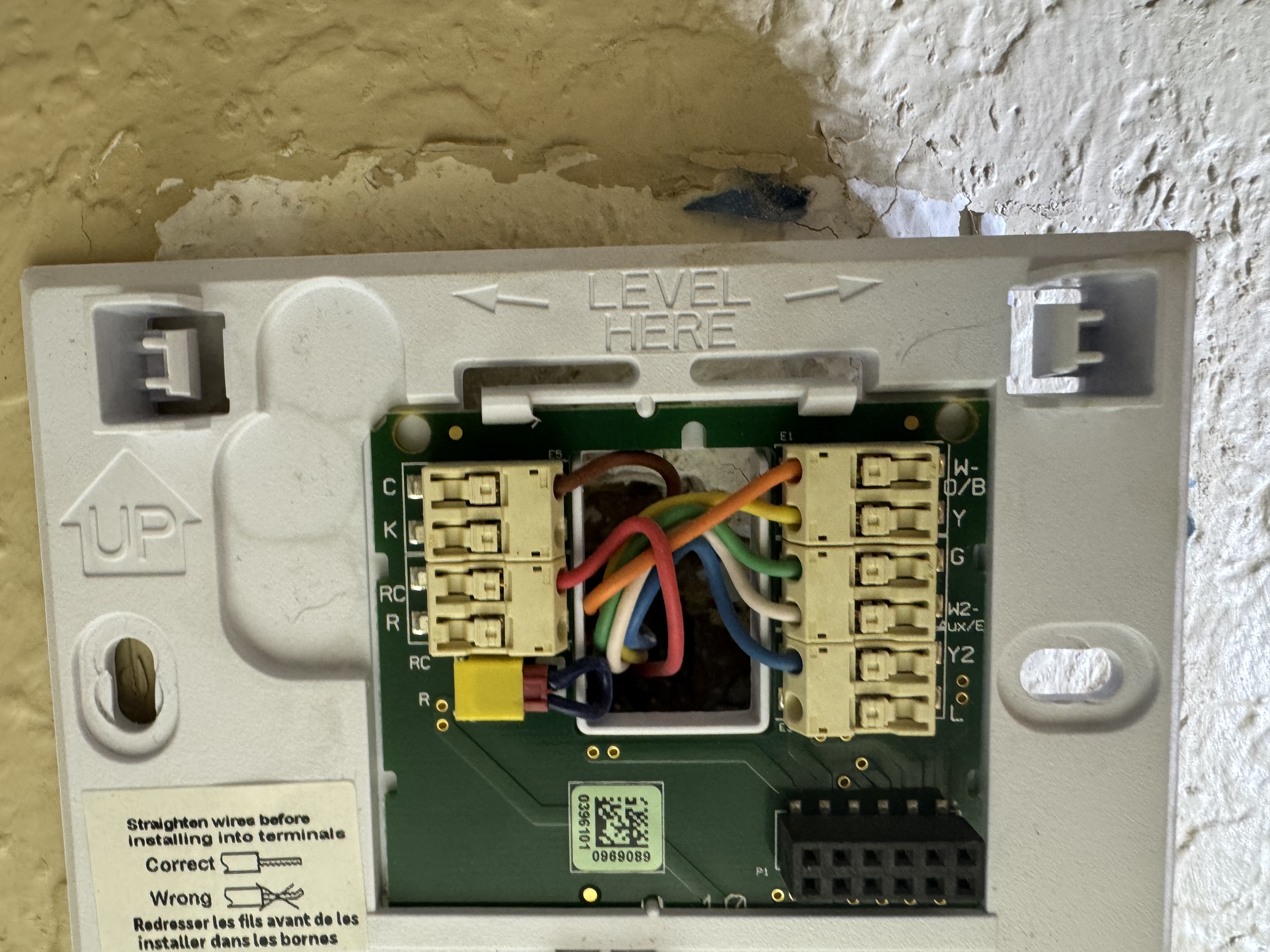
. Attached is the old wiring set up. I’m trying to figure out if this is compatible with my system. It is hooking up and turning on the fan, but not engaging the compressor.
@rcosby For Heil heat pumps, the quickest way to confirm whether the W200 supports your exact wiring (especially if you have heat-pump-specific terminals like O/B for the reversing valve, and potentially Aux/E stages) is to run your setup through Aqara’s official compatibility checker: https://www.aqara.com/en/w200-compatibility/
Since you mentioned the fan turns on but the compressor won’t engage, I’d also double-check that the W200’s wiring configuration in the Aqara Home app matches what you physically wired. You can view/adjust it here (note: rewiring clears prior settings, and if you’re using Matter it can also clear ecosystem settings): Aqara Home app → Thermostat Hub W200 → … → Device Settings → Wiring
If you share a clear close-up of the thermostat terminals and wire labels (e.g., R/Rc/Rh, C, Y/Y1, G, O/B, W/Aux, E, etc.), folks here can sanity-check the mapping—but the compatibility tool above is still the best first “yes/no” for your system.
This information comes from community discussions and user experience summaries and may vary by environment. Please verify carefully. Original post link: https://www.aqara.com/en/w200-compatibility/
If you look at the photo I posted above you can see the wiring I have checked with the wiring tool the problem is that the old thermostat has the W-O/b wire. If that goes to the O/B in the 200 it does not work if it goes to the W it is supposed to.
@rcosby If your old Honeywell terminal is labeled W–O/B, that usually means it was a combined terminal that could be configured as W (heat)orO/B (reversing valve) depending on how the thermostat was set up. On the W200 those are separate functions, so the “right” landing spot depends on what that wire actually controls on your Heil system.
A couple things you can do on the W200 side:
Re-check the W200 wiring configuration in the Aqara Home app and make sure it matches what you physically wired (and the system type you’re using). You can do this in Aqara Home app → Thermostat Hub W200 → … → Device Settings → Wiring. Note: changing wiring in-app clears previous settings (and can clear Matter ecosystem settings too).
Run your wires through Aqara’s compatibility checker again, but specifically select the option that matches a heat pump setup (since O/B behavior is heat-pump-specific): Thermostat Hub W200 Compatibility Checker | Aqara
Since you’re seeing fan but no compressor, the missing piece is often the Y/Y1 (compressor call) and/or the O/B reversing valve not being mapped the way your system expects—but I don’t have W200-specific guidance in the reference info for a combined W–O/B terminal, so I don’t want to tell you “put it on X” and have you chase your tail.
You seem to be experiencing an issue with a Heil heat pump where a combined W–O/B wire doesn’t engage the compressor when connected to O/B on the W200. You can contact customer support for assistance.
Contact the Aqara Home App Customer Service Team (Profile> Help & Feedback > Customer Service) or scan the QR code:
This will be more efficient. If you do not have an Aqara Home account, Please click here to create a ticket. Sorry for the inconvenience.
If you want, post a clear close-up of the terminal labels + wire colors and also which terminals the W200 currently has them on, and we can help you sanity-check before you open a ticket.