I have a G400 poe connected to a M3 hub. The G400 is at a remote gate connected through fiber. Is there a way of adding a voice file notification that plays off the M3 instead of the preprogrammed doorbell or alarm selections? Something like “Someone has requested gate access”
I don’t think there is a way to play off the M3
You can do it from the G400 or if you use Home Assistant you can do it from an automation real easy.
Here is a possible way to play off the G400 doorbell if you can upload your own sound file “Someone is at the Gate”
You could also use a motion sensor at the gate to add an automation alerting you “Someone is at the Gate” also.
There are several options
.
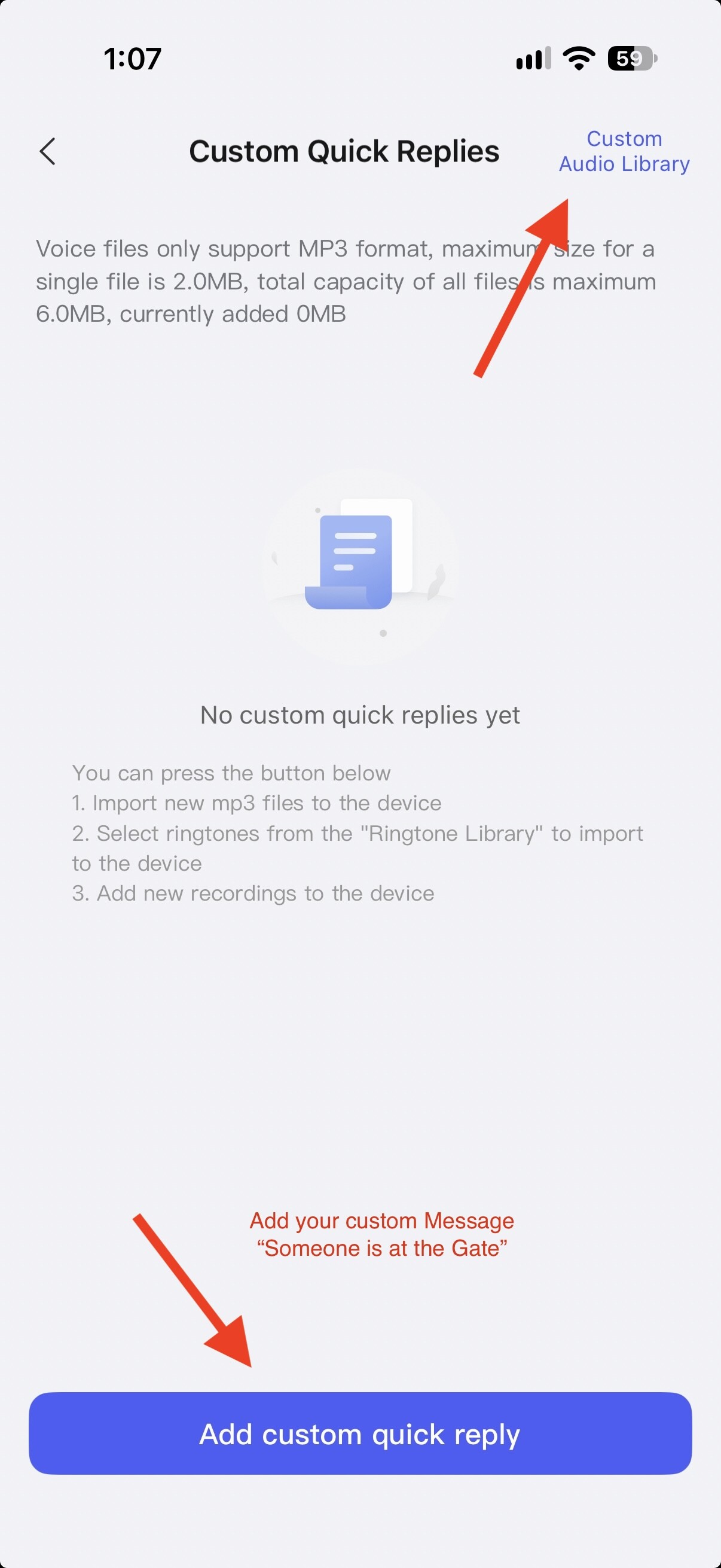
The Aqara G400 populates its Custom Audio Files list directly from the Custom Quick Replies library. Because the ringtone menu doesn’t include an import button, you must first upload the audio to the quick reply section.
Step 1: Upload the Audio File
-
Prepare an MP3 file that is under 2.0 MB.
-
From your first screen (Custom Quick Replies), tap the blue Add custom quick reply button at the bottom.
-
Choose your upload method:
-
Select Import new mp3 files to the device (to browse files from your iPhone / Files app).
-
Or choose Add new recordings to the device to record audio directly using the mic.
- Name the clip and save it. Wait a moment for the file to upload and synchronize to the doorbell hardware.
- Verification: The new sound should now appear listed on the Custom Quick Replies page instead of showing the “No custom quick replies yet” placeholder.
Step 2: Assign it as the Doorbell Ringtone
-
Navigate back to your G400 device settings in the Aqara Home app.
-
Go to Sound Settings > Doorbell outdoor unit ringtone (your second screenshot).
-
Look directly beneath the Custom Audio Files header. Your newly uploaded MP3 file will now be listed there.
-
Tap the custom sound to select it (a blue checkmark will appear next to it).
- Verification: Press the outdoor doorbell button physically. The custom audio file will immediately play from the outdoor unit rather than the default chime.