Hi, my Aqara U200 isn’t showing up in the CarPlay widget while my garage door opener is. I’ve asked in an Apple forum and it seems the U200 is only recognised as a lock not a door. Has anyone else found a workaround? Other than that it is working well.
7 Likes
One workaround would be to use it with HomeAssistant if it’s an option for you.
8 Likes
It is as I run HAOS also but still, I cannot make it show on the carplay widget, only the garage door.
1 Like
I’ll try it later when I have my car back, and I’ll get back to you after I’ve done some tests.
4 Likes
Hello! I can try it this evening.
I’ll let you know!
3 Likes
Thank you.
1 Like
Thank you too.
Should it do that ?
1 Like
I’ve been doing this for a while with my two locks.
Adapt this to fit your needs
Goes in your configuration yaml
template:
  - cover:
      - name: "Back Door (CarPlay)"
        unique_id: back_door_garage_fake
        device_class: garage
        state: "{{ is_state('lock.aqara_smart_lock_u200_lite', 'unlocked') }}"
        open_cover:
          - action: lock.unlock
            target:
              entity_id: lock.aqara_smart_lock_u200_lite
        close_cover:
          - action: lock.lock
            target:
              entity_id: lock.aqara_smart_lock_u200_lite
2 Likes
I’ve never had a lock show up on CarPlay. Only garage doors.
2 Likes
Using home assistant you can baskcally create a fake garage door linked to the smart lock.
Like I say. I’ve been using this now for ages and it works perfectly
2 Likes
Hello,
I tried this morning. My u200 shows correctly on the widget in apple CarPlay
2 Likes
Thanks everyone, this community forum is incredibly reactive, helpful and refreshing.
So regarding the u200 in CarPlay, while it’s possible, it doesn’t seem to be standard behaviour.
@agurusso_93 do you have a special setup? Are you using a hub or homeassistant?
Hello I have the m3 hub of Aqara. No special setup, I added it in apple
Home. Did you customize your widget in apple
CarPlay with your accessories that you want to see?
1 Like
There is no Aqara widget that i know of.
But the homeassistant widget does the trick.
Still, it is strange that you managed to get it on CarPlay without any trickeries.
Ehm… no wait… I added it via apple home widget. Not Aqara widget…
To be clear.
The code I posted above will allow apple carplay to show the lock natively while in the combined apple screen (the one showing the map as half a screen) When you get into range of your home the lock will appear on the bottom of the screen allowing to you interact with it. When leaving home the lock will show until you pass a certain distance and then it will disappear.
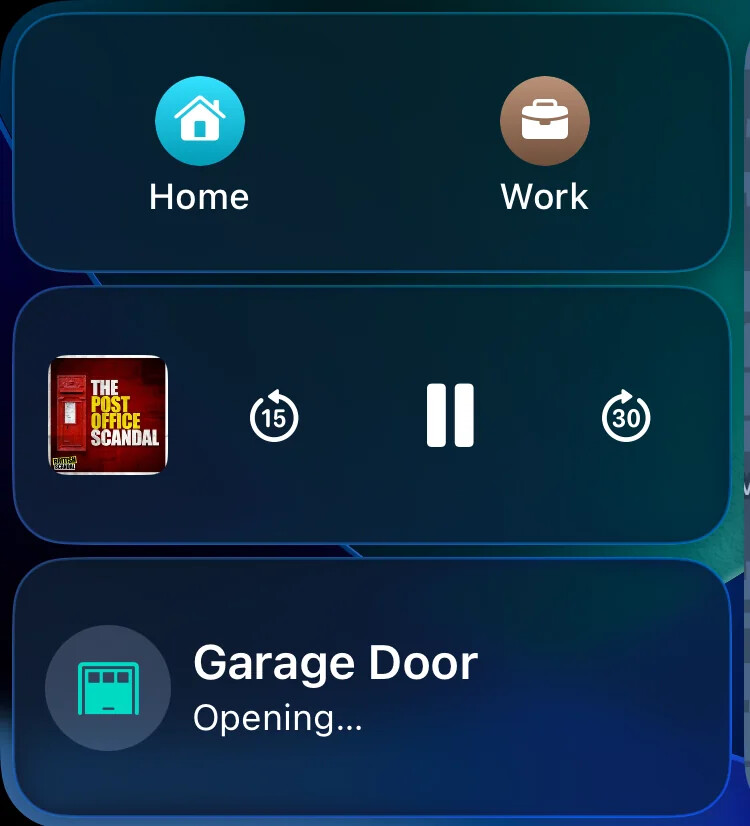
It is a “hack” by using home assistant, but by using the code I posted to create a “cover” inside home assistant and then exporting that new entry via homekit bridge to homekit.
2 Likes
IMO this is the most elegant way to do it.
Thanks @Hatton920 for the hack.
1 Like
Right, I’ve done this before as well…
I was more-so questioning whether locks in general should show up in CarPlay - thinking of the Siri Suggestions/Intents. But after digging into the settings a bit more, I guess @agurusso_93 means via widgets. You can turn on the Apple Home widget and select which devices you want displayed.
Your welcome.
Chatgpt helped me a lot when I was doing it.
Been working great since I did it a few months ago.
Bit of a warning tho - I live in the UK and my doors require the handle being pressed up before it can lock. Using this hack it reported the door was closed when in fact it was jammed, so I used the signal sync inside the aqara app to send a signal when the door is jammed and I have an automation that picks it up and reports that it is still opened using the following code
 - cover:
    - name: "Back Door (CarPlay)"
      device_class: garage
      unique_id: back_door_garage_fake
      state: >
        {{
          is_state('lock.aqara_smart_lock_u200_2', 'unlocked')
          or is_state('input_boolean.back_door_jammed', 'on')
        }}
      open_cover:
        - action: lock.unlock
          target:
            entity_id: lock.aqara_smart_lock_u200_2
      close_cover:
        - action: lock.lock
          target:
            entity_id: lock.aqara_smart_lock_u200_2