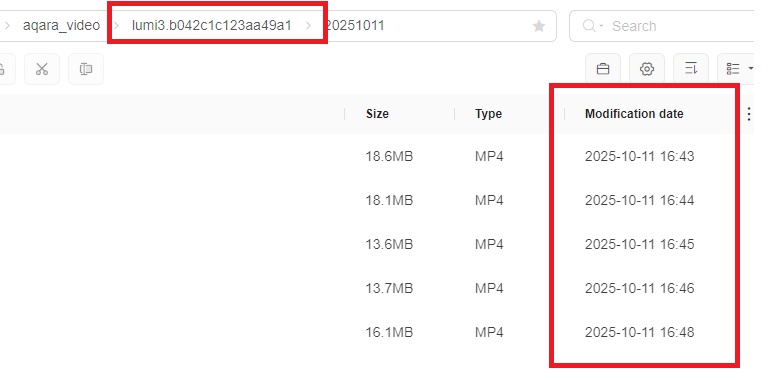
I’d like to request a new feature for consideration.
When 7 x 24 Direct Storage is enabled in the NAS settings with the Rolling Storage option, it would be helpful to have the ability to customise the folder name and adjust the recording interval. Currently, the interval defaults to 1 minute, which results in a large number of small, segmented files.
@DougD Hey D! Thanks for sharing your thoughts and suggestions for new features. I’m sorry, but I couldn’t find any relevant information regarding customizing the folder name and adjusting the recording interval in the NAS settings when 7 x 24 Direct Storage is enabled with the Rolling Storage option.
Community collaboration is always a great way to drive improvements! If others in the community have any ideas or experiences related to this, feel free to chime in.
If you have suggestions or suggestions for improvement like this one, I’d recommend submitting manual customer service feedback. You can do this by going through the Aqara Home App (Profile>Help&Feedback>Customer Service) or scanning the QR code:
. If you don’t have an Aqara Home account, you can click here to create a ticket. This way, your valuable input can reach the relevant team for consideration. Let’s work together to make the Aqara Smart Home experience even better!
@DougD Thanks for sharing your feature request, D! It’s great to see you thinking about how to optimize the NAS storage experience—custom folder names and adjustable recording intervals could indeed make managing those segmented files much smoother.
Currently, the reference information we have doesn’t cover details about customizing folder names or adjusting recording intervals for NAS rolling storage. We appreciate you bringing this up! For feature suggestions, the best way to ensure your voice is heard is to submit feedback through the Aqara Home App (Profile > Help&Feedback > Customer Service) or by clicking here if you don’t have an account. This helps our team track and evaluate user needs effectively.
Feel free to share more about your use case with the community—other users might have similar experiences to add!