The Problem: Push Notifications Are Always Too Late
Most smart homes handle “leaving the house” with a phone notification when a window or balcony door is left open. By the time that alert buzzes in your pocket, your shoes are on, your hands are full, the front door is closed behind you, and you’re already halfway to the elevator or down the street.
Even worse: if a simple automation just flashes a warning whenever a window is open and the front door opens, it ends up nagging you when you are actually arriving home, when you are just opening the door for a delivery driver, or when someone else is still inside enjoying the fresh air.
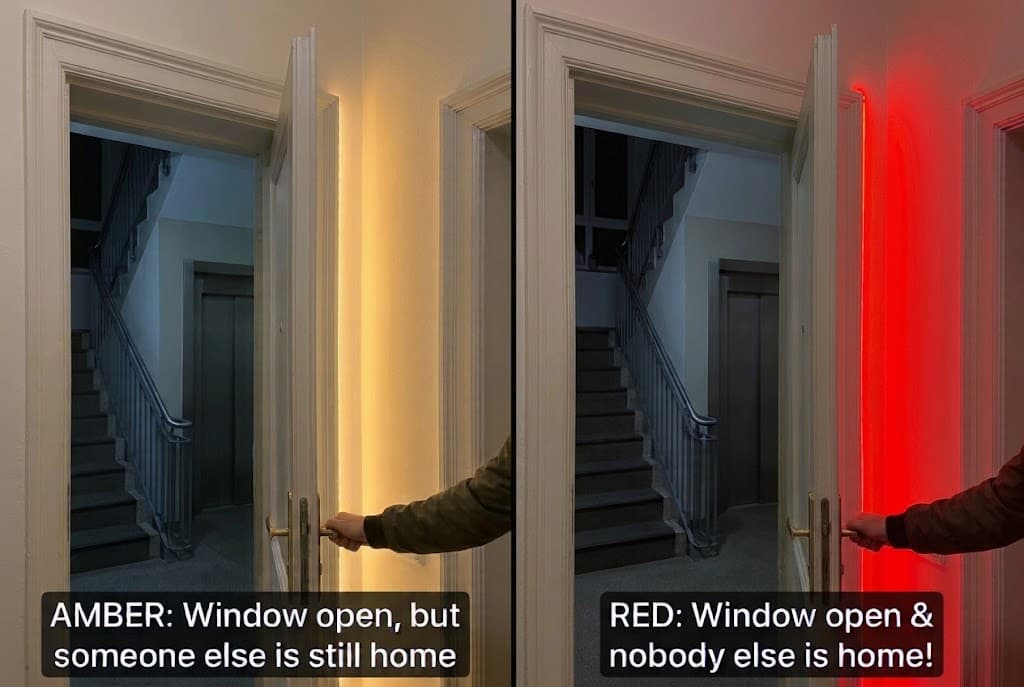
To fix this, I built a smart exit warning system driven by Home Assistant. The instant I open the front door to leave, Home Assistant checks the state of all doors and windows alongside the live occupancy across the apartment, and uses an Aqara LED Strip T2 (which I was lucky enough to be able to beta test) right at our main entrance to signal the result before I even step across the threshold.
The Hardware Lineup
My setup consists mostly of Aqara devices, alongside a few sensors from other brands, all integrated locally and orchestrated through Home Assistant:
-
Main Entrance Trigger: Aqara Door and Window Sensor P2
-
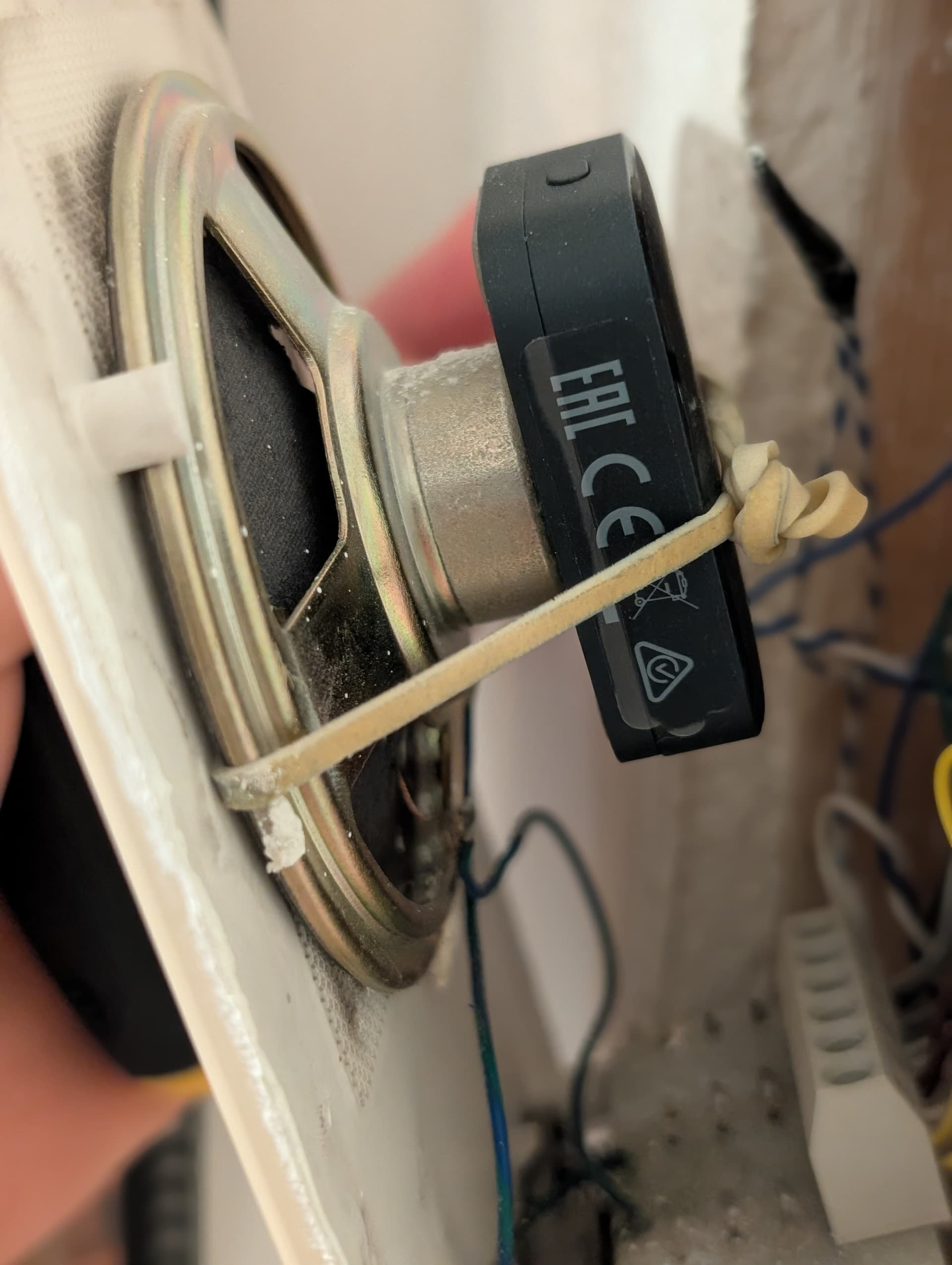
Doorbell Check: Aqara Multi-State Sensor P100 (attached to the speaker housing of my existing apartment intercom chime in Object Monitoring mode)
-
Perimeter Check: Aqara P2 and third-party contact sensors on windows and patio/balcony doors
-
Direction & Whole-Home Occupancy: An Aqara Presence Multi-Sensor FP400 covering the entryway and main living area, plus two Aqara FP300 sensors covering the other rooms
-
Visual Signal: Aqara LED Strip T2 installed near the front door.
How the Logic Works
The moment the P2 sensor on the main entrance door opens, Home Assistant evaluates three things in milliseconds:
1. Are we coming, leaving, or just answering the door?
Before checking any windows, Home Assistant figures out why the front door just opened:
-
Coming vs. Leaving (via FP400): Home Assistant checks the FP400 zone right in front of the entrance door just before the door opened. If that zone was unoccupied beforehand, someone is arriving from outside, so the automation stops right there. If it was occupied, someone is inside opening the door.
-
Answering the Doorbell (via P100): Even if someone opens the door from the inside, they might just be letting a guest in or taking a package. To handle this, I added a little extra smartness using my “upgraded” retro doorbell (I attached an Aqara P100 to the back of our old intercom chime with a rubber band to pick up ringing vibrations, as I shared in my earlier post: Upgrading my old doorbell chime with the Aqara P100). If the P100 detected a doorbell ring shortly before the door opened, Home Assistant knows we are just letting someone in and suppresses the exit warning altogether.
2. What should the LED Strip T2 signal?
If someone is genuinely leaving the apartment, the LED Strip T2 reacts immediately based on the window states and whether the FP400 and FP300 sensors still detect presence in any other room or zone:
-
All Windows & Doors Closed: The LED Strip T2 stays in its normal state (no warning). Everything is shut and you are good to go.
-
Window/Door Open + Someone Else is Still Home: The LED Strip T2 flashes Amber. Because the FP400 or FP300 sensors still detect someone in another room, this acts as a gentle heads-up that a window is open, but you don’t need to run back and close it.
-
Window/Door Open + Nobody Else Left in the House: The LED Strip T2 flashes Red. All other zones are clear, meaning you are the last person leaving and a window or balcony door is still open.
Why the FP400 + FP300 Combo Makes This Possible
Standard PIR motion sensors fail at this scenario because if someone is sitting quietly on the sofa or working at a desk when you open the front door, PIR thinks the house is empty.
-
By combining the FP400 and the FP300s across the rooms, Home Assistant knows reliably whether another room is still occupied when I walk out.
-
Differentiating between Amber and Red completely eliminates “alert fatigue.” When the LED Strip T2 flashes Red, muscle memory kicks in immediately. I pause before taking another step and go close the open window.
What’s Next: Future Ideas for the Exit Strip
Now that the core “coming vs. leaving” detection and LED signaling are working reliably, I’m thinking about extending the LED Strip T2 with a few more color cues when I open the door to head out:
- Trash & Recycling Day Reminder (e.g., Green or Yellow Pulse): Checking our local waste collection calendar in Home Assistant and flashing a specific color if the trash, paper, or cardboard needs to go out that morning.
- Rain / Umbrella Warning (e.g., Blue Pulse): Signaling when rain is forecasted for the next few hours so we don’t forget to grab an umbrella on the way out.
- High-Power Appliance Check (via Power Plug H2): Checking my Aqara Power Plug H2 to warn if an appliance that shouldn’t run unattended is still drawing power when the last person leaves.
What else would you add to an exit status strip like this? If you have cool ideas for other checks or color signals to trigger right as you walk out the door, share them in the comments!
If anyone wants to build something similar for their own home (whether you’re looking for the Home Assistant logic, how to track the “coming vs. leaving” zone and doorbell state, or how to restore the LED strip’s previous state after flashing), just drop a comment below and I’m happy to help!