I have multiple Aqara devices in the Aqara app that were automatically added to my SmartThings app after linking it with the M3 hub (all Zigbee devices). But two Thread devices can’t be added (even manually):
Aqara Door and Window Sensor P2
Aqara Motion and Light Sensor P2
When I try to connect them to SmartThings (using the Aqara Home app “Matter Pairing Code” feature), the devices are recognized but get stuck on the last step (“Registering Device” screen) and after few minutes the ST app throws error code 39-517.
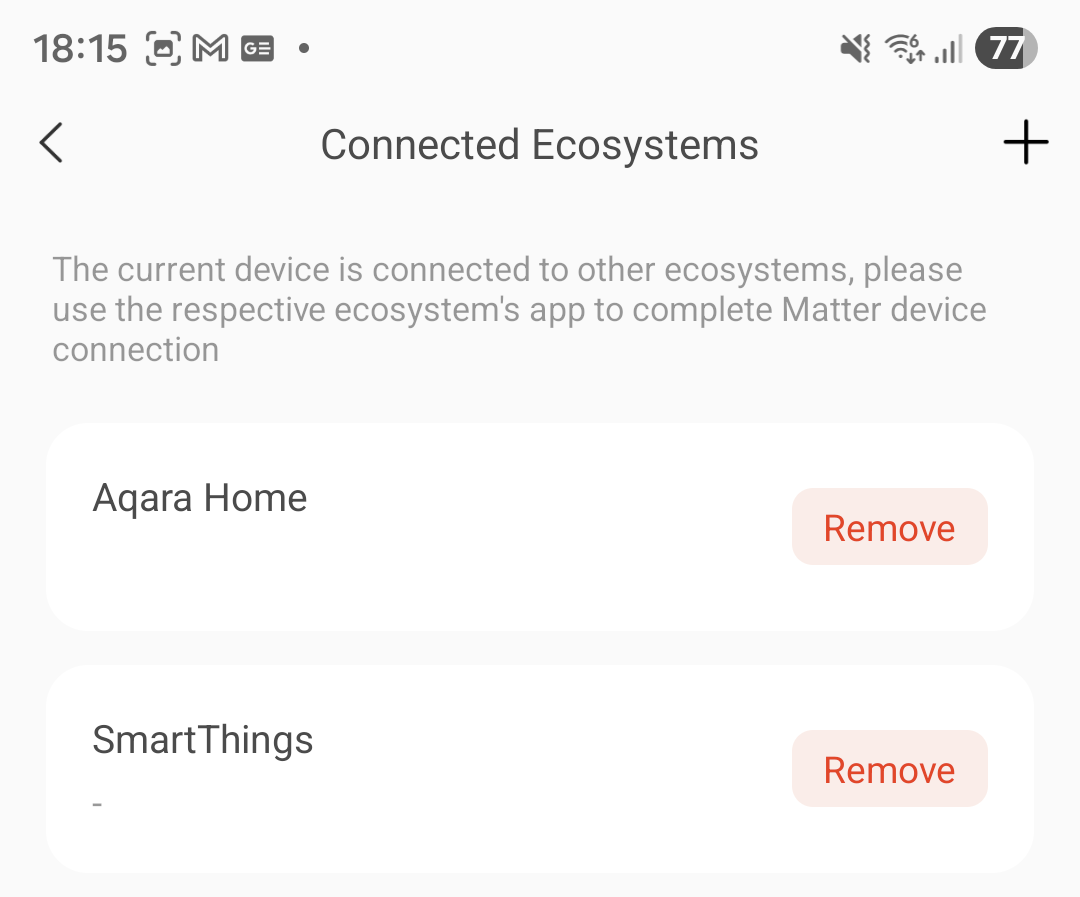
I also noticed that before the pairing process fails, the ST is present in the sensor’s connected ecosystems list in the Aqara’s app but dissappears after that error.
When I try to do it the other way around (first add the device to the ST hub’s network in the ST app and then share it to the Aqara app) it works but my intention is to connect it to the Aqara hub as it is closer.
I suspect that the error occurs because ST is trying to add the sensor to its own Thread network but it’s already connected to the Aqara network so it fails (if I turn off the ST hub I can’t even start the matter device adding process in the ST app). Shouldn’t the “share to other ecosystem" process retain the original network?
Is there a way to add these devices to ST app retaining the Aqara Thread network?
Disable your 5GHz Wi-Fi and ensure that all devices are connected via LAN or 2.4 GHz Wi-Fi. IPv6 must be enabled on the local network. IPv6 does not need to be enabled for the Internet connection. Delete the devices in the Aqara Home app, SmartThings, Apple Home, etc. If you are using an iPhone, go to Settings > General > Matter Accessories. Delete the devices you want to reconnect here as well. Perform a factory reset of the device. Start pairing in the Aqara app with the Matter code on the device. If it was successful go to the Aqara app, select the accessory, select General Settings > Third-party Matter ecosystem > Matter pairing code, and use the code to connect it to SmartThings.
If it still doesn’t work, check the threat network. Use an app such as Discovery DNS SD browser. Search for “_meshcop._udp.” All hubs should be listed there. Check whether they all use the same name under “nn=” and which version is displayed under “tv=”.
I disabled 5GHz Wi-Fi and nothing changed. Then I tried disabling WiFi6 and WPA3 but it also didn’t help. I don’t think it’s the source of this problem as I use shared 2.4/5GHz SSID anyway and these devices don’t use Wi-Fi.
I checked the Thread network in the DNS app and it found the Aqara network and also 2 Samsung networks (from TV and soundbar). They all have the same “tv” version (1.3.0) but different “nn” parameter (“AqaraHome-xxxx” for M3 Hub and “ST-TIZEN” for both Samsung networks) but I think it’s supposed to look like this.
I also changed the connection for the M3 hub from Ethernet to WiFi but for some reason after doing so the pairing process couldn’t even start in the ST app (first step after entering the Matter pairing code fails to find the device, I deleted the P2 sensor from the apps and reset it but it didn’t help).
BTW I also had to re-add the M3 Hub to the ST app and organize all of the devices again… (the hub previously added using ethernet was not recognized as the same device for some reason). Overall, the device pairing process seems to pass the first step only with the M3 in ethernet mode so I connected the hub using the ethernet again.
Here is a screenshot from the Aqara app - as I wrote earlier, during the “Registering Device” step, the ST ecosystem is visible for a few minutes but shortly before the “31-517” error it disappears (I noticed that the blue LED in the P2 sensor blinks in that moment):
I don’t know what can I do more to fix this, I’m checking this issue every few months to test if something got fixed but eventually I’m wasting few more hours and get nothing.
One more thing - I noticed that both of these devices have newer firmware versions in the database (probably adding Matter 1.4.0) but both are not available in the Aqara app for some reason: Distributed Compliance Ledger
My Door and Window Sensor P2 is still using the 1.0.0.0 version (1.0.2.0 available in the database) and the Motion and Light Sensor P2 uses 1.0.2.0 version (1.0.3.0 in the database).
Your smartphone, all hubs, and all boarder routers don’t use Wi-Fi?
I only know that shared 2.4/5GHz SSIDs can cause problems. So it’s worth trying to pair with 5GHz turned off.
Okay, so you have two separate thread networks. The goal when using Matter is to actually have a single, large Thread network. If all your devices (e.g. the Aqara M3, your Samsung TV and your soundbar) were on the same network, they would amplify each other and improve the range (i.e. they would form a mesh network). All your devices are running Thread version 1.3, which means they can technically connect to form a single network.
This is also due to the separate networks. The Aqara Hub manages the devices in its network separately, and the ST hub manages its devices in its network. If you switch off the ST hub, there will be no Broad Router for SmartThings.
Actually, yes, but there can be problems with two networks. The Matter controllers themselves decide which network a new device should join. Parallel thread networks should be avoided.
Apple writes Thread credentials to its keychain and makes them available to others. That’s why I suggested deleting it. I read somewhere that it may be stored in Google Play Services on Android, but I can’t tell you where exacly.
Here’s a reading tip. Especially point 10.
Aqara promises to recognise Thread networks that have been set up by Border Routers from Google. The Aqara hub should then join them automatically. It’s strange that this isn’t working for you.
This article may be helpful:
But the technology is still in its early stages and, if I understand correctly, it only works with an external SmartThings hub. However, it doesn’t hurt to check whether the option is available.
I was able to update my P2 via Home Assistant, but this option was not available in the Aqara app. This may be the reason:
Is that still the reason?
That’s exactly right.
Take a look at this video (it’s best to set the audio to English):
As an alternative, try connecting all Matter sensors to the Aqara Hub and then adding your SmartThings account in the Aqara Home app via the ‘Connect to Ecosystem’ option and selecting ‘SmartThings’. However, this may result in Zigbee devices being displayed twice in SmartThings, as you are already using the Matter Bridge. You will then need to remove the Matter Bridge.
In fact the TV and Aqara hub use Ethernet in my case, only the backup Soundbar hub and of course phone use WiFi I meant that the Aqara P2 sensors don’t use WiFi so in my config the WiFi config probably isn’t the source of the problems.
Yeah, just today I read that Samsung update their hubs in September to support two functions important here:
With 2-way Thread network unification, SmartThings becomes the first major platform enabling Border routers from different ecosystems to join our Thread network, or vice versa. This enhancement makes setup easier, extends coverage, and delivers the performance users expect.
Added support for 3rd party Matter HRAP (Home Routers and Access Points) device types: Thread Border Router (TBR)
Unfortunately the TV/Soundbar built-in hubs always get new features some time later (as this forum suggests) so maybe Thread Unification will finally solve my problems in a near future I don’t think Aqara hub has ability to do it at this moment - In the “Change Thread Network” only the Aqara network is available.
Actually I found a list of Matter devices in “Android Settings” → “Google” → “All services” → “Matter devices”. There were two devices listed (probably the P2 sensors) so I deleted them. I managed to add the P2 sensor to Google Home account in this menu and it appeared in the “Connected Ecosystems” list in Aqara app but if I try to share it to the SmartThings app it fails with the same error as with the Aqara App which suggests that the problem is on the ST side.
BTW You can also check the available Thread networks in the same menu (“All services” → “Thread Networks”) - the Aqara network is listed as “preferred” here.
This would probably work if I had a Google Nest - in the Aqara App you can even import and join Google Home thread network.
Yeah, for the Door Sensor P2 has Aqara blocked the firmware updates (“Software Version Valid: false”). For the Motion Sensor P2 it’s not blocked but it doesn’t find the update in the Aqara app. Thanks to your suggestion I quickly set up a Home Assistant server on a virtual machine (never used HA before) just to update the Motion Sensor to the newest firmware but unfortunately it didn’t fix the pairing issue.
I’ve already had the ST account linked to the Aqara account but only Zigbee devices are automatically appearing in the ST app (also I’m not really sure if this is because the account connection or M3 hub in the ST app).
Thanks for a detailed response, I thought that Matter/Thread configuration is rather simple but there is a lot of hidden settings to remember As I mentioned, now I have to wait for a new Samsung hub firmware that should allow Thread network unification.
What do you mean by backup hub? You can set the primary Matter hub, but you cannot choose the primary Thread border router. The Thread border routers determine this automatically. Only the primary Thread border router establishes the connection to the LAN/WLAN; the other Thread border routers do not route anything to the home network. The P2 sensor only has a connection to its nearest Thread boarder router (in the best case). If you’re unlucky, the soundbar is the primary router, which acts as a bridge between the home network and the Thread network. If your hub is on the 2.4 GHz network, your smartphone is on the 5 GHz network, and your Wi-Fi router does not forward the completion confirmation (multicast packets) cleanly between the bands, then you have a problem.
Okay, I didn’t express myself clearly. It should actually work with all Thread networks, as long as the Aqara app has access to the Thread credentials on your Smartphone.
Sorry, I’ve misunderstood. I thought you were using the Matter Bridge. I knew it only passed through ZigBee devices, but I didn’t know this also applied to using the ‘Connect to Ecosystems’ function in the Aqara Home app.
With Thread 1.4, a border router can share its access data with others on request. Regardless of the smartphone operating system or the Matter platform used.
The new Matter 1.4 standard includes the new device type “Home Router and Access Point” (HRAP), which has a secure storage area where Thread credentials can be stored.
I am therefore not sure whether the Aqara Hub also needs to learn Thread 1.4 first.
I meant the Hub Group function in the SmartThings app - I have the TV set as the primary hub (ethernet) and the soundbar (WiFi) secondary hub is supposed to be only used when the main hub goes offline:
Hub Backup increases resiliency by allowing secondary hubs to act as backups if the primary hub goes offline. In such cases, users receive a notification about the disconnection and assistance with diagnosing the issue. If reconnection is not possible, users can select another hub within their Hub Group to become the new primary hub. The Hub Manager then guides users through the process of transferring all devices and routines to the new primary hub, ensuring seamless continuity. If a user does not take action within ten minutes of the primary hub going offline, transfer to an available secondary hub will happen automatically.
Both M3 hub and TV hub have Matter 1.4 already but as you said Thread 1.4 has some improvements that may be necessary for it to work in my case. Thread 1.4 should be included if the next ST hub update but I’m not sure about Aqara M3 as they have been promising a Thread 1.4 for months.
This will probably be the same as with Aqara or Apple. You specify the main router for Matter and/or automation, and so on, but the Thread Border Router is automatically selected according to the Thread standard.
I assume that the Thread Border Router with LAN will be selected automatically, as this will have the lowest latency. However, under unfavourable circumstances, the WLAN hub can also be selected as the primary Thread border router.
That was the only thing I could find. However, it still sounds very vague.

 I meant that the Aqara P2 sensors don’t use WiFi so in my config the WiFi config probably isn’t the source of the problems.