Hy All
I have integrated the Switches H2 EU via hub M3 in Home Assistant as Matter.
I am unable to see the event double-pressed.
AM I missing something?
Thanks
Hy All
I have integrated the Switches H2 EU via hub M3 in Home Assistant as Matter.
I am unable to see the event double-pressed.
AM I missing something?
Thanks
Hi mate, double press and long press options are only available using Aqara Home via Zigbee. For other ecosystems only single press is available.
Thank you @Cifer_Aqara
I have also a H1 wireless switch and the event double press and hold are available in Home Assistant. I think is more related to the H2 switches
Yea for wireless switch with no relay switches we do support these actions you are right. But for the in-wall ones, it’s not, unfortunately
This should be true for the main button with the relay but not for the second one that is a wireless switch.
Looking online and also on this forum it seems that works but only via zigbee integration, not with matter integration in Home assistant
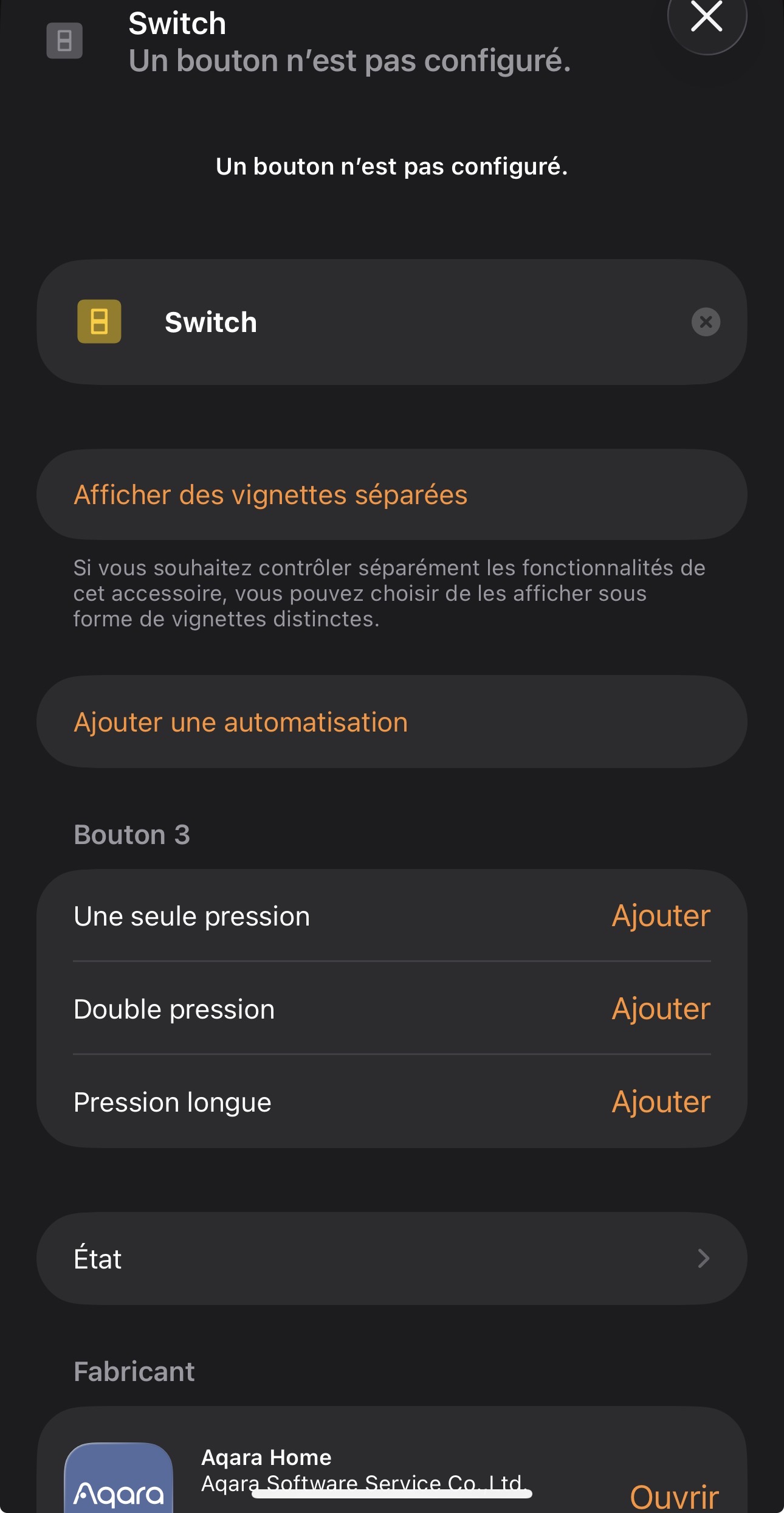
I ve purchased some H2 4-buttons, and initialy I was dissapointed I couldn’t have the double click in home assistant, via homekit.
suddenly, it appeared though!! the strange thing is that it does not work for all of them. Below you see two images of the available triggers in a ha automation.
do you have the same the behavior? there is no firmware update available. So, how do i get them all to have double and long clink?
I’ve implemented the switch via aqara hub M3 and used Matter as protocol.
In my case, still nothing on the double press.
I can see that your implementation is via HomeKit.
I actually created an automation that checks if the button is pressed twice within a second 
cant you use signal to pass through the double press if its not showing for you, I know its a pain but it should work.
in home assistant create a button helper, call it h2 double press (living room or which ever room its in).
Then in aqara app profile connect to eco systems then create a signal for the double press?
then just automate when that signal is activate it presses the input bootlean
(the reasoning behind having the automation and bootleen is incase you ever need to restart or reset the m3 and messing up the signal, sometimes home assistant will play silly and kill the automation the disable it.
If you do it this way you have a option to just change the trigger in automation for the bootleen if tthen signal ends up with a different name
I didn’t know about signals.
I didn’t test it yet, but via Aqara app (profile-> connect to ecosystems), I created a signal for the double press and chose Matter as ecosystem. In this way I can see directly a new device under matter integration in Home Assistant.
Thank you!
Any update on this topic, I just purchased the H2 EU DOBBLE DOCKER for the longpress feature that is listed in the zigbee2mqtt page and it doesn’t show in home assistant. I never get the long press… I want to one dimmer per button but it doesn’t work without the long press. Thanks for your help
Thanks, @Cifer_Aqara, is there a plan to add this support to Matter in the future?
My H2 EU is connected directly to a ZBT-2 and I would really appreciate the double press and long press functionality.
see above solution, signal is perfect for this.
I tried a few more things by now
I’m pretty lost since I can’t find any reliable solution which exposes all 4 types of events (single, double, hold and release). Anyone with any creative ideas?
I’m on the latest firmware for the switch (0.0.0_1626)
I tried that and have two issues with it:
Some general notes:
The Matter firmware only supports single presses.
For Zigbee integrations: Multi-click must be turned on (cluster 0xFCC0, attribute 0x0286). So check if your integration has a setting for that.
For those interested: here is my SmartThings Zigbee Edge Driver for the Aqara H2 Wall Switches.
Thank you for that.
The Matter thing is unfortunate, but I saw it and moved to Zigbee accordingly. The multi click functionality is enabled.
What I don’t understand is why I’m not getting a single click event when connected to the Zigbee dongle/bridge directly in HA (double, hold and release are reliable though).
I then don’t understand why the M100 doesn’t forward the release event. I think this is missing on the Aqara side. I.e., when you set the forwarding of the Hold signal, it should automatically also expose the release signal. Otherwise this signal is practically useless.
After far too much time working on this, I can confirm that I wasn’t able to get a consistent single button behaviour.
I moved the switch to the HA’s Zigbee adapter which properly exposes single, double, hold and release events. Yet the single event requires a different event to reset and doesn’t work consecutively. I.e., after I press it once, I need to double press or hold before it works again.
I even deployed a custom converter in Zigbee2MQTT to try and reset the device after every event.
Nothing.
I am giving up and will be removing the H2 from my system (and my home) unless I hear of a concretely planned firmware update to fix this in the next 2-3 days. @Cifer_Aqara ?
Hi,
I had the same issue with HomeKit. I don’t know if the solution is the same for home assistant, but just in case someone sees it…
I now have single, double and long press available for the bottom buttons in HomeKit.
For it to work in HomeKit, you have to use Zigbee mode, and I used a cheap second hand M100 hub.
In the Aqara app, once connected to the hub, you have to go in the switch’s settings, then “custom press mode”, and enable it for each bottom buttons.
The double/long press isn’t available for the physical, upper buttons.
They now appear in HomeKit
Hoping that it might help with HomeAssistant,
Age a great day