I’ve got everything up and running.
U400 and M3 Hub in the Aqara app and in Apple home.
Beta software installed
The UWB is very intermittent and unlocking when I walk up to it it’s kind of the only reason I’m sure most of us purchased this lock in the first place.
Is there anything I can do to fix this?
Please contact our technical support team for personalized assistance. In the meantime, you can perform the following self-checks to troubleshoot your UWB performance:
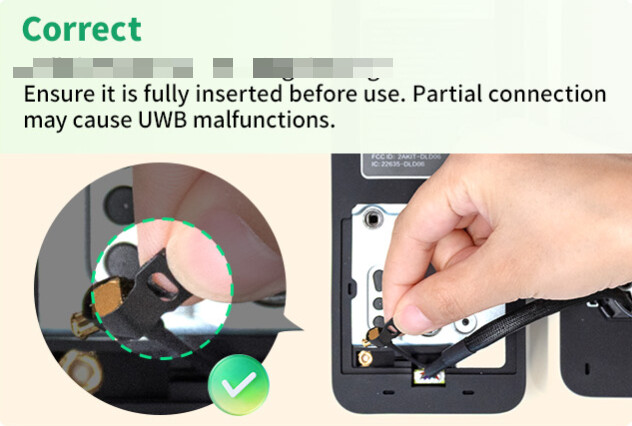
Check the Antenna Connection: Unscrew the rear panel to inspect the UWB antenna. Important: The antenna is extremely fragile. Please handle it with care—any damage to the wire or connector will lead to UWB malfunctions. Ensure the connector is fully seated before reassembling.
Refresh Apple Home Settings: Open the Apple Wallet app on your iPhone, locate your Home Key, and toggle the “Unlock on Approach” feature off and then back on.
Software Updates: For the most stable and smoothest performance, we highly recommend updating your devices to iOS 26.2 and watchOS 26.2.
No the Aqara beta 3.1.07
I have an iPhone Air updated with current iOS 26
This morning I came back from walking the dog and stood right in front of the door for a few seconds before it unlocked
I checked the cables and they look good
Root cause (likely):
Unreliable UWB proximity + Thread routing instability due to suboptimal border router selection, IPv6 handling, and RF environment.
Working configuration:
Thread / Border Router Layer
Deploy Apple TV 4K (3rd generation) Wi-Fi + Ethernet as the primary Thread Border Router (TBR).
Physically position within ≤3m of the Aqara U400 to minimise packet loss and reduce Thread mesh hop count.
In Apple HomeKit, ensure this Apple TV is elected as the active TBR (avoid multiple competing TBRs where possible, or ensure this node has best link metrics).
Network Layer (IP + Transport)
Force a dedicated 2.4 GHz SSID only (disable band steering for this SSID).
Enable IPv6 (SLAAC) on the LAN — Thread over Border Router relies on IPv6 for device addressing and routing.
Recommended topology:
Apple TV joins Wi-Fi (2.4 GHz SSID) → obtains IPv6 lease
Then connect Ethernet → allows stable backhaul while maintaining correct Thread/IP bridging
Avoid mixed-mode instability from dual-band SSIDs (common issue with IoT onboarding and mDNS discovery).
Wireless Infrastructure
Using Ubiquiti stack:
Multiple APs with wired Ethernet backhaul (no wireless uplinks)
Low transmit power on 2.4 GHz to reduce co-channel interference
Channel planning (1/6/11) to avoid overlap
Fast roaming features (802.11r/k/v) optional — but can interfere with some IoT, so test if instability occurs
UWB Considerations
UWB is highly sensitive to:
Physical obstructions (metal, reinforced walls)
Multipath interference
Antenna orientation
Keeping the TBR close reduces reliance on fallback BLE triggers and improves handoff timing.
HomeKit vs Aqara Logic
Disable Auto-Lock in HomeKit (stateless trigger)
Configure Auto-Lock in Aqara Home:
Uses device-level state (door sensor + lock state)
Prevents false lock events when door is open
Key takeaway:
Stable UWB performance here isn’t just RF — it depends heavily on Thread topology + IPv6 correctness + deterministic routing via a well-placed border router.
 Important: The antenna is extremely fragile. Please handle it with care—any damage to the wire or connector will lead to UWB malfunctions. Ensure the connector is fully seated before reassembling.