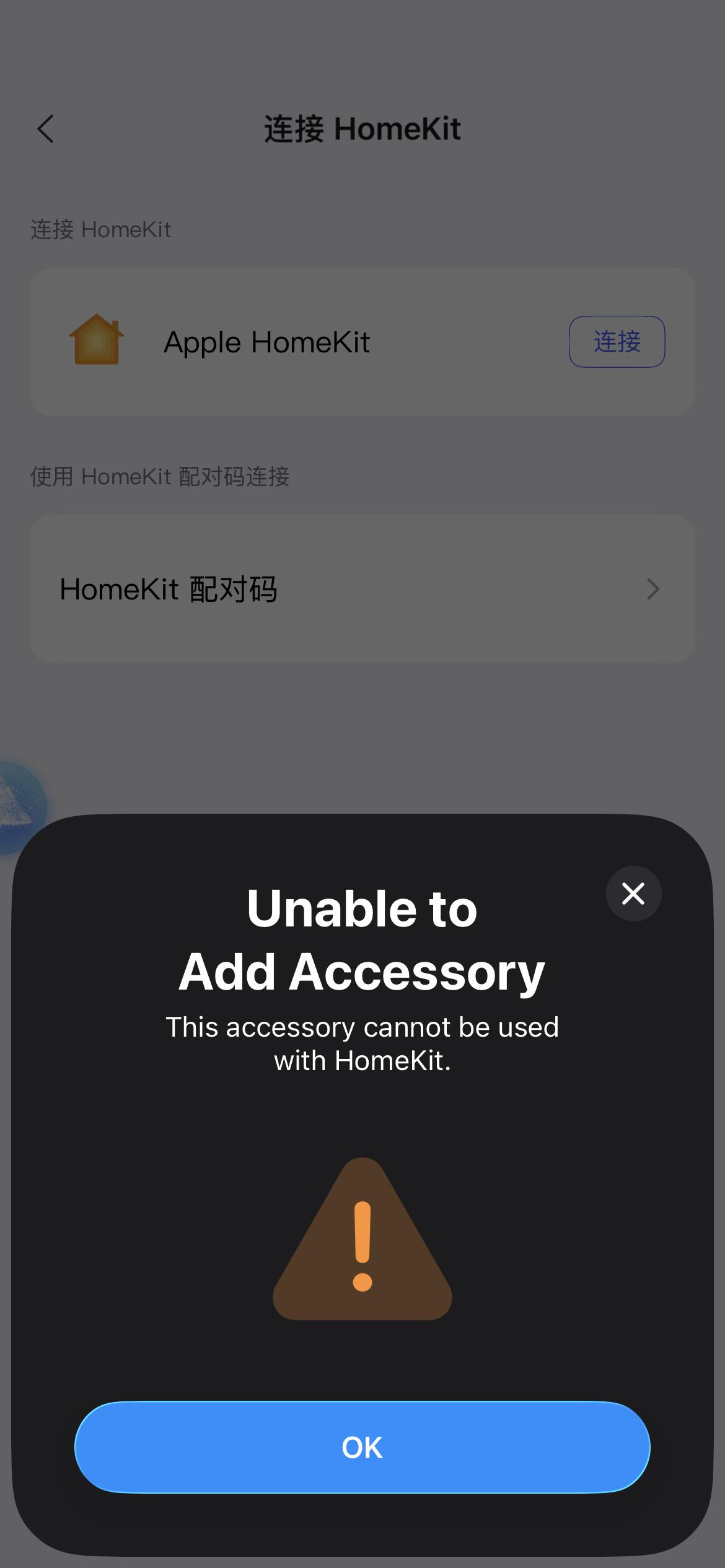
My G100 camera disappeared from the Home app after one of the recent updates. I was able to reset it and add it back in the Aqara app, but I haven’t had any luck reconnecting it with HomeKit.
Whenever I scan the HomeKit code or enter the number, I get the error: “Unable to Add Accessory. This accessory cannot be used with HomeKit.”
I also have a G3 Pro camera (as a bridge), two G400 doorbell cameras, a U100 lock, and two leak sensors — all of which work with HomeKit without any issues. The G100 is the only device that shows up in the Aqara app but not in the Home app.
I’ve already rebooted my router and APs, and confirmed that both my phone and the G100 are on the same 2.4GHz Wi-Fi. I can’t think of anything else that might be causing the problem.
Could there still be a “ghost” G100 camera in HomeKit that I can’t see or reset, which is preventing me from adding the device back? Or did a firmware update make it incompatible with HomeKit?
2 Likes
@wxzx6008 It sounds really frustrating that you’re having trouble adding your G100 camera to HomeKit after the update. When you’re getting the “Unable to Add Accessory” error, it could be due to the iOS cache retaining error information from repeated connection failures. You can try restarting your iOS device (iPhone or iPad) and resetting the G100 camera, then attempt to add it to HomeKit again .
Here are some other general steps that might help resolve the issue of adding an Aqara device to HomeKit:
- Check the network connection:
- Ensure that both your G100 camera and HomeKit hub (such as iPhone, iPad, or HomePod) are connected to the same Wi-Fi network. Devices on different networks may not communicate with each other.
- Check Wi-Fi router settings: Ensure that the router does not have AP Isolation enabled and that mDNS functionality is not disabled. These settings may prevent the phone from communicating with the device on the same local network.
- You can try using a different phone to create a Wi-Fi hotspot and connect the device to this hotspot for testing .
- Restart the device and hub: Turn off and restart both the G100 camera and your HomeKit hub (e.g., iPhone, iPad, or HomePod). Sometimes a restart can resolve temporary connection issues .
- Ensure the device is in pairing mode: Make sure the G100 camera is in pairing mode. Refer to the device manual to learn how to put it into pairing mode .
- Check the HomeKit pairing code: During the setup process, make sure you scan the HomeKit pairing code from the G100 camera or its manual. If scanning fails, you can try manually entering the pairing code .
- Update device firmware and software:
- Ensure your G100 camera, Aqara Home app, and iPhone/iPad with the Apple Home app are all updated to the latest versions.
- Check for firmware updates for the G100 camera in the Aqara Home app and apply any available updates .
- Reset the device: If the above steps don’t resolve the issue, try resetting the G100 camera and re-pairing it. Typically, you can reset the device by holding the reset button for 5 - 10 seconds. After resetting, try adding the device to HomeKit again .
- Check HomeKit limits: If you are close to the HomeKit accessory limit (100 devices), you may need to remove some devices to add new ones .
- Check the status of the Apple HomeHub: Ensure that your Apple HomeHub (such as HomePod, Apple TV, or iPad) is working correctly and connected to the HomeKit network. If there is an issue with the HomeHub, devices may not be able to add to HomeKit .
- Use the Aqara Home app to pair directly: If adding the device via the Apple Home app fails, try pairing it directly in the Aqara Home app and ensure it works properly within that app .
- Restart the router: Sometimes, network issues can be caused by the router. Try restarting your router to ensure a stable connection .
If none of these steps work, you may want to contact Aqara customer support or technical support to inquire about known device issues or firmware updates . Let’s hope you can get this sorted out soon and have your G100 camera back in HomeKit! If you find a solution or have more questions, feel free to share them here in the community.
@wxzx6008 I’m sorry to hear you’re having trouble adding your G100 camera to HomeKit—let’s try to work through this. While the G100 isn’t specifically mentioned in our reference materials, many HomeKit addition issues share common troubleshooting steps that might help here.
First, the error “Unable to Add Accessory. This accessory cannot be used with HomeKit” could be related to cached data in your iOS device. The reference notes that repeated failed attempts can leave unresolved errors in the iOS cache—try restarting your iPhone/iPad and fully resetting the G100 (hold the reset button for 10s as per the manual) before attempting to add it again. Manually entering the HomeKit code (instead of scanning) after resetting might also help, as cached QR code data can sometimes cause conflicts [“content_id”:0, “content_id”:5].
For the “ghost device” concern: HomeKit can occasionally retain residual data from previously added devices, especially if they were removed improperly. While our references don’t specifically mention this, you can check if you’re near HomeKit’s 100-device limit (removing unused devices might free up space) . Additionally, ensuring your HomeKit hub (like Apple TV or HomePod) is working properly and connected to the same network is key—restarting the hub could resolve hidden communication issues .
Since you’ve already confirmed Wi-Fi (2.4GHz, same network), double-check router settings: make sure AP isolation is disabled and mDNS is enabled, as these can block device discovery . If the issue persists, verify that the G100’s firmware is up-to-date via the Aqara app (outdated firmware or new updates can sometimes cause compatibility blips, though we can’t confirm this for the G100 specifically).
If none of these steps work, reaching out to Aqara support might help—they can check for device-specific firmware issues or provide further guidance.
Hope this helps get your G100 back in HomeKit soon! Let us know if you try any of these and how it goes—community insights often help others too.
@wxzx6008 I’m sorry to hear you’re having trouble adding the G100 to HomeKit—let’s try to troubleshoot this step by step.
First, the error “Unable to Add Accessory” often relates to cached data on your iOS device. Repeated addition attempts can leave residual error info, so restarting your iPhone/iPad (to clear the cache) and resetting the camera (by pressing and holding the function button for 10s to reset the network) might help resolve this . After resetting, wait 3 minutes before trying to add it again, and make sure to manually enter the HomeKit setup code (instead of scanning) to rule out QR code issues .
As for “ghost” devices, while the reference info doesn’t specifically mention this, clearing the iOS cache via a restart and resetting the camera should help eliminate any lingering conflicts. Regarding firmware compatibility, the reference info doesn’t indicate known issues, but if the above steps don’t work, it’s worth checking if there are further firmware updates for the G100 via the Aqara app.
If the problem persists, feel free to share your progress here—other community members might have similar experiences. For more personalized help, you can contact the Customer Service Team via the Aqara Home App (Profile>Help&Feedback>Customer Service) or by clicking here to create a ticket.
Hope this gets your G100 back in HomeKit soon!