I have 2 dimmer switches H2 EU connected via Matter and since the beginning they give me a very hard time to stay connected.
Very often they disconnect from Apple Home and show as “No response”. Automations (via Apple Home App) using the Presence sensor FP2 fail because of this, making the sensor use and the whole experience frustrating.
The dimmers are next to each other, connected quite near my matter hubs.
I tried uninstalling and re-adding them a few times, but the problem persists.
Any tip for me?
@brachetta I’m sorry to hear about the connectivity issues you’re experiencing with your Aqara Dimmer Switch H2 EU. From the reference information, here are a few tips that might help improve the situation:
Network Compatibility: Ensure that your Matter-compatible app and Thread border router are properly installed and configured. Both your dimmer switches and the FP2 sensor should be on the same local network to ensure stable communication.
Device Reset: If the devices are frequently disconnecting, try resetting the dimmer switches and adding them again. This can sometimes resolve persistent connection issues.
Firmware Updates: Make sure all devices, including your Matter hubs and the dimmer switches, are running the latest firmware. Updates often include improvements and bug fixes that enhance connectivity and performance.
Proximity to Hubs: Although you mentioned the devices are close to the hubs, consider any potential interference sources. Metal objects or electronic devices nearby can sometimes affect signal strength.
Automation Settings: Double-check the automation settings in both the Aqara Home App and Apple Home App. Ensure that all conditions and actions are correctly configured to avoid any miscommunication between devices.
If these steps don’t resolve the issue, it might be beneficial to reach out to Aqara’s customer support for further assistance. They can provide more detailed help tailored to your specific setup. Please contact the Customer Service Team via the Aqara Home App (Profile > Help & Feedback > Customer Service) or by scanning the QR code:
@brachetta I’m sorry to hear about the connectivity issues with your Aqara Dimmer Switch H2 EU via Matter—unreliable connections can definitely take the joy out of your smart home setup.
From the available information, the Dimmer Switch H2 EU requires a Matter-compatible app and a Thread border router for setup, and factory resetting (via ten consecutive presses) is a step for protocol switching, but specific troubleshooting for persistent disconnections isn’t detailed in the current references. Since you’ve already tried re-adding the devices, it might help to double-check if your Thread border router is functioning stably and if there are any nearby wireless interference sources (like other electronics) that could affect the connection.
If the issue persists, you’re welcome to share more details here—other community members might have encountered similar situations and could offer insights. For further assistance, if you have suggestions for improvement or need more targeted support, please contact Customer Service Team by Aqara Home App (Profile>Help&Feedback>Customer Service) or scanning the QR code:
For the sake of completeness, I’ll just comment that I switched the protocol to Zigbee and everything works fine now.
There’s something about Matter (in my case at least) that makes it unreliable depending on the vendor.
@brachetta Thanks for sharing your follow-up, @brachetta! Really appreciate you circling back with what worked—switching to Zigbee mode is a solid workaround, and it’s great to hear your setup is running smoothly now.
Your experience actually highlights something useful about the H2 series: the dual-protocol flexibility is there for exactly this kind of situation. While Thread/Matter offers direct ecosystem integration without a hub, Zigbee mode unlocks Aqara’s full feature set and often provides more stable mesh networking through the Aqara hub—especially in environments where Thread border router performance can be inconsistent[“content_id”:3"].
The “unreliable depending on the vendor” point you raised is worth noting. Thread/Matter performance can vary based on the specific border router implementation, network topology, and even firmware maturity across different ecosystems. Apple’s HomeKit Thread management, for instance, has seen iterative improvements but isn’t immune to hiccups[“content_id”:4"].
For others reading this thread: if you’re experiencing similar Matter/Thread instability with H2 switches, brachetta’s approach—testing Zigbee mode via an Aqara hub—is a valid troubleshooting step. The protocol switch is reversible (ten consecutive presses to factory reset), so you’re not locked in[“content_id”:7"].
Even if you were able to resolve it by switching to Zigbee, if you use other Matter over Thread devices in the future and the problem reoccurs, it could be due to the configuration of your IPv6 addresses:
That’s great and knowledgeable information, @JohnD: thanks for this!
Indeed, I don’t have IPv6 enabled on my router.
To be honest, I’m a bit reluctant to change things dramatically on my network, but maybe I would need to address it at some point…
The fact is that I also have two Nuki smart locks connected via Matter over Thread and they also sporadically get unresponsive on Apple Home (they’re always available on the Nuki app, though). I always attributed this to the distance from the locks to the HomePods mini, currently my only two Apple Thread border routers.
I’ll need to figure things out. I’m afraid that my expertise is more limited compared to yours when it comes to networks!
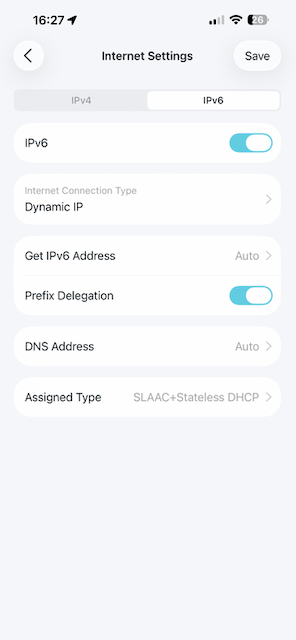
Besides, I believe that my Deco BE65 (my main router) doesn’t expose that level of granularity: I don’t think I can set up ULA manually, so maybe I should leave DHCP Prefix Delegation enabled.
It’s probably the same as with my router: IPv6 is enabled by default, but the prefix is provided by the ISP. And from time to time, the prefix changes, which causes problems. I noticed this back then with my Nanoleaf Matter over Thread light bulbs. Every so often, they would become unreachable.
Luckily, though, there’s a solution, and it doesn’t happen to me anymore. If you need help figuring it out, just let me know. I’d be happy to help!
Yes, Apple Home uses Matter over Thread, and the Nuki app uses Bluetooth, or you’ve enabled remote access via Wi-Fi (check the Nuki app under Settings → Connection Info).
I use Matter over Thread, activated via the Nuki app, and it is exposed to Apple Home. Interestingly, the Matter over Thread connection is live in the Nuki app even when Apple Home says No Response.
Remote access is also active (it’s included in my Nuki Pro 4th gen).
Bluetooth is always active regardless of Matter, and it’s the last option if all Wi-Fi connectivity were to go down (well, using the physical key is the very last one! ).
Yes, please! I’d like to learn from your experience. I also have two garden lights from Nanoleaf!
This is what I get as the default configuration when I activate IPv6 (I haven’t saved the changes yet):
I did some research on the Deco BE65, and unfortunately, there really seems to be no option to set a ULA, unlike home routers from other manufacturers. It’s actually quite sad for such expensive devices.
In many forums, it is recommended to operate the Deco router in Access Point mode and connect another router, such as a FRITZ!Box, Ubiquiti UniFi, MikroTik, or an OPNsense/pfSense system (which support ULA assignments), in front of it. In this mode, the Deco disables its internal gateway and DHCP functions. The upstream router handles the entire network management including ULA, while the Decos solely focus on providing the Wi-Fi.
At this moment I’m not planning on any hardware/architectural modifications. Besides I have one main BE65 connected to the modem and 4 Deco satellites wired to the main Deco.
Would it be safe for me to enable IPv6 with the defaults from my screenshot and see if that improves the matter over thread experience? Or should I rather endure stoically the eventual disconnections?
The system is mostly great, so I don’t want to break it.
Before you change anything, I have a few quick questions:
Is IPv6 currently disabled on all your Deco routers?
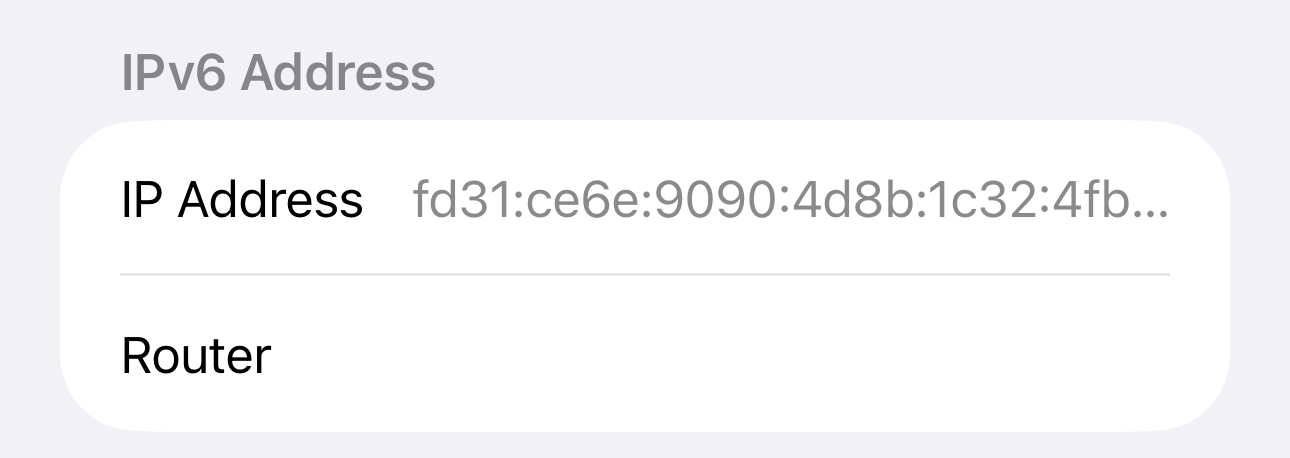
Could you check your iPhone? Go to Settings → Wi-Fi → tap the blue i icon next to your network and scroll down to the IPv6 Address section.
a) What address is listed next to Router?
b) Next to IP Address: If it says something like “X Addresses” on the right, tap on that. How many addresses are listed there in total, and what are the first four characters of those addresses?
That would be really helpful to know to understand what is handling the routing in your network right now.
Alright, that confirms my suspicion! I was actually wondering how you were able to use Matter over Thread devices at all, since that technically doesn’t work without IPv6.
I strongly suspect that your Apple Home Hub is distributing ULA addresses within your network because your Deco router isn’t doing it. In that case, everything is actually fine and I would just leave it exactly as it is. Relying on those local ULA addresses is definitely better than enabling IPv6 on the Deco, which would force the network to use the changing GUA prefix from your ISP.
However, this doesn’t completely explain why you are still experiencing occasional problems. You should definitely keep an eye on your iPhone’s IPv6 address and check if it changes exactly when those connection issues occur.
Do you have multiple Apple Home Hubs? If so, it would probably help to set a preferred Home Hub in the Apple Home app. The active Home Hub might be switching in the background, and that can lead to dropouts.
Hmm… I feel quite embarrassed to admit that my preferred hub, for some mysterious reason, is (was!) an older AppleTV that isn’t a thread border router… The two HomePods mini are, and they sit very next to each other, making a stereo set. You make me guess that because of that proximity some devices were switching to the other one…
Hopefully the new AppleTV will finally be out soon to take the place of the old one!
Thanks, @JohnD, you’re really helpful!
Hi there.you shouldn’t be embarrassed at all we are here to help and learn so we can enjoy our smart home without issues. @JohnD is an expert on this things.now you need to just set one of your HomePods as main controller into apple home app settings/hubs this way one will be the controller and the other border router.i had issues when I had my internet fiber from Vodafone and I had so many “network issues” with my apple devices witch lead to many of my switches to be offline or turn on by themselves was an nightmare.now with my new internet witch I have they give me symmetric fiber and I have to say that everything works as it should no more “network issues “ or switches that turn on like I’d have ghosts in my house.



 ).
).