This automation is configured in the Aqara application and reacts to real-time weather conditions in Paris. The trigger is the moment rain begins, as reported by the app’s external weather data for that location. When the system detects that it has started raining, it immediately checks the status of several door and window sensors in the home.
The logic is set so that the automation activates if any of the monitored sensors are open. Three sensors are included in the rule. Each sensor reports an “open” or “closed” state. If at least one of them is open at the moment rain begins, Aqara executes the action defined in the automation.
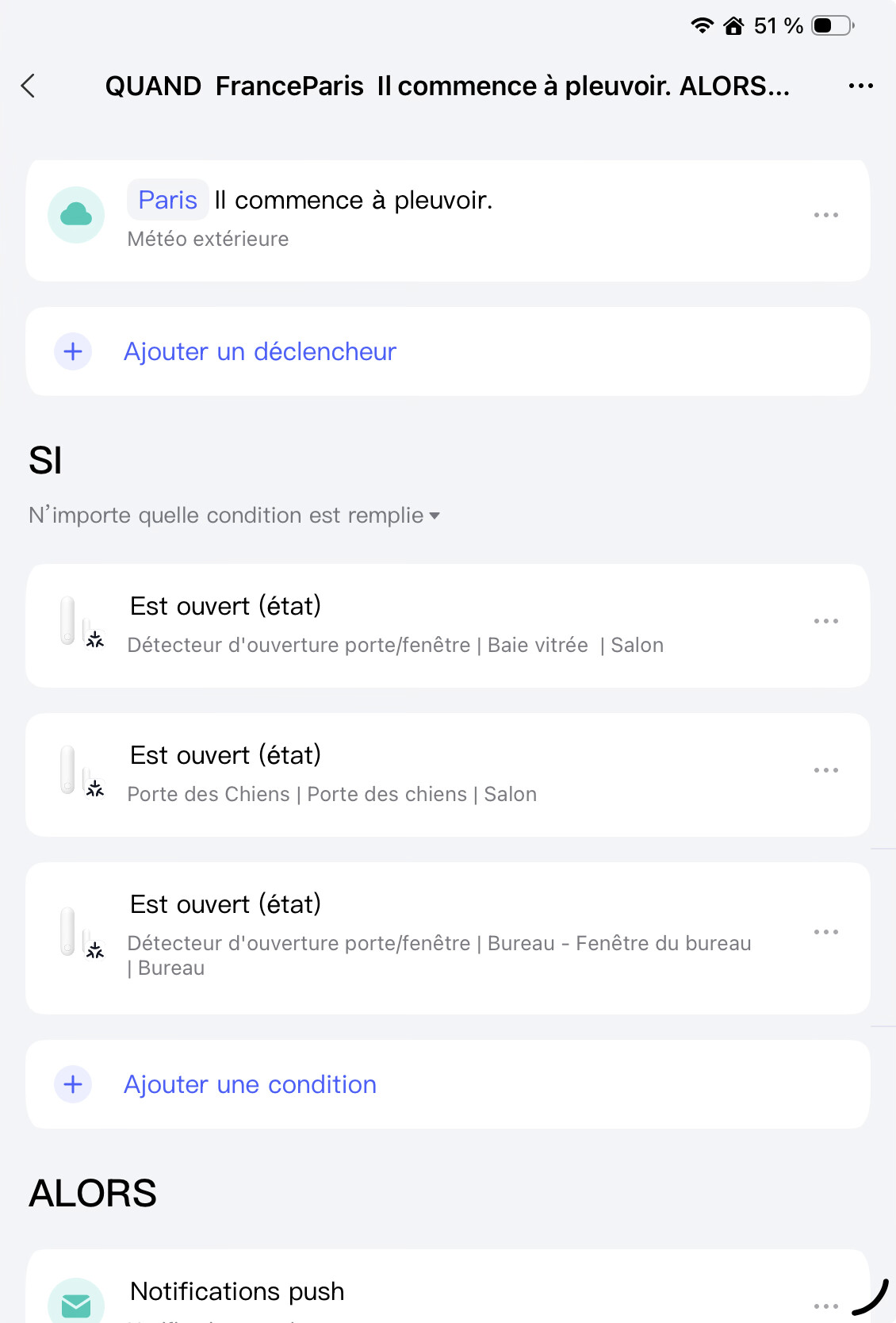
When it starts raining in Paris (Outdoor Weather).
If any of the following conditions are met:
• The patio door window in the living room is open.
• The door in the living room is open.
• The office window is open.
Then the automation triggers a push notification.
Key point:
- Select ANY and not ALL conditions are met!
(the UI of the tools won’t help you to find this option… something to improve Aqara)
the end, make sure to have your location setup correctly ! I guess your location should be used, but for France, there is one city is available : Paris.
I’m lucky to live close to Paris, but I don’t believe this action is reliable. There are plenty of free services that can provide really local weather information. Aqara should use them instead.