Hello! Anyone else experiencing the W500 being duplicated in Apple Home when it’s connected in Zigbee mode to the G410?
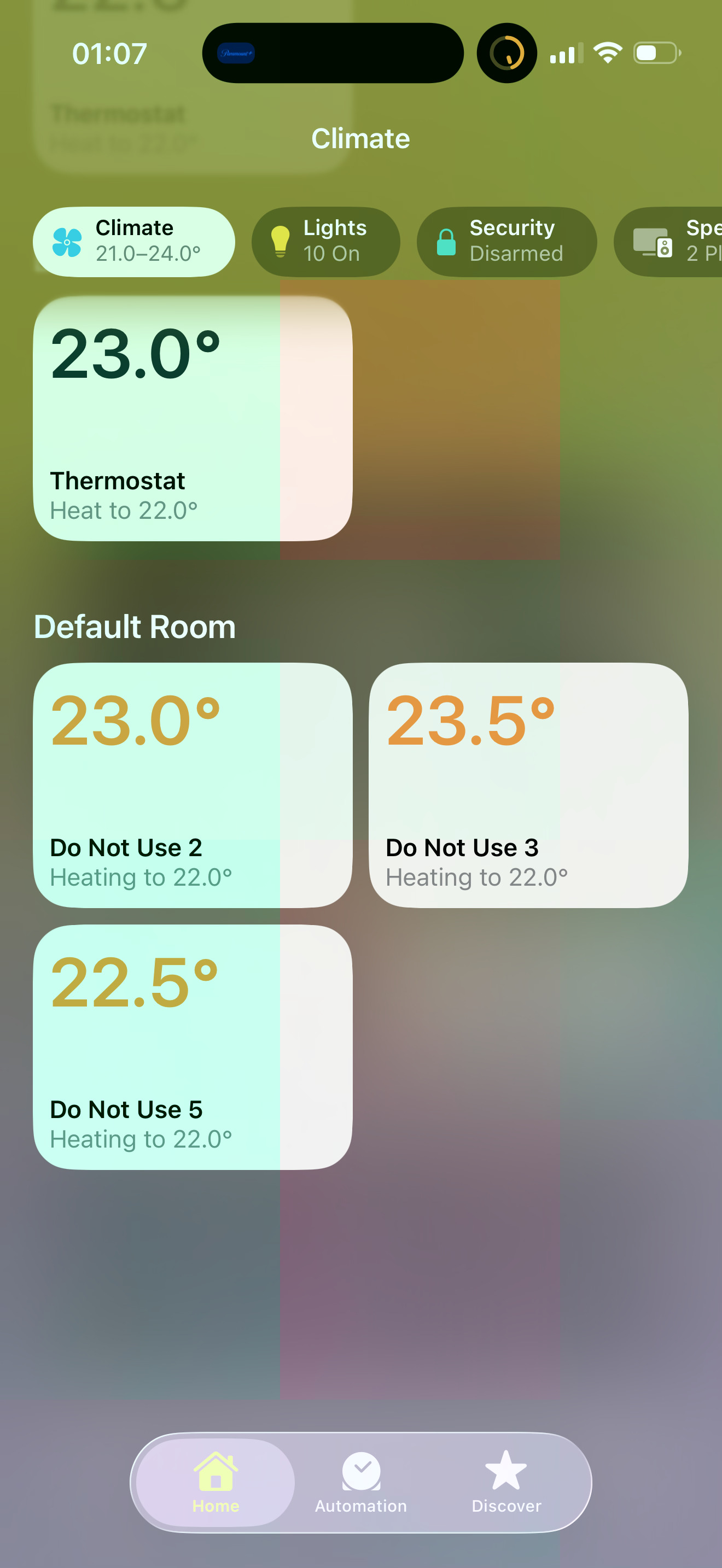
I’ve attached screenshots. On top of being duplicated, it shows the wrong icon for the Thermostat (shows as the Humidity sensor first instead of the Thermostat).
4 Likes
Hi.
Take a look at:
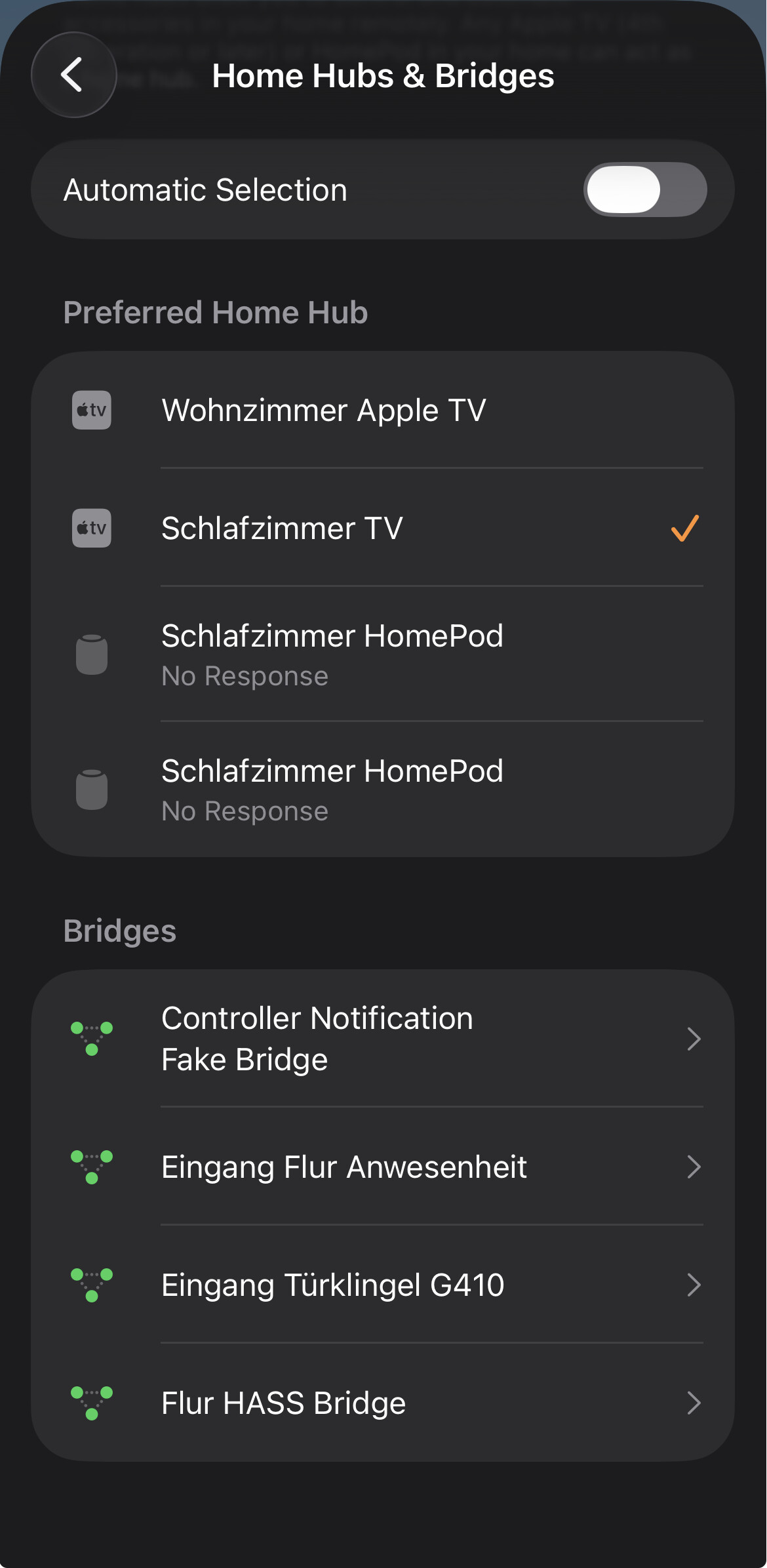
Apple Home App > three dots at the top right > Home Settings > Home Hubs & Bridges > Bridges > Accesories
Are there multiple bridges and does the device appear on more than one of them?
You can also remove one of the duplicate devices from the Home view. Tap and hold the device to remove it from the Home view. Alternatively, you can do this via Settings (gear icon). There, disable the option “Show on Home screen.”
5 Likes
There’s just one bridge. I only have the Aqara G410 as a bridge
3 Likes
You can integrate the same hub via HomeKit and Matter, in which case you will have two bridges and the devices will appear twice in the Apple Home app.
If this is not the case, then the issue lies elsewhere. How are the devices displayed in the Aqara Home app?
5 Likes
Yeah I noticed that but I checked and that doesn’t seem to be the issue. I have configured mine with HomeKit.
They are not duplicated in the Aqara app
2 Likes
I find your pictures and video a bit confusing. Could you please explain what can be seen in them?
- What is the W500? Which parts are thermostats and which rooms are they in?
- In the video, it looks as if each device is in a different room. Is that correct? What exactly is duplicated?
- Could the issue be that the W500 is showing a different icon to the one you described, because it is linked to a thermostat? Are the other devices normal thermostats?
- Since you integrated the device via HomeKit/Zigbee mode, why mention ‘Matter’ in the headline?
If a device is really duplicated, please check again under ‘Accessories’ on the bridge in ‘Home Settings’. If so, please show us a screenshot so we can better understand the situation.
If there really is a duplicate device, then I suspect either a caching problem or that another system is involved. Alternatively, there may be a fundamental misunderstanding. Therefore, it would be helpful if you could answer the following questions:
- Have you ever removed and re-added the device?
- Have you tried restarting the Aqara Hub and your Apple Home Hub (Apple TV or HomePod)?
- Do you have the options “Show as Separate Tiles” and “Show as Single Tile” for the W500? Try switching back and forth.
- What happens if you remove one of the devices from your favorites? Will both devices disappear?
- How many devices are displayed as the number of devices connected to the bridge in Apple Home under “Accessories” and how many are displayed in the Aqara app under “Child Devices” for the hub. Just look at the number shown.
- Is it just this one device that is duplicated, or are others as well?
- Do you have Home Assistant, HomeBridge or something similar on your network?
- What is displayed in Apple Home under Connected Services in the Home Settings?
- Are you using the latest firmware on the hub and the affected device?
- Are you using Matter to synchronise signals or scenes from Aqara to Apple Home?
3 Likes
There are several issues, but let’s focus on one now so it’s easier to follow.
The issue is simple: Aqara Zigbee devices added to the G410 hub show up twice in Apple Home. I’m experiencing the issue with the W500 thermostat but also now the new FP300.
Here’s a video that shows the issue clearly: when I turn off one thermostat, you can see the duplicate also turning off.
There is only one Aqara hub in my Apple Home, the G410. One of the thermostat shows connected to the hub, and another to the motion sensor of the G410 Doorbell, which is itself connected to the hub…
So clearly, there’s a bug in the background.
All devices have the latest firmware. I am only using HomeKit, not Matter. My G410 is connected to the Apple Home app through HomeKit, not Matter. This is because the Doorbell G410 isn’t supported by Matter: Matter doesn’t have a specification for doorbells yet.
The issue is an aqara one, not an Apple One.
1 Like
How did you come to that conclusion?
The video shows that six devices are integrated into Apple Home via the hub. How many are displayed in the Aqara app under “Child Devices” for the hub?
Have you tried restarting the Aqara Hub and your Apple Home Hub (Apple TV or HomePod)?
2 Likes
I’ve come to that conclusion because this issue started when I got the G410 and connected my W500 to it via Zigbee. Did not happen with Thread. Does not happen with any of my other devices in my home, Aqara or not.
1 Like
Everything has been restarted and the Aqara hub reset too. The issue is the Aqara Hub. Otherwise it wouldn’t be happened with a product released yesterday and would be happening with my other non Aqara products.
1 Like
Okay, what else are you using? Have you perhaps linked another ecosystem in the Aqara app that is also linked to Apple Home?
Take a look in the Aqara app under Profile > Connect to Ecosystems.
And while you’re there, check what’s displayed under Apple Home > HomeKit Devices. Anything unusual?
1 Like
No other ecosystem is linked in the Aqara app or elsewhere else. When I go under Connect to Ecosystem > Apple Home, the G410 shows there twice: as the doorbell, and as the Hub. Every other accessory connected to it (W500 and FP300) also shows up twice, just like in the Home app.
If I delete one on either side, it deletes it from the other side too.
Again, more evidence that this is a bug on Aqara’s side
There are definitely two hubs, as you can see, and some devices have only been assigned to one of them. I don’t think this is a bug caused by Aqara; at least, I don’t get that impression.
I would remove the “Aqara Matter Zigbee Hub” and then re-pair the devices that were connected to it. Hopefully, everything should then work properly.
By the way, I just noticed that the Apple Home app does not display all hubs under
Apple Home app > three dots at the top right > Home Settings > Home Hubs & Bridges > Bridges
The overview shows the number 7, but when I tap on it, only 4 hubs are visible.
This affects hubs from Home Assistant and Aqara, so it’s probably a bug in Apple Home.
1 Like
There are two hubs showing because the bug is duplicating them.
I don’t have two Aqara hubs in my home: I have a single Aqara G410.
All the steps you have mentioned, including reset, have already been tried unsuccessfully.
It’s. A. Bug.
One device in HomeKit can have child devices without being a hub (for example in the case of multisensors) and for some reason, all of my devices Aqara devices paired to the G410 hub seem to show in HomeKit as a child device of the doorbell itself and the hub embedded in the door chime.
The reason why you don’t see all of your hubs in that section is because you have automatic selection off. If you turn it off, you will see your other Apple hubs appear and the total should add up. That’s is how it is in my Apple Home.
Do you have a G410 by the way?
We’ve already discussed this. A device can be connected via HomeKit and Matter, so it appears twice in Apple Home. This also happened to me with my E1 hub. And yes, the E1 and G410 are Matter bridges. And your video from the Aqara Home app leads me to believe exactly that.
Thanks for pointing that out. What confuses me is that my G5 Pro isn’t listed as a hub in Apple Home, but all paired devices are there. And the Aqara App shows it under HomeKit Devices. So it’s a bit like your situation, where two hubs are displayed in Aqara but only one is in Apple Home, with all devices from both hubs being included. One of my hubs from Home Assistant is also missing.
No, but I couldn’t find any reports from other users who had the same problem. The only issue was that they had all connected the hub via Matter and HomeKit.
However, I don’t want to argue with you about whether or not it’s a bug. If it is a bug, it must be reproducible by multiple users. Overall, I simply don’t have enough information about what you did or didn’t do. If you’re certain it’s a bug, that’s fine, but I’m not so sure.
Have you already removed the duplicate “Aqara Matter Zigbee Hub” under “Connect to ecosystems” > “Apple Home” > “HomeKit devices” and then re-paired the devices that were previously connected to this hub alone, without pairing the hub again?
1 Like
I have a similar situation with a 410 doorbell hub and several zigbee sensors and devices. I think I understand your responses. I’m just not sure exactly what steps are needed to resolve. You said remove one of the integrations - matter or HomeKit. What are the steps for that?
Go to the hub settings. There you should find the menu items “Home Kit” and “Third-Party Matter Ecosystems”:
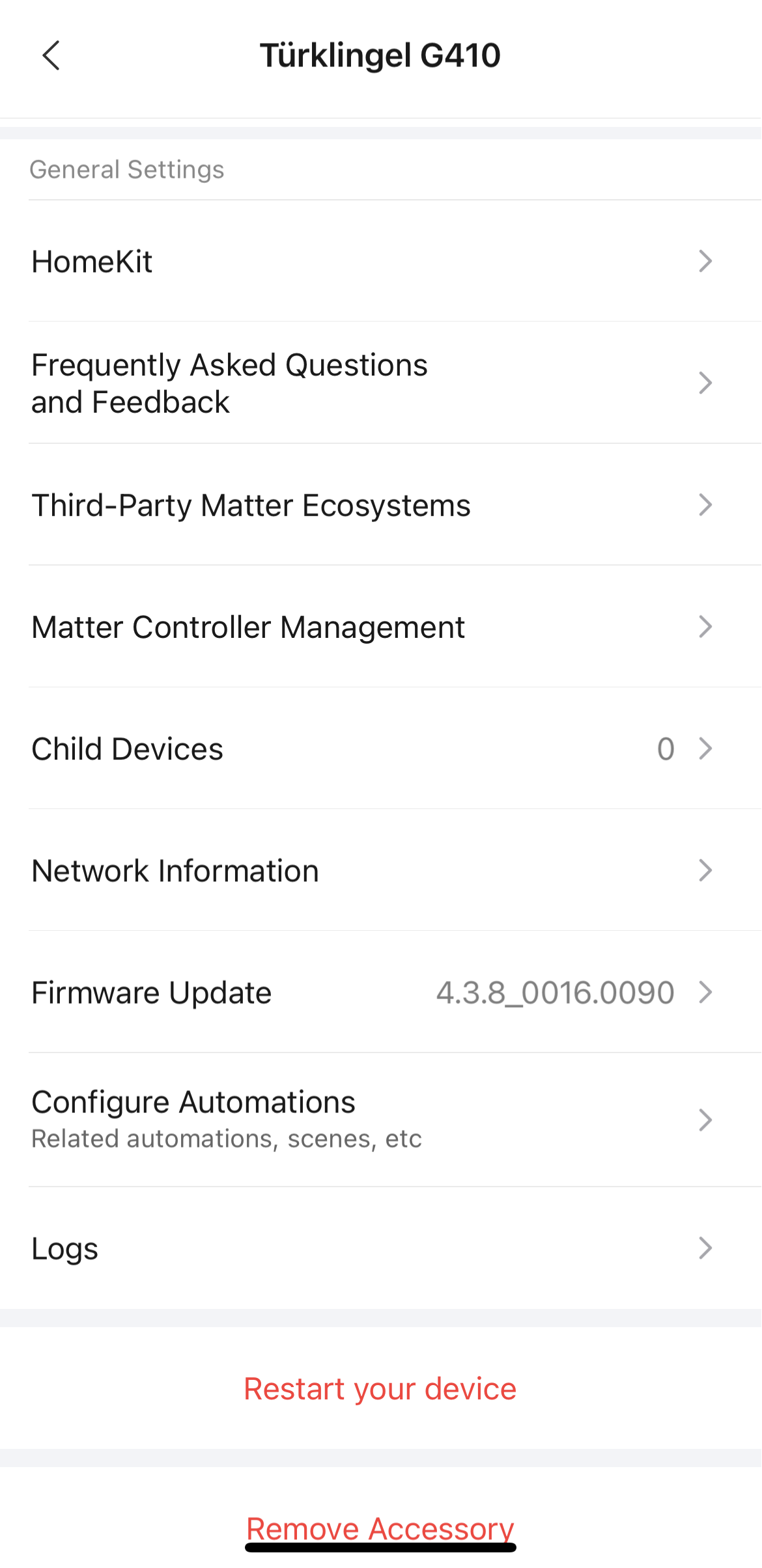
Select “HomeKit”. If you now see the “Remove” button, the hub is connected to Apple Home via HomeKit. Keep the connection intact!

Then go back and select “Third-Party Matter Ecosystems.” If you see the “Remove” button here as well, the hub is also connected to Apple Home via Matter. Click on the „Remove“ Button and afterwards it should look like this:
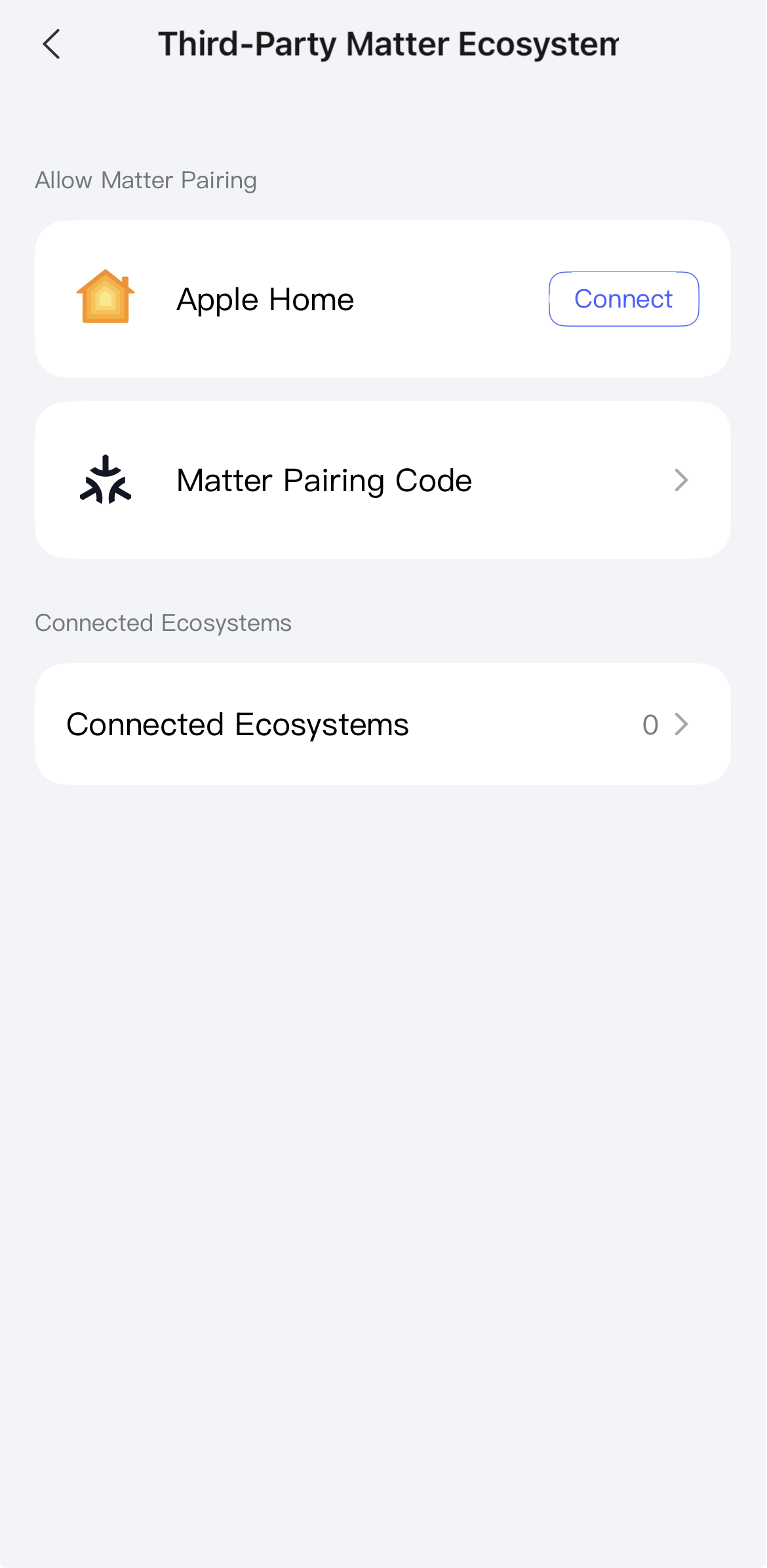
Under “Connected Ecosystems”, you could also see which ecosystems are connected to the hub via Matter.
You can also find an overview under
Profiles → Connect to Ecosystems → Apple Home → HomeKit Devices
of all hubs and child devices connected to Apple Home via HomeKit.
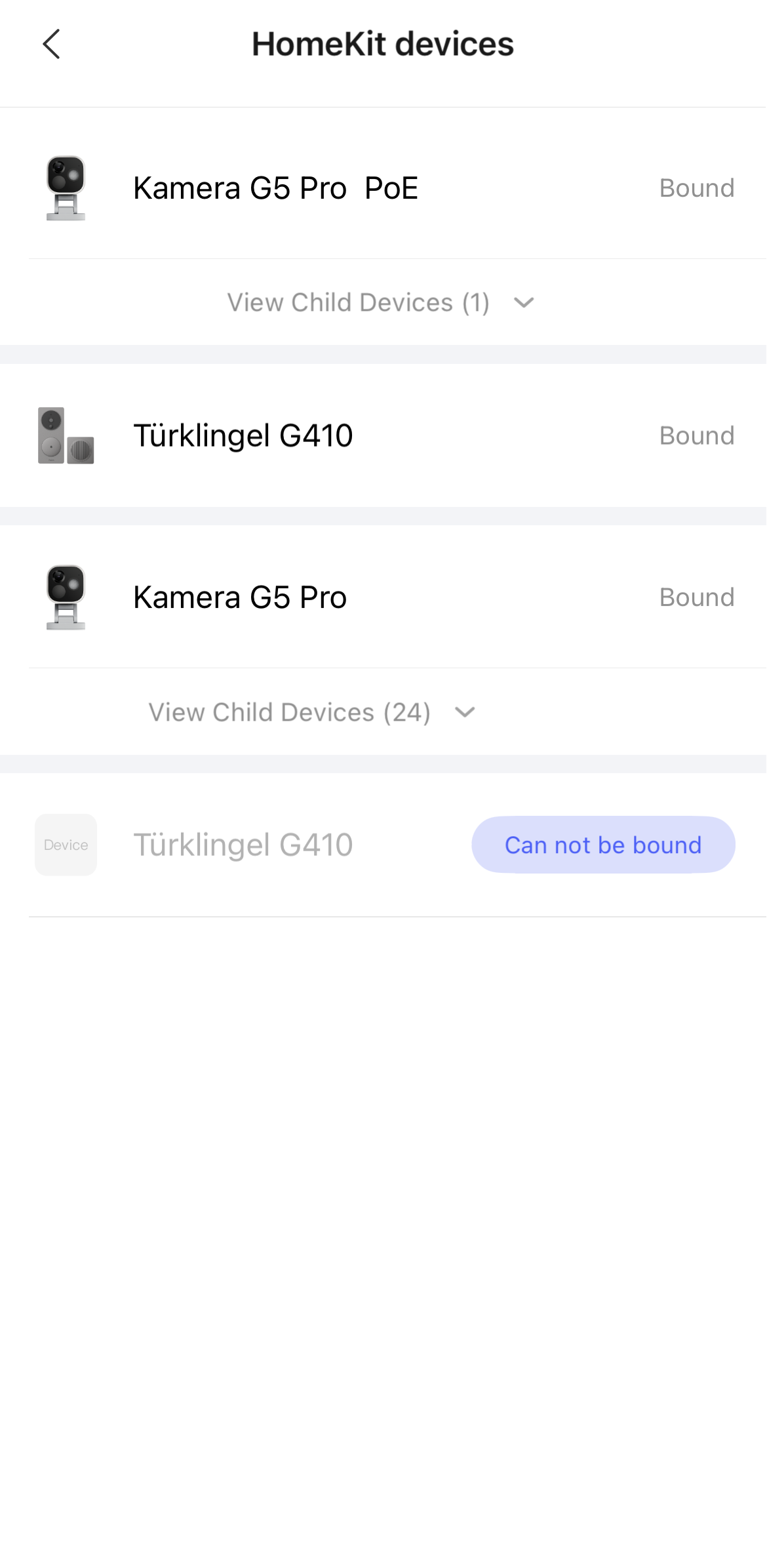
In the Apple Home app, you can also check this under:
Home Settings → Home Hubs & Bridges → Bridges
But I don’t think you can tell very clearly which connection protocol is being used here.
5 Likes
Problem is if you remove HomeKit, your doorbell won’t show up in Apple Home because neither support Matter 1.5 yet.
3 Likes
Awesome. Worked like a charm! I did have to go into Settings>General>Matter Accessories on my iPhone and remove the hub in order to finally remove all of the “ghosted” devices from HomeKit.
4 Likes