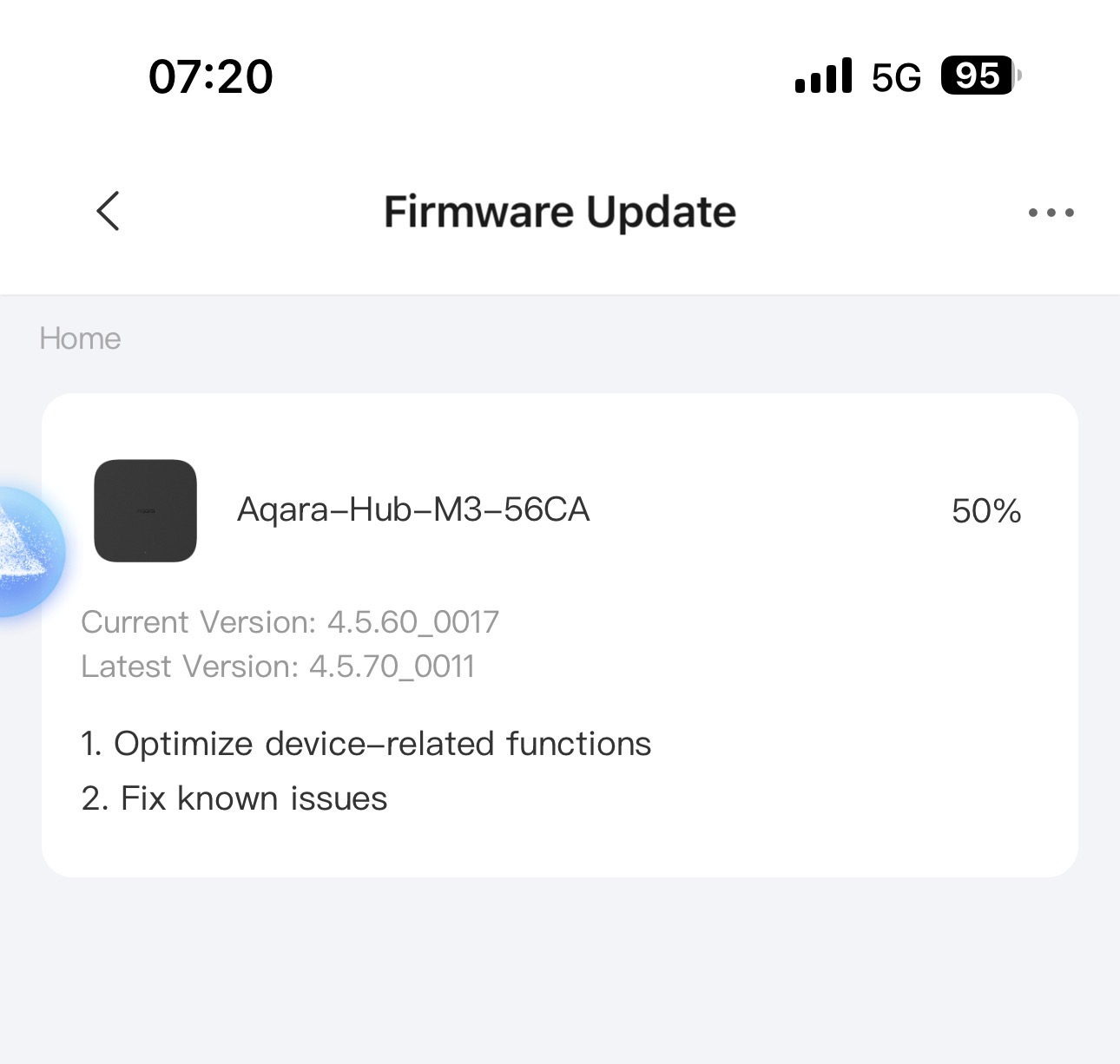
Aqara released a new firmware update for the M3 hub
17 Likes
@fn_nimer Nice find—always good to see the M3 getting regular firmware love.
If anyone hasn’t pulled the update yet, you can check it in the Aqara Home app via Profile → Firmware Update, and you can also enable Automatic Update from the More (top-right) menu so the app can batch-update during the selected window. If you’re on the adventurous side, there’s also a Beta version Update entry under Profile → Firmware update → “…” (top-right) when beta firmware is available.
Curious: did you notice any specific changes/improvements after updating (stability, Matter/Thread behavior, device responsiveness, etc.)?
4 Likes
Apparently, the update is for support of the FP400.
3 Likes
Hi! I got that firmware already more than a week ago - and had problems as the update changed the Expand PAN ID for me!
see New M3 Firmware i received today - 4.5.70_0011/Thread 0011 changes Expand PAN ID
3 Likes
@thomas_bergmair That’s a really useful heads-up—Thread “network identity” changes like an Expanded PAN ID shift can definitely ripple out into weird behavior for Thread devices, especially if you have multiple border routers or you’re relying on a very specific Thread topology.
From Aqara’s side, the only broadly applicable guidance we have is to make firmware updates as “clean” as possible: keep the hub on stable power and a stable network during the upgrade, and avoid anything that could interrupt connectivity mid-process. Under normal circumstances, an update shouldn’t make the hub abnormal, but it’s still worth double-checking power + network stability before/while updating. This information comes from community discussions and user experience summaries and may vary by environment. Please verify carefully. (Original post link: New M3 Firmware i received today - 4.5.70_0011/Thread 0011 changes Expand PAN ID)
If you’re still seeing issues after the update, the general recovery steps that often help with “firmware-related weirdness” are:
- Restart the hub / router and try again (and re-check the hub’s firmware version after reboot). This information comes from community discussions and user experience summaries and may vary by environment. Please verify carefully. (Original post link: New M3 Firmware i received today - 4.5.70_0011/Thread 0011 changes Expand PAN ID)
- If an update behaves strangely or fails repeatedly, try updating on a different network / temporarily disabling firewall protections (some failures are caused by the hub being blocked while downloading the package). This information comes from community discussions and user experience summaries and may vary by environment. Please verify carefully. (Original post link: New M3 Firmware i received today - 4.5.70_0011/Thread 0011 changes Expand PAN ID)
Since this Expanded PAN ID change is pretty specific, it’d be great if you can share a bit more detail:
- Did it break Matter/Thread accessories pairing, or just routing/responsiveness?
- Do you run other Thread border routers (HomePod/Apple TV/Nest/Eero, etc.) alongside the M3?
And if you want Aqara to investigate your конкретный case (logs/version details), the fastest route is: Contact the Aqara Home App Customer Service Team (Profile> Help & Feedback > Customer Service) or scan the QR code:
This will be more efficient. If you do not have an Aqara Home account, Please click here to create a ticket. Sorry about that.
2 Likes
Extended PAN ID did not change for me post update
1 Like
Hi! no other thread border installed /active
breaked all pairing 
1 Like
@thomas_bergmair Oof—if you have no other Thread Border Router in the home and the M3 update effectively broke all Thread/Matter pairing, that usually points to the hub’s Thread network state getting into a bad place (or being regenerated), so the phone/controller can’t complete commissioning.
A couple of things that are worth trying on the M3/Aqara side:
- Make sure the M3 is set as the Preferred Matter Controller in Aqara Home: M3 device page → “…” → Matter Controller → Set as Preferred Matter Controller
- Confirm your phone and the M3 are on the same local network (same Wi‑Fi/VLAN), then power-cycle the M3 (unplug/plug) and try pairing again
- If Thread commissioning is still dead, try switching/creating a new Thread network: M3 device page → “…” → Network Information → Thread Network management → Switch or create a new Thread network (note: Thread devices will need to be reconnected after creating a new network)
If you’re pairing to a third-party Matter ecosystem as well, double-check the common blockers: IPv6 enabled on your Wi‑Fi, Bluetooth on during pairing, and keep the device/controller within a few meters for the initial join
If none of the above brings pairing back, you seem to be experiencing an issue with Hub M3 Thread/Matter pairing failing after the firmware update. Contact the Aqara Home App Customer Service Team (Profile> Help & Feedback > Customer Service) or scan the QR code:
This will be more efficient. If you do not have an Aqara Home account, Please click here to create a ticket. Sorry about that.
If you tell me what you’re pairing (P2 sensors? H2 switches? U200/U400 lock? etc.) and whether the Thread Network info page on the M3 looks “blank” or normal, I can help narrow the next step.
1 Like
As this happend already a week ago - I started all from scratch - and at the moment it works stable - but it cost me 2 days to fix all
thanks
1 Like