After my previous post about my first impressions on the FP300, I now have 2 other issues. This time it is all within the Aqara app. Before sending a support ticket, I was wondering if others experience the same issues. It is similar to this post except that I use the Zigbee protocol.
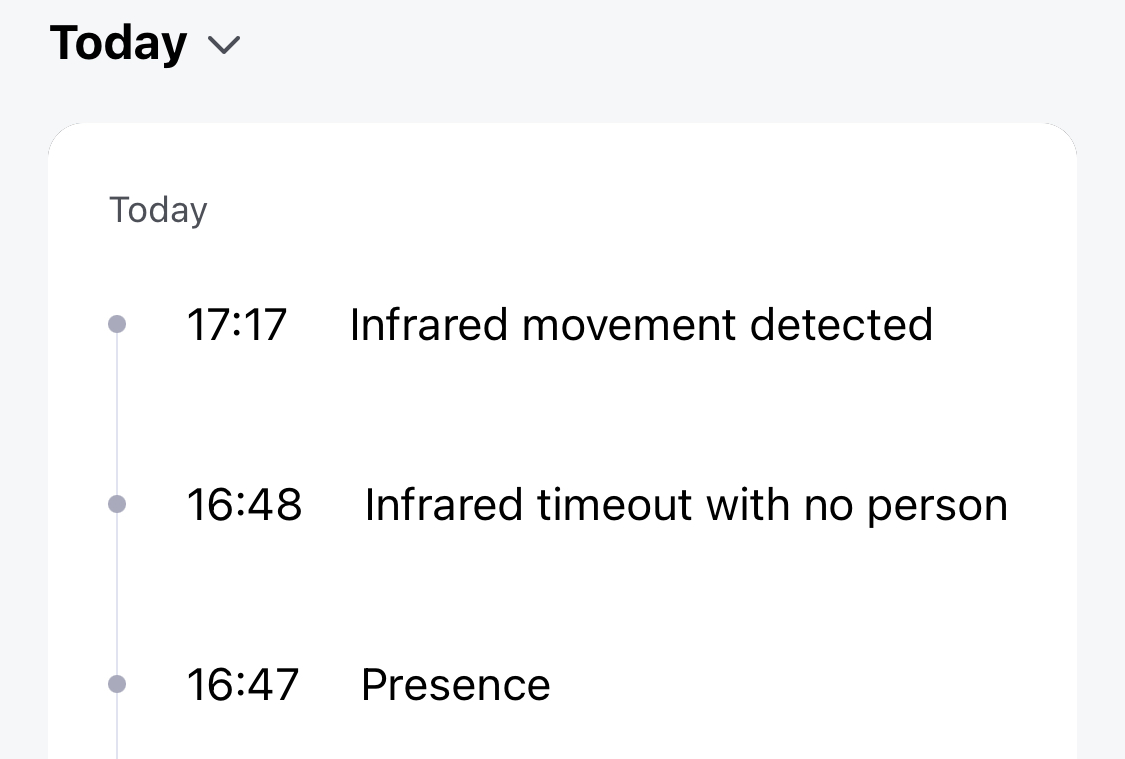
the fp300 sometimes does not detect absence after it detected presence. This screenshot of my fp300 logs summarises it pretty well:
Once the infrared timeout with no person was triggered, I was already out of the room. The absence should also have been triggered. The status of the occupancy remained on ‘presence’.
Sometimes, an ‘infrared movement’ is detected while there is no one or nothing happening in the room. To test it, I set a regular Aqara P1 motion sensor right next to it. This device does not detect any movement as expected. The results that I regularly get false positives.
Does anybody recognize any of the above? t fp300 is connected using the zigbee protocl to a 3 hub. All related software is running the latest firmware.
@jelle You seem to be experiencing issues with FP300 not detecting absence after presence and false infrared movement detection. Maybe our Aqara Experts can help you @Creator@Expert@Moderator , or you can contact customer support for assistance. Contact the Aqara Home App Customer Service Team (Home > Help & Feedback > Customer Service) or scan the QR code:
Hi. @DEChrisE has the right questions here. Positioning and setup are crucial to making this sensor amazing. If you think the sensor is placed well, you should go into Settings(3 dots) - On Site Configuration - AI Spacial learning and run this to help it learn. It’s worth noting that you can run this every time it misses absence or presence and it will usually be spot on after no more than about 3 learning sessions.
Yes, I have done the ai learning and I have played around with the detection range settings. I have submitted a submitted a support call with Aqara. This is what I wrote:
“ In the aqara app you can create a trigger for an automation with the fp300 when motion is detected OR when presence is detected. My question is: are these functionally the same? If in the settings you indicate to combine the presence sensor with the motion sensor, does it expect the same trigger reaction time when using the presence sensor or motion sensor as trigger? What I notice is that the detection zones are different. For example, when the motion detection is used as trigger, it is triggered immediately when entering a room. If the presence sensor is used as trigger, I also have to raise my hand in order for the trigger to occur.
My automation gave issues when I used the motion sensor as trigger to turn on a light and the absence detection as trigger to turn off the light. The light sometimes did not turn off.
Working with a motion detection as turning on trigger and ‘no motion detected anymore’ as turning off trigger, gave false positives because sometimes motion was detected while there was no movement in the room.
When I use the presence sensor as trigger in combination with the absence trigger, the automations seem to work better but there was no immediate response due to different detection zones”
Thanks for the suggestion @The_Heckmeister . I did several resets but this did not work.
I am still in touch with Aqara support with this issue. Whether this issue can be resolved or not you still end up with a suboptimal situation when you use the motion sensor to turn on a light and absence sensor (no presence) to turn off a light. This is what I wrote:
“Ideally you want to turn on the light as soon as motion is detected. Turning on the light when presence is detected, however, takes a little longer. When turning off the light you want to do that when no presence (absence) is detected. If there are no false positives in detecting motion, these 2 automations should do the work. But when a false positive is triggered to turn on the light, there will never be presence; the light will never turn off because ‘absence’ is never triggered. Therefore I have created a third automation that turns off the light when no motion is detected for a while. The issue of false positives remains, but I have created a workaround to turn it off again.
Combing the motion sensor and presence sensor is a unique sensor that can create an optimal automation in turning lights on and off. But it does require some instructions and awareness. My suggestion would be to write an article / video that explains these differences and that if you create a turning on automation with one type (motion) you also need to create a turn off automation with the counter part (no motion). Using both types (motion and absence) is in theory the best solution, but in practice not the best outcome in case of false positives.”
Thank you for describing the issue. We have also identified this risk ourselves and will fix it in the new firmware. When there is a false positive in the PIR, we will report absence to trigger the lights off
Did the firmware update get the issue solved as @Tech-savvy suggested? I just got the sensor and am having the same issue. After seeing this behavior I moved it to a small bathroom with no windows so there would be no interference and the issue persisted.
I’ve emailed support twice on this with no response which is concerning. I’m going to follow the above link to create a ticket.
I have currently turned off the motion triggers and only work with the presence/absence triggers. I will retry it with the motion triggers to see if I stil get false positives and if lights also tuns off afterwards.