First of all, thank you sincerely for choosing Aqara Smart Lock U400 and for the positive feedback we’ve seen since launch. As the product manager of U400, I want to personally say how much we appreciate your trust and support
At the same time, we’ve also received reports about some issues and unexpected behaviors during use. These voices are extremely important to us!
Why we’re opening this thread
This post is meant to be a central place where you can:
Share any issues, bugs, or usage problems you’ve encountered
Provide suggestions or improvement ideas
Tell us about edge cases in your installation or daily use
Our team will actively monitor this thread, collect feedback, and push it to our R&D and QA teams.
During the first week, we’ve collected a lot of valuable feedback. I’d like to share a quick update on the three main issues we’ve seen and our current progress.
16/1/2026
1. Battery status & charging
Some users noticed battery level not syncing across platforms and slow charging.
Solved in firmware v3.1.0.6
We optimized charging protection and battery sync timing, so battery data can now sync earlier and more reliably to other Matter ecosystems.
Switch on the beta update > Entry smart lock U400 - setting > Firmware update
Please refer to the content in this link. I hope it resolves your connection issue.
Thanks again for your patience, feedback, and trust in Aqara.
If there’s an issue, we’ll fix it, and we’ll keep improving U400 together.
Note on firmware versions:
Firmware versions v3.1.0.6 and v3.1.0.7 are beta releases . These versions have been fully tested internally by the Aqara team to address the issues mentioned below. However, they have not yet been submitted for Matter certification .
If your device is not affected by the issues listed, we recommend waiting for the upcoming official Matter-certified firmware . For users experiencing these specific problems, the beta firmware can help improve the experience.
Oh, here’s another one from doug316 in another thread:
One problem is that the instructions are not clear. When I press set on the lock, it tells me to press set on the lock to enter pairing mode. But I just pressed it. If I press it again, it says it again. So is it in pairing mode or is it not in pairing mode?
I experienced this same behavior. Basically, when you go to pair, you press the set button. Then it says to press 1, 2, 3, 4, or 5. Option 4 is to pair with Matter, but when you hit option 4, it says to hit the set button to pair which then goes through the menu again. It the thread doug316 posted, the response was that as soon as you hit the set button it is in pairing mode, but the voice prompts are super confusing.
I also had a little bit of uncertainty when adding the lock to Apple Home. Once it starts pairing and Apple Home is going through its prompts, it gets to the point where it tries to give you the option to add user codes (if I remember correctly) and it eventually fails, but before it fails, the lock voice prompt says something to the effect of the pairing process has timed out (which isn’t the case…it pairs successfully).
It seems like the voice prompts may not be fully baked yet.
Hi Scott ,
Thanks for the great suggestions! I’ll respond briefly to each point
Battery
We recommend charging the lock without removing the battery, using a power bank hung on the door handle indoors.
This way, the lock can stay in use even with only one battery installed.
The batteries are designed for a long service life (10+ years, Input: 5v, 1A-2A) and support multiple charge cycles, so they’re safe for long-term use.
We’ve seen requests for purchasing extra batteries and will continue to keep an eye on that
Lock cylinder
Thanks for the suggestion.
We’re preparing more detailed information about the lock cylinder and will include it in our product materials.
For after-sales support, replacement cylinders will be available — if a key is lost or the cylinder is damaged, users can contact our support team for help.
Matter setup
Matter setup and onboarding is one of our top priorities.
We’re working on clearer setup guidance and improving the experience together with other Matter ecosystems.
Nickel version (US)
Good news : the Nickel color version is expected to launch in US Apple Stores by the end of January, and it will include two lithium batteries in the box.
Dear User, thanks for the excellent suggestions and problem feedback.
Voice Prompt
Sorry for any inconvenience this may have caused. We understand that this interaction can be confusing, and we are already aware of the issue. We plan to improve and clarify this behavior through a future firmware update.
Our current design intent is as follows: once you press the Set button on the lock and hear any voice prompt (regardless of the specific message), the lock has already entered Pairing Mode.
No further action is required on either the front or rear panel, even if the voice prompt suggests otherwise.
Time out voice prompt after adding user codes in Apple Home
If the lock is first added to Apple Home or another third-party Matter ecosystem *before being bound to the Aqara Home app via Bluetooth, the lock will automatically start the door lock calibration process.
This is because the lock has not yet been calibrated. As a result, calibration voice prompts will begin automatically to guide the process. If there is no user interaction during this process, the lock will eventually announce “Time Out”.
In most cases, the calibration voice prompts occur at the same time you are setting up Apple Home Key. We recommend completing the lock calibration while configuring Home Key to ensure proper operation.
Based on your description, we believe the “Time Out” voice prompt you heard occurred after Home Key setup was completed, which is expected behavior if calibration was not interacted with in time.
Meanwhile, there is no issue if you miss the calibration process. You can manually start calibration by pressing the Set button once, then pressing “5” on the front panel to begin the calibration process.
Already in one of the other threads and support said it’s being added to the next release. But would be great to have the option for a chime to occur when the door locks - like it does currently when the door unlocks on approach. Would be good to have confirmation as you are walking away from the door that it has auto-locked.
Must have figured out the Aquara app and Apple Home somehow and it all works. Bunch of resets etc. Maybe create a macro kind of setup to make this easier. Aqara/Apple, Aqara/Google…etc.
Battery would not charge past the 77% via the plug on the lock. Had to remove and then it achieved 98% max.
If you offer a replacement battery so you can have one on standby… either have a hot cradle where it keeps topped up or make sure the battery can hold a 100 % charge for a few months.
I do not always see the UWB in green when I walk up to the door but the door opens…
Having said that, this works great once operational. So much so, I have junked my ecobee and eufy devices and now have the 410, some 5 pros, the U400, hub, sensor and am waiting on the W200 to complete this.
Hi, I followed those updates instructions for pairing to aquara matter hub, (g5pro) and it still won’t connect. It says it’s connected to a different WiFi, but I verified phone, camera, are on same WiFi channel, and band.
BTW, just installed the G410. Works great but next go around, vertical FOV needs to be expanded. If the current imager supports 16:9 you can turn it 90 degrees and adjust video rotation. Far more important to see packages below by the door than the width of the porch.
I finally got it paired into apple home kit, and aqara app but cannot get it bound to aqara m3? i have everything on the same network and it just times out. initially i had it in the aqara app and bound to my m3 but couldnt get it into homekit. so it seems that if its bound to one it cant bind to the other?
I have the exact same setup
M3 Hub
U400
Apple Home
I spent a while trying to get the M3 to get added to the Aqara app, it tells you to put the U400 in Home to copy the pairing code, did all that over and over so I gave up.
Tried it again this morning and it worked for some reason. Have no idea why it decided to let me add the M3 to the Aqara app when I was doing the exact same thing yesterday
Another thing I noticed is the UWB is on and setup in Apple Home, my door is on a slight angle when you walk up to it but when I installed the U400 yesterday as I walked up and reached for the door knob boom the UWB would unlock the door and let me in as if it was already unloacked. But today it wouldn’t do that and I had to wait a few seconds before it unlocked. But that was after I had gone for an hour. If I walk out and come back it works, almost as if its in a sleep mode

 Battery status & charging
 Solved in firmware v3.1.0.6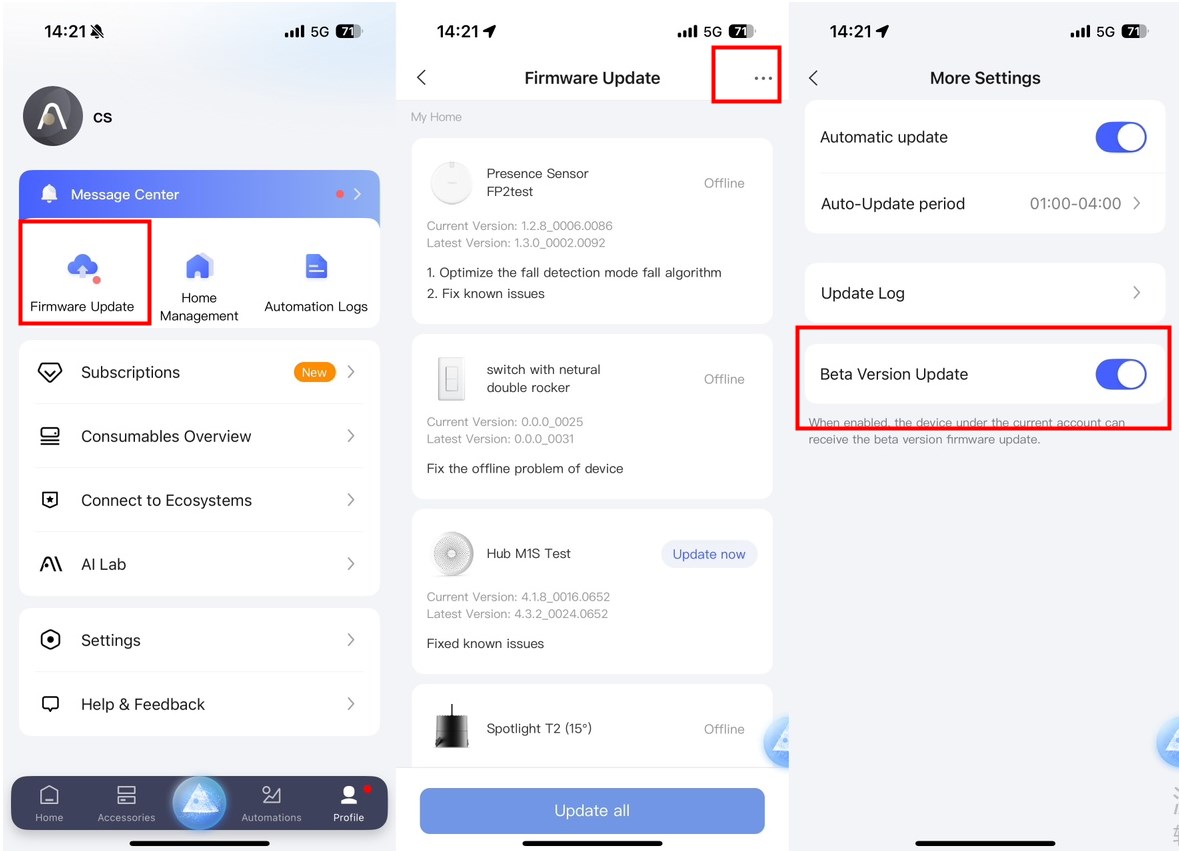
 Lock not fully engaging / motor torque
 The new firmware v3.1.0.7 is already finished.
 Matter connection issues

 Lock cylinder
 Nickel version (US)