I love my Aqara cameras, I have four G100s and the doorbell camera hub G410.
I’m using my Apple TV 4K as my home network hub, plus the Aqara doorbell camera hub G410 is also in my network.
I also have a Samsung smart TV with smart things, and I have access to IP cams RTSP streaming.
I constantly see rotating dropouts, from one camera to the next, they freeze for a few seconds, sometimes longer, then they drop out, reconnect, work for a few seconds, and then freeze again and repeat the pattern. Very rarely can I see all five cameras working at the same time. There is always at least one camera where the clock stopped moving, and shortly thereafter the connection disappears, reappears with a moving clock. This roams from camera to camera to camera, sometimes more than one at a time, often there’s only one or two of the five that are actually able to maintain a live stream.
I’ve been working with Verizon for weeks, on phone calls that last hours long, checking settings within the 5G home network modem and its Wi-Fi router, I also turned off the Verizon router and connected a Wyze mesh Wi-Fi network, which displays the exact same problem.
The dropouts and freezes happen on the native app, using the home app to view the cameras, and even viewing cameras on RTSP stream.
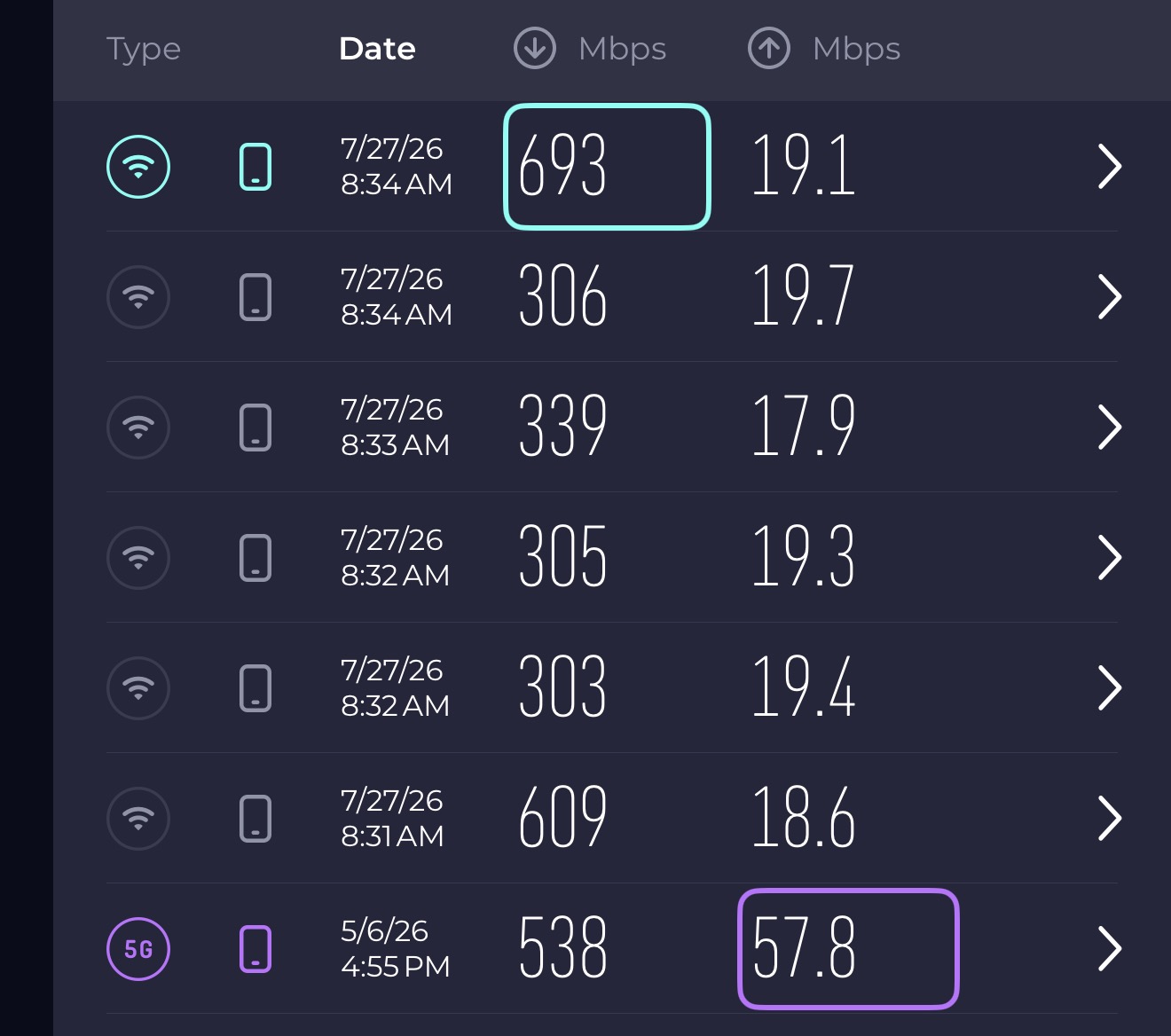
Verizon actually had the nerve to say there’s something wrong with the firmware on the cameras. I do not understand how a 1 to 300 kilobyte video stream, from a total of six cameras should be choking a 300 megabyte download 25 megabyte upload Internet connection, with very high Wi-Fi speeds and very strong signals to every camera and to the 5G tower.
Does anybody have any suggestions as to what might be causing this?
Has anyone upgraded their Wi-Fi to one of the more expensive routers and found that it handles this problem better?
Is it the Apple TV and the home hub that’s choking this?
Any suggestions would be greatly appreciated!
Hi there, it looks like you’re experiencing a support-related issue. We’ve automatically created a support ticket for you and will reach out via the forum email within the next two business days.
If other members have any suggestions or insights on this topic, feel free to share!
It would be helpful if the G100s could offload more through a central Aqara hub. As I understand it, each camera independently handles its own Wi-Fi connection and video sessions, so multi-camera viewing can expose limits in the cameras rather than shifting that work to the G410. Missed might also allow other options, viewing on Apple Home kit on my Apple TV, or using RTSP.
After extensive testing and elimination of possibilities, I come to that conclusion.
Verizon bandwidth was not the main problem.
DHCP and IP conflicts were not the main problem.
The Apple TV was not responsible for the Aqara-app freeze.
The camera stayed online while the multicamera stream stalled.
Opening the camera individually refreshed the video immediately.
@nikrib That’s a really useful set of observations, and your conclusion lines up with what we typically see with multi-camera live viewing: it’s often less about raw internet bandwidth and more about concurrent live-stream session limits and connection handling on the camera side.
A concrete thing to check: several Aqara cameras/doorbells only allow up to 5 concurrent viewers/sessions per device (and HomeKit only 2 at a time). It’s easy to accidentally “consume” sessions if you’re doing any combination of:
Multiple phones/tablets viewing (even briefly)
Multiple logins to the same Aqara account / guests watching
A panel/home display showing a camera feed (this can also count)
Even if you personally are “only watching once,” background sessions can stack up and cause the kind of rotating stalls/reconnects you described.
A few practical angles to test, based on that:
Make sure you’re not hitting viewer/session limits
Log out other devices, stop any always-on displays, close camera views on other apps (Aqara/HomeKit/RTSP viewers), then try viewing again from just one client.
Update app + firmware
Aqara explicitly recommends being on the latest app/firmware when you see streaming issues like this.
If you think what you’re really asking for is “can G100 offload to a central Aqara hub,” that’s more of a product/architecture suggestion than a setting you can flip today—worth submitting as a feature request via official support.
Contact the Aqara Home App Customer Service Team (Profile> Help & Feedback > Customer Service) or scan the QR code:
I was viewing it exclusively on the app and only on my cell phone.
When I watched one single camera, it ran smoothly and consistently with no problems.
As soon as I opened the multicamera view and watched five cameras, they all started pausing, delaying, and one or two actually froze somewhat permanently.
I then opened a single window, closing the multi-camera view and watched the one camera that was frozen and it instantly started streaming freely.
Sometimes when viewing one single camera alone, I get the network is poor, suggesting I lower the resolution.
If I wanted low resolution video, I would’ve bought low resolution cameras. I purchased these cameras because their pictures are very clear, especially the ones that go to 2K.
I have automatic updates on, and in addition to that I am emphatic about updating firmware immediately upon my knowledge that they exist.
As far as utilizing the hub, it made little sense to me that Aqara would make a hub that their own cameras do not take advantage of.
Why isn’t that self-evident?
@nikrib What you’re describing (single camera is rock-solid, but the multi-camera view starts “round-robin” freezing and then instantly recovers the moment you open any one camera full-screen) really does point away from Verizon bandwidth and toward how multiple live streams are being handled at once.
A couple of Aqara-specific behaviors to keep in mind:
On Aqara camera hubs, there isn’t a hard “one device only” viewer limit, but too many simultaneous client connections will consume CPU resources and can cause real-time video to freeze/delay—Aqara even recommends keeping it to about 4 users watching at the same time for stability. This information comes from community discussions and user experience summaries and may vary by environment. Please verify carefully. Original post link: https://www.aqara.com/en/product/camera-hub-g2h/faq/
Even though you’re only using one phone, multi-camera view can effectively behave like multiple concurrent streams (because it is).
Separately, on the G410 side specifically: if you see freezing / frame skipping / choppy behavior, Aqara’s guidance is to look at Wi‑Fi interference and placement (doorbell ↔ chime/repeater distance, interference on the same band/channel), and try changing the router’s Wi‑Fi channel or relocating the repeater/chime. This information comes from community discussions and user experience summaries and may vary by environment. Please verify carefully. Original post link: FAQ - Aqara (see video freeze/intercom choppy topic)
Why the “hub should offload it” expectation isn’t self-evident
Aqara “hub” functionality on camera hubs is primarily about being a control center for Aqara Zigbee sensors/controllers (door sensors, motion sensors, switches, etc.)—not acting as a video aggregation/relay to reduce camera streaming workload. This information comes from community discussions and user experience summaries and may vary by environment. Please verify carefully. Original post link: https://www.aqara.com/en/product/camera-hub-g2h/faq/
Practical next tests (quick and telling)
Reduce multi-view load as a diagnostic: try 2 cams → 3 → 4 → 5 and see where it falls apart (this helps support pinpoint whether it’s a decode/compose limit in the app, a camera-side session/encode constraint, or Wi‑Fi airtime contention).
For the G410: try a different Wi‑Fi channel / reduce 2.4 GHz congestion (especially if you’re in a dense area), and check the doorbell ↔ chime/repeater placement.
If any camera shows as offline during these events, run the standard offline checklist (power cycle camera, reboot router, verify signal range, check firmware/app updates). This information comes from community discussions and user experience summaries and may vary by environment. Please verify carefully. Original post link: Aqara Smart Home Products (general offline steps apply to cameras/doorbells listed)
If you want, list: (1) whether your G100s are on 2.4 GHz or 5 GHz, (2) how many total Wi‑Fi devices are on that SSID, and (3) whether the freezes happen more at specific times of day—those three usually reveal whether this is RF/channel congestion vs multi-stream processing limits.
If you’d like Aqara to confirm expected multi-view limits/behavior for G100 + G410 specifically (and whether any model-specific tuning is available), the fastest path is official support:
Contact the Aqara Home App Customer Service Team (Profile> Help & Feedback > Customer Service) or scan the QR code:
Wi‑Fi interference and placement:
(doorbell ↔ chime/repeater distance, is less than 15 feet.
interference on the same band/channel), I have tried the 3 available different channels
" On Aqara camera hubs, there isn’t a hard “one device only” viewer limit, but too many simultaneous client connections will consume CPU resources and can cause real-time video to freeze/delay"
Question: If each camera is utilizing its own individual stream to the WiFi router, how can the camera be freezing due to congestion at the camera? This is where I am baffled. The only Aqara hub I am using is the Doorbell Hub which does not include the cameras.
The AppleTV 4k is the HomeKit hub, but that doesn’t come into play while viewing on the Aqara App.
@nikrib What you’re running into can feel counter‑intuitive, but “congestion at the camera” isn’t about your internet download speed—it’s about the camera’s own ability to maintain multiple real-time streaming sessions reliably and the quality/stability of the Wi‑Fi link.
A few grounded points from Aqara’s published troubleshooting guidance that map to what you’re seeing:
Freezing/choppy video can be caused by Wi‑Fi interference/conditions even when RSSI looks strong
For the Doorbell Camera Hub G410 specifically, Aqara’s guidance for “image freeze / skipped frames / choppy intercom” is to check whether the doorbell↔repeater/chime distance is within range and whether there’s Wi‑Fi interference on the same frequency; the recommended fixes are adjusting the chime/repeater placement or changing the router’s Wi‑Fi channel.
So even at ~15 ft and after trying channels, interference/airtime contention on 2.4 GHz (neighbors, lots of IoT devices, etc.) can still show up as exactly the “freeze, reconnect, rotate between cameras” behavior.
Multi-camera view = multiple simultaneous streams
Even though each camera is “its own stream,” the system (Aqara app + your phone + your Wi‑Fi airtime) is suddenly dealing with 5 live streams at once. If the network gets even a little lossy, you’ll see stalls. Aqara’s own general advice for improving camera connectivity starts with physically optimizing placement, reducing obstructions, and keeping interference sources away—because those small RF issues become obvious under heavier concurrent load (like multi-cam live view).
It’s still worth ruling out the boring “offline/connection stability” items
If any of the cameras actually go offline during these events (not just the live view freezing), Aqara’s baseline checklist is: verify power, restart camera, confirm internet stability, reboot router, ensure Wi‑Fi range, and make sure firmware/app are up to date.
What I’d try next (quick and diagnostic, based on the above):
Temporarily reduce 2.4 GHz congestion as much as you can (move cameras/router to reduce obstructions, keep away from interference sources like TVs/microwaves, etc.).
If your router supports it, test a different Wi‑Fi channel again at a different time of day (some neighborhoods are simply slammed on certain channels). This is explicitly recommended for the G410 freeze/skipping symptom set.
If you haven’t already, incrementally test multi-view (2 cams → 3 → 4 → 5). When it “tips over” is useful data for support.
If you want, share whether the G100s are on 2.4 GHz or 5 GHz and roughly how many other 2.4 GHz devices are active—multi-stream issues are often really “2.4 GHz airtime” issues rather than WAN bandwidth.
This information comes from community discussions and user experience summaries and may vary by environment. Please verify carefully. Original post links:
If you’d like Aqara to confirm expected multi-view behavior for G100 + G410 in your exact setup, please contact:
Contact the Aqara Home App Customer Service Team (Profile> Help & Feedback > Customer Service) or scan the QR code:
Hi there.all you mentioned was working before?and if yes then what was changed or what exactly you added or changed before all this happens?as I am not an expert on this but from what I know if cameras freezes or get stuck is because of an poor connectivity.you need to see how many devices your routers handle at once as each router can handle an number of connected devices more that verizon router like many ISP routers doesn’t handle well multiple devices at once and that could lead on connection los or slowing even frizzing.
Well I also read a bit about your internet connection and from what I understand is an 5G connection not fiber this can make your smart home unstable because it uses the same 5G like on phones and if your area doesn’t have enough signal for it or for weird reason there are interference that can affect you internet speed witch affect your cameras.when you try to access all cameras at once this is to much for your internet and makes then freeze or lag.my suggestion is to find another ISP that offer fiber connection as this will make your smart home stable and without lags or freezing.
Thank you for the reply!
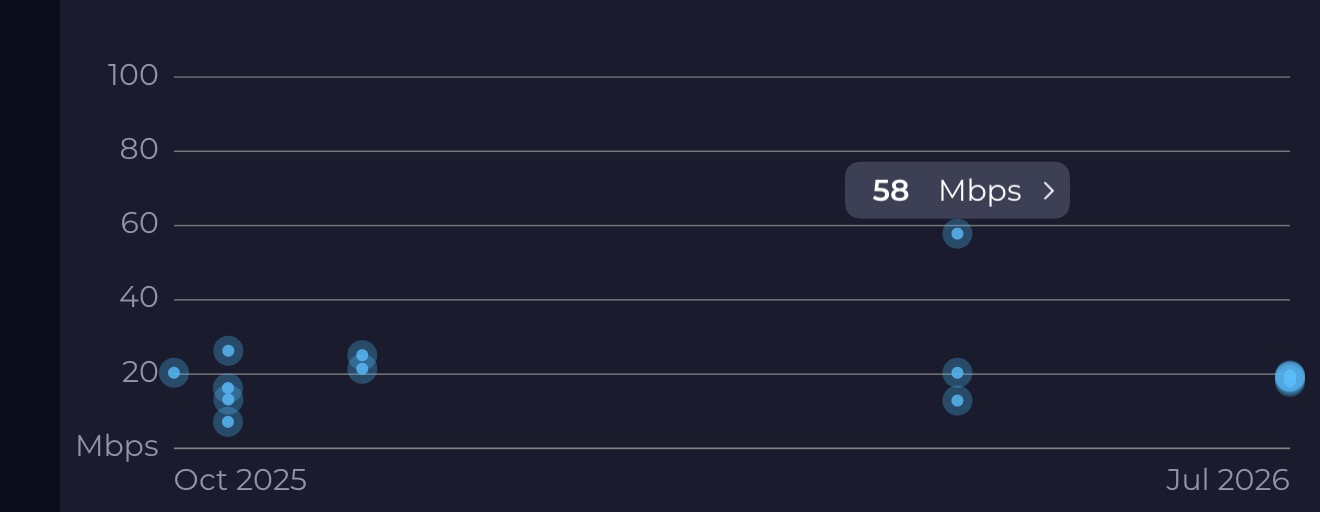
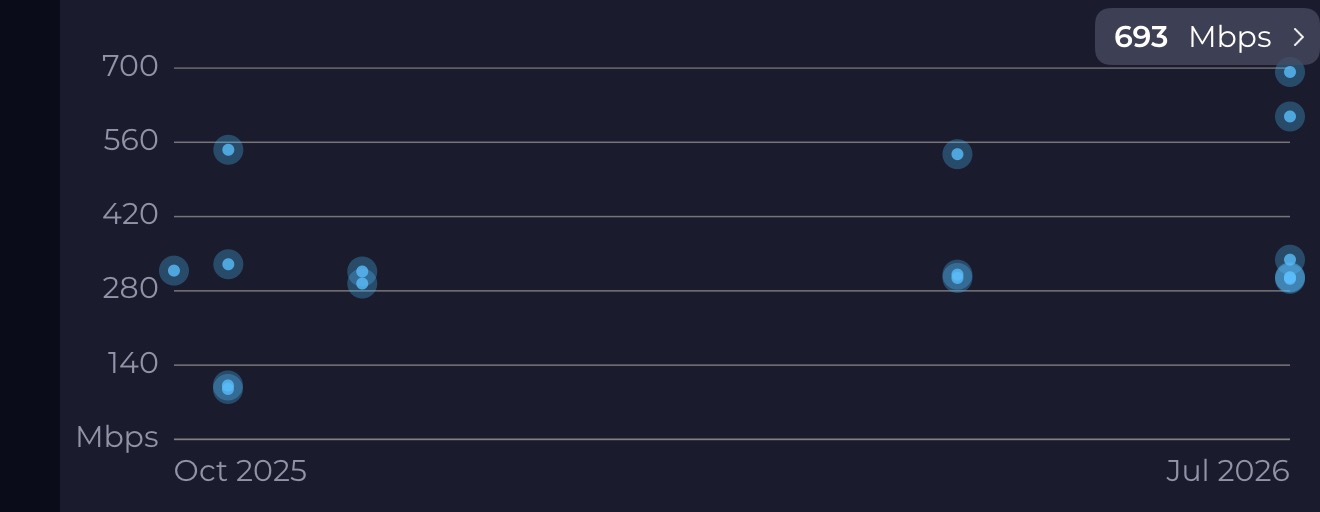
I would prefer fibre, but unfortunately this is the best source for Internet, I can get right now. I am line of sight to the 5G tower and have a full strength signal at all times. Understanding that 5G is shared amongst many, many users, this could vary dramatically, as to the speed that would be available to stream to and from my “modem”, I get decent speed and somewhat consistent quality, considering. Download speeds rarely dip below 300 m/s. It’s the upload speeds that suffer, but even at the lowest the stream that’s required for six cameras maxing out at 2 to 300 kB/s should not have a problem with that.
It seems more likely that the traffic jam is happening at the 2.4G Wi-Fi channel, which all but one of the cameras are limited to.
One of the cameras can operate using the 5G Wi-Fi channel, but even when viewing that camera alone, I have connection issues, and freezes and dropouts consistently. This is why I am at a loss trying to figure out the cause and potential solution.
I meant to add that the final speed reading at the bottom of that list was using my cell phone 5G signal, which seems to do a much better job of achieving higher streaming speeds. I don’t believe using my cell phone’s hotspot would provide more consistent performance under the load of my smart home network, for other reasons. It’s just interesting that it seems to be able to get how much higher quality 5G connection than this HomeModem.
The funny thing is, I actually turned off the Verizon Wi-Fi at one time and connected a mesh Wi-Fi router from WYZE, and I got the exact same performance issues.
Well the issue is not on the download speed is the upload speed with you need more as I see the upload speed is way to low and cameras doesn’t use download speed from what I know uses the upload speed to send signal and video you your phone or tablet.then you need to ask Verizon to increase your upload speed to not just the download as many companies on 5G gives you download speed and less upload speed that is the issue of your cameras now working or stream all as they need band to do so.this is what Verizon need to fix for you as the upload speed I see there on your photos is unstable and is very lower you that will work for basic things like controlling some zigbee devices an my be 1 camera.you also sad that you can stream well open just one camera at the time clearly that upload speed is good but for multiple cameras to stream them at once you need more speed.not sure if I explain myself but in conclusion the upload speed you need to be at least more then 100/150mb or more and be stable this way you will be able to see all your cameras at once.this is the best thing on symmetric fiber as I have download and upload speeds almost identical and my smart home runs great.
Hello.
If I were you, I would try to create (for testing) a 5G access point from a mobile phone. You create WiFi 2.4 with the name and password exactly the same as you have on the router. Then do your research.
I monitor my parents’ house on 4G in this way. To be honest, there is only one G350 camera involved, everything else is a gateway, relays, sensors, lamps. There have never been any problems, except from the 4G provider. Unfortunately, we have an absurd war that a neighboring state has been waging against us for 10 years, so stability is not guaranteed when there is no industrial network for more than 48 hours.
Think this way when you access all cameras basically you do not download nothing all cameras send you the images and each have different resolutions witch requires more upload speed to send you those package to your phone to can see each at once when you access one camera depending the resolution it will work well or my be will be a bit slower all this need an better upload speed.the download speed is used for mostly all ppl for downloading and watching ex. Netflix in 4K for that your download speed is great but not for your cameras.there is your problem not the router is the upload speed that Verizon give you.call them and tell them that you need more upload speed and if they can give you 300mb on upload that will be fantastic this way will help you to see all your cameras at once
Yeah agree but he’s upload speed is way to low for all his cameras as he state that accessing one works his problem is when he access all his cameras at once.even if he makes what you told him his upload speed won’t be better for all cameras.this is an issue on this kind of internet that 4/5G is by air and is unstable.
I’m not sure how a program that uses direct IP to cameras operates, does it stay only on the Wi-Fi network or does it need to go out to the Internet and back in order to function?
I was thinking if it goes direct IP from my phone, for example, if that’s how I’m viewing, through the router directly over my Wi-Fi to the camera and back, then the upload and download being to Verizon is irrelevant. but, if it does need to go out to the Internet and back in order to provide the stream, then obviously the Internet upload speed can be choking things.
And by the way, thank you for all the replies. I’m having a hard time keeping up with them and giving each one the attention that they deserve. I really appreciate your responses!!