If there’s one major breakthrough in the world of smart home technology today, it’s Matter, together with its trusted companion Thread.
Thread, to recap, is a mesh network layer that allows Matter-compatible devices to communicate directly with each other fast, reliable, and future-proof.
But here’s the challenge: most of us already own devices based on older standards such as Zigbee, Z-Wave, or Tuya. Naturally, you’d like to integrate them into modern ecosystems from Apple, Google, or Amazon.
These major platforms now prioritize Matter accessories, since a Matter-certified device can appear simultaneously in Apple Home, Google Home, and Alexa.
In other words, one device can live in several ecosystems. once a true game-changer for interoperability.
So how can you turn your Zigbee accessories into Matter devices?
Based on my experience, here are four practical approaches.
1. Buy a dual-protocol accessory (Zigbee and Matter)
This is the simplest but also the “rarest” option.
Currently, Aqara is one of the few manufacturers offering dual-protocol devices that can be flashed to switch between Zigbee and Matter.
Zigbee often provides more advanced features for now, but Matter is evolving fast and catching up quickly. If you buy a dual-protocol device, the migration to Matter will be effortless when the time comes.
2. Use an Aqara Hub, such as the Aqara M3
If you own multiple Aqara devices that only work with Zigbee, the Aqara M3 Hub is an excellent solution. (There is also the Stick @ 2euros)
It automatically translates your Zigbee Aqara devices into Matter accessories, making them visible in Apple Home, Google Home, and Alexa even the 3 Au travail the same time  .
.
The main limitation is that this method only works with Aqara devices.
You can’t add third-party Zigbee accessories (like Ikea or Sonoff). But if your smart home is fully Aqara, this is the most seamless approach.
Cost: Aqara M3 Hub +/- 130 euros
3. Combine Zigbee2MQTT with MatterBridge
This method is more technical, but extremely powerful for advanced users.
Zigbee2MQTT (Z2M) allows you to integrate all your Zigbee devices (Ikea, Aqara, Sonoff, Philips Hue, and more) into a central platform usually Home Assistant.

Once your Zigbee network is set up, you can add the MatterBridge module to connect Zigbee2MQTT to Matter.
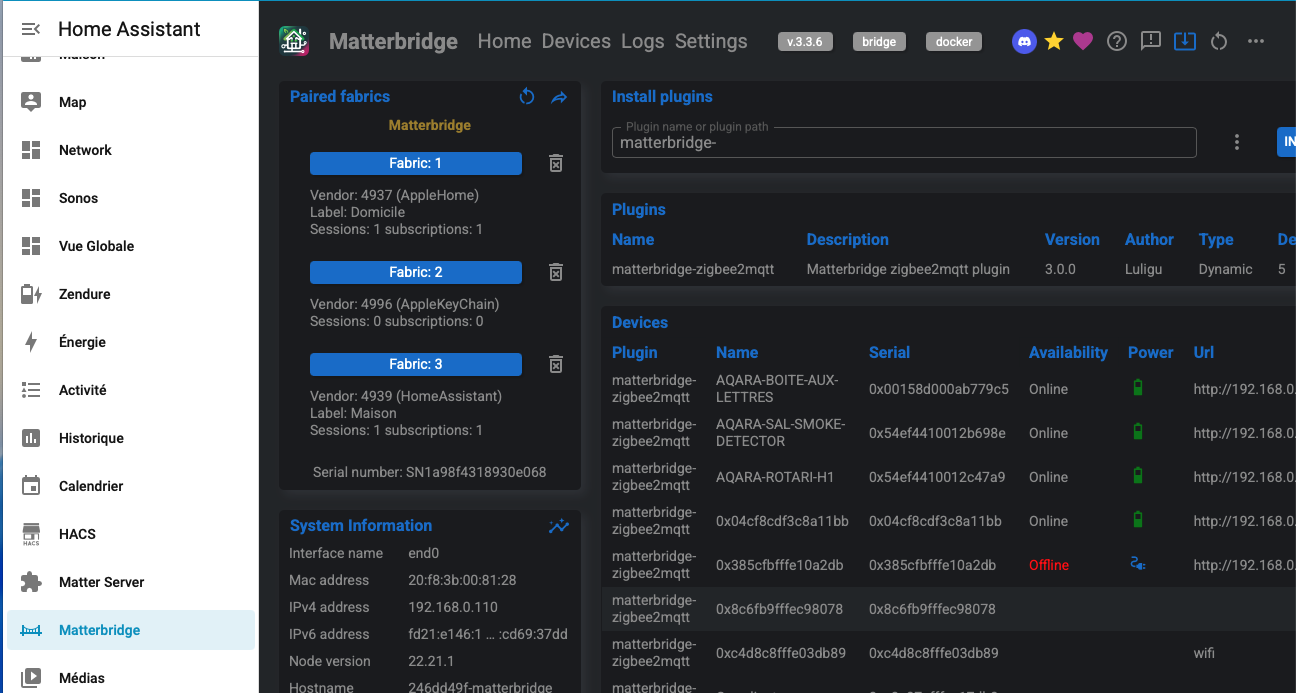
Your devices will then appear in the MatterBridge interface, where you select which ones to expose to Matter.
MatterBridge generates a QR code that you scan to add this virtual Matter hub to your preferred ecosystem.
The main advantage: all your Zigbee devices, regardless of brand, become Matter-compatible.
The downside is complexity. You’ll need to maintain several components: Home Assistant, a Zigbee USB stick, Zigbee2MQTT, and MatterBridge.
If one of them fails, the whole chain breaks. It’s a brilliant solution, but fragile.
Cost: Home Assisant Green +/- 150 euros + antenna 50 euros
4. Use the Homey Pro Matter Bridge = the simplest approach
This is currently the most straightforward and stable solution I recommend.
The Homey Pro is a complete smart home hub that natively supports RF433, Zigbee, Z-Wave, Zigbee2MQTT, Thread, and Matter, no extra antennas required.
Its interface is elegant, easy to use, and lets you create automations without any coding.
Recently, Homey introduced the capability to convert any connected device into a Matter accessory. This feature is not limited to Zigbee devices; it can also work with Z-Wave or any other compatible protocol. The Matter Bridge facilitates the conversion of these devices into Matter-compatible devices.
That means you can add devices from any brand to your Homey setup and expose them as Matter devices to Apple Home, Google Home, or Alexa.
It’s fast, reliable, and incredibly user-friendly.
You choose what device you want to transform as Matter:

that’s it.
Cost: Homey pro @ 399 or Homey Pro Mini @ 199 euros
In summary
- Aqara dual-protocol devices = simple, but limited in choice.
- Aqara M3 Hub = perfect for 100% Aqara setups.
- Zigbee2MQTT + MatterBridge = powerful but complex.
- Homey Pro = the most flexible and future-proof option.
Matter is still in its early stages, but it’s already changing universal smart home connectivity.
Be aware of not all functionalities are yet working with Matter, quick list of compatible devices:
- On/Off Lights, Dimmable Lights, Color Lights & Temperature Lights
- Plug-in Sockets
- Thermostats
- Locks
- Blinds, Curtains, Roller Shutters
- Door/Window Sensors
- Temperature & Humditity Sensors
- Motion & Occupancy Sensors
- Air Quality Sensors
- CO2 & Smoke Alarms
I’m sticking to boxes: the Homey Pro for its simplicity and ease of use, and the Aqara Hub M3. Aqara provides specific support for certain devices, which also enables me to update my Aqara devices.
The future of home automation will be multi-platform, open, and far easier to maintain I hope this helps you to choose the right tools for the transition.