Hello, smart home newbie here lol.
I have a Presence Sensor FP300 set up with my Z1 Pro 3 button switch in my living room. Hub is M3 (I plan to expand so i get the “good stuff” right away lol)
The thing with my set up - I have the FP300 cover the main area of living room plus the door going to the living room. I have the basic automations put in place like when motion is detected lights will turn on and when no motion is detected lights will turn off.
The thing I notice, when other family members or guest, manually turns off the lights via switch then closes the door – as expected, FP300 will reads this as motion (or presence I tried to use) then turn on the lights again 
Again, I have automations to turn it off automatically when we went away, but on the actual, when this instance happened, it reduces the “wow factor” I want to present to my guests lol
Are there any way to by-pass this in automation? Tried putting duration but duration is simply:
Motion detected at 0mins:00secs time, (5 seconds duration), at 0mins:05secs my lights will turn on.
3 Likes
Rather than looking for a solution in Automations how about moving the FP300 to a better location?
Remove the small area around the switch and door so the FP300 does not detect Presence. Consider reducing the Sensitivity etc.
3 Likes
In addition to what @srl77411 said, you could try running the ai spatial learning a few times with the door in different opening conditions. This might help as well
4 Likes
Do you want automations based on motion or presence?
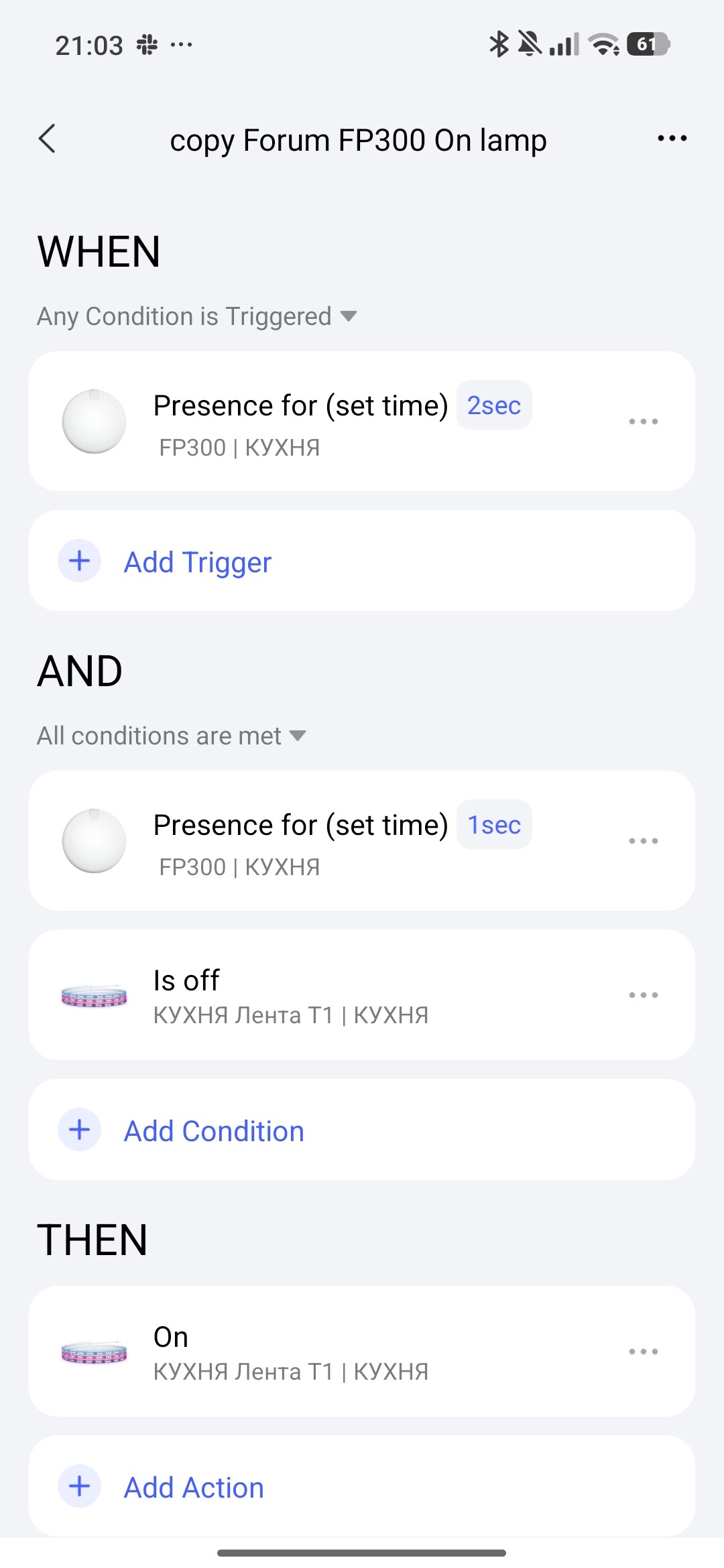
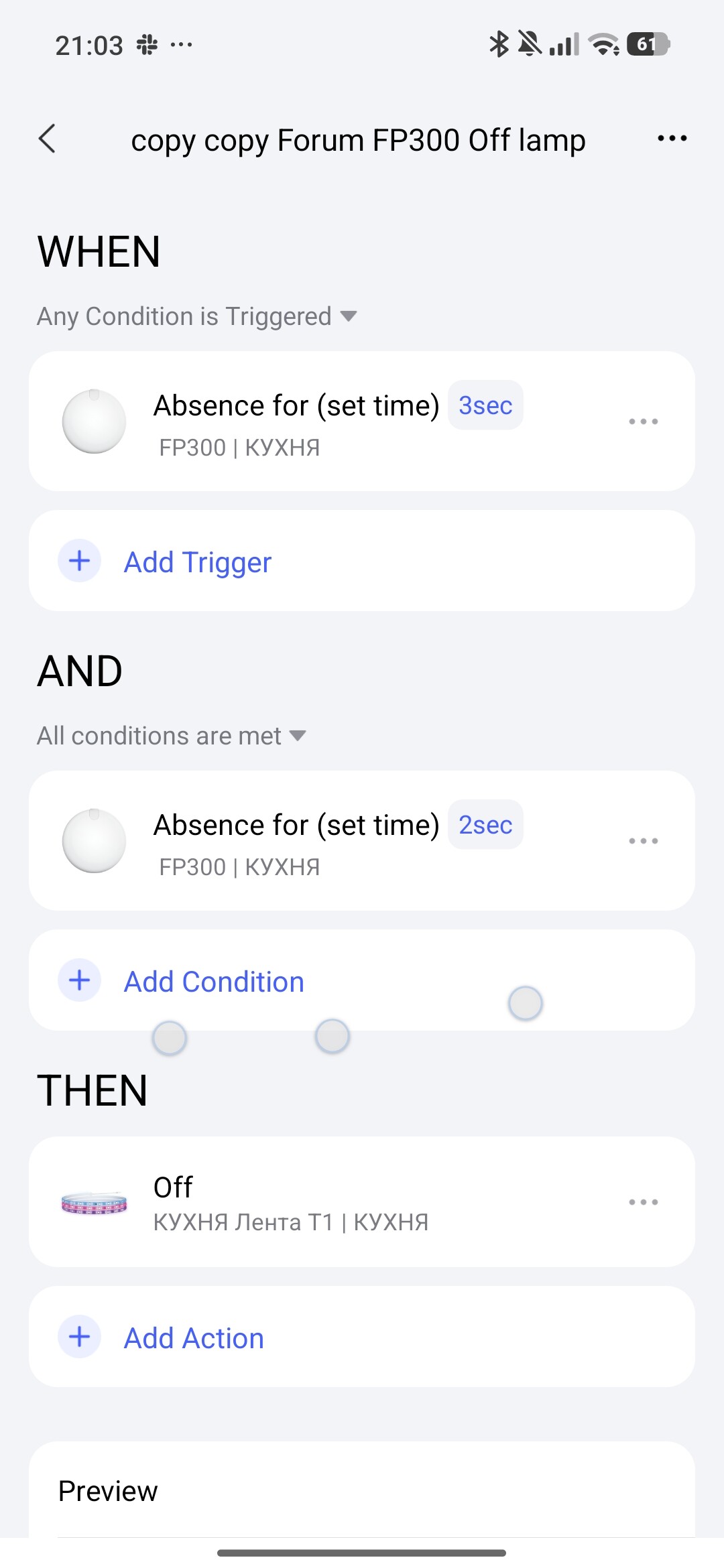
Could you use the ‘Presence For (set time)’ trigger to a longer period?
Ideally, the logic would support a condition based on the state of the switch, but you can’t do this today (based on the options I see for my H2 switches). Basically if the switch is turned on or off manually the presence automation should be overridden for a period of time. Not possible for this level of logic in Aqara Home today.
1 Like
Hello, welcome to the forum. I will consider your question. First, you will be satisfied with automation that will turn on the light with condition control. To help you more precisely, give a step-by-step algorithm for the requirement. For instant automation response, you need to set the FP300 sensitivity to 1 second, this will eat the battery.
The automation has been tested for serviceability by me, I use it in my house.
3 Likes
Yes I did consider this but I feel like the location of my sensor including how it faces is the most optimal one. Like the doorway is right beside our couch. Then my switches is between that door and couch.
If I did try to face it away from door/switch, lights wont turn when I enter on unless I move to the location of sensor’s detection area.
But really appreciate your response 
1 Like
Oh, I did see that in the features. I havent tried the AI learning yet. I will try to do this, thank you!
1 Like
Awesome will definitely try this. I did see this in the condition dropdown but haven’t explored each automation yet (I chose the basic commands lol). Appreciate this 
Another question, my next plans are in my stairs. For that, I plan to have cheaper motion sensor P1’s (FP300 is overkill for stairs for me), does the aqara motion sensor P1 have that set time in as well?
I have switches in the landing & top of stairs, so most probably depending on how I place my motion sensor I would be on the same scenario as my current one. (I mindlessly, manually turned off the switch then as I walk away from the last step, motion sensor might register that action as motion then turn the lights on again)
1 Like
Of course, you can. I equate the P1 motion sensor to the FP300 sensor. This is a cool sensor that has sensitivity settings from 1 second. If you turn it upside down, we will get a unique directional diagram only for humans (animals not ). I have automation 2.0 lessons, where I describe various automations, you can read them. I recommend paying special attention to the addition to the first lesson. This topic is the alphabet of automation 2.0. Automation 2.0 Tutorial Collection - Lesson 1 report
2 Likes