LESSON CONTENT.
Lesson1 Automation 2.0 Tutorial Collection - Lesson 1 report
Lesson 1 (continued) Automation 2.0, lesson 1 (continued), description of the algorithm for transitioning automation 1.0 to 2.0
Lesson 2 Automation 2.0. Lesson2. Advanced settings "..." (Execution time, delay of conditions, reversal of conditions) is
Lesson 3 Automation 2.0. Lesson 3. Controlling lighting devices
Lesson 4 Automation 2.0. Lesson 4. Lighting control by time periods
Lesson 5 Automation 2.0, Lesson 5, vector lighting control by sensors
Lesson 6 Automation 2.0, lesson 6, bathroom automation on a working example
Lesson7 Automation 2.0, lesson 7. Controlling Aqara smart lamps using switches (wired and wireless)
Lesson 8 Automation 2.0, lesson 8, using group lamp control using scene's
Lesson 8(2) Automation 2.0, lesson 8 (part 2), creating a dimmer for a group of lamps using a two-button wireless switch
Lesson9 Automation 2.0, lesson 9, (blitz topic of the addition to lesson 4) using group control of lamps using scenes
Lesson 10 Automation 2.0, lesson 10, room climate control. Creating a smart heating schedule for radiator thermostats (E1, W500, W600)
Lesson11 Automation 2.0, lesson 11, creating the simplest automation for heating devices
Lesson12 Automation 2.0, lesson 12, blitz topic, VIRTUAL Aqara switch
Lesson13 Automation 2.0, Lesson 13, creating a trigger for a WHEN section with controlled polling time
Lesson14 Automation 2.0, lesson 14, creating automations for controlling groups of rooms using radiator thermostats (E1,W600) and a controlled heating boiler
Lesson15 Automation 2.0, lesson 15, blitz topic, controlling individual boilers using AqaraTVR (W600, E1)
Lesson16 Automation 2.0, lesson 16, creating automations for combined room temperature control (AqaraTVR and thermal actuator) of an autonomous heating boiler
Lesson17 Automation 2.0, lesson 17, mini topic of temperature control systems in one room (answers to forum questions)
Lesson 18__Automation 2.0, lesson 18, creating temperature control automation using air conditioning
Lesson 19__
Automation 2.0, lesson 19, creating On/Off automations for the U200 lock (and similar ones) using a wireless button
Lesson 19(2)__Automation 2.0 continuation of lesson 19(2). Open/closed status information for the Aqara U200 lock (as well as locks of all types of Aqara)
Lesson 20__Automation 2.0 lesson 20. Plugin for the Aqara leak sensor, water control in the pool (tank)
Lesson 20 (part 2)__ Lesson 20 (part 2). Automation 2.0. Pump protection against dry running using Aqara Power Plug H2 EU
Lesson 21__ Automation 2.0, lesson 21, creating On/Off automations for the G5, G100 camera spotlight
Lesson 22_Automation 2.0, lesson 22, FP300 sensor, creating On/Off automations for lamps
Lesson 23__Automation 2.0, lesson 23, creating a G5 (G100) constant cyclic sound (light) alarm
Lesson 24__Automation 2.0, lesson 24, code lock from Aqara wireless button
Lesson 25__Automation 2.0, lesson 25, P100 sensor as a doorbell in England
Lesson 26_Automation 2.0, lesson 26, U200 (or other locks) automatic closing of passage doors
Lesson 27(1)_Automation 2.0, lesson 27 (part 1), controlling camera spotlights at night (G5, G100). Permanently turning on the spotlight
Lesson 27(2)_Automation 2.0, lesson 27 (part 2), controlling camera spotlights at night (G5, G100). Turning on when the camera sees an event
Lesson 27(3)_Automation 2.0, Lesson 27 (Part 3). Camera Rotation to Surveillance Zones (G3, G350, E1). Automatic Rotation on Sensor Trigger (FP300, P1, etc.)
My big greetings to everyone!
I want to start a topic related to the release of the new Aqara 2.0 automation algorithm.
I, as well as many users, have been waiting for this moment for a long time and it has come!
ACCESS TO 2.0.
Let’s start with how to enable automation 2.0 from the Aqara home application.
To do this, we need to go to the profile tab and select the “Automation 2.0” menu in which to give permission to use it (Fig. 1, 2).
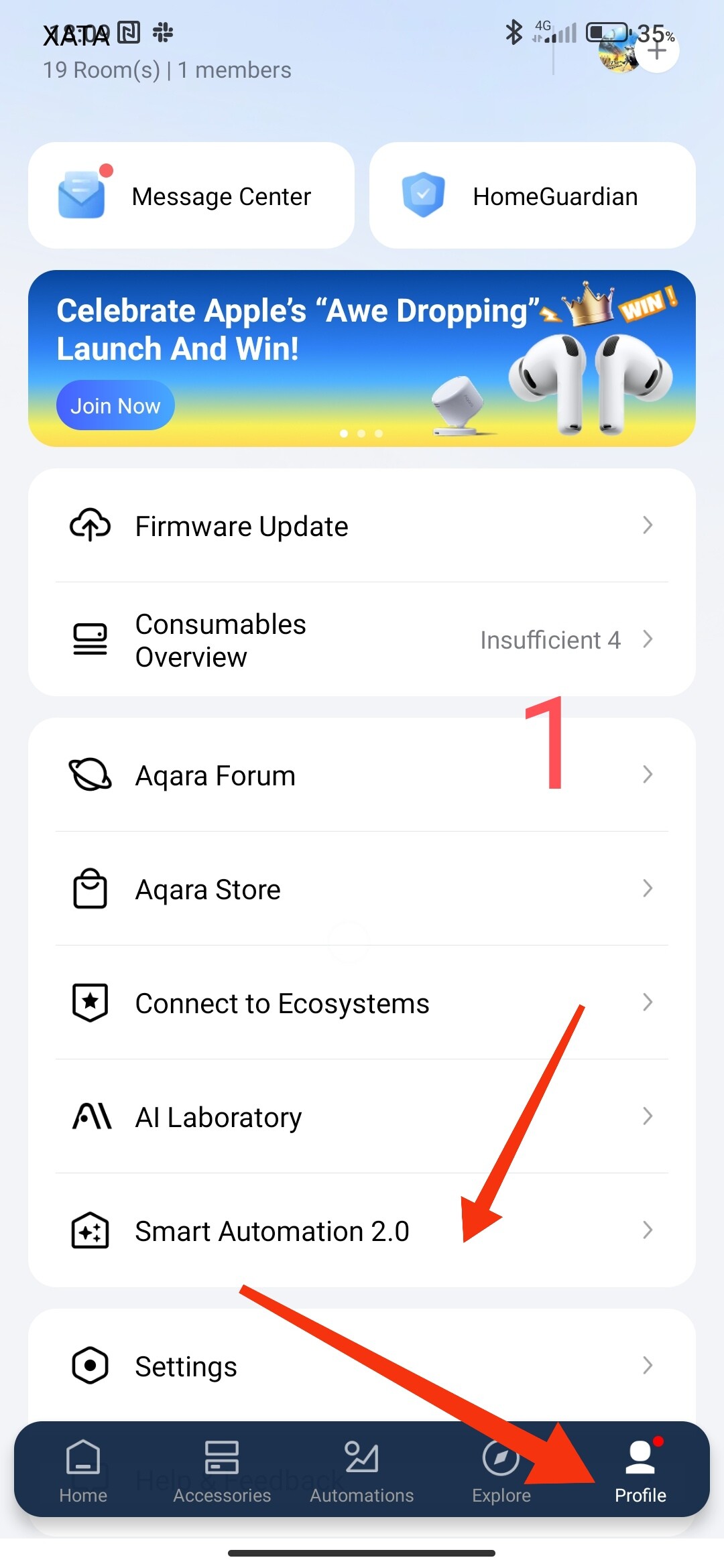
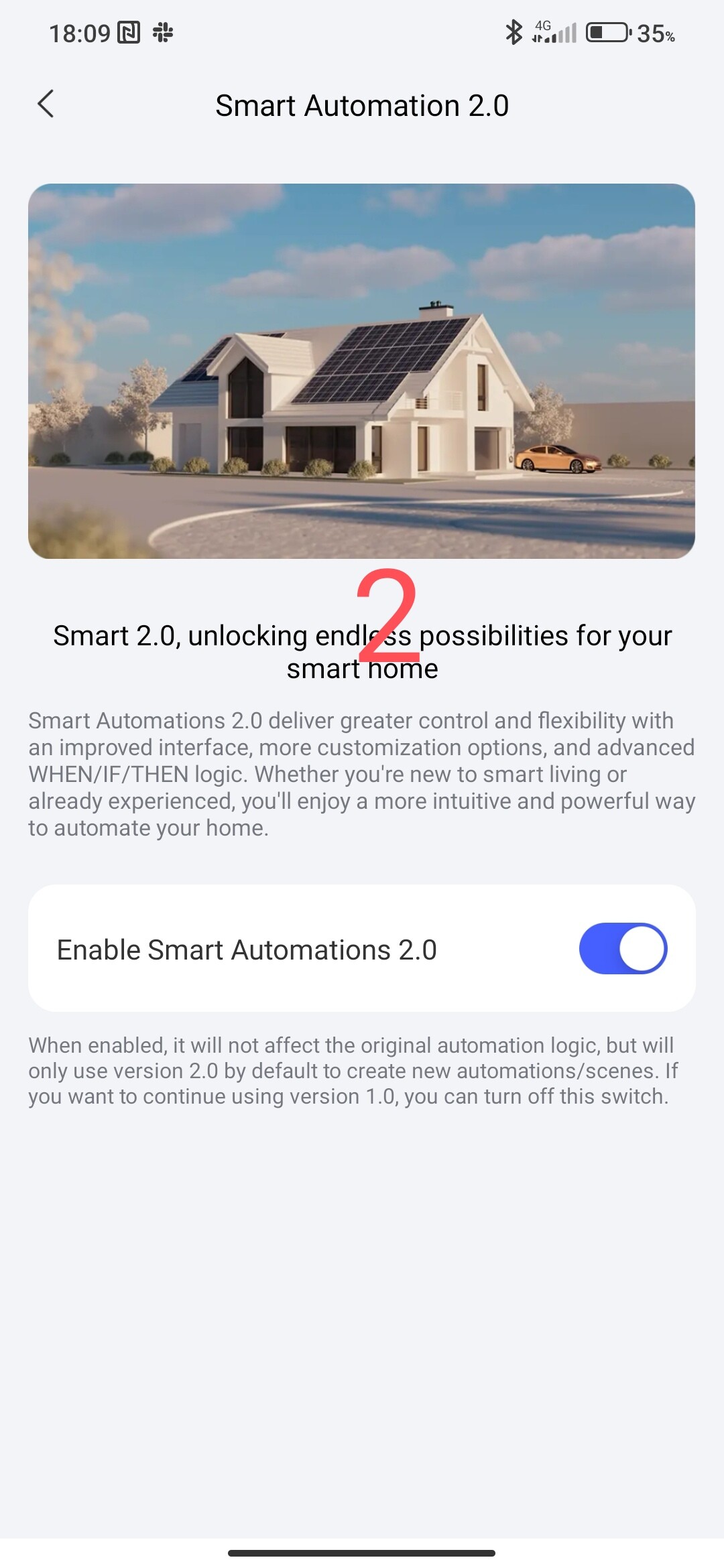
After that, the automations that we will create will be in the new interface, if you want to return to the old version, you need to disable permission for 2.0. The transition from 1.0 to 2.0 and vice versa will help beginners adapt faster to creating automations (2.0 can be said to be a semi-professional version and requires some knowledge and understanding of processes).
OVERVIEW OF BASIC 2.0 TAGINGS.
The main feature of 2.0 is the double condition of the device state “THEN” and “IF”.
Fig. 3
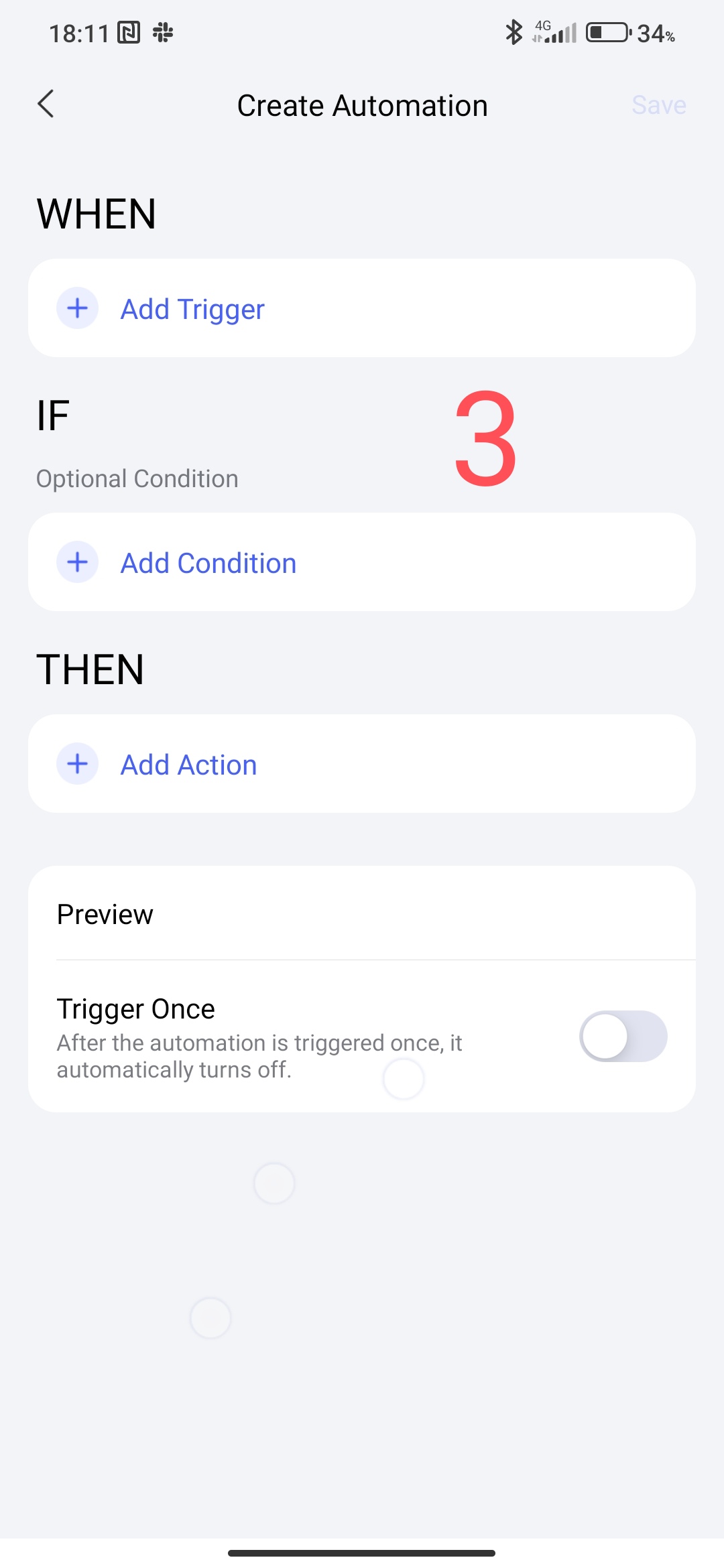
I want to emphasize right away that in 2.0 the “IF” condition does not play the same role as in automation 1.0. In 2.0 it is an auxiliary condition that is used in conjunction with the “THEN” condition. To make the algorithm clear, I give an elementary example,
THEN
- there is movement (motion sensor 1)
IF - lamp Off
THEN - lamp On
(Fig. 4)
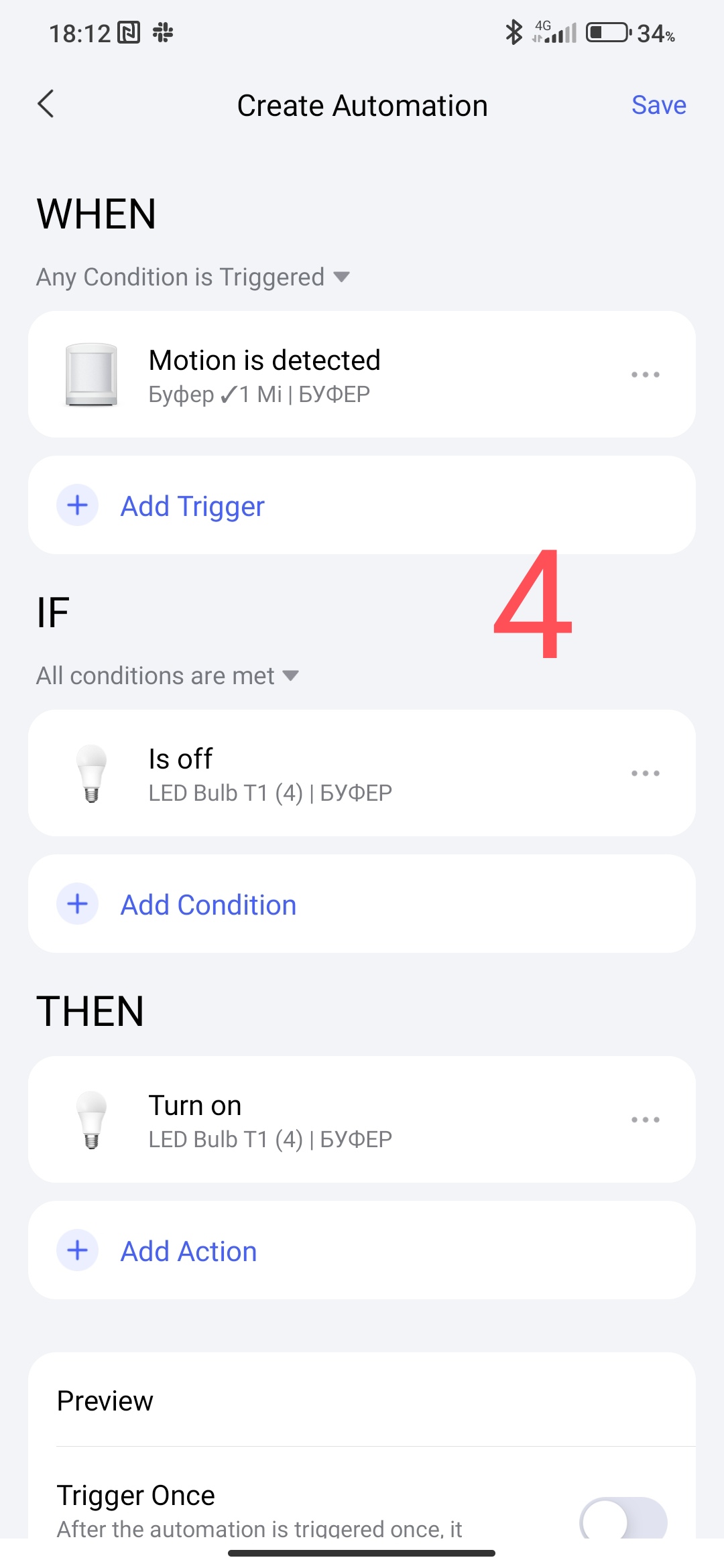
If there is movement in the lamp in the room is off, then turn on the lamp.
This automation can also be done like this
THEN
- there is movement (motion sensor 1)
IF
THEN
- lamp On.
Fig. 5
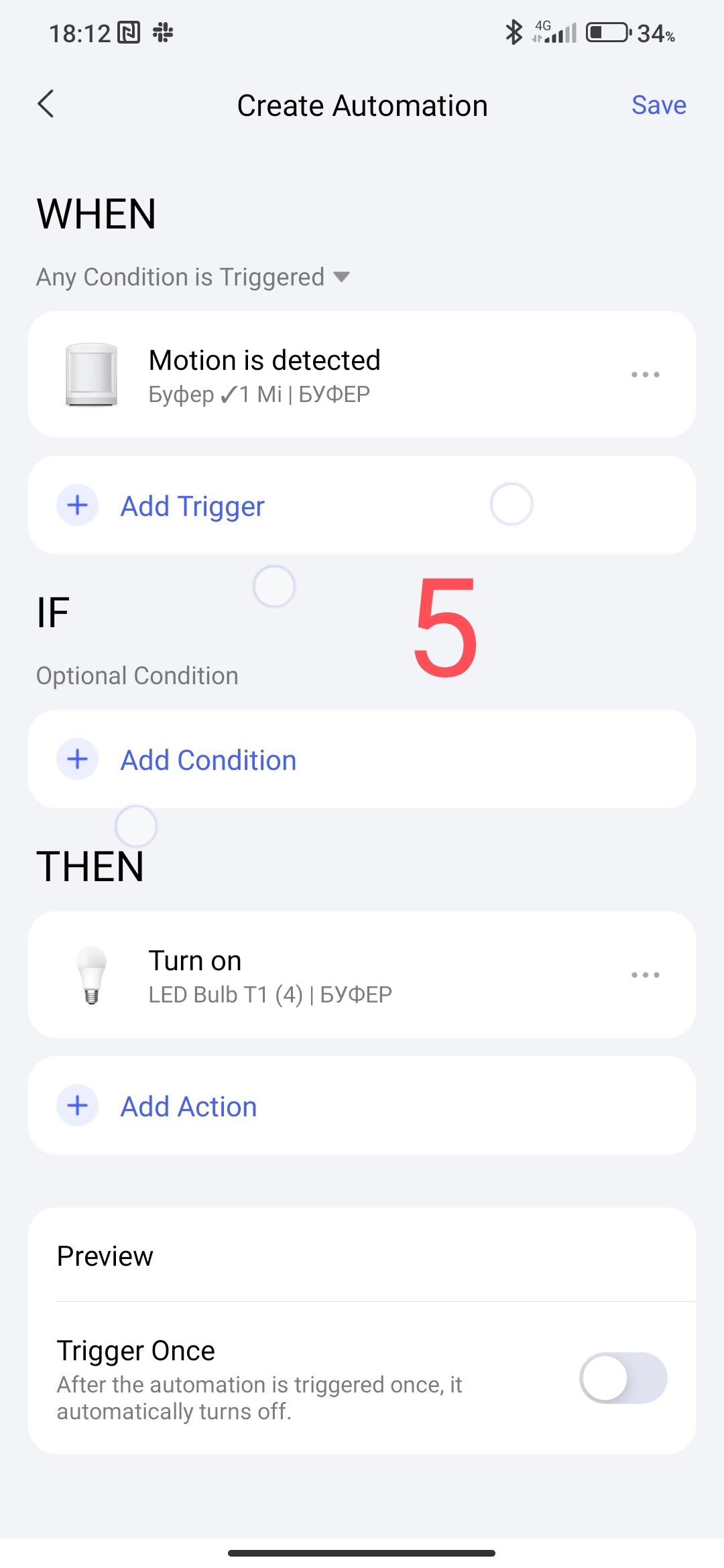
Both automations work, but for your understanding, there may be no condition in “IF”. Practically, the “THEN” condition in automation 2.0 plays the role of the “IF” condition in automation 1.0 (sorry for the pun :)).
I also emphasize that the “IF” condition must be fulfilled at the time the “THEN” condition is triggered!
The “THEN” sequence checks “IF” then performs the task.
PARAMETERS OF COMPLEX EXECUTION “THEN” and “IF”.
The “THEN” tab has the ability to check the sequence of conditions with setting the control time limit (from 1 sec to 5 min). Select the tab marked in Figure 6.7.
Figure 6,
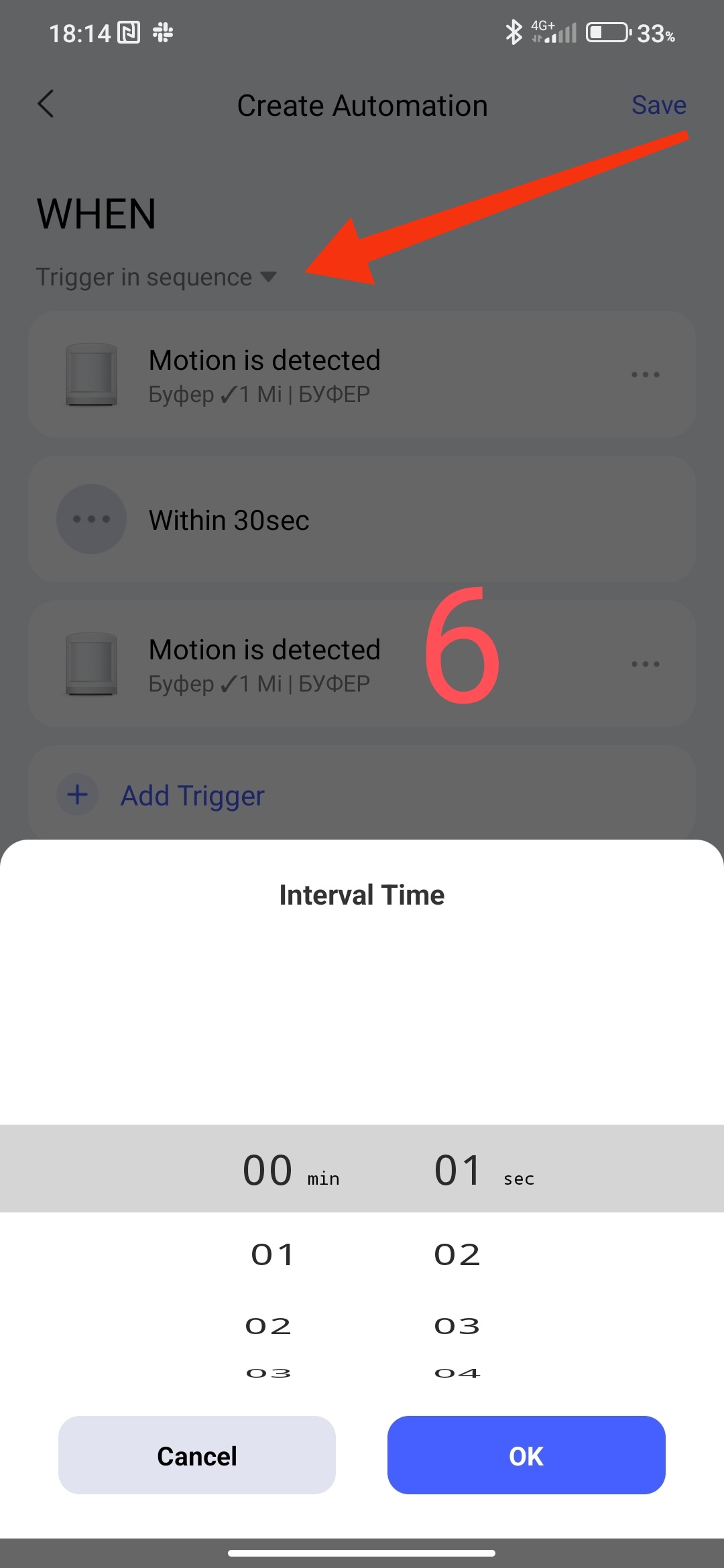
For example, there are two motion sensors in the corridor, if I pass sensor 1 (there is movement) and within 5 seconds I pass sensor 2 (there is movement) then turn on the lamp that is in the direction in the far corridor.
Figure 7
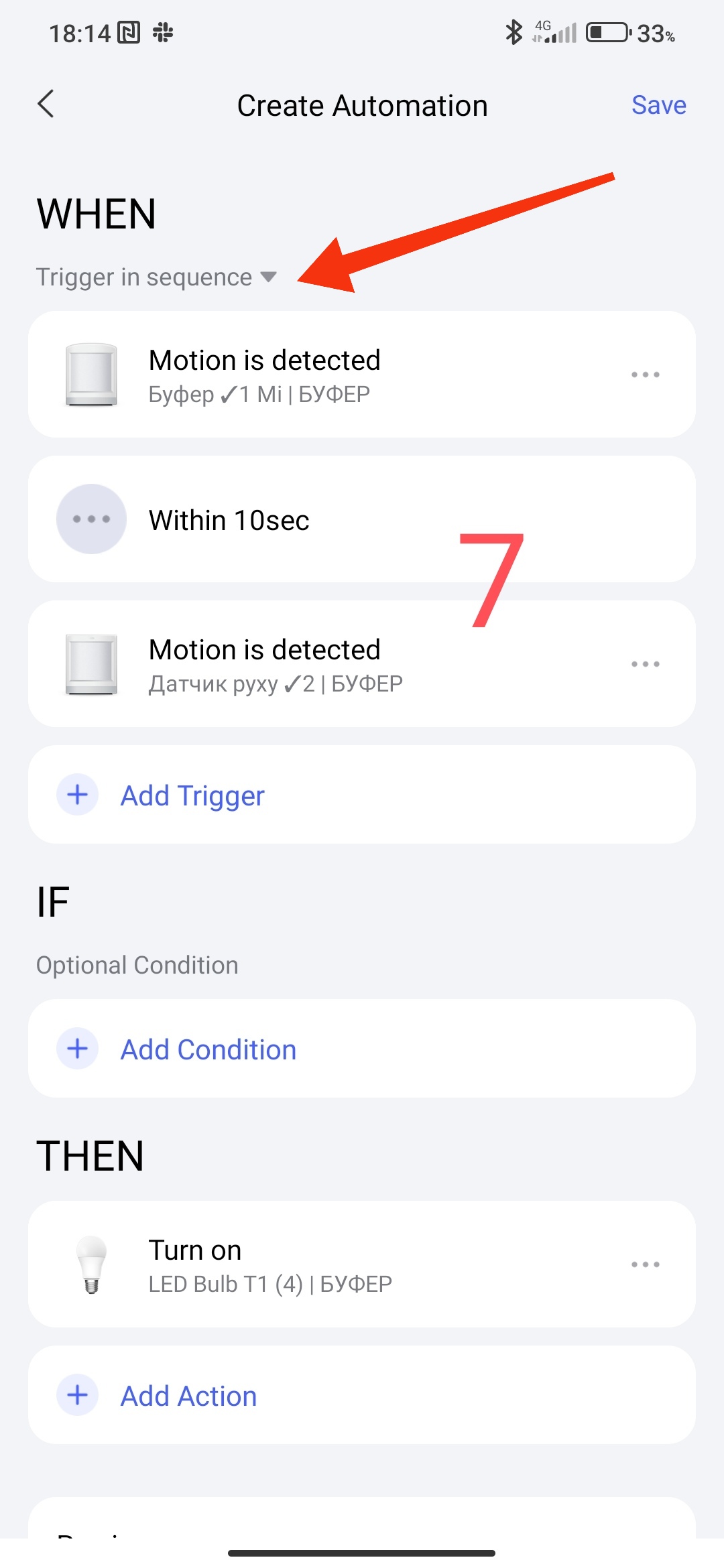
You ask, why can’t I just turn on the lamp using the second sensor? And because you set the motion vector (mathematical term) from point A to point B. This is all called semi-professional automation 2.0.
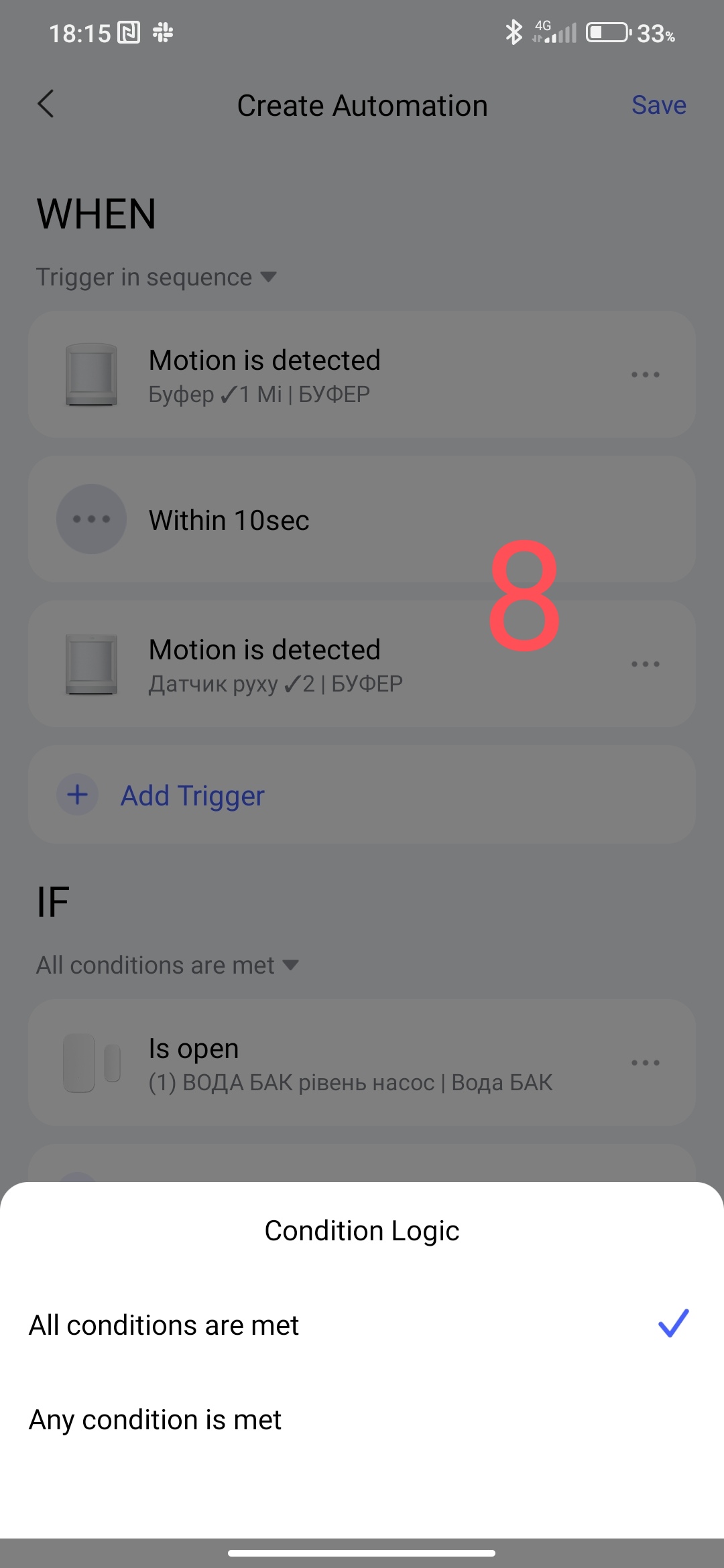
In the “IF” condition, it is standard, “fulfill all conditions” or “fulfill any condition”, no explanation is needed here.
Figure 8
.
This concludes the first introductory lesson. As I have free time, I will continue and write new lessons. Believe me, there are many, many secrets here, during testing there were cases when I, the tester, gave a solution to a problem that led developers into a dead end. I will also talk about this but much later, I want you to emerge into this fascinating world of automation 2.0.
Note 1 - as of 01. 10.2025 automation 2.0 provides local automation if the gateway has been updated to a version no lower than 4.3.7. Lower versions do not support local automation. I suggest waiting for new firmware versions, they are coming gradually.
Note 2, I recommend that users do not immediately transfer all automations to 2.0. First, transfer a few pieces (non-critical automations), understand the algorithm of work in practice, examine the execution state (local, cloud). After some time, after realizing that you understand the principle of work, you can gradually switch to 2.0.
Note 3. My recommendations for using 2.0. If you have problems with 2.0 and want to re-create the automation in 1.0, you need to disable the 2.0 automation (Fig 2) and create a new automation in 1.0. Saved automations from 1.0 and 2.0 work in parallel without problems.
Lesson 1 (continued) Automation 2.0, lesson 1 (continued), description of the algorithm for transitioning automation 1.0 to 2.0


